227 comments found.

Hello, I’m having a hard time. When I access “my account” and go to “requests” and click on “view” it opens back to the “my account” Do I need some kind of plugin to view order details?
Hello,
Can you please provide some screenshots of this? You don’t need to install a separate plugin to view orders.
Thanks, Select
what plugin should I install to make this feature work?
Thanks
Sorry for the message up, I read wrong. this is the link with the printscream. watch how the url changes https://imgur.com/a/C7Zf1Pu
Hello,
Thanks for that. We tested this and it’s working fine on our end. Please make sure that you’re using the latest theme version and WooCommerce version 3.3.4. If you need further help, please open a ticket at https://select.ticksy.com/ with your admin access, and one of our support agents will assist you.
Thanks, Select
Hi, Can your grouped products show the product short description next to each single product in the list? It’s important to differentiate products for customers.and I can’t find any themes that show anything other than the product name for grouped products. Only Magento theme seem to show this as standard.
Hi there,
Thank you for taking interest in our Bazaar theme. It is actually default behavior of Grouped Products https://www.screencast.com/t/6pH82XhfkmX And additional info about products you linked could be added in description parts.
Best, Select
So you can’t add the short description to the simple products in the grouped list like we asked. We know what woocommerce’s functionality is! I have found a theme author that will do it for us so sorry no sale.
Hi,
We are really not able to make such a customization on one request. Thank you for your suggestion. If we have numerous request for it, we will consider implementing it in our theme.
Best, Select
Hi!! I’m really interested in buying this theme for my new website, but i’d like to know if I can add to the masonry shop page a left column with the product categories and product filters…. Is this possible??
I hope you can help me, I really love this theme! Thanks!!
Vanesa
Hi,
Thank you for taking interest in our Bazaar theme. Unfortunately, it is not an option. To see sidebar with that widgets, you’ll need to assign that page as default shop page, and in that case you cannot have Masonry effect.
Best regards, Select
ok i have buy this theme but impossible to import demo content …why?
Hello,
Thank you for purchasing Bazaar! Please refer to this article of ours: https://select.ticksy.com/article/12623/
If you need further help, kindly open a ticket at https://select.ticksy.com/ with your admin access, and one of our support agents will assist you as soon as possible.
Thanks, Select
I never had to go through so many steps to download a demo content. I have spent more than 6 hours of my time and still no success downloading the demo content. There better be a easier way to import content, this is insane! I’m waiting for a response from the developer…I will keep this updated.
Hello,
Thank you for choosing Bazaar. We located and replied to your ticket. You can check Ticksy.
Best, Select
HI I need to know why they re dont have any update since march? i want to buy but i need to know if it’ s still relevant…
Hello,
Thank you for your interest in Bazaar! We are updating all of our themes according to priority, active users, and amount of requests from users. We are currently working on an update for Bazaar.
Feel free to let us know if you have any other questions.
Best, Select
Hi, i have imported the demo content, the different shop pages work. But when i apply them to my woocommerce shop page, the products appear in a 4 product grid no matter which page type i select. How do i activate these pages and their effects?
Hello,
We located and replied to your ticket. You can check Ticksy.
Best, Select
Good day, I’ve purchased the Theme, but I’m not satisfied, Can I request a refund?
Hello,
You can contact Envato directly, since they’re the official theme distributor and handle all the sales and refunds. However, please note that from our experience, you’re unlikely to get a refund for the reason mentioned.
For any theme related questions, you can always submit a ticket at https://select.ticksy.com/ and one of our support agents will be happy to assist you.
Best, Select
There is some broken shortcodes on my home! See: qodef_product_list info_position
Hello,
We located and replied to your ticket. You can check Ticksy.
Best, Select
Hello, you have a great design ! but what i’am concerning about is speed, do you have some updates in futur that will fix that ?
Hello,
Thank you for your interest in Bazaar!
Please note that we haven’t optimized our demo site speed-wise, because we wanted to show all the possible features our theme offers – so there’s a lot of content. Our support team tests the site of each user on request, and provides individual tips for improvement. Good server configuration is always necessary, plus proper image and content optimization, caching usage, etc. in order to achieve the best possible performance.
Feel free to let us know if you have any other questions.
Best, Select
Hello! I already bought the theme and I had the same question as @krikrip: “On the product page when I click on photos, they pop-up in a image (light) box. Is it possible to see all photos on the same page instead of a new pop up? (i.e. when I click on the thumbnail, the main large image will change to that one in thumbnail I just clicked on).”.
I just saw your answer but I really would like to change this aspect on the theme. Is that possible? Could a developer change this?
Hello,
Unfortunately this isn’t possible within theme options, sorry  Implementing it would require some custom coding which goes beyond the scope of our support system. We are currently not in a position to offer custom work, but if you’re looking to hire somebody, this link could be helpful: https://studio.envato.com/
Regards, Select
Hi there. Thank you for the awesome theme. I am having some problems with the revolution slider. It says “Revolution Slider Error: Slider with alias main-home not found. It says so for other pages. When I try to import Sliders in the Revolution slider section, it says Ajax Error which I believe why it was not able to import some sliders which my page cannot reference. Any solution to this?
Thank you.
Hello,
Thank you for choosing Bazaar! Please make sure that you’re uploading the slider’s entire zip file, which you can find in the file you downloaded from ThemeForest, in xml export\revslider.
If you need further help, kindly open a ticket at https://select.ticksy.com/ with your admin access, and one of our support agents will assist you.
Thanks, Select
Hello, I have a pre-purchase question: On the product page when I click on photos, they pop-up in a image (light) box. Is it possible to see all photos on the same page instead of a new pop up? (i.e. when I click on the thumbnail, the main large image will change to that one in thumbnail I just clicked on). Hope that makes sense. Thank you
Hello,
Thank you for taking interest in our theme. When lightbox is opened there images will be switched, and not in thumbnails. In our options you could choose between these two lightbox layoyuts https://www.screencast.com/t/jTtu5B7Sa
Best, Select
Thanks for your reply. Is there option to disable lightbox completely and preview these images directly in the product page without opening lightbox? The reason I am asking is that I saw this at other templates and I prefer that option before using lightbox. Thank you
Hello again,
You are welcome. Lightbox could be disabled using custom css. But there will be not other action on click in that case, just main image with thumbnails.
Best, Select
That’s a real shame. I really like your theme otherwise. Unfortunately for me, this was the deciding factor.
We are sorry to hear this
There seems to be an issue with the import functionality in the theme. It gets to 90% and then is stuck there. A friend of mine who also has the theme experienced the same thing.
Hello,
Please see this article of ours: https://select.ticksy.com/article/12623/
If you need further help, kindly open a private ticket at https://select.ticksy.com/ with your admin access, and one of our support agents will assist you as soon as possible.
Thanks, Select
Hi. Please tell me how can I edit the theme directly with code. I´ve tried in Wordpress- Appereance- Edit – Footer.php but it seems that there´s no css code. I just want to paste a pop up suscribe code from Mailchimp. Thank you.
Hello,
There is option to add custom css in Select Options > General > Custom Css https://www.screencast.com/t/Vdexp7oZCBest, Select
Ok but the field is empty. How am I supposed to locate and modify/add some specific line? Thank you.
Hello,
It is better idea to add css with same selector in this field, that will override main modules.css file we are using. Because, if you make changes directly in modules.css file, those changes will be lost after theme update.
Best, Select
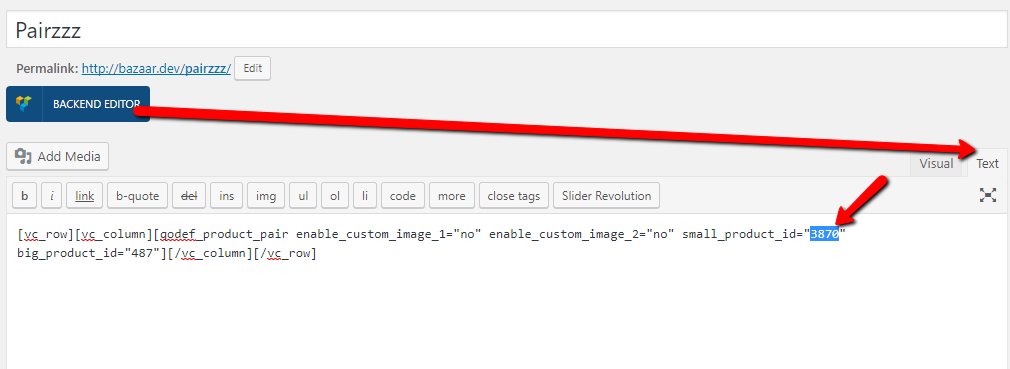
3rd time i’m reporting this bug on Product pair module – If a products is set and then deleted from woo commerce the site breaks and shows Fatal Error below.
I was never given a solution and the new update didn’t fix it.
Fatal error: Uncaught Error: Call to a member function get_price_html() on boolean in //framework/modules/woocommerce/shortcodes/product-pair/templates/product-pair.php on line 7
Can you pls offer me a solution.
Hello,
Please, submit a ticket on our support forum at https://select.ticksy.com/ and include your site URL with wp-admin access so our agent could investigate. Thanks
Best, Select
I have renewed support twice for this bug only. I am not going to waste money renewing again for a bug that I have reported twice before.
That should be helpful.
Best, Select
The site syncs the stock to a POS everyday – every time this is done the error comes up on the live site. So yes i already do what you suggest everyday. It would be nice to fix the bug once and for all. Even if i have to pay for the fix.
Yes, we added it in our TO-Do list for the next theme update.
Thank you for this suggestion.
Select
Hello, I have a problem with the map on the contact page, this is not working. I put a new API code in the general settings, try differents adress and I don’t know where the error comes from ! This is the page : http://manae-bio.com/contact/ Do you know what’s happening ? Thank you, Best regards, Aude
Hello Aude,
Please, submit a ticket on our support forum at https://select.ticksy.com and include your site URL with wp-admin access and our agent will investigate and assist you there.
Best, Select
Hi, is it possibile to add new social share in the product page? (ex. Instagram)
Hello,
Unfortunately this isn’t possible within theme options. Instagram sharing is not very wide-spread, which is why we haven’t included this social network.
Best, Select
Hi, where I found the new images setup dimensions? Now Woocommerce display it in theme customization menu… but there are only fields for image width. Which are the best settings?
Hello,
We replied to your ticket. You can check Ticksy.
Best, Select
Hi,
I have a problem with image loading on all title page,
Do you have a solution ?
Thanks,
Hello,
You can use a tool like this to check your site and see how you can optimize it speed-wise: https://gtmetrix.com/ If you need further help, kindly open a ticket at https://select.ticksy.com/ with your site URL and one of our support agents will assist you.
Thanks, Select