83 comments found.

Hi,
Thank you for your offer I really appreciate it. I was actually able to adapt my project to work with the version I purchased, so there’s no need to exchange. Thanks again for your help!
Hi,
Glad to hear that 
Best Regards, Sean.
Hello, I purchased the HUB .NET Core 9 product, but I actually need the Bootstrap version. Could you please arrange the exchange? Sorry for the inconvenience.
Hi,
No worries at all! You may go ahead and purchase the Bootstrap version of the product. After that, you can submit a refund request for the .NET Core 9 version, and we’ll be happy to process it for you.
Best Regards, Sean.
Hello, I am interested in Hud Template. I want to use it with Blazor. Supports es also blazor? Regards Ali Kemal
Hi,
As long as you include the required css / js file, it shouldn’t be an issue to integrate it with blazor.
Best Regards, Sean.
Dear Author,
I have successfully configured the theme however the preview on live server is completely different than the theme visuals i receive after configurations.
Some important things are the font-family used on live preview is “Chakra” however it is missing in the theme file.
Secondly based on documentation of the theme i set the basic Jquery Data table and CSS styles are different.
Can you please let me know what is the problem?
Hi,
The chakra petch font has been included in /src/scss/font.scss. You may try to include it in partial/header as well.
For datatable, make sure you do include the bootstrap 5 datatable extension.
Best Regards, Sean.
The theme i recieved after downloading is different (AspStudio) than the one listed (HUD 3.1), I tried to reach via support ticket # 3762510 however no response is recieved as of now.
It is kindly requested to look at the issue asap.
Thanks.
Hi,
Thank you for bringing this to our attention. We have resolved the issue by uploading the correct version of the theme. You can now re-download it from your User Control Panel once you receive the email notification.
If you experience any further issues or need assistance, please don’t hesitate to reach out.
Best regards, Sean.
Thanks for your quick response, let me try download it again and configure. Will get back to you if there is still any issue.
When I try downloading the Admin Template for HUD, I am getting ASP Studio 4.5. How can I get the HUD template?
Hi,
Thank you for bringing this to our attention. We have resolved the issue by uploading the correct version of the theme. You can now re-download it from your User Control Panel once you receive the email notification.
If you experience any further issues or need assistance, please don’t hesitate to reach out.
Best regards, Sean.
Does this contain just the design and plugin files to import into an existing .NET MVC project in VS 2022? Or is it a complete project in and of itself?
Hi,
Yes, it includes all the design and plugin files that you can import into an existing .NET MVC project in Visual Studio 2022. However, it is not a complete project as it does not include backend integration.
Best Regards, Sean.
Hello Sean
Download the new version “HUD – .NET Core 9.0 MVC Admin Template”, but when trying to compile I have errors. For my part I have the latest versions: VisualStudio2022 v17.12.3 | npm v10.9.2 | nodejs v22.12.0 | Swallow CLI v3.0.0. I performed several steps as indicated above but none of them worked for me. You can help me solve it.
You can see the errors in the image in the following link: https://postimg.cc/F7w24HvxRegards!
The problem is here, which version should I use for npm install @types/node[version]—save-dev
Hi,
You may try to remove the .ts file within the folder of /wwwroot/lib/@fullcalendar.
Best Regards, Sean.
Not sure if i framed my question correctly before. Let me try again.
My output for the select-picker should be as below for display purpose
Group 1 SubText 1 SubText 2 SubText 3
Group 2 SubText 1 SubText 2 and so on
I am using opt-group to show these groupings, but its not visible on load. Tried using the attribute you mentioned before data-live-search=”true” but to no avail. Can you help?
Hi,
Thank you for clarifying your issue. Now we understand your requirement better. Unfortunately, the plugin you’re using does not support the <optgroup> element for grouping items, even with attributes like data-live-search=”true”.
You might need to explore alternative plugins or custom solutions to achieve the desired grouping and display functionality.
Best Regards, Sean.
Hey, Not able to see the the optgroup label here.
<label class=”form-label”>Multiple SelectBox * </label> <select class=”selectpicker form-control” id=”ex-multiselect” multiple> <optgroup label=”Picnic”> <option>Mustard</option> <option>Ketchup</option> <option>Relish</option> </optgroup> <optgroup label=”Camping”> <option>Tent</option> <option>Flashlight</option> <option>Toilet Paper</option> </optgroup> </select>Hi,
Can you try to include the data-live-search attribute to your selectpicker?
e.g <select class=”selectpicker form-control” id=”ex-multiselect” multiple data-live-search=”true”>
Best Regards, Sean.
Hi Sean
There is a way to add a role control to the sidebar menus to block the view to unauthorized users. Adding something like this: “roles”: [ “SuperAdmin”, “Administrador” ],
sidebar.json { “sidebarMenu”: [ { “text”: “Visualización”, “is_header”: true }, { “controller”: “Mqtt”, “action”: “Dashboard”, “icon”: “bi bi-cpu”, “text”: “Dashboard” } ] }
Regards.
Hi,
To add role control to the sidebar menus, you might need to modify the logic in your Program.cs where the sidebar.json file is loaded.
Best Regards, Sean.
Hi Sean
Can you help me with the following? How can I remove the window that shows the URL of each view when hovering over the sidebar menu or sub-menus buttons (see image)?
https://postimg.cc/D8VtJCVdRegard.
Hi,
Regarding your question, the window that shows the URL when hovering over sidebar buttons is actually the browser’s default behavior for anchor () tags. If you want to avoid this, you can use a <button> tag instead and handle the redirection using JavaScript’s onclick function to navigate to the desired page.
Here’s an example:
<button onclick=”window.location.href=’/your-page-url’” class=”nav-link”>Dashboard</button>
Best Regards, Sean.
It worked 100% thanks!
Glad to hear that your issue was resolved.
Hello Sean
Tried changing the color of the tooltip with tooltip: { theme: ‘dark’ or ‘light’, but it has no effect, apparently something is overriding it.
https://postimg.cc/zVT0j4NxThe sample image has the colors that I cannot invert. I need to change the color of the Title and the text with the Variables.
I created a small separate example and it works, but when using the HUD template it doesn’t work anymore. Can you help me?
I am using the apexChart chart.
Regards!
Hi,
For the apexcharts tooltip, you may change the following scss files
FILE: /src/scss/plugins/_apexcharts.scss
Best Regards, Sean.
Hi,
I made some modifications but didn’t get any changes. Since the above did not work, I commented out the following line ’/@import ‘plugins/_apexcharts.scss’;/’ in the file: /src/scss/_pluginss.scss, finally I got no changes. What could be missing?
Hi,
Did you run the gulp command after change the scss files? This is because gulp command is needed to regenerate new app.min.css.
Best Regards, Sean.
Sean
Can you help me solve the problem in production mode. In development mode it works correctly.
I have made many adjustments, but I can’t get it to work. I have a connection to MySQL using Authentication with Identity.
https://postimg.cc/JtXTL81jRegards,
Hi,
Thank you for reaching out. Unfortunately, we are unable to assist with this issue as we cannot debug the problem on our side, especially since it occurs in production mode. I recommend reviewing your production environment settings and configuration, as they often differ from development mode and could be the source of the issue.
Best regards, Sean
I finally found in some forums that this failure is usually caused by an exception. I corrected the exception at runtime and the problem was resolved.
Hi,
Glad to hear that your issue was resolved.
Best Regards, Sean.
Hi Sean
It is possible to automatically adjust the height to the maximum according to the size of the ‘_Layout’ and set a maximum height limit (I’m not sure if this functionality fits within responsive.), If possible I would like to apply it to this example view.:
https://i.postimg.cc/RVQThVqX/code.pngRegards
Hi,
In that case, you might need to create your own css to set a maximum height on app-content / browser height.
Best Regards, Sean.
Thanks for the suggestion, I implemented it and it works 100%.
Hello Sean
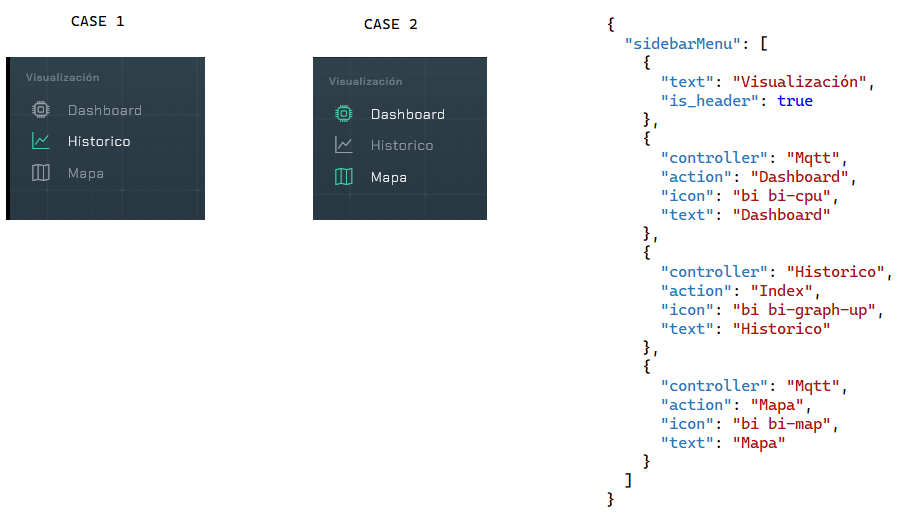
I have the following problem. The attached image link shows 2 cases. Case 1 visually works fine, but selecting ‘Map’ leaves ‘Dashboard’ and ‘Map’ visually selected (see Case 2). The same thing happens if I select the other way around, first ‘Dashboard’ and then ‘Map’, both are highlighted. On the right side of the image is the code I am using to control them. What could be causing the problem?
https://i.postimg.cc/bw27Dnc1/d1.pngHi,
If you wish to use the same controller but different action, you might need to add another extra checking on
FILE: /Views/Shared/_Sidebar.cshtml
LINE: 30
from @(menuController @menu["controller"] ? "active" : "")
to
@((menuController @menu[“controller”] && menuAction == @menu[“action”]) ? “active” : ””)
Best Regards, Sean.
Just removing ‘)’ at the end @menu[“action”]), works 100%. Thank you so much!!!
Glad to hear that your issue was resolved.
Sean
Is there a way to disable the “pace-progress” and “pace-progress-inner” using ViewData[“BodyClass”]
Regards
Hi,
You may create your own css to hide / show the pace plugins.
e.g
<style type=”text/css”> .hide-pace .pace { display: none !important; } </style>
Best Regards, Sean.
I added your recommendation but it didn’t work, I had to add this to the view and it worked 100%. @{ ViewData[“Title”] = “Title”; ViewData[“BodyClass”] = “hide-pace pace-top”; }
Hi,
Yeah, you need to append the css class to the body tag in order to use it.
Best Regards, Sean.
Hi Sean
I am using the login.cshtml template but it adds a vertical scroll bar, whereas the example ‘https://seantheme.com/hud/page_login.html' does not show it. How do I remove the scroll bar in my login.cshtml code.
Regards!
Hi,
As long as you have the following page options which will not have a vertical scrollbar
https://pastebin.com/KSawSUGDBest Regards, Sean.
It works very well, thank you!
Glad to hear that your issue was resolved.
Sean
Can you help me, after applying GULP, compiling, cleaning the cache, now the ICONS are not visible. What should I do to get them back?
Hi,
You might need to tell us what changes you have done to the gulpfile.js.
Besides that, make sure the following code is not comment out from gulpfile.js
‘node_modules/@fortawesome/fontawesome-free/css/all.min.css’,
‘node_modules/bootstrap-icons/font/bootstrap-icons.css’,
OR you can revert back to the downloaded version for the following folder
/wwwroot/webfonts
/wwwroot/css/fonts
Best Regards, Sean.