237 comments found.

My woo-commerce product images are too big so part of the image is not visible only on click, is there an option to change size?
Hello,
You can set up product image sizes in Customize > Woocommerce > Product Images. Let us know.
Best regards!
Thank you
the theme is outdated can you please fix it
Hello,
Theme’s last update was in May 18, 2018. Do you have any issue with your installation? Please open a ticket into our support forum so we can help you.
Best regards!
hi, i’ve bought this theme for client, we had some product test, we notice that’s a issue with variation product in woocommerce. In single product page, in the qty the plus and minus button don’t change the qty to add to the cart?Only work if you change directly the number of qty
Hello,
please open a ticket into our support forum and send us some valid wp credentials in a private reply. So we can give it a closer look.
Best regards!
Hello,
When i see the products as a list, your theme has a feature to select the color on the thumb image before you enter the product page to see the other colors as a preview.
I see the colors over the image that are the variations of the product, but when i click over them the image is not swaping. Is there anything else i should enable to work that?
All variations have their cover image.
Regards
Hello,
Please open a ticket into our support forum. Send us some valid wp credentials in a private reply (from the second reply on, you can set it as private). So we can give it a closer look.
Best regards!
Hi,
See here https://imgur.com/a/AmuDgo9 I can’t make this featured product to show nicely. Please let me know what can be done.
Thank you
Hello,
Do you have assigned featured images for the two products shown in the screenshot? Please open a ticket into our support forum and send us some wp credentials. So we can give it a closer look.
Best regards!
I can’t open a ticket on your forum it gets to this page https://codeless.co/support/?page_id=8 but I’ve added my login in info in Extra Fields, please check
Thank you
Hello,
Yes, that is the support forum main page. With what username are registered? SO i can check the topics raised from that user and help you.
Best regards!
usename: melirlbr
ok, I’ll check, please remove the postimg.cc screenshot
Is this theme in compliance with the GDPR? Can one disable all cookies and/or have opt-in and opt-out possibilities with cookies? Is there the possibility to host custom fonts on ones own server?
Hello,
Yes, theme is in compliance with the recently announced GDRP. The cookies are not controlled by theme. You need to add additional script to add user control for cookies. Yes, you can add custom fonts for June.
Best regards!
Unfortunately I didn’t get the confirmation mail (even not in spam) from the codeless support center, so I’ll ask here: HOW can I add custom fonts? I didn’t find any suitable tab in the customisation option on wp-admin …
Hello,
Ok, let me explain to you in 3 steps how you can add this custom font:
1. Open the functions.php file and add this code:
function cl_custom_fonts( $standard_fonts ){

    $my_custom_fonts = array();

    $my_custom_fonts['kitten'] = array(
        'label' => 'kitten',
        'variants' => array('regular'),
        'stack' => 'kitten, sans-serif',
    );

    $my_custom_fonts['font2'] = array(
        'label' => 'Another Font',
        'variants' => array('regular','italic','700','700italic'),
        'stack' => 'anotherfont, sans-serif',
    );

    return array_merge_recursive( $my_custom_fonts, $standard_fonts );

}
add_filter( 'kirki/fonts/standard_fonts', 'cl_custom_fonts', 20 );
2. Upload the custom font into css/fonts folder. Normally you have to upload .woff font type and woff2
3. You have to load the font through css font-face
@font-face {
    font-family: 'customfont';
    src: url('fonts/customfont_light-webfont.woff2') format('woff2'),
    url('fonts/customfont_light-webfont.woff') format('woff');
    font-weight: normal;
    font-style: normal;
}
Save the file.
Now you have only to select the new font on the customizer.
Let us know.
Regards!
hi does this theme have a sticky header
Also is it possible to have sidebar in search result and also to make the sidebar sticky
I wanna buy this theme but it looks like its taking a lot of time to answer questions about the theme
Hello,
Yes, theme does have the sticky header feature. The sidebar in search is not available by default. Sorry for the late reply. We are located in Eastern Europe (UTC +1) Please consider the timezone differences while waiting for a reply.
Best regards!
Thanks for the reply. So can you twitch the search sidebar for me and can you also make the sidebar sticky
Hello,
yes, we can help you get this layout.
Regards!
ok thanks, i will pay for it now
hi how long does it take to install theme demo. its been going for more than 30minutes now
It will take a few minutes, but not 30. Please make sure to have enough memory limit and file upload size. check theme requirements here: https://codeless.co/june/documentation/#requirements
If you still can not manage, then open a ticket into our support forum: https://codeless.co/support/ So we can help you with it.
Regards!
I have installed it. but what am seeing is totally different from the demo sneakersify.com
Hello,
Do not worry. You only need a few clicks and it will be the same as the demo. First go to Settings > Reading, and assign a home page to the site. Then go to Appearances > Menus, and remove the duplicated menu items (present due to multiple attempts to import dummy data).
Please open a ticket in our support forum so we can keep up and guide you further.
Best regards!
Hi, how do I create a default product layout style. I opened a ticket but haven’t gotten any response
hi can you please get back to me. I’m on a tight schedule
Hello,
Sorry our support staff today is on holiday so they will be back with a response to you tomorrow.
Regards!
Is it possible to use or buy a license for this theme to use it on a multisite for different clients?
Hello,
You can use one license for one domain name. So, if you plan to use more than one domain you need licenses for each domain.
Thanks
This means it’s possible to use one license for different subdomains of one domain?
We sell in a marketplace like Envato so you need to read license info for more. Yes, as we know you can use one license for subdomains
I m having problem when saving a product , main image is returning image not found !
Hello,
Pease open a ticket into our support forum. So we can give it a closer look and help you.
Best regards!
I did open but still waiting for a reply . Thanks
Does importing demo content do not work on localhost?
Does importing demo contant do not work on localhost?
Hello,
The demo content can be installed on localhost if you have a internet connection. Please try to make the installation without the images.
Let us know!
I sent you a message to your gmail account. I cannot receive a confirmation email while registering in support site.
Hello,
sorry for the late reply. Please check the email used to register. We have already send you there, the credentials to use for the support forum. Let us know.
Best regards!
Hi I tryed to register myself on codeless.co to get suport but did not receive a password to create a ticket. I am configuring a header for a website but I want to insert a line between the logo and the main menu.
Aparently Because of the 3 colums Icannot get the image to go full width and can’t inser a new row with the image with theline only.
Now: https://ibb.co/cNtubJ Wanto to do:https://ibb.co/mTBfGJ
Could you help me by telling if Ican dothis with the header? Thanks
Hello,
Yes, you can but you will need to do this using custom css. We have send some valid credentials to use for the support forum, in the email used to register. Please check it and then open a ticket into our support. So we can guide you on this.
Best regards!
Hello,
Sorry for the late reply. The support time is from Monday to Friday, from 9:00AM-17:00PM. The ticket was raised after official support working hours. We are checking it and will respond asap.
Best regards!
Hello,
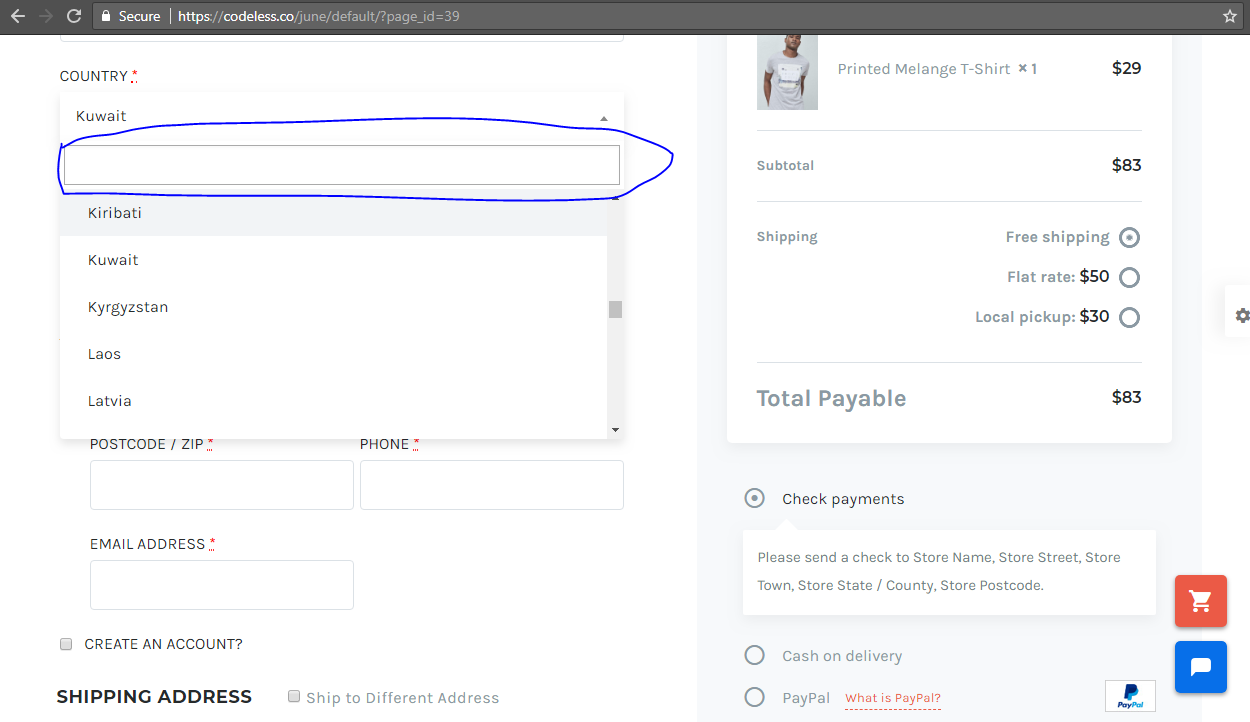
How can I make the cursor to blink on the input field for countries on the checkout page just to make it noticeable for someone to know its a place to type in. I would like after someone selects a countries the white box should have inside a blinking cursor.It shouldn’t be like this https://s25.postimg.cc/tv6hvw5db/Cursor_blink.png
Regards,
Hello,
This is not possible to focus the input search field of country select.
Let me know if you need something else.
Thanks
Hi there, is it possible to get a grid view on mobile devices instead of having to view a single product at a time?
Hello,
Yes sure, we have added an option for this, you can select the number in theme options page. You can view changelogs 
Thanks
Great, I will purchase now!
You’re welcome!
Thanks
Hello, There is something wrong with the shipping locations drop down for countries on the checkout page. It doesn’t open at certain viewpoints on the desktop and on mobile. Kindly need your help. Check it on my website www.ndgfashion.watu.co.ke/
I would like to know if I can put a search button on the select box for the billing countries. Thank you.
Hello,
I checked and i don’t see any issue selecting the state or entering the country name. See screenshot: https://postimg.cc/image/k2m97otwb/ In what screen dimensions are you having troubles with?
Best regards!
As in certain viewpoints, the drop down won’t open. Check it like in here, it shows that is active, but wont open https://s25.postimg.cc/lcnegdarj/Capture1.png . You can try selecting the locations multiple times and scroll from your browser and you will notice it.
The problem is also on your demo, see the screenshot https://s25.postimg.cc/h3ioe9kdr/Capture2.png . When you scroll to this point, the dropdown is not opening
Thanks!
Hello,
Please add this code into your Custom Css box:.select2-container--open .select2-dropdown--above{
box-shadow: 0px 5px 15px 0px rgba(0, 0, 0, 0.1);
border: none !important;
opacity: 1;
}
Let me know for anything.
Best regards!
Thanks alot ! It works perfectly. I really appreciate your help.
Do you have a problem with chat support?
Hello, chat works, just test it. Maybe you have a connection problem or something else. What browser are you using? Thanks
I use chrome, I sent a message at 7.50 and nobody answers.Is the codeless.xxx@gmail.com mail correct? can you check spam please? My email is admin@thepetshopboys.es
Hi,
I’ve installed Storefront Powerpack in the back-end but it does not show up in the “Customize” section of the site. Do I need to activate this somewhere manually?
Hello,
Sorry but this plugin works only with WooCommerce default theme, the Storefront theme. As it says on it’s official page: “This extension is designed to work specifically with Storefront, the official WooCommerce theme. It will not work with any other theme.”
Best regards!
I would like to know are this theme support rtl ?
what is the memory_limit for themes ??
this theme support plugin massive Addons for WPBakery Page Builder ?
this theme suppor demo importer ??
Hello,
Yes June theme supports RTL. You can check out theme requirements here: http://codeless.co/june/documentation/#requirements Yes, you can import the demos demonstrated online. Theme is compatible with WP Bakery page builder and has it included. Although the main builder is Codeless Builder. Which is used to create all the elements you see in the demos and we encourage you to try it out. Let us know if you have further questions.
Best regards!
thank you for answer my question but ,
my question for plugin (massive Addons for WPBakery Page Builde ) and this link for it https://codecanyon.net/item/massive-addons-for-visual-composer/14429839can you tell me please if all demo themes for you compatible with it ?
Best Regards,
Hey,
We haven’t tested this. But we believe there would not be any problem since WP Bakery plugin is incorporated within theme.
Best regards!
Hello @Mirela2910
i would to thank you for replying me
now i need to see Some users for your themes use RTL to Take my decision and Buy your themes so please if you can help me in this request send me some of it ؟؟
Best Regards,
Hello,
We have some users but they have not finished completely the migration to RTL. We can’t share inks for now until they finish the website.
Thanks
How can I add products by ID in a new content page?
Hello,
Sorry but this is not available for now. We will consider adding this feature in the future. You can customize the ‘shop’ element of Codeless Builder to show up the product categories you want.
Best regards!