

1303 comments found.

Hello again,
I can’t update my theme through envato market. Why? And where can I find documentation that you have on updating the themes?
Thank you!
You can find the instructions on how to update the theme here: https://wydethemes.com/overlap/documentation/#update
Hello,
recently I am not able to add information to my Team Members. What shop I do?
I have the window with team members and I can add a new one, but I can’t add the information that appears under the picture.
There may be plugin conflicts on your website. Try to deactivate the third party plugins to see if it works.
Also, you may need to update the theme and all bundled plugins to make sure they will be compatible with the new version of WordPress.
Hello,
Is possible to overlap on mobile and tablet?
Thank you
Hello,
We are sorry but the Overalp layout doesn’t work on mobile and tablet because you will have only one column on those devices.
Hello. I purchased the ‘Full Version’ of WPBakery, and installed it from the download-file. But I cannot activate the Plugin. Accessing from the Dashboard, the “Product License” tab is missing (along with the “Design Options” and “Custom CSS” tabs…) How can i activate the product?
Hello,
The WPBakery Page Builder plugin that is included in the theme is the “Full Version”. We have purchased the Extended License of that plugin so you can normally use it without to activate the product code.
The product activation option is available for direct customers to enable the automatic update feature and to access direct support from the plugin author.
However, that plugin was packed with the theme and it needs to be updated by the theme author to make sure it will be compatible with the theme. And when the automatic update feature is disabled, the Product License tab won’t show up either.
Anyway, if you would like to activate the product purchase code, you will need to add the PHP code below into functions.php in your child theme to enable the automatic update feature and Product License tab:
function overlap_enable_updater() {
    vc_manager()->disableUpdater( false );
}
add_action( 'vc_before_init', 'overlap_enable_updater', 100 );
Thank You!. This works fine
I have been trying to figure out page issues for days!
GALLERY page misloads with another random page from site. Seems like cache issue, but cleared cache on browsers and also WP-Optimize. Tried Chrome, Edge, and Safari. Same results.
This page also does not display header when I preview or do get it to display. Will not display full width unless set to slider revolution.
I tried deleting and recreating page, renaming, etc. Can you please look to see what is causing this? I’ve never experienced anything like this.
Second issue. How to make header text white over slider before sticky header scroll in effect?
http://windward19.new.salonreddayton.com/Thank you!
Hi,
I am sorry for the delayed response!
Your Gallery page is using the page template from another plugin. Looks like it doesn’t include the header menu and has different page structure so it doesn’t display correctly.
You may need to change the Template in the Page Attribute section on the right hand side of the page edit screen to “Default Template”, please see the picture below:

Also, to make the page full width without padding, you will need to set the Padding Size of the column to “No Padding”, you will find the instructions on editing column settings here: https://wydethemes.com/overlap/documentation/#section-options
Regarding the header text issue, you can change the menu text color under Overlap Options -> Header -> Foreground Style, you can find more details here: https://wydethemes.com/overlap/documentation/#page-header-options
I’m stuck finding how to change the blog main image. I have updated my own image at 960×540 in theme options/blog settings and tried to reset some of the WP Bakery Role Manager settings with no luck. The page still displays the full-width blog masonry image and text overlay. I’ve been through every setting page I can think of. What am I missing?
http://windward19.new.salonreddayton.com/blog-masonry-full-width/That is the background image of the page title area. It is included in the Overlap Options -> Title Area on the page edit screen, you can find more details here: https://wydethemes.com/overlap/documentation/#title-options
Also, you can set default background image for the page title area under Theme Options -> Title Area.
Hi, I have two questions regarding portfolios (I have just left a comment but addign them together for ease).
Firstly, I would like to add a suppliers details but they arent a CLIENT, can this word be changed?
I am looking to add audio files, but I want it to be below the text and the layouts do not offer this option. When adding a URL as media in the main text box it adds the media but it is not responsive and isn’t placed well on the page. I cant seem to see anyway of editing? For context I will be looking to add podcasts from either spotify or sound cloud. Thanks!
Hi,
I just provided the instructions on how to change that word, please check out your previous question.
To add audio files, I recommend using the Media Player (from the page builder). You can place them with other content elements on the page as you can see in the demo: https://wydethemes.com/overlap/elements/video-player/
Thank you so much for this reply. I will investigate the translate option later tonight.
This might sound silly but I cant seem to access page builder in portfolio and blog posts? This is where I will need the audio. I really like the layout in that link, but cant see how to do it in a blog (I understand how to do it in a main page). Do I need to enable page builder in blog posts somewhere?
Thanks,
Kimberly.
SOrry, ignore this, I’ve found it. Thanks, Kimberly.
I have found for blogs, but cant find for portfolios?
Sorry, I had actually found it for a blog page. I really need the audio in either a blog or portfolio as they will be showcasing weekly podcasts. Can you advise how I can do this when they wont be pages?
You can put a URL from either Spotify or SoundCloud into the Media URL option under the Overlap Options to set it as the featured media of the post, as you can see in the demos below.
https://wydethemes.com/overlap/open-the-window/ https://wydethemes.com/overlap/portfolio-item/portfolio-10/For the blog post you will need to select “Audio” or “Video” in the Format setting on the right hand side first. You will find more details in the links below:
https://wydethemes.com/overlap/documentation/#post-media-embed-options https://wydethemes.com/overlap/documentation/#portfolio-post-optionsHowever, if you would like to add more audio files to the blog post and portfolio, you may need to enable the page builder to edit the blog post and portfolio first, so you will be able to add them using Media Player.
Navigate to WPBakery Page Builder -> Role Manager, choose “Custom” for Post types and then select “post” and “wyde_portfolio”, you will find more details here: https://wydethemes.com/overlap/documentation/#visual-composer-settings
Hope this helps!
Hi, I have recently purchased OverLap. In portfolios, I want to change CLIENT to CREATOR (or something similar) as I am not using the portfolio for client work. Can you advise if this can be done?
Thanks,
Kimberly
You may need to translate the theme to change that word.
There are 2 ways to translate the theme:
1. Using the POEdit, you will need to download and install POEdit on your computer first. You will find the instructions here: https://wydethemes.com/overlap/documentation/#translations
2. Using the plugin such as Loco Translate ( https://wordpress.org/plugins/loco-translate/ ). It is easier because you don’t need to install any application on your computer. You can find more details here: https://localise.biz/wordpress/plugin#guides
Hope this helps!
I need support with two additional issues, please:
1) CSS code to override the menu uppercase I tried this code that I found on the support page, but it does not work: .vertical-menu > li > a, .vertical-menu .back-to-parent span { text-transform: capitalize;
2) How do I override the theme color/custom color setting for Google Map and set to full color?
Thank you,
Tina Marker
#top-nav > ul > li > a {
    text-transform: capitalize;
}
2) Unfortunately, the color and style of Google Map in this theme has been customized to fit the theme design. You couldn’t set it to full color (to make it display default style). You may need to set the “Map Color” in the Google Maps element settings. Otherwise, the theme color will be used instead.
Only way to display default map color and style is to select the “Satellite” mode for the map.
Hello – with the recent update, I lost my Slider Revolution slider. As in, I go to Slider Revolution and there are no images or text that were previously there. Anyone else experiencing this problem with the latest Overlap update?
Please ensure that you’ve already updated WordPress and all bundled plugins to the latest update. You should have Slider Revolution 6.0.x installed on your site to make sure it will be compatible with the new update of WordPress and the Overlap theme.
Also, if you have a cache plugin, you may need to clear the caches after updating the theme and plugins.
If it still doesn’t work, try to re-install the Slider Revolution plugin to see if it works.
Here’s a step by step guide on how to re-install that plugin:
1. Actually, deleting the plugin won’t affect your existing sliders. However, I recommend exporting the sliders to backup your sliders first. You will find more details on how to export the slider here: https://www.themepunch.com/slider-revolution/export-modules/
2. Deactivate and delete the Slider Revolution plugin on the Plugins screen.
3. After you delete it, you will see a notification message at the top of the admin page to install it. Click on “Begin installing plugins” to install it again.
Hope this helps!
That worked. Thank you.
Glad to hear it has been solved 
I need support on the Overlap theme, please. I can’t get the menu to display above or under the Revolution Slide. It only appears with lines in the far right side.
I also am wanting to have the images on the home page touch at the corners. There is a slight padding now. How to remove?
Site URL: http://windward19.new.salonreddayton.com
Thank you,
Tina Marker tina@windward-design.com c076d4d8-e74b-46ae-b6c2-8b3f4d1ba7f8Hello,
Thank you for choosing our theme!
1 – It looks like you are using a Full Screen menu so you will need to click hamburger (three lines) button to show the menu items.
You may need to change the navigation menu layout in Theme Options -> Navigation -> Layout to make it display menu items instead of the hamburger button.
2 – Here’s a quick tip on how to make the row and column completely full-width without padding:
1. Edit the row settings, choose “Full Width” for the “Content Width” setting.
2. Edit the column settings, change the “Padding Size” to “No Padding”.
You will find more details on the row and column settings here: https://wydethemes.com/overlap/documentation/#section-options
Hope this helps!
Hi just bought your theme. I installed the demo content and want to activate it. Now i cannot find the part with theme options. Can you help me?
Found it. Thank you
Glad to hear that you’ve figured it out!
Anyway, you can find more details on how to import demo content here: https://wydethemes.com/overlap/documentation/#import-demo-content
Hi, could you please tell me how I can make the font used to name products in Woocommerce smaller? My products page/shop has product codes/names under each product which are bigger than I want them to be. Many thanks!
Hi,
You can change the font settings of the product names on the shop page under Theme Options -> Typography -> H2. Also, if you would like to change the font of product names on the single product page (product details), edit the settings for H1.
Thanks for the fast reply! Will changing the size of H2 in theme options change the H2 throughout the entire website? So also on the pages where H2 is the suitable size as it is now?
.woocommerce-loop-product__title {
    font-size: 20px;
}
That did the job, thanks!
On the demo page of the creative agency theme, the second section below the slideshow “We work with passion” is flush right. When I opened the downloaded pages this section is flush left. When I looked at the custom row layout it says 1/3+2/3. How can I get it to look like the demo page—(Flush right)?
If the custom row layout says “1/3+2/3”, it should be flush right as seen on our demo page.
However, here’s the step by step guide on how to easily make it look like our demo page:
1. On the page edit screen, switch from the “Backend Editor” to the “Classic Mode”.
2. In the editor, select “Text” mode and then add the codes (below) at the end of the existing codes:
[vc_row padding_size="no-padding" parallax="parallax" bg_image_url="https://wydethemes.com/overlap/wp-content/uploads/2015/09/overlap-bg-005-2-150x150.jpg" background_image="4315"][vc_column width="1/3" offset="vc_hidden-sm vc_hidden-xs"][/vc_column][vc_column overlap="bottom" overlap_distance="100px" overlap_index="50" width="2/3"][vc_row_inner background_color="#ffffff" css=".vc_custom_1445753439968{padding-top: 30px !important;padding-right: 15px !important;padding-bottom: 30px !important;padding-left: 15px !important;}"][vc_column_inner width="1/2"][vc_single_image alignment="center" image="3069"][/vc_column_inner][vc_column_inner overlap="right" overlap_distance="0" overlap_index="50" width="1/2"][wyde_heading style="6" text_align="left" title="We Work with Passion" subheading="Lorem ipsum dolor"][vc_empty_space height="20px"][vc_column_text]
<p style="text-align: justify;">Morbi eros lorem, imperdiet a dictum ac, consectetur vel lacus. Aenean gravida posuere elit. Cum sociis natoque penatibus et magnis dis parturient montes, nascetur ridiculus mus. Duis lacinia et urna sit amet congue. Pellentesque vel leo a eros sollicitudin varius a ac lacus. Aliquam viverra laoreet aliquet. Sed eu odio magna. Aliquam non lectus egestas, laoreet felis quis, sagittis lacus. Fusce maximus laoreet tincidunt. Nulla hendrerit felis nec magna condimentum congue et feugiat risus. Etiam vel elit eget nibh rutrum efficitur quis id eros. <a href="#">Learn more »</a></p>
[/vc_column_text][/vc_column_inner][/vc_row_inner][/vc_column][/vc_row]
3. Switch back to the “Backend Editor” so will see that section at the bottom and can edit and move it to the top using the page builder.
If it is still flush left, there may be something wrong with the content elements on that page, you may need to send me the link so I can take a look.
It is still flush left after I added the code you sent. It appears to only be happening in Safari—it worked correctly in Chrome
Here is the page link: https://www.barbaraetzkorn.com/home-2/Hello. Hoping this can be fixed for Safari. I am putting my site back in maintenance mode now that you know what the problem is. Please update me if have a resolution.
Hello,
It is working fine on my end. The content on that section is flush right on both Chrome and Safari. I have no idea why it doesn’t work on your end. The whole code I provided was from the demo content, it should appear exactly the same as our demo page.
However, looks like you’re using a “Boxed” layout for that page, try to change it to “Wide” to see if it works. You can change it under Overlap Options -> Page at the bottom of the page edit screen.
If it still doesn’t work, please provide me more details about your browser. What is your Safari version? Are you using it on a Mac or a PC?
Hi. Changed to “wide” layout and that didn’t help. I just noticed WPBakery needs tp be updated and it won’t let me update it on the plug-in page. When I googled this problem it said the developers need to update this plug-in if it came with a theme. Using Safari 12.1.1. and Im on a Mac. I still have the original home page layout with untouched code and that page shows the box flush left too? Is there a private way to send you permissions to go in and look? I have made no changes except simple copy and removing the slider at the top of the page.
After you update the theme, you will see a notification message to update that plugin. You will find more details on how to update the theme and bundled plugins here: https://wydethemes.com/overlap/documentation/#update
Also, you can send a private message with the login details in the contact form on our profile page: https://themeforest.net/user/wyde#contact
The plug in has updated since I logged back in-great!
It makes no sense to have you log in since it is obviously my computer that is showing me the flush left. Is there anything you can do from your end so I see this section properly? Again I am working on Safari 12.1.1 on Mojave 10.14.5 Mac. The fact that the demos are all flush left tell me it is not anything I touched.
I’m sorry but I meant that you may need to send me a password or something to access your site because it is now under maintenance mode and I couldn’t check it again with different computers to make sure it happens only on your computer.
However, I’ve tried it with my iMac using Safari 12.1.1 on Mojave 10.14.5 (the same as yours), but everything is working properly.
I have no idea why it doesn’t work on yours, but try to clear the browser caches to see if it works.
If it still doesn’t work, you may need to open your browser console to check for errors. You will find the instructions on how to open the browser console here: https://www.wickedlysmart.com/hfjsconsole/#sm
I have sent my credentials for you to look at my site to see if there is something causing this. I tried to follow the browser instructions but the dropdown did not have the field mentioned in the tutorial. Please see if you can resolve this?
Thank you for the credentials!
I just tried it on different computers, your site looks great in Safari on both iMac and Macbook, please see the screenshot below:

That means your site is working properly and it is not a theme related issue so there is nothing I can do to fix it from my end.
There may be an issue with Safari on your computer. You will need to open the browser console to view errors.
If you don’t see the “Develop” menu in your Safari, you’ll need to turn it on first. Open Safari > Preferences, and click on the Advanced Tab. At the bottom of the pane, check the box “Show Develop Menu in menu bar”:
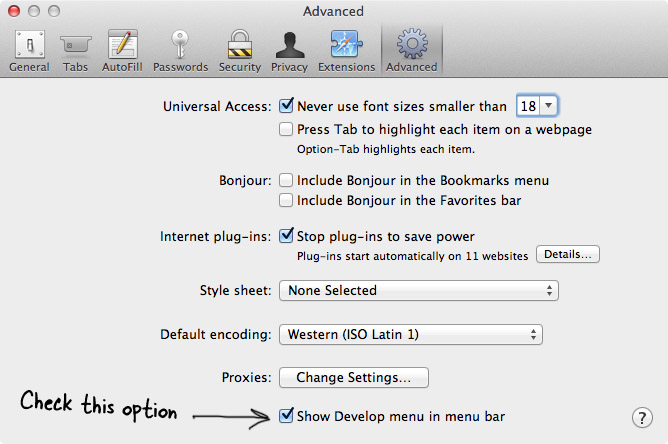
The “Develop” menu will appear and you’ll be able to access the Show Error Console menu item.
If there is any error in your browser console, you can send me a screenshot directly to my email. I just sent you a private email so you can reply me with attached images.
The “Show Develop menu” was already selected. There was no “Show Console error” only Show Javascript console, Show page source and Show page resources and show web inspector.
Got our IT department to reset and reinstall Safari and now it works. Thanks for your help.
Glad to hear that it has been solved!
I am having an issue at www.prichardcommittee.org. When I do a search, say for “Student Voice” and click on any of the results, I get this error [object Object].
What is going wrong with the search?
There seems to be a plugin conflict on your search page. That plugin is trying to show the content in the lightbox when you click on any of the results. You may need to deactivate the plugins one by one to find the problematic plugin.
You were correct. By updating all the plugins and removing those not in use, I managed to solve the problem. Thanks for your help.
Great! Glad to hear you solved it.
Hi I need update WPBakery Page Builder 5.7 to 6.03 Can you help me?
Thank you
If you’re using WPBakery Page Builder 5.7, you don’t need to update it and can normally use it with the latest update of the theme.
The new version of that plugin will be included in the next update of the theme.
Hi. Amazing theme. Been developing for about three months and this is my first Support Query. The Team Members display functionality is very nice, but is driven around the “Featured Image”. I have a class of members that I will not being be displaying pictures for. I want to display just their name and title, and would like to have the name as a link to view their bio.
Before I start looking at other plugins, doing custom CSS, I wanted to see if there is any simple functionality available within Overlap to do this quickly? Any suggestions on an approach?
Thanks, Mike
We are sorry but the Team Members element requires the featured image to make it work properly. You may need to use a placeholder image or an avatar image if you don’t have a member’s photo.
However, if you wouldn’t like to display any picture, you will need to create custom member’s bio page (using the page builder), and then use the Text Block and the Link Button to add the member’s name with a link to the bio page.
Contact Form 7 is not visible in mobile format. Tried the old fix by adding add_filter( ‘wpcf7_load_js’, ‘__return_false’ ); in functions.php and it just broke the theme by returning errors at top of site.
Author of Contact Form 7 suggests to ask Theme author for a fix, as the plugin work with default WP theme.
Try checking the column settings. That column might be disabled on mobile devices.
Edit the column (the container of the contact form), select the Responsive Options tab then uncheck all boxes for “Hide on device” setting.
If it still doesn’t work, you may need to give me your web address so I can take a look at it.
Thanky you! It works now.
Hi, First of all, well done with the theme, I really like it. I have a few quesions: 1. How can I hide some specific images for the mobile version? the templates work pretty well on the desktop, but on the mobile are too much images… 2. How can I eliminate or edit the info that appears by pressing the tree dots on the right top corner? Thanks!
I found out the point #2 so forget that one
I just want to know the #1 and one more question, where can I set a favicon?
Thanks!
I found also how to hide the images hehe so my only question will be how to set a favicon thanks!!
Great! Glad to hear you’ve figured it out
Anyway, you can set the Favicon under Appearance -> Customize -> Site Identity -> Site Icon. You can find more details here: https://wordpress.org/support/article/creating-a-favicon/
Hello When I want to install the overlap-demo-content in the plugin I have this error message: “Le lien suivi est expiré.Veuillez réessayer.” (The followed link has expired). Can you help me please? Best regards Salomé
Hello,
It sounds like your WordPress site has a low file upload size limit. You will need to increase the maximum file upload size in WordPress to fix this issue. There are a couple of ways to increase the PHP limits, you can find more details here: https://www.wpbeginner.com/wp-tutorials/how-to-increase-the-maximum-file-upload-size-in-wordpress/
Also, to import demo content you may need to increase other PHP limits to the minimum as below:max_execution_time = 300 memory_limit = 128M post_max_size = 32M upload_max_filesize = 32M max_input_vars = 5000


