

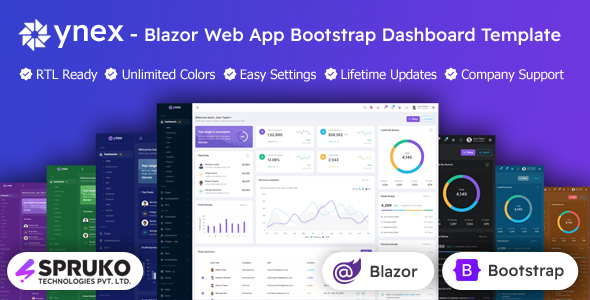
Discover YNEX – A Powerful Blazor Web App Server Bootstrap Admin Dashboard for Scalable and Dynamic Web Solutions
Ynex blazor web app server template is a modern, feature-rich blazor bootstrap admin dashboard designed for developers, designers, and businesses seeking a highly responsive and intuitive interface. Built with clean architecture and optimized for performance, ynex blazor template offers seamless management, monitoring, and visualization of complex data across dynamic blazor web templates.
Equipped with a comprehensive collection of reusable blazor widgets and blazor bootstrap components, the ynex blazor framework offers unmatched flexibility for creating intuitive blazor admin dashboards, control panels, and backend ui interfaces. Whether you’re building enterprise-grade systems, analytics dashboards, or SaaS admin panels, ynex blazor components adapts effortlessly to your blazor admin ui requirements.
With support for leading chart libraries and extensive customization options, the ynex blazor dashboard empowers developers to build fast, scalable, and maintainable web solutions. Leveraging the latest blazor framework combined with blazor bootstrap, this blazor admin dashboard template delivers a professional-grade ui kit ideal for everything from corporate blazor web templates to lightweight blazor admin panels.
ynex blazor webapp blends modern design, flexible layouts, and developer-centric features to deliver a future-ready blazor bootstrap template focused on performance, scalability, and ease of use. Featuring comprehensive documentation and a modular code structure, it makes customization and extension straightforward. With a fully responsive design ensuring smooth performance on all devices and seamless integration with popular blazor tools, the ynex blazor admin template accelerates development while enhancing the user experience. Whether building complex enterprise dashboards or simple admin panels, the ynex blazor with bootstrap ui framework offers a solid foundation for creating powerful, maintainable web interfaces.
Key Features of the Ynex Blazor Bootstrap Admin Template:
Ynex blazor bootstrap admin template is packed with essential features like multiple dashboards, Razor pages, charts, maps, and plugins. Its clean code and responsive design make customization easy, helping you build modern admin panels quickly and efficiently. Plus, regular updates and professional support keep your blazor project running smoothly.
- Blazor Counter page
- No JQuery
- 170+ Razor Pages
- 20+ Plugins
- 12 Dashboard Variations
- Vertical & Horizontal
- Menu Click, Menu Hover, icon click and icon Hover
- 2 types of Charts
- Responsive Bootstrap Framework
- Well Commented Code
- Filepond
- Dropzone
- Easy to customize
- Neat, clean and simple design
- TimeLine
- Message Chat
- Google Fonts
- 3 Types of Maps
- Mail Inbox
- 6 Types of Icon sets
- Lock screen Pages
- Error Pages
- Shopping Cart
- Checkout
- Order Details
- Wishlist
- Professional Company Support
- Regular Updates
- Form Elements
- Image Gallery
- Under Construction Page
- Invoice Page
- Calendar
- Pricing Tables
- Very Easy to Create your Own Site
- More Widgets
- Company Support
Extensive Range of Pre-Designed Dashboard Layouts:
Our ynex blazor template includes a diverse set of dashboard designs tailored for various industries and purposes, enabling you to get started fast with visually appealing and fully functional admin panels.
- CRM Dashboard
- Ecommerce Dashboard
- Crypto Dashboard
- Jobs Dashboard
- NFT Dashboard
- Sales Dashboard
- Analytics Dashboard
- Projects Dashboard
- HRM Dashboard
- Stocks Dashboard
- Courses Dashboard
- Personal Dashboard
Key Features of the Ynex blazor Web App Server Responsive Admin Dashboard:
With a clean design and flexible features like dark mode, RTL support, and multiple menu styles, this jQuery-free template ensures easy customization and smooth performance across devices. It also includes regular updates and reliable support.
- No Jquery Dependant
- Multiple Menu Style Options
- Dark, Light and Custom Color Options
- Easy Settings Color Switcher
- Neat, clean and simple design
- RTL Supported
- Well Commented Code
- Major Browser Compatibility
- Clean, well-structured
- Easy customization
- User-friendly interface
- Responsive design
- High-quality code
- Extensive documentation
- Regular Updates
- Company Helpdesk Support
Flexible and Customizable Switcher Options in the Ynex Blazor Dashboard:
The ynex blazor dashboard offers a wide range of switcher options, allowing you to easily customize themes, navigation styles, layouts, and menu behaviors. With features like light/dark modes, vertical/horizontal navigation, fixed or scrollable headers, and multiple menu configurations, it ensures a personalized and user-friendly admin experience that adapts perfectly to your project needs.
- Light & Dark Themes
- LTR & RTL
- Vertical & Horizontal Navigation Styles
- Menu Click & Hover Styles
- Icon Click & Hover Styles
- Page Regular, Classic & Modern Styles
- Layout Full Width & Boxed
- Menu Fixed & Scrollable
- Header Fixed & Scrollable
- Sidemenu Closed
- Icon Text Menu
- Icon Overlay
- Detached
- Double Menu
Extensive Theme Color Variations in Ynex Blazor Admin Panel Dashboard:
Ynex Blazor admin panel offers a wide variety of theme color options, including light, dark, color, gradient, and transparent styles for both menus and headers. With dynamic color pickers for primary and background colors, plus support for menu background images, it provides complete flexibility to create a visually stunning and personalized dashboard experience.
- Menu Light
- Menu Dark
- Menu Color
- Menu Gradient
- Menu Transparent
- Header Light
- Header Dark
- Header Color
- Header Gradient
- Header Transparent
- Theme Primary Colors & Dynamic Color Change Picker
- Theme Background Colors & Dynamic Color Change Picker
- Menu With Background Images
Key Advantages of Choosing the Ynex Blazor Web App Server Admin Dashboard Template
This ynex blazor webapp template offers lifetime free updates, dedicated helpdesk support, and easy-to-follow online documentation to simplify your development process. With flexible navigation menus, multiple layout options, and ready-to-use pages, it ensures a smooth and efficient setup for building professional, scalable admin dashboards.
- Unlimited free updates for life
- Responsive customer support through helpdesk
- Complete access to online guides for easy installation
- Starter pack included for quick project initiation
- Clean, well-organized, and maintainable source code
- Flexible vertical and horizontal navigation menus
- Various layout choices: boxed, full-width, fixed, and scrollable
- Pre-built pages including Login, Signup, Lock Screen, Maintenance, and Error pages
Top Advantages of Using the Ynex Blazor Admin Dashboard
Ynex blazor admin dashboard offers fast development with ready-to-use UI components and seamless integration with existing systems. Built with clean, modular code and a fully responsive blazor interface, it ensures a modern, efficient, and jQuery-free user experience. Plus, professional support is provided to keep your project running smoothly.
- Accelerated development using ready-made UI elements and templates
- Seamless compatibility with current systems and APIs
- Clean, modular codebase designed for developer ease
- Contemporary, fully responsive interface built with Blazor
- Zero jQuery dependency – powered entirely by Blazor
- Professional support from a dedicated technical team
Who Benefits Most from the Ynex Blazor Admin Dashboard Template
This ynex blazor dashboard template template is perfect for developers, businesses, agencies, and freelancers looking to build fast, scalable, and fully responsive admin dashboards. With versatile ui components and seamless integration, it streamlines project delivery while ensuring a modern and professional admin panel user experience across all devices.
- Developers & Designers: Accelerate your workflow with a versatile, high-performance Blazor admin dashboard featuring cutting-edge UI components.
- Businesses & Startups: Launch fully responsive, production-ready web interfaces designed specifically for modern enterprise and SaaS solutions.
- Agencies: Craft and deliver custom, scalable Blazor admin templates tailored to diverse client needs and industries.
- Freelancers: Build efficient, reusable blazor admin dashboards that seamlessly integrate across multiple web projects.
Key Dependencies Required for the Ynex Blazor Admin Panel Template:
- Visual Studio Code or Visual Studio 2022
- C# for Visual Studio Code
- .NET 9.0.102 SDK
- Sass
- gulp
- esbuild
Complete Package Contents of the Ynex Blazor Template:
- All Razor Files
- All CSBlazor Files
- CSS Files
- SCSS Files
- JS Files
- Documentation
- StarterKit
Essential Details About the ynex Blazor Web App Server Dashboard Template
The ynex blazor admin dashboard template is delivered as a static blazor package, offering developers full flexibility to customize and extend the blazor bootstrap template based on specific project requirements. This comprehensive UI kit includes pre-built components, responsive layouts, and clean, modular code—ideal for building dynamic and scalable admin interfaces.
With a responsive design and developer-friendly architecture, the ynex blazor framework simplifies the creation of professional admin panels and control dashboards. To fully leverage its capabilities, familiarity with Blazor, and related web technologies is recommended.
We recommend consulting your technical team before purchase to ensure the ynex blazor template user interface design fits your project goals, development setup, and workflow needs.
Why Choose SPRUKO® TECHNOLOGIES PRIVATE LIMITED
- Legally registered software company
- Elite Author on Envato with 5-star reviews
- Years of experience in the web development industry
- Clients and users from around the world
- Clear and easy-to-follow documentation
- Free lifetime updates and helpful support
- Customer-focused approach to product development
IMPORTANT:
SOURCES: All images are used exclusively for DEMO purposes. They are not integrated into the template and are NOT included in the final purchase files.
How do I get Support ? :
We have an expert team to provide you with the best support whenever needed on business working days. We are also trying to assist non-technical support on the remaining days. Our Company’s technical support team will provide fast and reliable support assistance within response time or sooner.
Please note that we do not provide support via comments section these are not official channel for customer support. How to contact support section?
Note : Our support team will respond to your request as long as the support purchase period is active. We will be providing our support service as per the product/item support policy. In order to continue our support service extend or renew support for an item is required. How to renew support ?


