

Download LinkPress Today! `
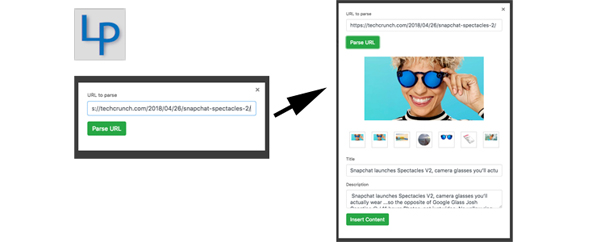
When you paste a URL into a post, LinkPress’s server automatically grabs the title and description from the linked website and lets you select a thumbnail image from those available on the linked site.
This saves so much time that you would otherwise spend finding, copying, pasting, resizing and uploading an image for your post.
1. When you are in the WordPress editor, you click a special button called “Generate Link Preview”.. our LP (Linkpress) logo
2. LinkPress brings up a new small window, which asks you to enter enter the URL into a text field, then you click OK.
3. LinkPress then retrieves the title, description and thumbnail images from the destination site and then displays a draft link preview in the small window.
4. The user can make any final edits to the link preview, i.e. editing or removing the title, description or choose a different thumbnail image. Once the user is done, they click on a a button named “Insert”, which pastes a block of HTML into the editor.


