1328 comments found.
Hello,
Currently I install a theme for a client.
He wants to have the same layout shop, but when I activate the page WooCommerce do not look anything like your demo.
See: http://themes.themegoods2.com/vega/shop?vegastyle=1 and http://themes.themegoods2.com/vega/product/happy-time/?vegastyle=1
Could you tell me how to have the same layout, because normally sold on a theme ThemeForest must match the description, options, demo, etc …
Thank you in advance for your help David
Please login with your purchased account.
Hello,
It is the customer who purchase your theme.
I will just do the install.
I know very well that you only help people who have purchase your theme, but could you at least give me the process of applying for the shop as your demo.
Thank you in advance David

I’m no techno, not familiar with WordPress or setting up/building a website using a ‘theme. Do you have any basic video on setup/building for this theme? totally frustrated and getting lots of errors messages.
Hi,
You can access theme documentation here http://themes.themegoods2.com/vega_doc
Here is instruction about how to install theme http://themes.themegoods2.com/vega_doc/theme-installation/
I am still having issues I did as suggested via private ticket’ to get ‘web host to clear server cache’ these are the steps I have taken to date; 1)got web host to clear ‘server cache’ I tested it by changing content on a page but still got error msg 2)I asked web host provider to remove the installed ‘theme’ 3)I reinstalled the ‘theme’ I tested it by changing content on a page & updated, but still get error msg as follows;
Warning: Invalid argument supplied for foreach() in /home3/trish/public_html/wp-content/themes/vega/lib/custom.lib.php on line 1273
Warning: Invalid argument supplied for foreach() in /home3/trish/public_html/wp-content/themes/vega/lib/custom.lib.php on line 1273
Warning: Invalid argument supplied for foreach() in /home3/trish/public_html/wp-content/themes/vega/lib/custom.lib.php on line 1273
Warning: Invalid argument supplied for foreach() in /home3/trish/public_html/wp-content/themes/vega/lib/custom.lib.php on line 1273
Warning: Cannot modify header information – headers already sent by (output started at /home3/trish/public_html/wp-content/themes/vega/lib/custom.lib.php:1273) in /home3/trish/public_html/wp-admin/post.php on line 235
Warning: Cannot modify header information – headers already sent by (output started at /home3/trish/public_html/wp-content/themes/vega/lib/custom.lib.php:1273) in /home3/trish/public_html/wp-includes/pluggable.php on line 1196
Please continue on the ticket. I replied your ticket.
Hi,
In “Contact Fullscreen” page I want to put an acceptance check box, but in Theme settings I can’t put it.
I put an custom contact form with ContactForm7 plugin, but the “Send message” is still there. Is it possible to eliminate “send message” button?
Thanks!
Hi,
Open contact_f.php remove coed at line 196 to 198 here is code to remove<p> <input id="contact_submit_btn" type="submit" value="<?php echo _e( 'Send Message', THEMEDOMAIN ); ?>"/> </p>
Wow! I suppose that if you send a theme update, this change will disappear, won’t it?
In Item Details I read that theme supports Child Themes, but I didn’t notice nothing about it in theme documentation. What do you advise me? 
Hi,
This article might help you achieve that. http://wp.tutsplus.com/tutorials/theme-development/child-themes-basics-and-creating-child-themes-in-wordpress/
Thanks! I will read it!
I tried, but when I copy contact_f.php and remove code at line 196 to 198, theme stop working 
I’ve solved it using Child Theme Configurator plugin. Thanks!
Hi There,
Probably the fastest way to resolve this is to open a thread in our support portal:
https://themegoods.ticksy.com/ Please also add a link to your site as well as the login credentials when opening the ticket, so we can take a look at your site.Mega Menu is good but we still need to be able to organise the mobile menu…is this likely to come soon?
I got the same issue as pherux here. I updated the theme through the Envato Toolkit. So I guess there shouldn’t be any files that the theme doesn’t use anymore, right? Here’s the full error message:
Warning: Invalid argument supplied for foreach() in /home/linzprod/public_html/andrislinz/2015/wp-content/themes/vega/lib/custom.lib.php on line 1273
Warning: Invalid argument supplied for foreach() in /home/linzprod/public_html/andrislinz/2015/wp-content/themes/vega/lib/custom.lib.php on line 1273
Warning: Invalid argument supplied for foreach() in /home/linzprod/public_html/andrislinz/2015/wp-content/themes/vega/lib/custom.lib.php on line 1273
Warning: Cannot modify header information – headers already sent by (output started at /home/linzprod/public_html/andrislinz/2015/wp-content/themes/vega/lib/custom.lib.php:1273) in /home/linzprod/public_html/andrislinz/2015/wp-admin/post.php on line 235
Warning: Cannot modify header information – headers already sent by (output started at /home/linzprod/public_html/andrislinz/2015/wp-content/themes/vega/lib/custom.lib.php:1273) in /home/linzprod/public_html/andrislinz/2015/wp-includes/pluggable.php on line 1196
Hi,
I am not sure if there is issue with Envato toolkit theme file. But your errors come from you have old version of theme file /lib/custom.lib.php
Please download theme again from your account and then try to update /lib/custom.lib.php with the one you downloaded from your account.
Hi. Thanks for your reply. I’m sorry. Seems like I didn’t correctly clear all the caches. It works now. Still love the theme.
Hi,
I have a problem when I’m updating the home page on my website. I get the following error even though I update to V2.0 of the them and cleared the server’s cache.. could you please advise.
Thanks.
Warning: Invalid argument supplied for foreach() in /home/beavory8/public_html/wp-content/themes/vega/lib/custom.lib.php on line 1273
Warning: Cannot modify header information – headers already sent by (output started at /home/beavory8/public_html/wp-content/themes/vega/lib/custom.lib.php:1273) in /home/beavory8/public_html/wp-admin/post.php on line 235
Hi,
Could you send your Wordpress account and FTP detail please. I will have a look.
Hello, I have a problem with contact form that seems not to send some of the messages from our customers at http://mariuszstachowiak.pl/kontakt/. Customers tell us they send messages via contact form, however there are no e-mail in our mailbox, trash has also been checked and we asked our provider to double check if everything was working on their side.
I have temporarily switched the contact form off and asked customers to send direct e-mails, however would like to switch it on again and be sure we receive all the messages. Could you please advise where the problem might be and how to fix it?
Hi,
Open functions.php remove code line 428 here is code to remove$headers.= 'From: '.$from_name.'<'.$from_email.'>'.PHP_EOL;
Hi, I have just made the theme update following the instructions here: http://themes.themegoods2.com/vega_doc/how-to-update-the-theme/
The theme have updated fine, almost. Now I have two lines of code above and bellow the content. Please have a look:
http://www.carladurante.com.br/Why is this happening? Can you please help?
Thank you.
Hi,
Please contact your webhost and ask them to correct PHP session setting on your server.
It’s your server PHP session setting issue.
Hello there,
I’m using the latest version of the template (May 24) but I’m getting an error every time I try to update a page with Content Builder Option enabled. The error is:
Warning: Invalid argument supplied for foreach() in [my server]/wp-content/themes/vega/lib/custom.lib.php on line 1273
Warning: Cannot modify header information – headers already sent by (output started at /[my server]/wp-content/themes/vega/lib/custom.lib.php:1273) in /[my server]/wp-admin/post.php on line 235
Warning: Cannot modify header information – headers already sent by (output started at /[my server]/wp-content/themes/vega/lib/custom.lib.php:1273) in /[my server]/wp-includes/pluggable.php on line 1196
Thanks.
Hi,
Could you make sure you update all theme files successfully and please disable and clear all server cache.
The error comes from your site still have old version of theme file.
There is a new version of this theme… but it doesn’t appear in Updates Wordpress menu 
Solved! It had to enter an API key
ok
Hi There,
Probably the fastest way to resolve this is to open a thread in our support portal:
https://themegoods.ticksy.com/ Please also add a link to your site as well as the login credentials when opening the ticket, so we can take a look at your site.Please can you advise what I can do to resolve my website http://www.one-twenty.co.uk not displaying correctly on iPads the wedding gallery section crashes all the time so you can not view it at all and the some of the other pages do not show the images.
Hi,
I checked your site iPad mini and it’s working fine. I can’t produce crashes issue you mentioned. I think it’s issue with your device performance.
Hi,
How can I add search Icon on my menu? like (http://themes.themegoods2.com/vega/homepage-6/?vegastyle=4)
I would add the icon on right side of menu(http://christinasstyle.com/?page_id=12498).
Thanks
Hi,
Please make sure you have the latest version of theme. Then you should be able to change menu layout via Theme Setting > Header.
Thank you for reply. But I want to use layout 1, is there any way to put the search icon on the layout1 menu?
Sorry it doesn’t support that.
Hi – I’m getting the same issues as susansladephotography & EmCeeCee.
I followed the following advice:Content Builder data is broken on your current page. Please re build it again, the current data can’t be used....unfortunately this made no difference. Same issues again.
I am only using the “Image One Half Fullwidth” blocks.
The following errors appear each time I ‘update’ pages built with content builder:
Notice: Undefined index: ppb_image_half_fullwidth in /srv/vegadev/public_html/wp-content/themes/vega/lib/custom.lib.php on line 1271

Warning: Invalid argument supplied for foreach() in /srv/vegadev/public_html/wp-content/themes/vega/lib/custom.lib.php on line 1273

Notice: Undefined index: ppb_image_half_fullwidth in /srv/vegadev/public_html/wp-content/themes/vega/lib/custom.lib.php on line 1271

Warning: Invalid argument supplied for foreach() in /srv/vegadev/public_html/wp-content/themes/vega/lib/custom.lib.php on line 1273

Warning: Cannot modify header information - headers already sent by (output started at /srv/vegadev/public_html/wp-content/themes/vega/lib/custom.lib.php:1271) in /srv/vegadev/public_html/wp-admin/post.php on line 235

Warning: Cannot modify header information - headers already sent by (output started at /srv/vegadev/public_html/wp-content/themes/vega/lib/custom.lib.php:1271) in /srv/vegadev/public_html/wp-includes/pluggable.php on line 1196
Can you provide a patched version of custom.lib.php, or replacement code for the specific lines referenced by the error messages?
Thank you
I should add that the above code example is from a page with two Image One Half Fullwidth blocks present. Hope this helps narrow down the issue.
Cheers,
Hi,
Please update to the latest version of theme. It should fix your issue.
Download from Themeforest > your account > downloads and replace all theme’s files and folders using FTP account with the new version.
Also please make sure you have no cache and clear server cache.
Thanks for the quick response – I thought I’d updated to the latest, but I will check and retry next week.
Cheers,
Please make sure you clear cache or disable server cache. Other customer who has this issue, it’s because of server still cache old theme file.
Hi there, Private Ticket #443598, Yawar mentioned that the lead developer was looking into this – is there an estimated time when they’ll look into it?
The issue comes from your server cache old theme PHP file. You have to contact your webhost and ask them to clear PHP file cache. It’s not theme issue but server cache issue.
One of our customer has the same issue and they contact their webhost to clear all server cache to solve the issue. See http://themeforest.net/item/vega-portfolio-gallery-theme-for-photographer/9678282/comments?page=38#comment_10104251
I brought in an external developer to look at the caching issue, as we had no cache active on our server.
The issue is with the following two content blocks- “Text, HTML and Shortcode”
- “Image One Half Fullwidth”
To prove this wasn’t a cache issue, we moved everything in custom.lib.php down a single line, and the error messages updated from being line 1271 to line 1272, 1273 became 1274.
The developer I asked to look into the issue pointed out that the issue lies with the following section:
 //Get shortcode attributes
$ppb_shortcode_arr = $ppb_shortcodes[$ppb_form_item_data_obj->shortcode];

 foreach($ppb_shortcode_arr['attr'] as $attr_name => $attr_item)
{
Please can you advise?
Private Ticket #443598 contains login details
I replied your ticket.
There is no navigation available for enlarged images in the Gallery Wall option of the content builder.
and
With growing importance put on mobile web browsing, being reflected by Google’s newest Mobilegeddon update, a better mobile menu is a MUST! Please can you add the option to create a seperate mobile menu?
I cannot be the only person who has bought your theme that has more than two pages of content on their site….
Hi
I installed this theme and can’t import the default settings from the xml file. When I follow the instructions here: http://themetrust.com/knowledgebase/how-to-import-the-demo-content/
I get the following error: ”! content not found”
Can you please advise how to solve it?
Thanks
Hi There,
Please submit your question on https://themegoods.ticksy.com/ Please also add a link to your site as well as the login credentials when opening the ticket, so we can take a look at your site.
Hello,
Your theme is great but when viewing a password protected album on an iPad it crashes everytime. All images are very small, can you look in to this please?
Thanks so much
Hi,
Provide URL of page which has issue please.
Please try to reduce image file size. Currently you have 1,400+ pixels. I recommend image at 1024px resolution.
Also please try to disable all plugin to see if it fixes the issue.
Thanks so much, will do. Can I remove this question from the comments now please? Thanks
Hi all, i saw that in this theme can’t use the format for bold a text.
There’s a way to highlight with BOLD a word in a blog post or not?
Thanks for the time.
Hi,
It should be able to use that function without issue. Provide URL of page which has issue please. Please make sure you did apply bold to selected text.
Thanks for the time.
Bold text works fine on my end. Please try to clear your browser cache.
Pre-purchasing question: In the following gallery types:
ARCHIVE HORIZONTAL GRID MASONRYWALL WALL FIXED WIDTH CLASSIC CLASSIC 2
I don’t see any arrow to go to the previous/next image (horrible for user usability)
In the following gallery types:
FULLSCREEN FULLSCREEN COVER KENBURNS
arrows appear correctly.
The question is:
Is it possible to have these arrows in all gallery types? I think that it is a heavy bad point if you can’t do it…
Hi,
Provide URL of gallery page you mentioned please.
In the demo site URL doesn’t change in navigating. But you can go, for example, to Gallery->Masonry. I really like this kind of gallery, but it doesn’t show arrows to navigate between images (previous/next) like in (for example) Fullscreen gallery.
On demo gallery masonry page, it works. You can test it. Open image and use your keyboard left/right arrow to navigate or click on left/right part on image.
I didn’t say that it doesn’t work… I say that the user doesn’t SEE the arrows, and it’s a big problem for the usability of the site
Any solution? Maybe, change the arrows color?
Yes I can help guide you change arrow color.
Great!! In few hours I’m gonna buy it then 
Last question!
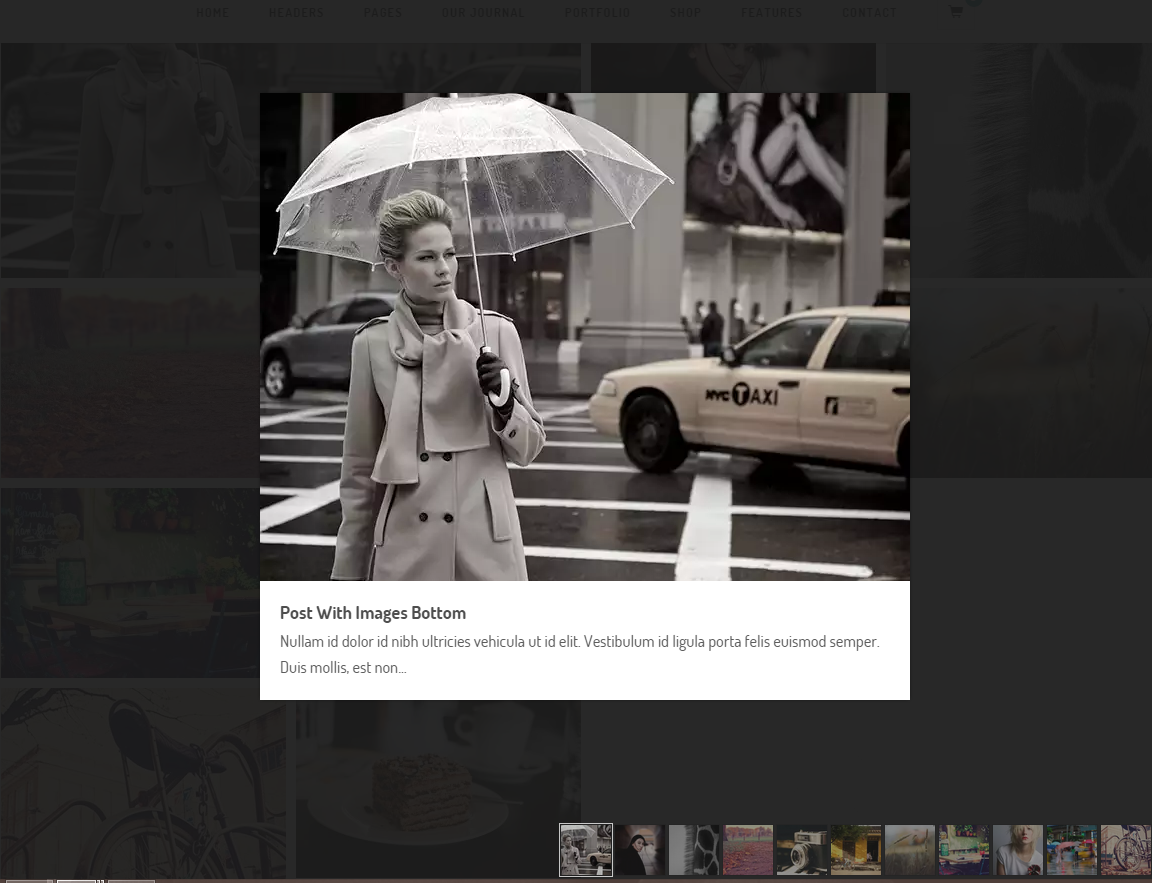
There ir any option to show a small list of images in a lightbox, similar to this?: http://i.gyazo.com/9b6fa2b4a00ae7b9e2e238772a602f92.png
Maybe any galleries plugin that can work with your content builder? (although it hasn’t support from you, I suppose)
Having this list of images in the light box, and arrows visible are two ‘must be’ from my client.
Thanks!
Sorry lightbox doesn’t have thumbnails in order to have more space for main image as you can see on demo site too.
It’s a good point having more space for main image, but for photographers is critical this point.
Having thumbnails, users can notice how many images they have to see and the style of each image. With out thumbnails, if usersz don’t like the first image, they will go out and we can lost a potencial client.
I assume that this feature doesn’t have support, but there is any way to have thumbnails in lightbox compatible with your content builder? (for example, NextGEN Gallery plugin can be integrated in the content builder?)
Thanks!
Yes it doesn’t support on lightbox script theme is used.
I don’t catch your last sentence (I’m not a native English speaker as you can see), it means that is not possible at all or that only it hasn’t technical support from you but it is possible to do?
Yes due to lightbox script theme used. It doesn’t support that functions as you can see on demo site too.
It is not possible at all then