3572 comments found.

I am using Arum theme (Aurum Child) and have a Hook In in the child themes functions.php file
this is the current file code
<?php /** * Aurum WordPress Theme * * Laborator.co * www.laborator.co */
add_action(‘wp_enqueue_scripts’, ‘enqueue_childtheme_scripts’, 1000);
function enqueue_childtheme_scripts() { wp_enqueue_style(‘aurum-child’, get_stylesheet_directory_uri() . ’/style.css’); } function wc_remove_related_products( $args ) { return array(); } add_filter(‘woocommerce_related_products_args’,’wc_remove_related_products’, 10); // Hook in add_filter( ‘woocommerce_checkout_fields’ , ‘custom_override_checkout_fields’ );
// Our hooked in function – $fields is passed via the filter! function custom_override_checkout_fields( $fields ) { $fields‘shipping’ = array( ‘label’ => __(‘Phone’, ‘woocommerce’), ‘placeholder’ => _x(‘Phone’, ‘placeholder’, ‘woocommerce’), ‘required’ => false, ‘class’ => array(‘form-row-wide’), ‘clear’ => true );
return $fields;
} I want to change the placeholder in the Order Notes and from my research I need to add the following
// Hook in add_filter( ‘woocommerce_checkout_fields’ , ‘custom_override_checkout_fields’ );
// Our hooked in function – $fields is passed via the filter! function custom_override_checkout_fields( $fields ) { $fields‘order’[‘placeholder’] = ‘Add gift tag message here’; return $fields; } I am unsure of how to combine the two
I have tried several ways and keep getting php errors
any tips ??
Hi
I’ve tried to replace the placeholder but without any success. But if I change label (not placeholder) it works, its weird, maybe a bug of WooCommerce. So here is what I did and worked for me:
add_filter( 'woocommerce_checkout_fields', 'custom_order_notes_placeholder', 100 );

function custom_order_notes_placeholder( $fields ) {

    $fields['order']['order_comments']['label'] .= ' ' . __( '(Add gift tag message here)', 'aurum' );

    return $fields;
}
This will place the message below the field, I guess this could work for you.
Arlind
great – can you show me how to combine the hook with the exisiting one
I am unsure of how they should fit together
Hi
The code I gave you can be added as extra code in the footer of functions.php it will simply replace any existing filter before and show the custom message.
Arlind
brilliant – I just added it to the bottom and it now reads “Order Notes (Add gift tag message here)”
Hi, I have messaged you guys a couple of times and each time you guys have not given me a straight answer. I’m at the point of asking for a refund if you can’t help me anymore. I’m having trouble with the image sizes. You guys said that it would resize automatically to the default demo size, but it just doesn’t. I even tried changing the size to the suggested 870×1110 but it still doesn’t work. Please respond.
https://www.tibetanheritagecollection.comTashi
Hi Tashi
Sorry for misunderstandings. There are several image sizes that can be changed in the theme. So for example if you want to change catalog image sizes: http://drops.laborator.co/1hKM1
Go to Theme Options > Shop Settings and change Catalog thumbnail size field:
http://drops.laborator.co/14nsvThen regenerate thumbnails (as suggested in the field description).
The same steps are applied Single Item Settings here: http://drops.laborator.co/1gMeu
Most of users have managed to solve this, I am not sure whats wrong with your site which cannot process images size submitted here. If you’ve forgot to regenerate thumbnails do that and you will see changes.
Arlind
This theme is a big scam. The theme developer says “Multi Language: & “Multi Currency” supported. But the theme doesn’t provide necessary .mo files. How it is multi language supported? Their .pot file is too much erroneous that one shouldn’t try to edit it for .mo. And about Multi Currency! A big lie. 0 Rating for this scam theme.
PS: The theme developer is a monopoly promoter of “Loco Translate” plugin. Instead f promoting paid plugin, the theme developer should provide .mo files.
Note; Never buy this theme if you don’t want to waste $59.
Hi AkashRbiz,
Please stop doing this kind of propaganda. At least 2,100+ customers can’t be wrong. The rating of 4.70 from 5.00 says it all.
If you want to get help, just write us here, ask for solutions and we will be glad to reply to all your questions.
Just be kind, we are here to help you 
Thank you for your understanding!
Arlind
1] Where are .mo files for Translations? Most themes provide .mo files, but you provide an erroneous .pot file. 2] Why there is no option to use Currency Switcher as short-code option that can support any currency switcher? 3] Why you are suggesting “Loco Translate” only? We can use WPML too, its our choice. Who are you to force to use “Loco Translate”? Where is .mo files?
Still you say I am spreading propaganda? For whom?? Customers bought your theme that doesn’t mean it is best match or error free. I too purchased, but now I am feeling myself an idiot to purchase it.
Hi
People do business with our theme, otherwise they will not purchase it. We are elite authors on theme forest and we take it very seriously. We do not sell c..p here, our main focus it to deliver the best quality themes over here in Themeforest. If you check our portfolio, we have more than 18,000+ sales, 5 of our themes have more 2000+ and 3000+ sales which means they are usable.
In your case I can explain why we work like that.
1. We do not translate our theme, we simply provide the template for our translation strings named aurum.pot located in languages/ folder. Translation process is up to the users.
2. As for currency switcher, you can install this plugin:
https://wordpress.org/plugins/woocommerce-currency-switcher/It supports shortcodes ( [woocs width='100px']) and also can be added in widgets page.
We also support the currency switch in the top header section:
http://drops.laborator.co/2uo4To set up this widget, you need to have the plugin activated and configured then go to Theme Options > Header:
http://drops.laborator.co/1igp83. Loco Translate has nothing to do with us, its simple plugin that allows you to easily edit theme strings, lot of users have found it very useful and never had issues with it. It is used just for “theme strings” translations, and WPML is used for multiple languages it all depends on the site you are building. The equivalent of Loco Translate of WPML is String Translation plugin. So whatever fits to you better you can use.
If we would recommend only WPML other users will say you are forcing us to purchase the plugin, so we are not going to favor any of these plugins, both of them work fine with our theme.
I hope I was clear on my explanation and you can setup your site properly.
Arlind
Why you have removed my Admin user? Use WP RESET Plugin. You have been given WP Admin access already in mail. But you instead of replying in mail, you are replying here.
Hi AkashRBiz
We will post our answer on this thread, because we reported your earlier comment, because your user credentials where there, and someone could enter on your site and do any damage.
It seems that there are some issues in installation, so I suggest you to delete the existing installation of all wordpress site and then set up new site so I can set up everything for you. Do not install any plugin, I will do everything for you. Just give me admin user and password (not here in forum but email).
Kind Regards,
Arlind
Done. Now even I too haven’t login for the first time
Kindly mind that, we are going to use your theme(if it helps us) with WPML and with this plugin-> http://goo.gl/phGD0d (This plugin uses shortcode)
Hi
I’ve set up everything and site is running WPML + WooCommerce Multilingual with our demo content. You need now to create german translations of items.
WooCommerce Multilingual supports Multiple Currency system, so here you have currencies:
http://drops.laborator.co/DF0AIn the head of site I’ve set up Language switcher + currency switcher:
http://drops.laborator.co/1bksCVia theme options.
Now change the default password you have set.
Best regards
Arlind
Hi AkashRbiz,
Did you have time to read our email please?
Kind Regards,
—Ylli
Hi Laborator Team,
I can’t manage to remove the sentence “Here is your custom order text” on the page “order received”.
Here : http://hpics.li/4ca114a I didn’t find where I can remove it neither in woocommerce files and Aurum.
Could you please help me with it? Thanks by advance!
Hi christophemarion,
To translate/rename theme strings, you can do this via Loco Translate plugin. If you don’t have this plugin, please install and activate it in your WordPress site.
1. Then go to Loco Translate > Manage Translations
2. Click “New Language” for the current active theme (if you didn’t created it yet, otherwise ignore this step). On the new language page, choose these options – click here http://d.pr/i/1ewoc
3. After that you will be redirected to the editing screen for theme translations. Before you continue make sure this is true – click here http://d.pr/i/18h0w
4. Follow these instructions to learn how to translate strings – http://d.pr/i/1jsek
5. The changes will be applied immediately – http://d.pr/i/1ju6w
Note: Translation files will be saved to wp-content/themes/{theme-name}/languages folder. Here you have the explanation – http://d.pr/i/1lBCJ
After you make your changes, always save a backup when there is new theme update. After you update the theme (languages folder will be replaced), just move the backup files you previously saved to the same languages directory and your changes will still be applied.
Kind Regards,
—Ylli
Hi, I am trying to translate this theme into Danish. Not really working for me. Do you have a quick fix?
Best regards,
Peter
Hi Peter,
First make sure that you are using our latest version of Aurum.
The easiest way to update our themes is if you use Envato Toolkit. On this link How to update Themes and Plugins
you can learn this easy step-by-step procedure
Then to translate/rename theme strings, you can do this via Loco Translate plugin. If you don’t have this plugin, please install and activate it in your WordPress site.
1. Then go to Loco Translate > Manage Translations
2. Click “New Language” for the current active theme (if you didn’t created it yet, otherwise ignore this step). On the new language page, choose these options – click here http://d.pr/i/1ewoc
3. After that you will be redirected to the editing screen for theme translations. Before you continue make sure this is true – click here http://d.pr/i/18h0w
4. Follow these instructions to learn how to translate strings – http://d.pr/i/1jsek
5. The changes will be applied immediately – http://d.pr/i/1ju6w
Note: Translation files will be saved to wp-content/themes/{theme-name}/languages folder. Here you have the explanation – http://d.pr/i/1lBCJ
After you make your changes, always save a backup when there is new theme update. After you update the theme (languages folder will be replaced), just move the backup files you previously saved to the same languages directory and your changes will still be applied.
Kind Regards,
—Ylli
Hi there,
I’m having issue with your theme and Js composer (that was included in the them).
I’m using accordion on one of my pages and for some reason they are not working (they worked at the start when I created them). The problem seems to be with js composer, for some reason accordion js file is not loading. Can you please let me know how we can resolve them.
We’re running on the latest theme and visual composer (this was updated after safety issues with the plugin).
Your prompt response would be much appreciated.
Tea
Hi Tea,
This is very strange, you are the first user that have this issue.
Can you please send us your WP credentials on email? We need to investigate your problem and then get back to you with possible solution.
To send us email use this link and please write us your request again, because we receive a lot of emails on daily basis and we unfortunately can’t remember all customers requests.
P.S: Please note that we usually do not respond to emails that request support, because here is our primary support forum. We use contact form just for sending sensitive information. Also emails response time can be up to 7 business days.
Kind Regards,
—Ylli
Hi Ylli,
thanks for your fast response.
I have send an email through the link.
I hope you can resolve this quickly as we’re just about to launch ads campaigns…Christmas shopping season is already here
Thanks Tea
Hi Tea,
We will reply to your email soon
Kind Regards,
—Ylli
Hi there,
Is there anyway to add a capatcha to the default contact form? Is there one you recommend?
Also, what is the fonts that you use for this theme and the included content?
Thanks
Hi Snowfreaks,
1— I’m sorry but that is not possible from our theme, maybe you can try any plugin that can do this.
We use Arimo, Open Sans, and Lobster font.
P.S: Can you please try to add all your questions in one thread please, you don’t need to open a new ticket for every question.
Hope for your understanding.
Kind Regards,
—Ylli
Hi there,
Thanks. Sorry, I thought it would be best to separate the questions to keep it easier for you.
I will comment here for now on.
Hi Snowfreaks,
Super
Cheers!
—Ylli
Hi there,
I downloaded and installed those fonts, yet none of them look like the font I see.
Can you confirm that one of those are this font: http://i.imgur.com/8mshpTN.png
Thanks
Hi,
I also have a question regarding layerslider: How come the slide won’t change to the next when the mouse is hover the slide? This could be annoying for customers who are not web experienced. They could be waiting for it to change and it wont because their mouse is on it.
Is there anyway to disable this feature or make it so after so long it changes?
Thanks
Hi Snowfreaks,
We have used Roboto Condensedthere, sorry i though that you made another question.
We’re sorry but we don’t give support for third party plugins, if you need help please visit LayerSlider Documentation.
P.S: You are using old version of Aurum, the latest version is 2.6. Also you have an old version of Layer Slider, the latest version is 5.6.2 that can be installed from the Appearance > Install Plugins, after you update to Aurum 2.6.
Kind Regards,
—Ylli
Hi I am just wondering where is the documentation on how to integrate the Uber Menu? I purchased it — even though you really make it seem like the mega menu is part of the theme, but anyway. Just wondering how to integrate it so that I still have the responsive menu with cart that comes with the theme and not have to use the responsive menu that comes with uber menu and looks different and doesn’t have the cart widget there? Should the included demo with the “row” “column” shortcodes work once I download & install mega menu? I have set the skin to ” none” as per one of your other reponses to mega menu comment. Can you give more detail on how to implement the menu into your ‘mega menu ready’ theme?
Nevermind, I have worked out a solution. — All the best,
Hi OwlJolson,
Glad to hear that
Kind Regards,
—Ylli
Hi, it’s a pretty nice theme, it looks really amazing but I’ve got some little troubles, when I want to reach any single product page or category, it says that the page is unavailable Error 404. I went to my woocommerce section and it says that there are some troubles with the templates.I dont have a lot of knowledge in these domains it will be great if you could help me. Thank you !
Hi Delavega76,
Are you using our latest update? If not, the latest version for the moment is (2.6), please update theme first.
The easiest way to update our themes is if you use Envato Toolkit. On this link How to update Themes and Plugins
you can learn this easy step-by-step procedure
Then don’t forget to go to Appearance > Install Plugins to update all your premium plugins to the latest version that we support.
If you still have this problem, please write us your site URL link, and we will inspect what the problem is.
Kind Regards,
—Ylli
Hi, thanks for your answer, I’ve checked if my theme and plugins were updated it seems that they are. I give you my site URL: www.zaketstan.com Thanks for your help Have a nice day
Hi Delavega76,
Can you please send us your WP credentials on email? We need to investigate your problem and then get back to you with possible solution.
To send us email use this link and please write us your request again, because we receive a lot of emails on daily basis and we unfortunately can’t remember all customers requests.
P.S: Please note that we usually do not respond to emails that request support, because here is our primary support forum. We use contact form just for sending sensitive information. Also emails response time can be up to 7 business days.
Kind Regards,
—Ylli
Thank you I’ve just sent the email with the informations!
Hi Delavega76,
We will reply to your email soon
Kind Regards,
—Ylli
Hi there, just a question about the Visual Composer. Am using the Aurum Jewellery demo theme and can’t seem to register the visual composer key. I have entered the licence key I received when buying the Aurum theme but it doesn’t work with Visual Composer. Can you tell me if this plugin came with my purchase or do I have to buy separately. Thanks
Hi Sarina567
You don’t need to buy Visual Composer, as it always comes with latest update of Aurum with its latest version.
Visual Composer doesn’t allow to re-distribute the purchase code so we have to put always the newest version of VC in Aurum updates.
If you need to update your visual composer I can send you the latest version via email. Just send us a message inquiring VC latest update and we will forward it to you.
Best regards
Arlind
can use this theme to sell digital goods ?
Hi PreactStudio,
Sure, this feature is supported by WooCommerce plugin
For more info, please read this link Digital/Downloadable Product Handling
Kind Regards,
—Ylli
Hello . How can i get the new banner tag on my new products like on the site ( ontheblock.nl ) and when you hover over it you get 3 options ? Also how can i get the banner under the subcategory like they have ?
Hi there,
I see the OnTheBlock site has changed it’s theme so it is not using Aurum anymore.
Kind Regards,
Art
Hi there,
First of all thank you for this beautiful theme. I would like to know how to modify the menu apparence. In the theme preview we can see a shop menu with illustration. How can I have the same on my website ? There is the preview (click on shop menu to see the menu) : http://themes.laborator.co/aurum/fashion/
Thanks
Hi there,
That is called UberMenu, it is a premium plugin which the theme supports and lets you create many columned and multi-functional menus.
Unfortunately this menu doesn’t have an importer to get the same settings as in the demo, so you will need to set it up on your own.
Kind Regards,
Art
Dear Art, Thank you for your answer. I install UberMenu and It work like I want. But I have some issues with the mobile version. Do you know the way to have only one toggle in the mobile version ? Had the UberMenu content in the only theme default toggle ? like in the fashion theme demonstration for mobile ?
Best regards, Yves
Hi Yves,
We don’t usually give support for third party plugins, but this time maybe we can help you.
Can you please write us your site URL here on comments first?
Also can you please try to be very specific about the problem and explain it more to us, in this way we can easily understand you and give you the proper answer
Kind Regards,
—Ylli
Dear Ylli,
Thank you for your help It is possible for you to send me a email ? For the moment I’m working on a “secret” project and I don’t want to put the URL here. This is my email janin.yves@gmail.com (if it not possible I will put the URL here)
My problem is that on the mobile version of my website, I have 2 toggle. One from the original theme that only show the research button, and a other one (UberMenu) that show the entire menu. I wanted to know if is possible to merge the the ubermenu toggle with the aurum menu toggle ?
Thank you again Best regards, Yves
Dear Ylli,
I just solve the problem! I have a last question. With UberMenu I have issues for the modifications of the original theme skin menu. I can change the font, but not the color. Is that normal ?
Best regards, Yves
Hi Yves,
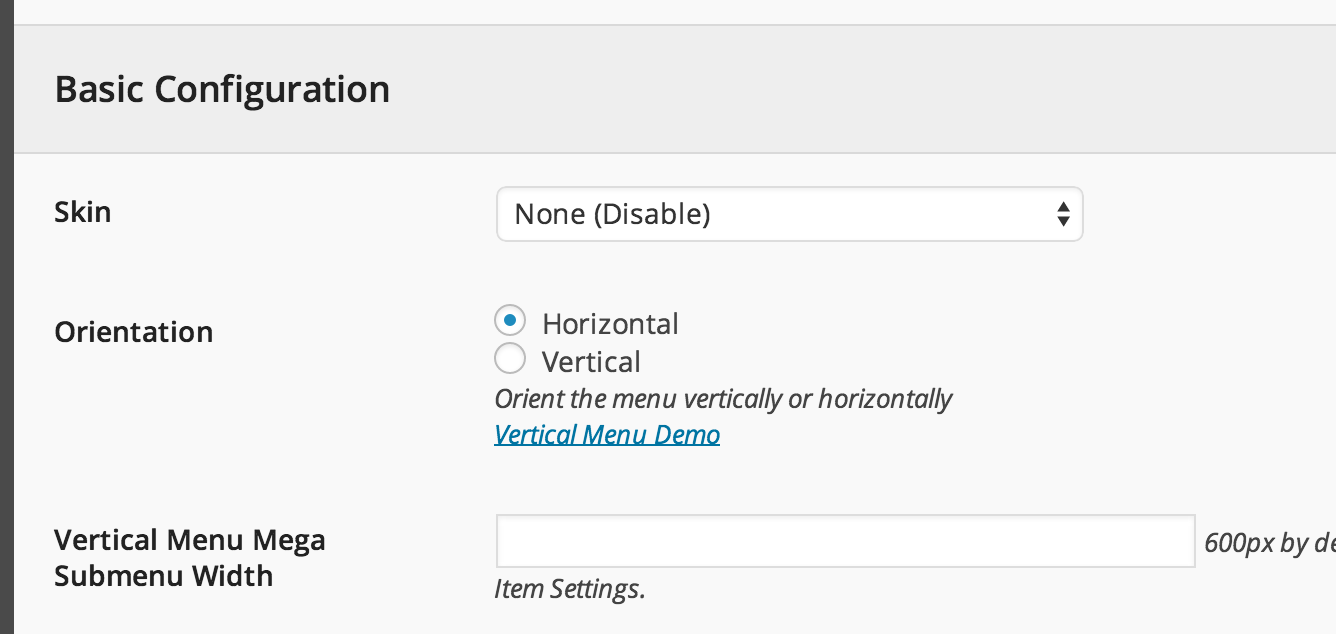
If you use UberMenu don’t forget to disable skin,
(view large version)
and it will fit the Aurum-s style
Kind Regards,
—Ylli
Dear Ylli,
Thank you for you answer. I already disable the skin. I see the original Aurum skin for UberMenu but i’m unable to change the font color and options. I can only change the font.
Best regards, Yves
Dear Ylli,
I just check and I can modify the color of the font but the modification don’t appear on the home page. On the other page I see the modification.
Best regards, Yves
Can you please send us your WP credentials on email? We need to investigate your problem and then get back to you with possible solution.
To send us email use this link and please write us your request again, because we receive a lot of emails on daily basis and we unfortunately can’t remember all customers requests.
P.S: Please note that we usually do not respond to emails that request support, because here is our primary support forum. We use contact form just for sending sensitive information. Also emails response time can be up to 7 business days.
Kind Regards,
Art
Dear Art,
Thank you for your help. I will send you the informations.
Best regards, Yves
hello thank you for this update but i have problem after i update to 2.6V the child theme not supported right to left Language (Arabic ) but aurum theme Supported
http://www.azyyai.com/wp-content/uploads/2015/11/Aurum-Child.bmp http://www.azyyai.com/wp-content/uploads/2015/11/Aurum.bmpHi zsbappa
Can you please give me your site URL so I will find whats wrong and will give you the quick fix for that is possible.
Arlind
thank you for your reply
www.azyyai.com
Hi
Can you please add this Custom CSS (when RTL) mode is activated:
header.site-header .header-menu .header-links .header-widgets {
float: left;
}
It should fix your issue.
Arlind
thank you very much
already i use this but not work in Aurum child theme it,s working in Aurum theme
.rtl .right-align { text-align: left; }
.rtl .right-align .lang-switcher { float: left !important; }
.rtl .right-align .woocs { float: left !important; } .rtl header.site-header .header-menu .header-links .header-widgets .woocs { float: left; }
.rtl header.site-header .header-widgets .search-form .search-input-env .form-control .woocs { z-index: 10; right: auto; left: -12px; padding-right: 10px; padding-left: 34px; }
.rtl header.site-header .header-widgets .search-form.input-visible .search-btn { z-index: 15; }
Hi zsbappa
I’ve found the problem and fix for this. Here is what you need to do:
Download this file:
http://drops.laborator.co/1a2V2+Move it to aurum-child/ folder. You will no longer have this problem.
Best regards
Arlind
thank you very much
it,s working now great service
but can i ask you how can i change the logo and font size in Sticky Menu ?
Try adding this code to the Custom CSS:
header.site-header.sticky.sticked .full-menu .menu-container .logo img#site-logo {
height: auto !important;
min-width: 100px !important
}
Kind Regards,
Art
Hi there, firstly just want to say I love your theme!! I’m customing the Aurum Jewellery demo theme and have added my site name through ‘site identity’ but I’m still getting Aurum Jewellry as the title on the pages and not my own name. Have tried various means but cant seem to get my own name up there and get rid of the jewellery title. Can you advise please? Thanks
Its OK, I found the solution under the Laborator tab in the dashboard
Hi Sarina567,
Glad to hear that you found the solutions
Kind Regards,
—Ylli
Hi Laborator,
Re Blog Post Pages, could you please tell me how to do the following:
1. remove the wording ‘please do not use offensive language’ that appears under ‘share your thoughts’ and above the comments section on each blog post entry.
2. Change the heading font size in the blog posts
3. Is there anyway to display a thumbnail image next to each blog post summary on the listing page
4. Is there any way to change the heading fonts from uppercase to lowercase
Thanks, Sarina
Hi Sarina,
1— Can you please add the code below to Custom CSS
body.single-post #respond small {
    display: none;
}
2 and 4— Just add the code below to Custom CSS
section.blog .post .post-content .title {
    font-size: 25px !important;
    text-transform: lowercase !important;
}
3— Can you please try to be very specific about the question and explain it more to us, in this way we can easily understand you and give you the proper answer
Kind regards,
—Ylli
How do I set the number of categories shown in the shop? I made 8 but the shop only shows 5?
solved it!
Hi Clautje1967
Glad to hear that
Kind Regards,
—Ylli
Hi there,
I see you have managed to fix it, or am I wrong?
Kind Regards,
Art
Any idea why there is a white line on the top of this page?
Hi there,
Paste this in the Custom CSS:
.header-top-menu.transparent-header {
padding-top: 39px !important;
}
Kind Regards,
Art
Did not work unfortunately.
Hi windfallclothing,
I just tried the code that Art gave you and i can confirm that this code is correct, please make sure that you paste the exact code on your Custom CSS area.
Kind Regards,
—Ylli
Ah, sorry I put it in the wrong place. Thank you!
Hi windfallclothing,
Glad to hear that
Kind Regards,
—Ylli
Hello again,
So this solved the initial issue, but now on the mobile responsive page I have a thick white bar on the top. Could you also help me with this?
Thank you, Josh
www.windfallclothing.com/about
Nevermind, I solved it with @media only screen and (min-width: 760px). I’m getting more familiar with coding because of this haha, thank you for your continued support.
Hi windfallclothing,
Glad to hear that the problem is solved now
Kind Regards,
—Ylli
Hi, is this theme compatible with the latest Woocommerce 2.4.8? If not, when will we receive an update version of this theme? Thanks
Hi there,
We will update the theme to the latest version of WooCommerce and other plugins soon, we don’t have any specific date but as soon as we can we will start doing it.
Kind Regards,
Art
Hi Laborator, On variable product page, when we change on color then one image add on porducts images slider, how to add this images on thumbnailer images.
Hi kamalkhanna12121
If you set a different image for variation it will be changed automatically when its selected but it will not appear in the thumbnails list as its not implemented in that way because Woocommerce doesn’t support it. An example is here, select Creme color and any site, you will see the image will change:
http://themes.laborator.co/aurum/fashion/product/bobble-beanie/Kind Regards,
Arlind