3572 comments found.
Do you advertise a theme with a plugin that is not included ?!
Hi halfpin,
We don’t do that. If you are talking about MegaMenu (Uber Menu) we have wrote on our item page that this plugin is not included, we have done one of the demos with MegaMenu, just to tell the users that we support this famous plugin.
We would include the Uber Menu for free with our theme but we are not permitted to do this because they do not provide Extended Licenses, so you must purchase it separately.
Here is the plugin page: UberMenu (MegaMenu) and for further info please use author link, UberMenu Documentation , is easy to understand.
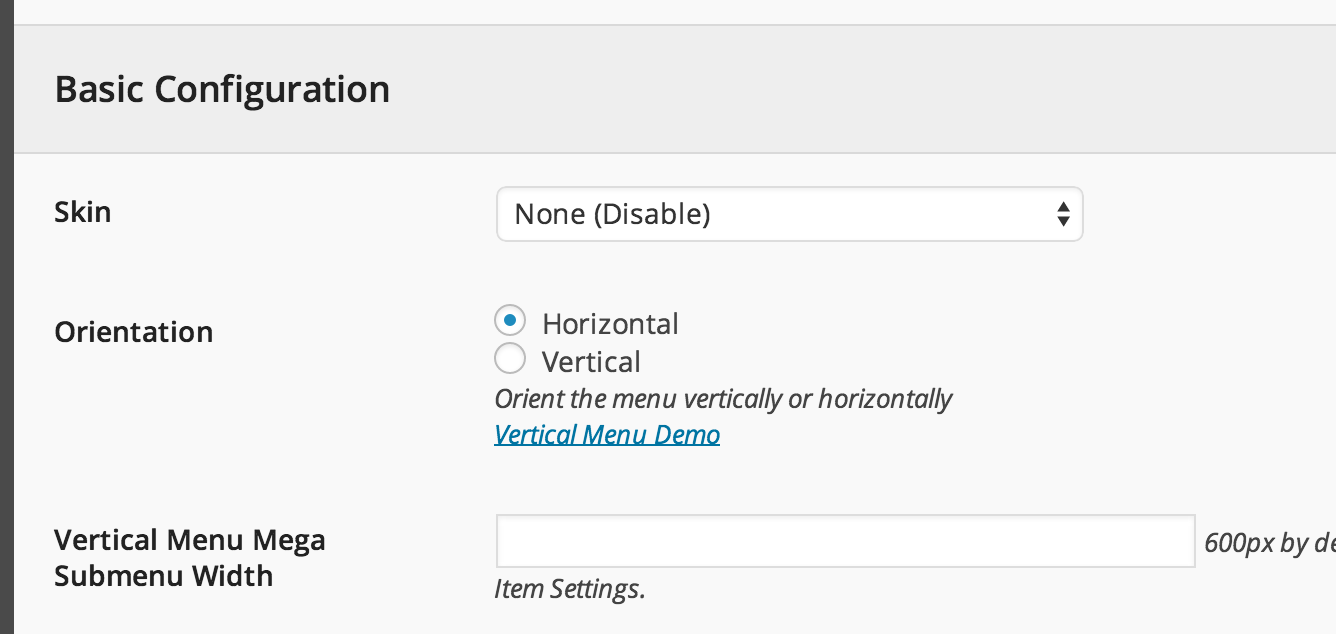
If you use UberMenu don’t forget to disable skin,
https://s3.amazonaws.com/f.cl.ly/items/0z1M1l2T3s2G150l4222/Image%202015-01-15%20at%2008%3A38%3A24.pngand it will fit the Aurum-s style 
Arlind
Also, the menu doesn’t seem to be responsive . When adding several menu items you have to horizontal scroll to see the cart on the right side of the header, on a 10” screen for example. Any thoughts on that ?
Hi there,
The menu is responsive but it may be broken depending on any specific case like using long texts for the menu and many links in the main menu.
Can you please send us your site URL first? We need to investigate your site and then get back to you with possible solution
Kind Regards,
Art

Hello,
How can I remove this margin on top as you can see on screenshot? http://postimg.org/image/s86u2tspp/ – it is in orange color, margin-top: 32px i need about 10px on all sites.
Thank you for your time and help Michael
Hi Michael,
I don’t see this problem on your site, have you solved this please?
P.S: Very beautiful site
Kind Regards,
—Ylli
Hello Ylli,
thank you for prompt reply. You are right, it is OK now. I had to wipe cache etc.
Anyway, I have one more question about wish list ( I know that this is YITH plugin), but maybe you can help me too. I would like to just ask you how to repair this bad image scaling as you can see on this screen http://postimg.org/image/4or0gu42t/
Thank you for your time, Michael
Hi Michael,
Can you please send us your site URL first? We need to investigate your site and then get back to you with possible solution
Kind Regards,
Art
Hi Art,
sure, check http://nikkilissoni.cz/ please. Add any item to wish list and you will see my issue.
Thank you very much for your time and help. Michael
Hi Michael,
Add this to the Custom CSS are to fix it:
img.attachment-shop-thumb-2.wp-post-image {
width: auto !important;
height: auto !important;
}
Kind Regards,
Art
Hi Art,
solved – thank you very much for your time and help.
Wish you a nice day. Michael
Hi there, I am looking for a wordpress theme that can act as a document library for pdf’s and word documents. The Library needs to be searchable for either and or title, author, key words, key phrases and possibly date ranges etc. This is not a bookstore so the bookstore will not have prices and there will be no shop page or cart. The search must not be the regular wordpress search. Each publication will also need a thumbnail. The reader should also have the option to download the publication or read it online. Does your theme support this?
Many thanks, Cali
Hi Cali,
Aurum is a WooComerce theme which means it supports the digital downloads, so instead of buying something you have the download button in any product you add – this is a WooCommerce built in feature.
The search results look like this, like you wanted them to be displayed, with images and titles.
You can also hide the prices by switching the theme to Catalog Mode.
Kind Regards,
Art
Hi, I seem to be missing the Shop templates on my theme. When uploading the demo content I only have a single “shop” page and a “single product page” but no “Shop Full Width”, no “Shop Sidebar Right” or “Shop Sidebar Left”. Is there a way I can enable them or do I have to customize them myself ? Thank you!
Hi there,
Actually these are not pages, these are just custom links that we have shown what you can achieve with the shop page, you can set the sidebar on any side or hide it by going through Laborator > Theme Options > Shop Settings, and in the Shop Sidebar and set the sidebar on which side you want, see screenshot:
P.S. To add widgets to the sidebar go dot Appearance > Widgets
P.P.S: I saw that you have created some other tickets, can you please try to add all your questions in one thread, because in this way is easy for us to understand what you have done and what is left, also is would be easy for you to post in one thread
Kind Regards,
Art
Hi,
I want to buy this theme for online bookstore. Can you give me some examples of bookstore websites created in this theme? I haven’t seen register, log in, my account links in home page. Can I add it to home page?
Hi there,
The login, my account and register pages are essential pages of every WooCommerce theme and without these the theme wouldn’t be approved, so don’t worry about it cause every theme has them and you can add them to the homepage without any problem.
I couldn’t find any of the bookstore demos right now, you can look up through the comments there may be any use who posted the theme here.
Kind Regards,
Art
Hi I’m getting an error: Warning: array_map(): Argument #2 should be an array in /home2/MYWEBSITE/public_html/wp-includes/category-template.php on line 1158. this shows up on the shop page, below each product thumbnail. this happens after I updated my woocommerce and wordpress to 4.4. what to do?
Hi there,
You are using an old version of our theme and the latest version for the moment is (2.7), please update theme to fix this problem.
The easiest way to update our themes is if you use Envato Toolkit. On this link How to update Themes and Plugins
you can learn this easy step-by-step procedure
Then don’t forget to go to Appearance > Install Plugins to update all your premium plugins to the latest version that we support.
Kind Regards,
Art
Hi, thank you so much for this awesome theme
I have got some questions: 1. If I have downloaded the theme can I use it for more than one website? 2. On the Iphone 6 I can’t add products to the cart. This is the link to the website: http://bit.ly/21N1ptK 3. Under products and under variations I uploaded different pictures for different variations. When I double click to preview the picture in a product page it will not enlarge but only show it in a very small size. For example, for the product Rio, when I have selected the size 40×50: http://bit.ly/1O5IgPI 4. How can I delete the menu point ‘My Downloads’ on the my account page?
Thank you very much in advance!
Hi legit-troupe,
1— You can read License Details on this link, you can only use one website for one purchase.
2 and 3: You are using an old version of our theme (2.6) and the latest version for the moment is (2.7), please update theme first.
The easiest way to update our themes is if you use Envato Toolkit. On this link How to update Themes and Plugins
you can learn this easy step-by-step procedure
Then don’t forget to go to Appearance > Install Plugins to update all your premium plugins to the latest version that we support.
If you still have any problem, just reply to this thread again
Kind Regards,
—Ylli
Hi, how can I display latest 5 blog post & latest testominal on the homepage. Im using the book template. Thank you
Hi there,
You can use the Post Grid to get the latest blog posts and the Testimonials element, to do this go create a new homepage or edit the existing one, then click on Add Element, a popup will appear asking you to choose between the elements that you want to use in that page.
Kind Regards,
Art
Hello, I was wondering how can I get my slides from visual composer to link to another page?
I found the option where I can enter the link for users to click, but it does not work.
www.KingCado.com
*At the bottom you will see the slide that says “Buy Here” I would love that link to transfer users over to our store page.
Here is my Transaction Number: 82b80d0b-af3d-4e5b-b469-d15d3fdca046 – 12 Oct 2015
Thank you Very Much!
Best Regards, Mikal
Hi Mikal,
To make a slide linkable you will have to go to the LayerSlider and then edit the slides, set the link of the slide like in the screenshot below:
Click to view full-sized image
You are using an old version of our theme (2.6) and the latest version for the moment is (2.7), please update theme first.
The easiest way to update our themes is if you use Envato Toolkit. On this link How to update Themes and Plugins
you can learn this easy step-by-step procedure
Then don’t forget to go to Appearance > Install Plugins to update all your premium plugins to the latest version that we support.
Kind Regards,
Art
On this site i am using layerslider … but the slider is showing only half screen and the other half is white… the length of this image in 2000px x 500px why is this happening ? have a look—>> www.shirtsnatch.com
Hi there,
I see that our theme is not activated in your site, you’re using another theme.
P.S: I saw that you have created some other tickets, can you please try to add all your questions in one thread, because in this way is easy for us to understand what you have done and what is left, also is would be easy for you to post in one thread
Kind Regards,
Art
Hi! this is a very good theme, I almost had no problems with it! The only issue is with the mobile version:
1. Im using the video slider and the menu icon display over, but when I try to click on it, nothing happen. It’s like the play button interfere with the menu. Any solution? (my website is bybuenavista.cl)
2. When I click the menu icon from other page (like single product pages) the action works, but only display the header widgets (search and cart) and the menu pages aren’t visible. Why is that?
2. It’s possible use an image slider instead video slider at home page just for mobile version?
Thanks!
Hi tauribe
1. I tried to play the video and was working just fine. See this video:
http://drops.laborator.co/1eUkL2. For this I can investigate the issue via FTP only! To send us email use this link. Please note that we usually do not respond to emails that request support, because here is our primary support forum. We use contact form just for sending sensitive information.
3. Yes that is possible create two 12 columns, then for the column with video click edit (pencil icon), go to Responsive Options and check those buttons;
http://drops.laborator.co/1jVEeThen for the next column do the opposite check:
http://drops.laborator.co/14z72The result should be what you wanted.
Here is the shortcode of the page demonstrated:
[vc_row][vc_column offset="vc_hidden-sm vc_hidden-xs"][layerslider_vc id="4"][/vc_column][vc_column offset="vc_hidden-lg vc_hidden-md"][vc_images_carousel][/vc_column][/vc_row]
Best regards
Arlind
I just send you the FTP access (to resolve the second issue) Thanks for your help
Hi, thanks for the great work at first.
1: I have a small trouble. I would like to have the woocommrce currency switcher in the top of the head in a menue.
I have try with this <?php echo do_shortcode(“[woocs]”); ?> in the header-top-bar.php but i dont like it. I need it in a menue!
2: How can i use your other widgets (cart total, ...) from the top bar in menue, too? And how can i fix to use [Menu] + [Widget] in the theme options.
Thank you.
Paul
Hi Paul
1. Can you please tell me with a screenshot which place do you want that Currency Switch to have positioned?
2. Actually there is no possibility to use the header widgets in menu, they can only be used in Top Header bar, but if you want you can customize the header of the theme to put those widgets. I am not sure if they will show good.
Thank you for your nice words!
Regards
Arlind
Hi Arlind
I will try to customize it. Can you give me the shortcodes for the widgets to put in the header-top-bar.php.
Hi Paul
To add Currency switcher in top header bar you don’t need to modify the code, it is already implemented. So here is what you need to do:
http://drops.laborator.co/1dEIbCurrency Switcher needs plugin to install and this is that plugin:
https://wordpress.org/plugins/woocommerce-currency-switcher/Best regards
Arlind
Thank you but i know that. Give me the shortcodes for the widgets to put it self with php code, please.
Hi Paul,
As I said earlier you don’t need a code to put it with PHP because we did not do this, it will be activated once you install this plugin and it will be shown in the header.
Kind Regards,
Arlind
How can I make a product page with only the pictures from the items I sell? With no further information. But if you click on the picture you’ll go to the product with details.
Hi MusthaveParty,
Can you please write URL of this exact page where you want to do this here on comments first? We need to investigate your site and then get back to you if we have possible solution
Kind Regards,
—Ylli
www.musthaveparty.nl/bash-party-goods
Thanks
Hi there,
I don’t see any product on this page.
Kind Regards,
—Ylli
Now you can see 3 items. I think the description below the picture have an error. I can’t fix that either. But what I want is 4 or 5 items on a row and only see the picture, without the description (or maybe only the price).
Hi MusthaveParty,
To remove the error you must update Aurum to the latest version.
The easiest way to update our themes is if you use Envato Toolkit. On this link How to update Themes and Plugins
you can learn this easy step-by-step procedure
Then don’t forget to go to Appearance > Install Plugins to update all your premium plugins to the latest version that we support.
And to remove the price from the product list only, please add the code below to Custom CSS
.shop .shop-item .item-info, .woocommerce .shop-item .item-info {
    display: none !important;
}
Kind Regards,
—Ylli
Yes, it worked  thanks!
But how can I set the products next to each other?
thanks!
But how can I set the products next to each other?
Hi there,
Can you post your site URL and the exact page where you’re having this issue, I want to see what you want to do and check if we can do anything about it.
Kind Regards,
Art
Now I have made columns from 3, but now the pictures are to small 
Hmmm,
Its really strange, the way you’re using the products is different cause you’ve put columns inside columns and they’re not letting the image be larger.
Can you please send us your WP credentials on email? We need to investigate your problem and then get back to you with possible solution.
To send us email use this link and please write us your request again, because we receive a lot of emails on daily basis and we unfortunately can’t remember all customers requests.
P.S: Please note that we usually do not respond to emails that request support, because here is our primary support forum. We use contact form just for sending sensitive information. Also emails response time can be up to 7 business days.
Kind Regards,
Art
Thanks Art, I’ll e-mail it. But what do you mean with WP credentials. The login and password from my Wordpress?
Yep
Kind Regards,
—Ylli
Hi there,
Great theme, pleasure working with it.
I got one question though, about the footer. I’ve selected 3 or 4 columns for the footer in the theme options, but in the Widget section, only one general footer widget shows up: http://prntscr.com/9dz21s.
Where can I find the other widgets/columns?
Chris
Hi Chtris,
Thank you for your kind words
You must drag and drop elements to appear on the footer
Kind Regards,
—Ylli
Hi there,
I know  What I meant was, that i have only one footer widget to put all my content in. While it should have different widgets like “Footer column 1”, “Footer column 2” etc. so I can specify which content goes in which column. Do you know what I mean?
How do I get my content in multiple columns in the footer?
Chris
Hi Chris,
They are sorted out by the order of widgets, how you put them in the Footer Widgets they will appear in the footer.
Kind Regards,
Art
Thanks, I will try that !
Hi. After going LIVE, my site http://www.laimeskrekli.lv/ become very very slow. I used W3 Total Cache to speed it up and now it performs much better, but it’s still like 10 seconds before it shows anything. I wonder if you could advise me anything, because we checked the server, went through different web-speed tests, internet connections, browsers and didn’t find problems there. But the load time reminds too long. It’s a small site – it should perform much faster.
Hi Savalne
There might be several factors that cause slowdown of the site, generally the execution time is 1~ second, see in aurum theme source code, see it live here:
http://drops.laborator.co/10npqJust view page source, end of page:
view-source:http://themes.laborator.co/aurum/fashion/
So it is always recommended to debug the site and understand the reasons what goes wrong with your site:
http://code.tutsplus.com/tutorials/how-to-analyze-your-wordpress-installations-performance--wp-26472There are more than 2000 customers who purchased this theme but its about less than 5% of them who had this kind issue, which resulted in server environment most of the times.
Arlind
Sorry about all the separate threads, I’ll join them all together here.
1. I lowered the number of products per page, there should be a 2nd and 3rd page now. Error: hover images on products not working on 2nd and 3rd pages. Also not working when I use the product filter on the left sidebar, seems whenever the products are not on the main shop page their hover image doesn’t work properly. Link to shop page: https://blueskylingerie.com/shop/
2. In the theme settings > shop settings > Single Item Settings there is an option for “product next-prev navigation”...I have this turned on and I really like the ability to go to next and previous products on each product page, but the image that shows on the slide out tab is not being sized correctly. If you go to this product you will see what I mean: https://blueskylingerie.com/shop/womens/french-connection-lula-stretch-dress/ ... here is a screenshot of the slide out tab: https://blueskylingerie.com/wp-content/uploads/2015/12/product-pagination.png3. When I click a product color variation, such as with this product: https://blueskylingerie.com/shop/womens/elle-macpherson-dentelle-contour-bra/ the image that is assigned to that color variation shows up small, low res, and cropped. Definitely not sizing the image correctly. Here is a screenshot of the place where I add the image in the product page back-end: https://blueskylingerie.com/wp-content/uploads/2015/12/product-color-variation-image.png
4. When I go to page 2 or 3 of the shop, the url remains as /shop. Can I change it so on page 2 it says /shop/page-2 …and so on?
5. When I open a product in the browser it shows a product category in the url, which is how I’ve set it in the permalinks. But it seems to show any product category that is linked to the product, like if there are 4 product categories it shows Womens, another product may show Accessories, and yet another product might show brand…is there a way for me to choose which product category will be displayed in the url? Sort of hard-coding it into the product?
Thanks for all your help. I know this is a monster thread but I am trying to really make this web store perfect for my client.
Cheers.
Hi SuperfeinCreativeStudio
1. On these pages there is an error, so thats why it prevents the hover effect to function properly:
http://drops.laborator.co/128TqSend me your FTP credentials and I will try to fix it.
2. Can you please download this file: http://drops.laborator.co/Y5cr+ and replace it in aurum/tpls/ folder.
Then in your child theme add this code (which will remain available for future updates):
add_filter( 'aurum_woocommerce_prevnext_thumbnail_size', create_function( '', 'return "medium";' ) );
Note that you need to add some custom CSS to fit the image in your site.
3. This was fixed previously.
4. This is not theme related, you may ask this question in WooCommerce forum there might be a solution to it.
5. This is related to the 4th question, so address this question to their forum.
Hopefully this will help you.
Arlind
2 and 3 are solved. Thanks so much for the assistance. I sent my ftp credentials to you at info@laborator.co.
I wrote a while ago with this issue, and it seemed to resolve itself when I regenerated thumbnails site-wide with the Regenerate Thumbnails plugin, but the issue recently came back. The product thumbnail images on the individual product pages are now getting clipped again, are somehow not being sized correctly. Strangely the product images on the shop page are fine. Here is a link: https://blueskylingerie.com/shop/tops/minkpink-aztec-daydream-shirt/
Hi
I am going to check the issue #1.
If images are shown cropped, apply the following setting, it should fix your issue:
http://drops.laborator.co/11RzBArlind
This setting was already in place. I regenerated thumbnails again just to be sure, still not solved. I then tried changing the setting from original to 68×102 and regenerated thumbs again. It changed the product thumbnails to the right size, but obviously the main product images on the product page were all blurry because they had been massively downsized. I set it back to original and regenerated again, everything went back to before but still the thumbs are getting clipped. Could you take a look?
Link: https://blueskylingerie.com/shop/tops/minkpink-little-gypsy-kimono/
Current Settings > product image size = original | Catalog Thumbnail Size = 407×614
Hi Zach
Now I understand what you are talking about. So here is the fix for that, add this custom code in your child theme:
add_image_size( 'product-thumb-small', 70, 90, false );
add_filter( 'single_product_small_thumbnail_size', create_function( '', 'return "product-thumb-small";' ) );
And regenerate thumbnails.
Arlind
I added the code to my functions.php file in my child theme, and regenerated thumbnails. Still the issue persists. https://blueskylingerie.com/shop/bobi/bobi-usa-light-weight-hi-lo-tank/
When you get back from your holidays would it be possible for you to take another look?
Cheers.
Hi there,
This question is related to theme developer and I am unable to give you any solution about this because I am not backend developer.
Our theme developer Arlind or Art can help you with this, but they took the holiday vacation and they will be back on 04 January.
When they come back, just reply to this thread and you will make sure Arlind or Art will see your comment.
Hope for your understanding
Kind Regards,
—Ylli
Hello! Thank you for your last message!
The “Add to Cart” button still not showing in Product Page, as well as the product attribute (size) http://www.loja.byvia.com.br/produto/blusa-eliza/
Can you help me?
Hey, the Add to Cart is working, it was my mistake. The only problem that I have is that no Attribute is showing (i need the customer to pick the clothing size, i’ve configured the atrributed, marked to show in the product page but nothing is there
Hi there,
Can you please send us your WP credentials on email? We need to investigate your problem and then get back to you with possible solution.
To send us email use this link and please write us your request again, because we receive a lot of emails on daily basis and we unfortunately can’t remember all customers requests.
P.S: Please note that we usually do not respond to emails that request support, because here is our primary support forum. We use contact form just for sending sensitive information. Also emails response time can be up to 7 business days.
Kind Regards,
Art
I have a new problem where I cannot enable lightbox for woocommerce. I have tried disabling all my plugins one by one but I still cannot enable it. The checkbox within woocommerce for the lightbox function always gets saved as empty.
Hi there,
I answered your other ticket, can you please try to add all your questions in one thread, because in this way is easy for us to understand what you have done and what is left, also is would be easy for you to post in one thread
Kind Regards,
Art
Hi there!
Great theme!
I have a couple of questions:
1. In visual composer, I’m using the image banner. Is it possible to have multiple images in this banner like a slideshow? I can’t seem to figure this out. Whenever I do add image, it replaces the former one.
2. The footer of the website starts floating in the middle of the page, when viewed in mobile version. (www.vanallesennogiets.nl)
3. Not sure if this is your area, but I cannot figure out how to assign different shippingcosts for different kinds of products.
Thanks,
H
Hi there,
1. Unfortunately thats not possible.
2. Can you please send us your WP credentials on email? We need to investigate your problem and then get back to you with possible solution.
To send us email use this link and please write us your request again, because we receive a lot of emails on daily basis and we unfortunately can’t remember all customers requests.
P.S: Please note that we usually do not respond to emails that request support, because here is our primary support forum. We use contact form just for sending sensitive information. Also emails response time can be up to 7 business days.
Kind Regards,
Art