995 comments found.

Sorry about my last question. The file is in the main folder.
Hi,
I’m glad you’ve found the file 
For future support request please send your questions from your buyer’s account.
Regards, Nat
Hi: I’m installing the theme but I can not import sample data (505 error) so I try to import using import tool. My question is ¿where is this file? In the documentation you state that it is in path-to-your-downloaded-package]/Installation File/Sample Data/TrueMag-data.xml, but there isn’t a Sample data folder there! Where can I find the file?
Hi there, I need to get the home page looking like you have it ’ Gallery Post Format With Custom Sidebar etc,’ how do I go about this?
Matt.
Hi Matt,
The theme package comes with documentation you should follow it.
—
There are some of important steps to set website as the theme Live Preview:
1 – The theme installation – http://strictthemes.com/documentation/getting-started/installation/ Don’t forgot to install ST Kit plugin. ST Kit brings an extended functionality to WordPress themes created by StrictThemes.
2 – Setting up frontpage – http://strictthemes.com/documentation/getting-started/setting-up-the-frontpage/
3 – Slider (on your screenshot) – You need to enable Sticky posts from within Theme Panel > Blogroll tab – http://joxi.ru/Vm6QoqZuxRygWr.jpg
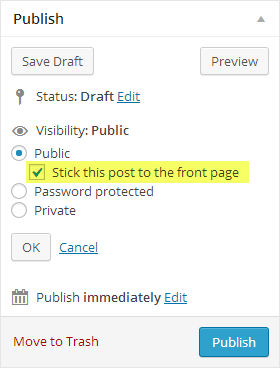
And then mark some posts as Sticky – http://strictthemes.com/wp-content/uploads/2013/12/doc_featured_posts.png
4- Choose blogroll template from within Theme Panel > Blogroll tab – http://dl3.joxi.net/drive/0012/0377/807289/160131/093017c714.jpg - For Live Preview we use Template 4.
5 – Enable Most viewed posts from within Theme Panel > Blogroll tab – http://joxi.ru/82QYKoBh1VlYW2.jpg
6 – Setting up menu – http://strictthemes.com/documentation/getting-started/setting-up-the-menu/
7 – Choose footer template from within Theme Panel > Layout > Footer tab – http://dl1.joxi.net/drive/0012/0377/807289/160115/dbdc001165.jpg
8 – Enable social icons and drop links on you social profiles from within Theme Panel > Layout > Header tab – http://dl3.joxi.net/drive/0012/0377/807289/160115/92ceffe88d.jpg
9 – Drop needed widgets to the sidebars on Appearance > Widget page – http://dl1.joxi.net/drive/0012/0377/807289/160115/cefc81d579.jpg
—
The theme package comes with documentation you should follow it.
Also you can take a look online manuals:
Regards, Nat
i do like to order this for my website but i don,t know how to setup , will you install and setup everything for me ? Thank you
Yes. We can do it for you. We provide installation and customization service for our WordPress themes. Take a look our services page – http://strictthemes.com/services/
Regards, Nat
Before I buy this I had one question, how can I implement google recaptcha. So if any one wants to post something I know they are not a bot.
Hi,
Thank you for your interest.
You can use Google Captcha (reCAPTCHA) plugin – https://wordpress.org/plugins/google-captcha/ – It works fine with theme.
Regards, Nat
Hi, can you help me in modify your position template? it’s urgent… Please add me on skype: webmasteraz Thanks
Hello It seems like updating to wordpress 4.4.1 breaks pagination on index page. I have tried to turn off other plugins – thats not helping please check
Hello,
It’s about core issue in WordPress 4.4.1, please take a look the thread about the issue – https://core.trac.wordpress.org/ticket/35344 – It will be fixed in WordPress ver. 4.4.2
Regards, Nat
There is another problem I have being able to do a turnaround on but is still bothering me… the template is duplicating the state field on the checkout page, this has being happening for a long time now and I don’t know how to fix it.
Hi,
Thank you for report. The next version will come without that.
Regards, Nat
I want to make a link in a html that is hosted on another server, adding a product to the cart, I want to send the user directly to the checkout page. The link is not working it is http://iepec.com/finalizar-compra/&add-to-cart=8116
Hi,
If you want to use external product you need to choose External/Affiliate product in the Product Data metabox and drop link there -http://dl3.joxi.net/drive/0012/0377/807289/160115/8addac1008.jpg
Regards, Nat
Thanks!
Sorry, I don’t think you understood, I don’t want to go to another URL to finish the buying process, I want to set a link in another website, that directs the person into the woocommerce checkout, and the correct way to do it is http://iepec.com/finalizar-compra/&add-to-cart=8116, but it is not working.
I solved it myself, added a form and passed the parameters.
i have a problem with pagination on home page please look at http://www.kucharczak.pl/ a try to use pager on the bottom on home page – theme is already update
Hi,
It’s about core issue in WordPress 4.4.1, please take a look the thread about the issue – https://core.trac.wordpress.org/ticket/35344 -
It will be fixed in WordPress ver. 4.4.2
Regards, Nat
Hi, is there a tutorial on this theme anywhere?
Hi,
The theme package comes with offline documentation and online manuals:
Regards, Nat
Thanks Nat
Hello Nat,
Since I installed this theme something strange happened at my google webmasters account (search console) for my site. It seems that this theme is generating some search pages that are totally empty. Check the screens: http://prntscr.com/9nlgp8 http://prntscr.com/9nlgx0This is what I get on site when I enter on one of the links: http://prntscr.com/9nlha5
How to fix these soft 404 errors?
With kind regards
Hi,
The theme cannot generate search pages. There is no functionality for such things.
See also:
Regards, Nat
Hello, this template has a Polish language and Polish fonts?
Hello,
The theme is support 900+ built-in Google Fonts. Design of most our themes are based on Open Sans font which includes Polish characters. You can use this one or any other of 900 Google Fonts.
The theme is completely ready to be translated into your language. You just need to translate the included language file.
Regards, Nat
Hello, All. Happy New Year! One of our site visitors pointed out to us that the social media icons are now redirecting to Google instead of the respective icon’s social media link. I was able to verify that this is indeed the case. The website is http://www.cheersva.org/. Is there a setting somewhere within the theme panel which I can change to fix this issue?
Thanks much.
Regards, Kory
Hello Kory,
Try to disable redirect from within Theme Panel > Misc > Redirect – http://dl1.joxi.net/drive/0012/0377/807289/160104/a3e430e4dc.jpg
Happy New Year!
Regards, Nat
Indeed that was it. Awesome support, Nat. Thanks so much!
Great. You are welcome.
Regards, Nat
Hello,
I have added some text bellow article. How can I reduce the text font that appears bellow article. I need smaller font in post after. Check this image please http://prntscr.com/9kfmgr
With kind regards
Hello,
You can drop something like this line on Theme Panel > Style > Custom CSS:
#post-after { font-size: 10px; }
Regards, Nat
Thank you very much Nat
Happy holidays
You are welcome.
Thank you. Happy holidays
The menu item change automatically, i can some itme on the menu and the next day it was one. i tried multiple times and same results
Hi,
Let me know an access details (to your WP admin) through the contact form – http://themeforest.net/user/strictthemes – I will take a look.
Regards, Nat
Hi,
I’ve checked your website I found the same quantity menu items as you set for Primary and Secondary menu:
Primary Menu – http://dl3.joxi.net/drive/0012/0377/807289/151231/cbffea9801.jpg
Secondary Menu – http://dl1.joxi.net/drive/0012/0377/807289/151231/02f113c842.jpg
If you need more assistance let me see a screenshot.
Regards, Nat
if you checked yesterday you would have seen VIDEOS on Main Menu, and Shop on secondary Menu. But they are no longer there and that is the issue.
Hi,
I’ve looked through all active plugins and found some of them have functionality to remove a content automatically. It seems some of these plugins cause the issue with menu. Try to disable plugins such as WP-Optimize, WP-eDel post copies and etc.
Regards, Nat
I just deactivated these 2 pluggins
Thanks Guy
howdy, i’m thinking about purchasing this theme. do you plan to continue updating it in the future? are you planning on releasing an updated version of this one? let me know because i’m really interested in purchasing it. could you check out my website http://livelifehappy.com and let me know if it’s possible to have a similar layout? thanks
Hi,
Thank you for your interest.
The theme has updates on regular base for supporting compatibility with a new versions of WordPress and browsers -
- http://strictthemes.com/documentation/changelogs/theme-truemag/
- http://strictthemes.com/documentation/changelogs/plugin-st-kit/
The theme comes with default blogroll template so you can create similar layout as on your example.
Regards, Nat
Hi. Will you be updating Truemag to be compatible with the new social networking plugin called ‘Peepso’ (https://www.peepso.com)? This plugin started as a Joomla plugin called ‘JomSocial’ and it has been rewritten for use with WordPress. It has awesome social networking capabilities (kind of like Facebook for WordPress) and I’d really like to use it with Truemag, however, there are formatting and layout issues when I try to use it with Truemag.
Please let me know if you are familiar with Peepso and what plans you may have to integrate it with the Truemag theme.
Thanks,
Mike O’Neill
Hi,
By default the theme support BuddyPress and bbPress which allow to build own social network. At this moment there are no plans about Peepso.
Regards, Nat
hi how are you?, update the version of truemag and I can not activate the option in Miscellaneous adsense . What can I do?
Hi,
Make sure you don’t use AdBlock or similar plugin on your browser.
For further assistance let me know an access details (to your WP admin) through the contact form – http://themeforest.net/user/strictthemes I will take a look.
Regards, Nat
I’ve just fixed the problem that I had.
What I had to do was to add my custom coding to this file: /plugins/jetpack/modules/minileven/theme/pub/minileven/content.php
Not to your theme…
I was not aware that the above was in usage for mobile users…
Dear Mihai,
The best way for adding your custom php code is a child theme. Drop the code on function.php file in a child theme. Avoid to tweak original php files because future updates.
Regards, Nat