201 comments found.

Dear Seller
How is it possible to change the parallax way to zoom in on the background, how can I avoid my background is zoomed as much into?
Thanks in advance
You can remove the zoom in your layout.css file.
Find the following rule ( on line 223 in “3. BACKGROUND” section ) :
.bg-parallax {
    position: absolute;
    z-index: -5;
    width: 100%;
    height: 100%;
    -webkit-transform: scale(1.02) !important;
    -moz-transform: scale(1.02) !important;
    transform: scale(1.02) !important;
}
and update it to:
.bg-parallax {
    position: absolute;
    z-index: -5;
    width: 100%;
    height: 100%;
    -webkit-transform: scale(1.00) !important;
    -moz-transform: scale(1.00) !important;
    transform: scale(1.00) !important;
}
Thank you really much for the fast answer. I just have one last question. Is it possible to make the text and objects fade in instead of sliding in from the top of the front page? I found an option to make the overlays fade in which works great I just need the “intro” to fade in aswell?
If you want a “fadeIn” effect instead of “fadeInUp/fadeInDown” effect do the following:
1. Open up your script.js file.2. Find section “1. LOADING”.
3. Find the following code:
$("#intro .container-mid").fadeIn("slow");
$('#intro.intro-1 img.logo').addClass('animated fadeInDown);

setTimeout(function() {
$('#intro.intro-1 h1').addClass('animated fadeInUp');

setTimeout(function() {
$('#intro.intro-1 p').addClass('animated fadeInUp');

setTimeout(function() {
$('#intro.intro-1 .arrow-wrap').addClass('animated fadeInUp');

setTimeout(function() {
$('#bg-effect-1 canvas').addClass('animated fadeInUp');

setTimeout(function() {
activeOverlays = 1;
$('#bg-effect-1 canvas').css('opacity','1');
$('#intro.intro-1 .arrow-wrap').css('opacity','1');
$('#intro.intro-1 p').css('opacity','1');
$('#home-screen .content-block h1').css('opacity','1');
$('#intro.intro-1 img.logo').css('opacity','1');

}, 1000);

}, 500);

}, 500);

}, 500);

}, 500);
4. Update it to:
$("#intro .container-mid").fadeIn("slow");
$('#intro.intro-1 img.logo').addClass('animated fadeIn');

setTimeout(function() {
$('#intro.intro-1 h1').addClass('animated fadeIn');

setTimeout(function() {
$('#intro.intro-1 p').addClass('animated fadeIn');

setTimeout(function() {
$('#intro.intro-1 .arrow-wrap').addClass('animated fadeIn');

setTimeout(function() {
$('#bg-effect-1 canvas').addClass('animated fadeIn');

setTimeout(function() {
activeOverlays = 1;
$('#bg-effect-1 canvas').css('opacity','1');
$('#intro.intro-1 .arrow-wrap').css('opacity','1');
$('#intro.intro-1 p').css('opacity','1');
$('#home-screen .content-block h1').css('opacity','1');
$('#intro.intro-1 img.logo').css('opacity','1');

}, 1000);

}, 500);

}, 500);

}, 500);

}, 500);
5. That’s it.
Thank you very much for the fast support it is a pleasure!  Thanks
Thank you for your feedback. We try to do the best for our customers.
Hey Avanzare!
I was just curious, I am trying to separate the background constellation overlay on the welcome page.
Where exactly is that defined / created in the css? js? Is there a tutorial on using that overlay effect somewhere?
Thanks in advance!
Hi
Do you want to move the effect to another place or do you want to hide it as long as the overlays are active / visible?
You need html,css and js to run it.
html – to define the “canvas” element
css – to make canvas element fullscreen
js – to run the canvas constellation effect
There is no real tutorial but a lot of code snippets just google “canvas constellation effect”.
I would like to move the effect to another place, correct!
I am currently checking out this link: http://codepen.io/acauamontiel/pen/mJdnw
If you have any other suggestions for moving it, please let me know (For example, say I wanted to transfer your exact constellation canvas effect to a plain black page).
Thanks again!
Ok, if you want to move / customize the effect I can’t help you anyways because this would not fit my support terms.
http://themeforest.net/item/gravity-coming-soon-under-construction/8875822/supportBut I strongly recommend to use some code from codepen or rip gravity down to the constellation effect and update the background to “color” and make it black via config.js file if you want a plain black page.
Hi there
Great template thank you very much. Im just having issues getting the php subscribe and contact forms to work. When I click on the submit buttons nothing happens. Any ideas? I tested a different form on the server and it worked, so it’s not a server side issue.
Hi,
please send me your files in zip via mail I will try to find the problem asap.
What kind of hosting do you use (provider,hosting kit name)?
What other form you tested?
Kind regards
Avanzare
Hello, this is a pre-sale question, when i bought it, can i use the reel on this example? Do i get the rights to do it just like you show it?
Hi,
I didn’t hold the rights and I don’t sell them with the template.
Kind regards
Avanzare
What’s the difference between the Extended Edition vs. the Launch Edition? I viewed both HTML and couldn’t tell the difference. Thanks.
Ignore my previous question about the Editions. I uploaded the latest Gravity version and the Responsiveness for the Intro Text isn’t showing that great when there are 3 lines of texts. It gets cut off at the bottom when viewed on a Mobile Phone. Check it out at:
WWW.RAMCONTROLSGROUP.COM
Let me know. Thanks.
Hi,
the media query fix is in the upcoming update.
If you can’t wait for some reasons I strongly recommend to fix it by yourself.
You find all queries inside the intro.css .
Kind regards
Avanzare
Tell me which Query file and which line of code to change and change to what and I’ll try to fix it myself. Thanks.
Add the following to the last query inside intro.css:
#intro .container-mid {
    left: 0;
    overflow: auto;
    width: 100%;
    top: 0;
    transform: translate(0);
}
Maybe you have to adjust the viewport height from the query.
Where exactly is the viewport height line to adjust? I’ve added your new codes but the issue still exist. Remember, I’m using h2 for the text, not h1. Let me know. Thanks.
Are you using the latest version of gravity?
You have to edit this line:
@media only screen and (max-width: 355px) ,only screen and (max-height: 280px)
To adjust height or width.
I re-downloaded the Gravity files last week. That line you say to edit, that’s just a text note line right? It’s not part of the coding. I even try to edit the lines below that but no luck. If your update is coming out soon, I’ll just wait for it. I don’t have time to deal with this right now. Thanks.
This line is code inside the intro.css
@media only screen and (max-width: 355px) ,only screen and (max-height: 280px)
The full markup looks like this.
@media only screen and (max-width: 355px) ,only screen and (max-height: 280px)
{
    #intro.intro-1 h1
    {
        font-size: 28px;

        margin-bottom: 20px;
    }

    #intro.intro-1 img.logo
    {
        margin-bottom: 4px;
    }

    #intro.intro-1 img.logo.custom-width
    {
        width: 140px;
    }

    #intro.intro-1 p
    {
        font-size: 7px;
        font-weight: 300;

        padding-bottom: 12px;

        letter-spacing: 2px;
    }

    #intro.intro-1 .open-overlay i
    {
        font-size: 16px;
        line-height: 32px;
    }

    #intro.intro-1 div.open-overlay
    {
        width: 36px;
        height: 36px;
    }
}
Well I changed some of those Values and I didn’t see any effect. In the Index.html file, I had changed the heading texts from h1 to h2, maybe that’s causing it to not be fixed?
Well I did change the (max-height: 280px) to (max-height: 380px) – but no effect took place. The intro text line still cuts off when there’s more than 3 lines of Intro Text.
The problem is that it’s to much content for panorama view the only thing you can do is to allow the container to overflow.
You can do this with following code:
#intro .container-mid {
    left: 0;
    overflow: auto;
    width: 100%;
    top: 0;
    transform: translate(0);
}
Add it in the media query.
I’ll just leave it as is, the full website will be up soon anyhow. Thanks for your prompt response and excellent customer support.
Thanks a lot for your feedback.
I’ve just downloaded the zip, but its missing the jquery.mb… file & I can only hear the video against a black screen http://vanderlyle-geek.co.uk/
Sorry must have been a caching issue, as it’s all working now!
Alright if you have something else feel free to contact me via my contact form on my profile.
hello, how can I change the loading? where the gif?
Hi,
Gravity is using a loading plugin without gifs.
http://github.hubspot.com/pace/docs/welcome/But you can overwrite the css spinner with for example your gif.
How to find the css spinner class:
1.Open layout.css
2. Search for the “2. LOADING” section
3. Find the following code
.pace .pace-activity
{
    position: fixed;
    z-index: 2000;
    top: 50%;
    right: 50%;

    display: block;

    width: 36px;
    height: 36px;

    -webkit-animation: pace-spinner 400ms linear infinite;
       -moz-animation: pace-spinner 400ms linear infinite;
        -ms-animation: pace-spinner 400ms linear infinite;
         -o-animation: pace-spinner 400ms linear infinite;
            animation: pace-spinner 400ms linear infinite;

    border: solid 2px transparent;
    border-top-color: #1fb8b2;
    border-left-color: #1fb8b2;
    border-radius: 100%;
}
4. Edit it
That’s it but if your image is to large and not centered correctly add following css rule:transform: translate(50%,-50%);
I put the youtube link in the config file and it’s still not working, how do i get it to work ?
I answered your mail.
Just change the background option from image to youtube.
That’s it.
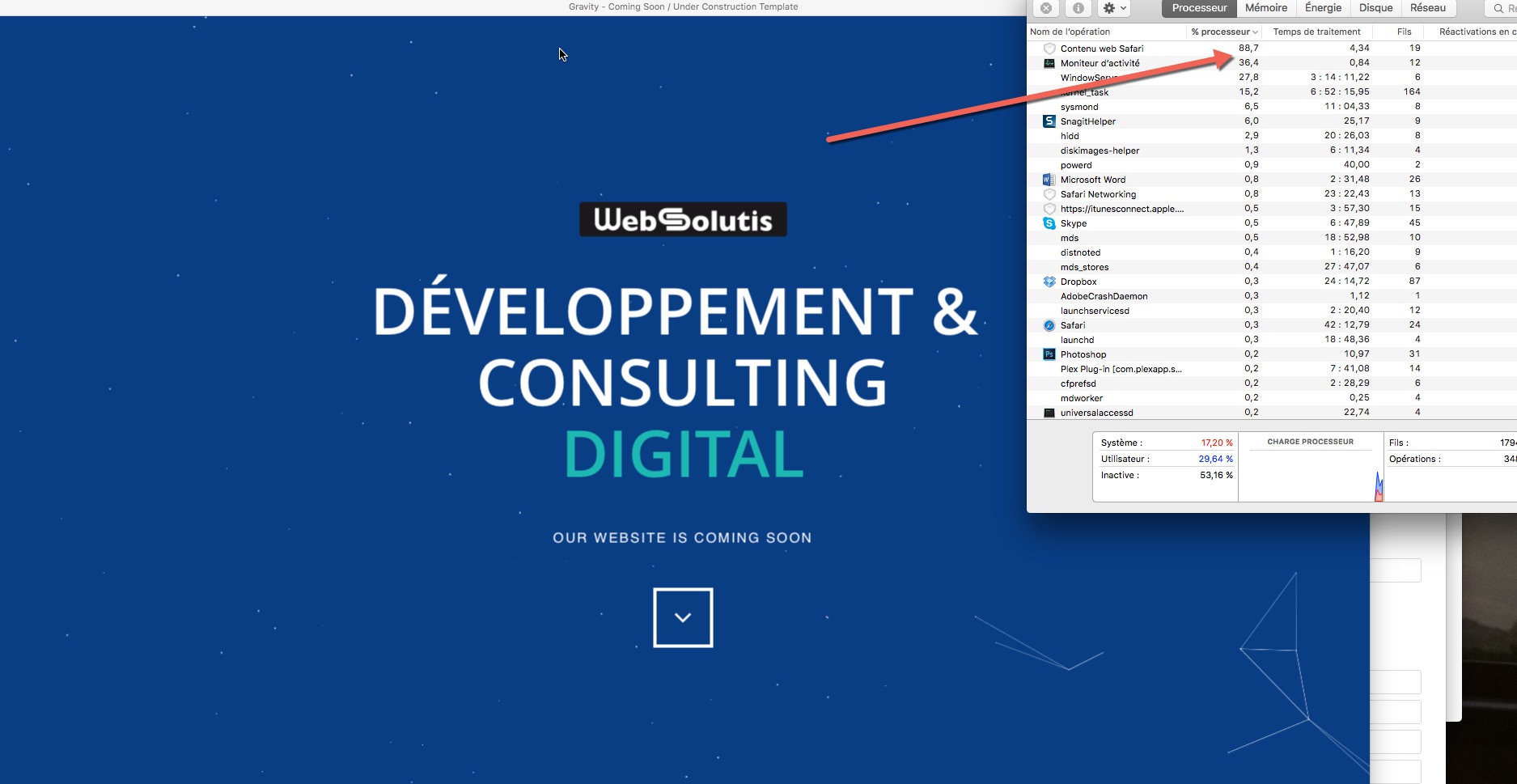
Hi, Just bought it, and it’s drives my 13” i7 MB pro crazy http://websolutis.com/ticket/pictures/2016-02-04_14-12-05.jpeg
This is normal for a 13 inch laptop without standalone gpu.
But if you reduce the amount of stars from the gravity background effect your pc will perform much better.
thanks you but how to do that ? And what the number you recommend to fit for every devices (phones etc..)
How to change the amount of stars:
1. Go inside the script.js
2. Search the “5. BACKGROUND” section
3. Find the following variable on line 750
var screenpointSplitt = 12000
4.
– Add a higher value to decrease the amount of stars
– Add a lower value to increase the amount of stars
Notice:
- screenSplitt is a varibale to help calculate the amount of stars and is not the total amount of stars
TotalAmoutOfPixelsOnScreen ÷ screenpointSplitt = Amount of stars
Thanks you very much for this reply, works perfectly. Have a nice week end, I’m going to rate 5 stars now
Thanks a lot for your feedback.
You’re welcome.
Also i guess you need to check landscape display on iphone 5S, the main part of the page is hidden
I’m sorry I have currently only a small amount of test devices…
Can you confirm that it’s looking similar to this:
http://quirktools.com/screenfly/#u=http%3A//creazione.avanzare.co/gravity/demo/image/black/index.html&w=568&h=320&a=37&s=1And again thanks for helping to improve Gravity.
Here is the problem to be more clear I couldn’t scroll up and down http://www.screencast.com/t/BZqySOqGwGHt thanks
OK, I will put a fix for this issue in the next update.
Even I put Youtube video URL in config.js does not display as a background. NOT WORKING AT ALL!!!
Please send me your files in .zip/.rar via mail that I can fix this issue as soon as possible.
Hi, Please add a version with a big logo and smaller byline. J
What do you think about a logo version without byline but with an arrow boxed pointing down?
Can this template be used as a landing page for my WordPress site while I work it? Does it come with instructions on how to set it up?
You can’t use the html template directly because it isn’t a wordpress plugin but you can upload it for example manuel on a web space and then you can set it as main page for the time you work on your wordpress.
Image and Slide index.html files are wrong—they are all the same as the YouTube one, so the only kind of site you get is the YouTube background version. The files in the download do not match the ones in the demo.
I download them to check them but all are working as they should please check them again.
I just wanted to ask how exactly you can add more overlay sections to the site…. GREAT WORK! by the way
I am sorry but you can’t add more overlays and thank you.
template looks amazing once i got it all together. beautiful work, everyone loves my site
Thanks a lot for your feedback.
HI There Can anyone tell me how to integrate the email form with Mail Chimp? Thanks Abhy
I answerd your mail.
The package could not be installed. The theme is missing the style.css stylesheet.
Theme install failed.
The template is not working/made with/for wordpress you have to upload it manuel on your webspace…
Pre-sale question
Congrats on this template. it looks great! May I ask if it is possible to add a link to my blog once I set up the template? e.g. I would like the blog link to appear next to social media icons. Thanks
It’s very easy you have just to copy and update the link and if you want you can use another icon from iconfont.
Hey there, is there a way I can apply your CSS Animation (Stars Floating, etc.) to a WordPress Post Page? is there a Plugin I can buy from a 3rd Party or from you to incorporate this into one of my WP Post Page? I think you use a JQuery for this animation right? It would add some real razzle & dazzle to my WP page if this is doable. Let me know. Thanks.
This effect is not a plugin but if you are good with coding you can make it run on wordpress.
Well I found a plugin called Firefly, has floating particles similar to yours. Was thinking maybe I can swap out their .js with yours and make it work, but I don’t think it’s the same. And I’m not that savvy with coding so thought I ask you for some help. If not, then no worries. Thanks.
My is not based on it.I am sorry but i am not available for custom work.
No worries, I manage to create what I needed and it’s working fine. Thanks. Hey, you had mentioned awhile back that you’ll be provide a Template Update on this soon? Since there was a bug on some of the browser where the Coming Soon page doesn’t display properly or something like that. As I recall from our preview forum discussion. Thanks.
The update is finished but its not even a update it a complet new template but I currently work on a config file setup type and after I finished the feature I will upload it.