985 comments found.

I just purchased your theme. I must say wonderful work. Now i would like to setup my site similar as special collection. I have got your demo contents but unable import database. I have opened a ticket as well regarding this issues.
Step by step instructions to achieve special collection layout with same contents will be much appreciated.
Please send me instruction to this email- ishraq.1991@gmail.com
Hi Fahim,
I have replied to you on your ticket #722148. Please check it.
Best regards,
Hello, i have the GON THEME, and I have some questions about it.
In your demo online, http://demo.theme-sky.com/gon-supermarket-2/, in our performance test, the time load is 4.57s approximately. In our page, http://fankys.com/ putting the same things is: 2.73s, off course we doesn’t have all images that you have.
But in the case of: http://demo.theme-sky.com/gon-sidebar/ in your demo online is more fast.. its only take around 1.27s but in our page with the same things http://fankys.com/test1/ images it takes around 1.81s but without images.
I am put your code text in the theme information to replicate each demo page, but in both performance loads differents names, requests, and size of css and js files, may exist a way to replicate exactly your demo pages that your offer in the web of the theme. Please may b eyou can send me the files??
I want know why the times of loads its different?? And why the menu vertical page its so faster than the horizontal?? Because I am make a performance test in the same pages in our web with horizontal and the vertical menu and the times of load are very different.
We want the horizontal, as this demo: http://demo.theme-sky.com/gon-supermarket-2/ but with better loading speed.
Thanks for your attention, and I will waiting for you response
Hi, I send a private ticket. Thanks 
Hi Jose,
I have replied to you on your ticket. Please check it.
Best regards,
Hi, the custom css section on theme options isn’t working. I’ve also tried a custom css plugin, but that doesn’t change the site either. Any ideas?
Hi PINMedia,
I think there are some special characters in your custom css. Please try to remove the white spaces in your code. If it still does not work, please open a ticket here https://skygroup.ticksy.com/ and give me your WP admin account. I will check it for you.
Best regards,
If there in theme is CSS files writen in Sass or regular normal style.css file? I ask becouse i don’t know Sass and I wonder will I be able to edit styles.
Hi ilot1926,
CSS is written in the css file. We don’t use Sass.
Best regards,
Hi There, i have problems with latin symbols in my menu and texts. For example I have menu item with “?” character, and this character is displayed in a different font than the rest.
I have default settings in typography admin. How to solve it? Thanks.
Hi martinbulak,
Please open a ticket here https://skygroup.ticksy.com/ and give me your website information. I will check it for you.
Best regards,
Hi. In the description you said HTML files are provided. But when i downloaded the theme, i can’t find any HTML files. From where can i download the html files?
Hi karanskumar,
I’m sorry. It is our mistake. Our theme is a wordpress theme. It does not a html template. So it does not have the html file. I have updated our description.
Best regards,
Oops! okie.. If you have html, can you please mail it to me. I bought the theme considering there are html files as said in the description. now this will not solve my purpose. What to do now.
Hi karanskumar,
Unfortunately we don’t have the html version for this theme  . You can contact themeforest to get a refund. If you need a html template, you should find them here http://themeforest.net/category/site-templates.
Best regards,
Hello,
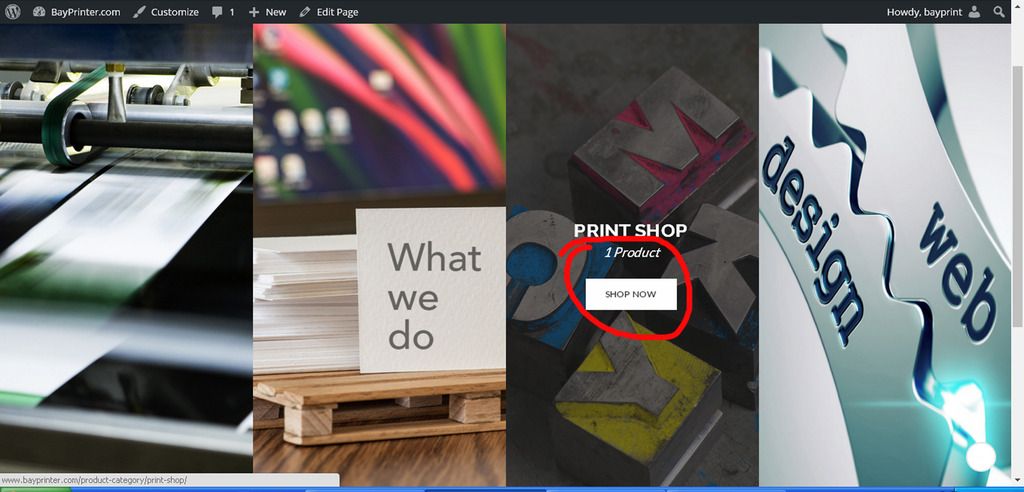
How can I change the word “Shop Now” and also how can I remove or hide the number of products that are there. please see image. http://i1045.photobucket.com/albums/b457/gustav59/1_zpsniemtgnd.jpg
Thanks -Gus
Hi Gus,
There are 2 ways to change the word Shop Now>
1. You find and edit this word in the gon/woocommerce/content-product_cat.php file. You can copy this file to the child theme and then edit it.
2. You use the Loco Translate plugin to translate this word (English to English).
To remove the number of products, you add my custom css.products .product.product-category .count{
display: none;
}Best regards,
Great, Thank you for your help
Dear authors,
Thank you again for such a nice template.
I just noticed that the main menu does not work - the buttons and the submenus do not work/appear - when the screen is reduced to a portrait mode screen (I have a monitor that is turned to portrait mode, so it’s height is much longer than its width). Why does the menu stop working in this responsive mode?
Thank you.
Hi zapruderworld,
Thank you very much for your compliments!!!
When you resize window, if it is smaller than 768px, the main menu will be hidden because mega menu does not work well on mobile. The mobile menu will be shown. You can click on the bars icon at the top left corner to see the menu.
Best regards,
Hello developers,
Thank you for your reply.
Actually, I’m not referring, here, to the responsive mobile menu, but to the regular main menu - the one that shows all of the menu items horizontally. There is a responsive zone - a screen width, I believe—that shows the regular menu (non-mobile menu) but doesn’t allow users to 1. click on any of the buttons displayed there horizontally or 2. view the submenu that should appear when a mouse is positioned over one of the main menu items.
Can you recreate this problem on your end? It only does this when I’m using a particular screen width—a narrow width.
Thank you.
Hi zapruderworld,
The sub menu of the main menu should appear when a mouse hovers over it http://prntscr.com/alei8d if you resize window. If you use the tool of browser, it will understand that you are working on a device, not PC. You need to click/touch on the menu item to see its sub menu http://prntscr.com/alekzk.
Best regards,
Hello,
Thank you for your reply.
Actually, when the website is in this particular screen mode, none of the menu buttons work, nor does the sub menu. The latter doesn’t even appear. And when you try to click on any of the buttons, nothing happens.
Just to be clear, I’m not referring to the mobile menu - which gets sucked up into that smaller menu with the three lined icon up at the top of the screen (when viewing a smartphone or a tablet). I’m talking about the regular menu - the one where the product categories menu is smaller (and sucked up into a small three lined menu), but all of the main menu items are still displayed horizontally like they always are on a computer browser. In this responsive screen mode, the menu does not work.
Thank you!
Hi zapruderworld,
Did you see my screenshots http://prntscr.com/alei8d, http://prntscr.com/alekzk? Is this responsive screen mode that you are mentioning? You should refresh the site after enabling the responsive mode. Because it may not work immediately.
Best regards,
Dear GON developers,
Thank you for your beautiful template. I’m very much happy with it.
However, I am experiencing a problem: When I password protect a Wordpress page, the password prompt appears both in the content section and in the footer, replacing my footer widgets entirely. (See https://ebuukuu.com/for-teachers/teaching-material/). Can this be fixed?
Thank you.
Hi zapruderworld,
Thank you for reporting. I fixed it for you. Please check again for me.
Best regards,
Beautiful. Thanks!!!
Hello, could you please check this page https://shop.azzreb.com/ the TS image on the home page has an extra space between vc blocks , and when I inspect page there is another block but I don’t see it in page edition
Hello, could you please check this page https://shop.azzreb.com/ the TS image on the home page has an extra space between vc blocks , and when I inspect page there is another block but I don’t see it in page edition
Hi devAzzreb,
There is an empty row below the banner http://prntscr.com/aldae1. Please check it again. If you can not figure it out, please open a ticket here https://skygroup.ticksy.com/ and give me your WP admin account. I will check it for you.
Best regards,
Hello,
I am contacting you on behalf of weDevs LLC. We have a WooCommerce based multi-vendor marketplace plugin named Dokan. It is available to download free from WordPress.org. You can download the plugin from here https://wordpress.org/plugins/dokan-lite
Currently, the free version is being used in more than 700 sites and more than 1800 sites are using the paid version of the plugin till date.
Some of our customers are using your “Gon” theme and having issues with the dashboard and store listing page.
I am here to request you to add Dokan compatibility to your theme and release an official update.
Some authors on ThemeForest has completed integrating Dokan on their theme. You can check those here http://themeforest.net/tags/dokan
After you successfully complete the styling fix, you can add “dokan” tag to the theme and we will promote that via our mailing list and blog.
Here is some basic information about how to start http://docs.wedevs.com/docs/dokan/how-to-make-a-theme-dokan-compatible/
If you need any help, we are always there for you at support@wedevs.com
Hi weDevs team,
Thank you for contacting us!
We will check your plugin. We will contact you later.
Best regards,
hi , nice theme.. I noticed in demos that product page is slow/bug ..
http://themeforest.net/item/gon-responsive-multipurpose-wordpress-theme/full_screen_preview/13573615
is this in demo only ? or it is something to be fixed ?
regards
Hi bonbona1980,
I have checked it again. I don’t see any problem. I think maybe because our server or your network is slow at that time. Please check again. You can see the results that I have checked on the pingdom website http://tools.pingdom.com/fpt/#!/cGDcfN/http://demo.theme-sky.com/gon/shop/ , http://tools.pingdom.com/fpt/#!/dz3iV0/http://demo.theme-sky.com/gon/shop/cras-isum-default-3/
Best regards,
hi! i have a prepurchase question. is there any possible to remove this theme‘s responsible layout?this is really important.let me know if it’s possible.
best regards
Hi chq1029,
It is possible. This option is available in Theme Options. You can turn it on or off http://prnt.sc/aju7fr.
Best regards,
Hey,
I just activated the theme but there is an error with the themesky plugin:
Fatal error: Cannot redeclare class OAuthException in /www/htdocs/w010bd6c/herren-umhaengetaschen/wp-content/plugins/themesky/includes/twitteroauth.php on line 17
Please help me fix that. I hate it when I activate a Theme and the integrated plugins do not work…
Hi elcanario,
Please open a ticket here https://skygroup.ticksy.com and give me your FTP and WP admin account. I will check and fix it for you.
Best regards,
Please Help Me.. How To Change The Text ” Add To Cart ” Button with my custome word,, like SHOP NOW or etc..
Thanks
Hi kimzaqinew2014,
You can use the Loco Translate plugin to translate this text (English to English). After installing the plugin, you go to Loco Translate > Manage Translations. You find the WooCommerce plugin and create a new language (English) as my screenshot http://prnt.sc/ajdzkv. Then you find the text and translate it http://prnt.sc/aje1by.
Best regards,
I’ve installed the theme however I can not find where to install sample data – could you please advise on this?
Also I can not find a link to your documentation
Thanks
Hi websiteprojects1234,
After installing the Gon Importer plugin, you go to the Gon Importer page to import the sample content http://prnt.sc/ajdnmy.
This is our online documentation http://demo.theme-sky.com/documentation/gon/.
If you need more help, you can open a ticket here https://skygroup.ticksy.com/ and give me your website information. I will help you.
Best regards,
hi how to make cancel order
Hi deepakkarki,
By default, only admin can cancel order in WP admin http://prnt.sc/ajd9wp. You can also install the WC Cancel Order plugin. It will add the Cancel button on the My Account page.
Best regards,
cool thanks
Hello, I would like to know, how I can change the background of the main menu top elements. In the GON theme settings. I see there only settings for text color. Thanks.
Hi martinbulak,
You find the Bottom Header Background Color option and change its value. It also depends on the header layout which you are using. If it does not work, please let me know what header layout you are using.
Best regards,
Is there a way to have a single product page only have a left sidebar? I’ve only been able to find a single product page with both left and right sidebar, but would rather just one or the other
Hi Create91,
Yes. You can do it. Just configure in WP admin. Please see my screenshot http://prnt.sc/aj7qqk. You can also change layout for the individual product.
Best regards,
how can i add shipping charges on product, i did someting on shipping page but its not showing plz guid me complete here is screenshot http://prntscr.com/aj0qrm
Hi WebexDesigner,
To enable the shipping methods, you go to WooCommerce > Settings > Shipping tab. You will see 5 shipping methods which are default supported by WooCommerce http://prnt.sc/aj7njy. Just enable them.
If you need more help, please open a ticket here https://skygroup.ticksy.com/ and give me your website information. I will help you.
Best regards,