2227 comments found.

I am trying to place a search form on the primary navbar.
1. Is it possible to set the placeholder color? Other navbar texts have opacity 0.9, placeholder has 1.0. Not very nice.
2. Without additional styling the icon-search is placed on the top of the form. To center the icon vertical I had to add inline style . Without this style the line-height was 1px. No idea which css class to overwrite.
Hi,
1. Of course, you just need to change 1 variable in variables-custom.less file – @input-placeholder-light and and recompile less files. By default it has #fff; value.
2. Looks like you’ve missed one of the classes or have a wrong markup. Please refer to this page, there is a set of supported navbar components, including text input with search icon.
Let me know please if that helps.
Thanks
Thank you. Just for your info – the icon-search position issue was caused by user agent stylesheet. Adding <!DOCTYPE html> solved the problem. Maybe you could add normalize.css or reset.css to your theme to avoid this.
Hi,
<!DOCTYPE html> is a must in Bootstrap markup, also it already uses normalize.css, you just missed HTML5 doctype at the beginning of your page 
Thanks
Yes, you are right, I built the page from scratch in a hurry and forgot it.
No problem, let me know if you have any other issues.
Thanks
hello, I’ve found a problem about “Sweet Dialog”
in components.css , about 8127 line :
body.stop-scrolling {
height: 100%;
  overflow: hidden;
}
When “Sweet Dialog” is open, the height will be changed to 100%. That cause footer’s position is not right. (footer is appear at the middle of the page)
Hello,
Could you please let me know in which layout you see this strange behavior? Just checked in 2nd and 3rd – all good and i don’t see any issues.
Thank you!
in file : components_modals.html ( Fourth layout variation )
when you click any “Sweet alerts” , you will see footer is gone.
Hi,
Thank you, good catch! To stop scrolling, Sweetalerts add a class to body with fixed height, just remove it and all will work as expected:
body.stop-scrolling {
    height: 100%; // remove this one
    overflow: hidden;
}
Will be added in the next update.
Thanks
Please try to include a blog article template in your upcoming update. I really need to show nice content designs for our system updates. It will include blog comments. It would be great to have the masonry feed for the blog articles as well. Infinite scroll would be ideal. If there is a way you can design and wire this up, it would be a life saver for me. I am even happy to pay for the development of this design and feature set.
Hey,
Will do, blog templates are also planned, along with news and other layouts.
Thanks
Hi,
I have the same issue that another user described before, however I cant seem to implement your resolution:
Question: “I have a question about the echarts Piecharts. It is related to the pie charts not being responsive.
As can be seen on the live demo here: http://demo.interface.club/limitless/layout_1/LTR/echarts_pies_donuts.html
You’ll notice that the pie chart breaks the panel responsiveness and you have to scroll horizontal to see the chart toolbox.
Compare this to the echarts example: http://echarts.baidu.com/doc/example/pie1.html#-en
You’ll see the pie chart actually scales to the window size in small viewports.
Any ideas/suggestions?”
Your resolution:
“The problem is that if charts have outside labels, title and legend, on small screens they overlap each other. I’ve added a few classes that add horizontal scroll and fixed width to the chart to avoid such issues. I didn’t add those class names descriptions to the documentation though, my bad.
The classes: has-fixed-height – adds fixed height in px defined in CSS; has-scroll – added to the parent container, it adds horizontal scrollbar; has-minimum-width – adds fixed width to the chart. To make them fully scaled, just remove those classes, but keep .has-fixed-height as in some cases it is required.”
Do you mean to remove the css class from the components.css file all together?
The classes are automatically assigned to containers…..
Hi,
No, no need to remove them from CSS/LESS, those classes are added to div container, for example:
<div class="chart-container has-scroll">
    <div class="chart has-fixed-height has-minimum-width" id="basic_pie" />
</div>
This is a default chart container. Simply remove extra classes from markup and charts will be scaled instead of have a fixed width with scrollbar:
<div class="chart-container">
    <div class="chart" id="basic_pie" />
</div>
Those classes can’t be automatically assigned, i added them manually to all pie/donut charts, feel free to remove them if you want those charts to be scaled on small screens.
Thanks
Hello Kopyov, will you include different styled cards in the future update? I think that’s the one thing, in my point of view, that this theme is missing. Great job with everything else.
Hello there,
Yes sure, i will, including material design ones with floating buttons.
Thanks
Hi again,
We are using fancy tree component and what we would like to have when the tree is renderd is <input type=”checkbox” /> element instead of . Of course, keeping the same styling for the check box element as it was for span element.
Is is necessary to change \assets\js\plugins\trees\fancytree_all.min.js file or it could be done by minor on-page javascript/jquery piece of code?
Thanks!
Hey,
As far as i know there’s no any available option to check input type for checkbox/radio, by default it uses simple span tag with proper classes for styling. Checkbox/radio input types aren’t supported at the moment and i am not sure if they will work as expected if you change them in the source code directly.
May i ask you why do you need those checkboxes/radios instead of styled spans?
Thanks
Hi and sorry for replaying to your question a little bit latter… What we have is an MVC application in which we are using your template. In order to pass the information about “checkboxes” (checked / unchecked) from the form to the controller (so from client side to service side) we need to have input element. Something like <input type=”checkbox”... As we mentioned earlier.
The other approach would be to write javascript piece of code that will catch style changes when “checkboxes” are checked / unchecked. In that case we will easily transfer that information from the client to the service. Do you know maybe how to check those style changes from js, or maybe you have some other suggestion now when you know what we actually need?
Thanks a lot!
Hi,
Okay understood, found out that this is not possible because of different checkbox states. Devs mentioned that you can try to use rendering in 2 callbacks, but i haven’t tried/tested this solution so i can ‘t help you much in here unfortunately. Here is a quick reference to fancytree events mentioned in that post.
Thanks!
Dashboard charts, I want to take down one off them and they all will not work. Its like connected to eachother. And I cant remove what I want and I cant change datas..
Hey,
All those charts are not connected in any way. You just need to keep in mind, that all of them have different configurations and different containers.
It’s pretty simple – removing container from HTML isn’t enough, because JS config still exists and tries to init chart on a container that doesn’t exist – you get JS errors and all other charts stop working. All you need to do is to open dashboard.js file (assets/js/pages/) and remove configuration of that chart you removed in HTML and all will be working as expected.
Thanks
Great kit!
Any chance to get a simple email templating?
That would be awesome, especially for the material version.
Hello,
Unfortunately authors are not allowed to include items from other categories into 1 template. But in upcoming update i’ll add a lot of new pages, if i’ll have enough time i’ll create email template and make it public for all Limitless users.
Thanks!
Okay, thank you bro! Keep up the good work.
Always welcome
I just buy, and I start to read the documentation, but I need to say the documentation is flawless, great job
Thanks for purchase!
I want to add something like “How To” section as well in the next update, so it’ll be more extensive
Thanks!
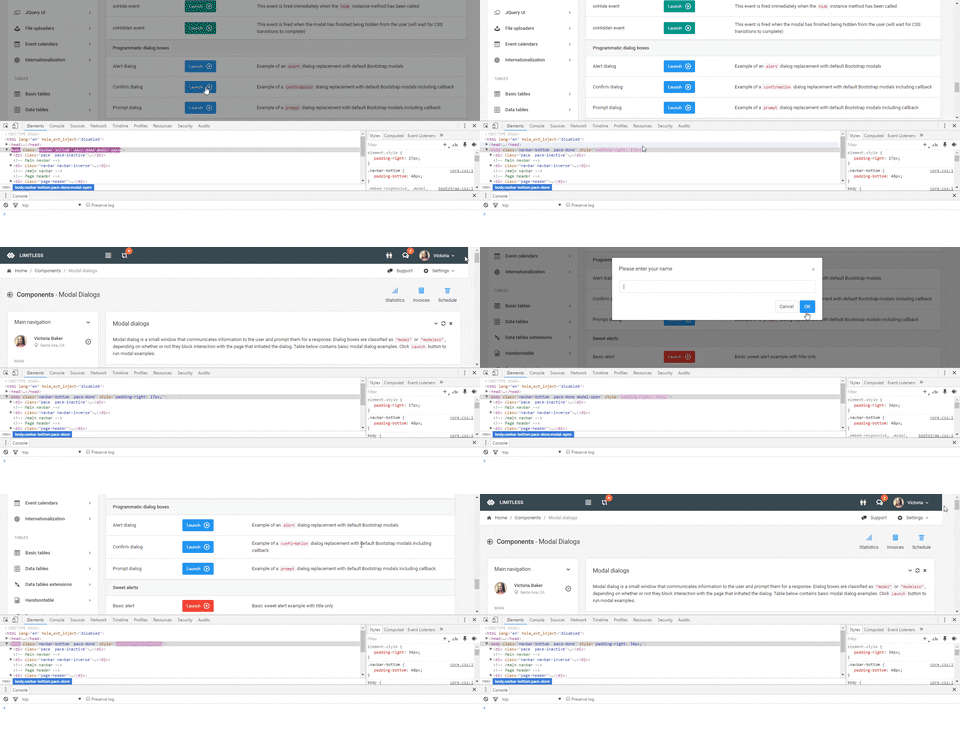
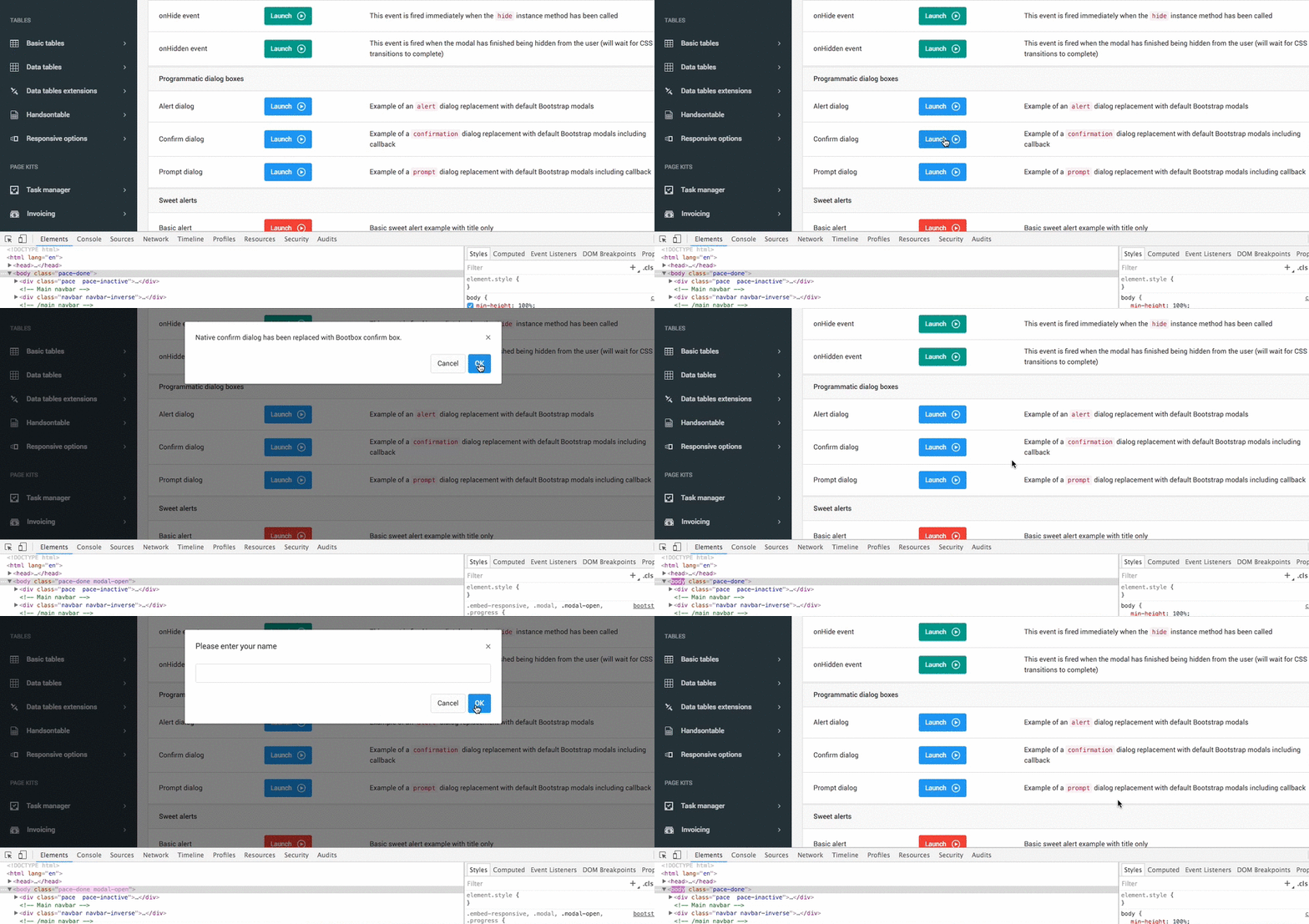
bugs on modals bootbox confirm and prompt dialog, when modals closed padding-right:17px will append to body.
would you please integrate https://github.com/jschr/bootstrap-modal in the next update 
Hi,
Hm, just tested in Chrome – i don’t see any inline CSS added to body when modals are closed (both on button and close icon click). Could you please let me know which browser are you using?
Sure will add, but most of the features of that library can be achieved with default Bootstrap modals component.
Thanks!
Hi,
checkout this http://i.giphy.com/3oGRFoOCJ51vCPNtGU.gif am using latest Chrome.
I’d like the modals appear on center of screen, Thank you.
Hi,
Ouch, and this is what i see in latest Chrome on Mac.. I’ll investigate this issue and test it in other browsers. Thanks for reporting!
Understood, i’ll add that extension in the upcoming update.
Thanks!
Hi, I want to use this theme with SugarCRM. Do you know if it is possible? If yes, could you guide me throught it?
Thanks Hamilton
Hi Hamilton,
I never worked with SugarCRM, so i can’t tell you for sure unfortunately. But if it supports adding custom HTML/CSS layouts than yes, it should work since Limitless is a static template.
Thanks!
Hello I bought “Limitless – Responsive Web Application Kit” 2 months ago, I want to use a black skin for my project with possibility to use white or black (Configurable). My question is if the template has the option of black skin or if possible that in the near future the template will have this feature. Thanks.
Hey,
Unfortunately not at the moment. I already received a few requests for dark version, going to add it in May’s update. It’ll require quite a lot of work, but shouldn’t be very difficult.
Thanks!
Awsesome job! Quick one, I want to build a draggable portlets dashboard and when you drag the portlet and re position it, I want it to save the position using HTML5 Storage to store the portlet layout or positions. Does your theme have this ability? thanks
Hey there,
Nope, unfortunately. I think this functionality is up to developers and how they want to save state. But this example might give you a hint how to remember position using localStorage.
Thanks
Hi there. Love your work. Just a question though. A lot of the dev forums I read mentions that it is good practice to place your .js scripts at the BOTTOM of your page? [performance??] I notice your theme .js is at the top of the page? What is your view on this and should I move them down? regards P
Hey,
I’ve tested both methods and really didn’t see any differences in loading time. Personally i prefer to have them inside <head>, but it’s up to you – if you want to place them before body closing tag – feel free to do it, it won’t affect functionality in any way
Thanks!
Hi, many of your demo pages are down. -< http://demo.interface.club/limitless/layout_3/LTR/d3_bars_basic.html
Hi,
None of them are down, the url is incorrect – starting from version 1.3, url was changed from LTR/ to LTR/default/ or LTR/material/. Could you please tell me where did you find this url? Probably i’ve missed it somewhere.
The correct url for that page is http://demo.interface.club/limitless/layout_3/LTR/default/d3_bars_basic.html
Thanks
Hi, sorry .. i have bookmarked the site. This was my fault
Ohh no worries, i thought something is wrong with demo
Thanks!
Hi,
The file ”.less” for the “pace page loader” is the “default” that is in the “components / pace” folder, but what are the other files in that folder?
Thank you
The template has so many things that is overwhelming.
Thank you very much!
You are always welcome
Accidental post. Not sure how to delete. Great theme!
Thanks
Does the latest update include a landing page?
Hi,
No, i didn’t include it yet. I am going to clean it up and make available for users who owns a copy of Limitless for free next week.
Thanks
Hi I emailed some questions ~3 weeks ago, can you please respond.
Hi, thanks for the release, I was looking forwards to new App views (http://j.mp/1RKcUdW , http://j.mp/1SML2rV) , pages (login + landing) in layout 3, please explain why are there 2 full copies for Default and Material.
Can I use the same HTML files and swap the theme CSS from Material to default and will it work?
Also, is the material theme – still same as bootstrap based with material colors or was the css /js framework changed to Googles Material.
I am asking because my code is now compatible with Bootstrap and I am wondering how to upgrade, and if the new material theme is compatible with bootstrap?
What is the main/common content holding container div class, is it container-fluid
How can I do a horizontal timeline
thanks
Hi,
I am very sorry, didn’t see your email last email.
What do you mean 2 full copies? Default and material versions are different, some of HTML and JS files are different as well. CSS files are completely different in both versions.
Yes, if you open Documentation, i’ve explained in there how to switch between themes.
Yes, they are completely the same, the main difference is LESS files. I didn’t touch any Bootstrap core files. To upgrade you just need to swap CSS files and make a couple of changes in HTML, if you want to use ripple effect (add ripple.min.js) and some of components don’t support a few features from default theme.
Container div – i didn’t get this question also from your email. Container div of which layout part – inner content, whole page, content part, page header, grid etc etc. I’ve already sent you a markup of general structure in my last email, but i am not sure i understood you correctly.
Horizontal timeline isn’t supported at the moment and requires quite a lot of work to make it from vertical one. Basically horizontal timeline is a totally different component, which needs horizontal scrolling and different elements position. Need to test it somehow, but i am not sure at the moment if that can be done at all using vertical timeline layout.
Thanks!
Hi Eugene,
1) for the layout, this is what I was referring to http://j.mp/1qa39ON. Using this can you tell me which container is the main div layout for the content (i.e. This is page content in purple/beige)
2) How can I let user switch themes from material – if so which CSS class changes the main theme? and which parent Div should I apply it to?
3) am I able to easily switch out the side bar between layout 3 (tasks app sidebar) vs the main menu.
4) what CSS/less file change the size and active/ text & background color of the horizontal tabs in horizontal/top menu
thanks
Hey,
1. I still don’t clearly understand what you mean by container div But here is the main structure of layout #2:
<!-- Top navbar -->
<div class="navbar navbar-default header-highlight">
...
</div>
<!-- /top navbar -->

<!-- Page container (everything below navbar) -->
<div class="page-container">

    <!-- Page content -->
    <div class="page-content">

        <!-- Main left sidebar -->
        <div class="sidebar sidebar-main">
            ...
        </div>
        <!-- /main left sidebar -->

        <!-- Main content (right side) -->
        <div class="content-wrapper">

            <!-- Page header -->
            <div class="page-header">
                ...
            </div>
            <!-- /page header -->

            <!-- Content area (below page header, main page content) -->
            <div class="content">
                ...
            </div>
            <!-- /content area -->

        </div>
        <!-- /main content -->

    </div>
    <!-- /page content -->

</div>
<!-- /page container -->
I hope this helps.
2. No need to change any classes in any container, main difference between Default and Material themes is CSS files. So you can switch paths to CSS files when user selects different theme.
3. Not sure i understand what you mean by this – switching between 2 sidebars. Could you please clarify?
4. Standard classes that are responsible for navbar navigation. It depends on the navbar – there are 2 kinds of variables: 1 for .navbar-default (white navbar), 2nd for .navbar-inverse (dark navbar). Both can be found in variables-core.less file (assets/less/core/variables/), starting from line 237:
@navbar-default-link-active-color
@navbar-default-link-active-bg

@navbar-inverse-link-active-color
@navbar-inverse-link-active-bg
Thanks
Thanks for the response.
We are pretty close to the answer, I wanted to know in the above HTML layout http://j.mp/1qa39ON., which is the highest that changes in every page.
For e.g. I am assuming – beginning in this DIV or content area, the content is different for every page, while everything/ above/higher/outside this div stays the same, would that be true?
<!For some reason markdown for code is not working on this forum.
Hi,
I understand what you mean from the first email and here is my third try to answer your question First off – your image doesn’t look like Limitless layouts in terms of structure, this is from some other template. Second off – Yes, in 1st and 2nd layouts, this container
<div class="content">
...
</div>
is the main one, where main page content is – “content holder”. All other parts don’t change, except page title and breadcrumbs if you want to use them.
I hope that helps.
Thanks
Trying to view all the sub pages on the demo, but no pages are showing up.. just letting you know..ie: http://demo.interface.club/limitless/layout_1/LTR/table_basic.html
Hello,
Correct, in 1.3 URL was changed to layout_1/LTR/default or material, so the correct URL is:
Default theme – http://demo.interface.club/limitless/layout_1/LTR/default/index.html
Material theme – http://demo.interface.club/limitless/layout_1/LTR/material/index.html
Or click on screenshots/buttons here – http://demo.interface.club/limitless/
Thanks!
Hi there!
Floating labels doesn’t work: http://demo.interface.club/limitless/layout_3/LTR/material/form_floating_labels.html
I think should work like this: http://codepen.io/simoberny/pen/gpddYQ
Thanks!
Hey,
They do work, but not on focus – they appear when you start typing or when you have some value. I personally don’t like them moving on input focus, but will add in the upcoming update if i’ll get more requests
Thanks