2227 comments found.

hey ! i have a question : how do i insert full screen background login picture? Thanks
Hey,
You just need to add login-cover class to body and change path to image:
.login-cover {
    background: url(../images/login_cover.jpg) no-repeat;
    background-size: cover;
}
Thanks
script have code add multiple textbox ?
Hi,
I am sorry, but i don’t understand what you mean by that. You want to insert multiple textareas? Or these textareas are a part of some plugin? Please be more specific.
Thanks
sorry im not good english
I mean, http://bootsnipp.com/snippets/featured/multiple-fields
Ahaa, understood, thanks.
Unfortunately this is not supported in static version as it’s a pretty specific functionality. I’ll consider it for the next update for sure, but as far as i understand the area of possible usage, that’s pretty easy to do using jquery’s .append() attached to a button click event.
Thanks
please update code T_T
Hi,
Sorry, but I don’t understand. What code do you mean?
Hi,
I’m having some trouble in displaying a modal over a modal. In the first wide modal I’m generating a standard responsive data table. Every record includes a button which opens up a small modal to modify data. Once the small modal is closed, the first modal is remains visible, however the scroll disappears and I am not to use the modal. I have tried hiding and showing the first modal when hiding the second smaller modal, I have also tried updating the theme that was released not long ago – to no avail.
Please advise.
Thanks
Hello,
Must be a data targeting or closing modal issue. Could you please email me the code you are using to e.kopyov[at]gmail.com? I’ll check what can cause this issue.
Thanks
Sent just now, thanks!
Replied back
Hi Kopyov,
I’m using the latest version of Limitless (1.3) and, when using a responsive datatable inside a tab-pane, the table does not behave as responsive.
Is there any workaround?
Thanks!
Hi, The “jquery.min.js” available with your theme does not support for auto complete jquery functionality in ASP.NET MVC5 Web Application, which is being hosted in IIS8.0. If i add new version of jquery file(sourced from jquery.com) in my application the theme does support for this. I need to write autocomplete and other main jquery functionalities like date picker, click event, etc., in my application , could you please fix this issue asap. Thanks.
Hi,
jQuery version that comes with Limitless is v2.1.4, as you can see on demo that both jQuery UI Autocomplete and Typeahead are working fine with this version.
A quick one – have you checked your console when you are using current version? Do you get any JS errors in there?
Anyway, feel free to change jQuery library version to whatever works for you, all plugins are supporting latest versions except Editable forms. Actually that was the reason why i didn’t update jQuery to the latest version in previous update, will try to find a workaround for Editable to work with it.
Thanks
Hi, I have checked in Console, the auto complete is not working (the jquery v2.1.4 is included in layout page), and for the same even by including in each form that is also not working. If you share a email id, i can send the screen shots to you with console message. Thanks a lot.
Of course, my email is e.kopyov[at]gmail.com. Also please send me the code you are using for autocomplete, will check it for errors as well.
Thanks
Hi Eugene, how are you doing?
My licence number is: 9c6f3f89-4e3d-44b6-9129-4c3b4b214e53 – 27 Feb 2016
I have a question related to the conflict between two plugins.
We are using the wizard “Steps” and we needed to add inside the form a tag input with the plugin that the template provides and seems like is there a js conflict between this two plugins working together.
Is like the wizard js events take the control and doesn’t allow the tags plugin to work properly. We tried disabling the wizard and then it works perfectly.
Did you find the same problem so far? Is there any recomendation that you could give us?
Thank you very much for your time.
Hello there,
Just checked both tags input libraries – both working fine, here is a quick screenshot.
Try to load and init tags plugin AFTER wizard, something like:
    // Basic wizard setup
    $(".steps-basic").steps({
        headerTag: "h6",
        bodyTag: "fieldset",
        transitionEffect: "fade",
        titleTemplate: '<span class="number">#index#</span> #title#',
        labels: {
            finish: 'Submit'
        },
        onFinished: function (event, currentIndex) {
            alert("Form submitted.");
        }
    });

    // Tags input
    $('.tags-input').tagsinput();
Let me know please if that worked out.
Thanks
Hi Eugene, sorry for my late replay…. Like you said.. it works… was the loading order of the scripts…
Many Thanks!
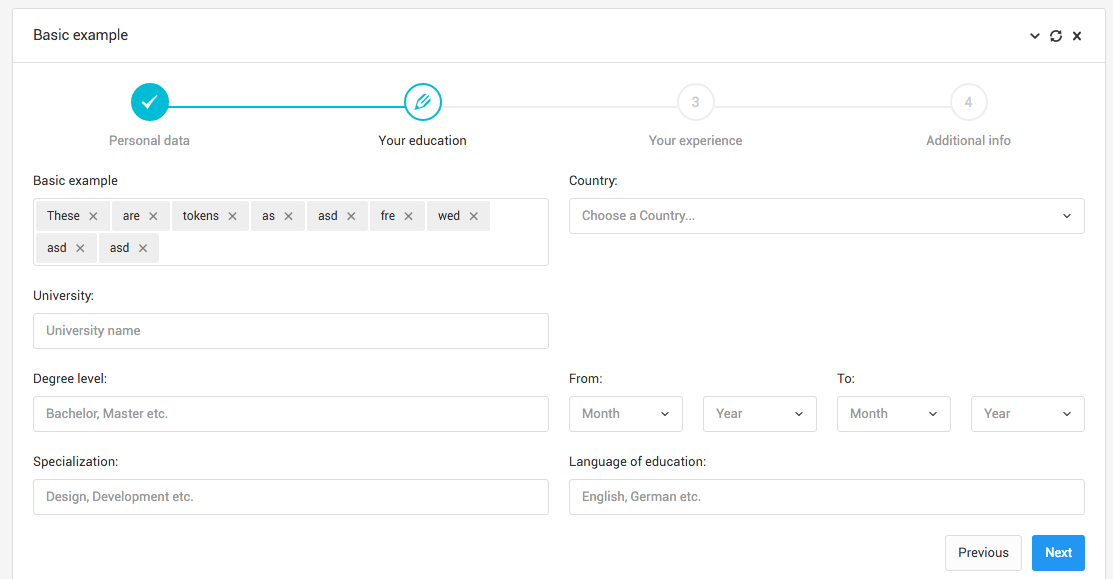
select2 in wizard-steps. I copied the first wizard in wizard-steps as is into a fragment html that is being loaded via ajax. The select2 drop downs (Country, from, to) is showing two times instead of once. The first copy is functioning properly and the second is disabled. I have copied the js files included into my template and initializing in a javascript snippet at the top of the fragment like below – any idea what is going on?
<script> $(”.steps-basic”).steps({ headerTag: “h6”, bodyTag: “fieldset”, transitionEffect: “fade”, titleTemplate: ‘ #index# #title#’, labels: { finish: ‘Submit’ }, onFinished: function (event, currentIndex) { alert(“Form submitted.”); } });
// Select2 selects
$('.select').select2();
// Simple select without search
$('.select-simple').select2({
minimumResultsForSearch: Infinity
});// Styled checkboxes and radios
$('.styled').uniform({
radioClass: 'choice'
});// Styled file input
$('.file-styled').uniform({
wrapperClass: 'bg-warning',
fileButtonHtml: ''
});</script><form class=”steps-basic wizard clearfix” action=”#” role=”application” id=”steps-uid-0”>
- 1 Personal data
- current step: 2 Your education
- 3 Your experience
- 4 Additional info
Personal data
Hi there,
Looks like you are initializing Select2 twice. Could you please email me your code to e.kopyov[at]gmail.com, i’ll take a quick look what could be wrong.
Thanks
Hello there, is it planned for the ecommerce suite to be released soon?
Hi,
Yes, it will be out in the upcoming update along with around 20 new pages. It’s currently in progress.
Thanks
Hi, thank you very much for that great Template, really love it!! i would like to ask you a small question: i am using the edit_form.html Template and i would like to make that on off switch where i can activate or deactivate the edit feature to be off at the begining. https://www.dropbox.com/s/sij349emiozjn79/Screenshot%202016-04-28%2006.24.50.png?dl=0
can you give me a hint on how to achiev that? thanks and best regards, Michael
Hello there,
That’s easy, you just need to do 2 things:
1. Find your checkbox and remove checked=”checked” attribute
2. In your JS code, add this line to disable plugin by default:
// Disable Editable by default
$.fn.editable.defaults.disabled = true;
That’s all  Thanks
Fixed navbar does not work in responsive mode?
Hey,
Unfortunately yes, fixed navbar has a static position on mobile, because in current layout structure multiple sidebars push content down, this is the only way you can show multiple sidebars on small screens. In one of the future updates I’ll add a new layout with mmenu, which will make sidebars floating over the content.
Thanks
Hi
I bought the limitless theme. And can you tell me where can I found the example code of Dashboard ?
“Members online” widgets on http://demo.interface.club/limitless/layout_1/LTR/default/index.html#
Hi,
All charts from dashboard are stored in dashboard.js file, located in assets/js/pages/ folder. All of them are based on native D3.js library code.
“Members Online” chart configuration starts from line 2858. Please keep in mind that it uses random data for demonstration purposes and requires some changes in order to use real data.
Thanks
Hi, We are considering purchasing and using your template in our system. I saw that 4 months ago you replied to one of the questions that you don’t have inline table row editing function in the javascript plugins/lib provided and you referred to another extension ($120) for Datatables – Editor. You also mentioned that hopefully in a month you will have it. What is the situation now? I saw in the sidebar the “Tables – Elements” feature. Does it have also the functionality behind it? How can it be integrated into each row of the table? Is it explained in the documentation? Many thanks,
Hi,
Yes, some time ago i’ve discussed a few things with Editor creators and i got a permission to use Editor in live preview only. So basically only CSS will be included in the package, if you want to use it you’ll need to purchase a license on their website.
It wasn’t implemented yet as it requires pretty much work with CSS, i’ll try to do that in the next update.
Table elements – nope, those elements are static, unfortunately there’s no any ready-to-use solution for inline row editing. If you know some nice solution – please share with me and i’ll include it in the next update as well
Thanks
Hi, We have implemented row reorder plugin and it is working fine in UI but the problem we are having is to save the sorting sequence value into DB after drag and drop and I can’t understand how can I get the sorted value on mouse leave event.
Example: we have 3 row in our table 1,2,3 and suppose these are unique track ID so when we have changed the row by drag and drop then position has changed, so when drag and drop is completed then one function should be called which will pass the updated row order value in jQuery so i can update the order into the database table.
Hi,
Understood, i believe you need to play with RowReorder configuration: there is an option called update, which disables automatic data update when reordering is completed.
Also you can check 2 specific events related to rowReorder extension if you want to do custom stuff when reorder is completed. And here you can check out events in action.
Hope that helps.
Thanks
How to add new js plugin to this theme
Hi,
As any other plugin, there’s no any specific requirements. Almost all plugins have a Quick Start sections, where plugin developers describe how to add and use plugins.
So, a quick guide:
1. Download plugin and unpack it
2. Find .js or .min.js file, copy it and paste in any folder inside assets/js/plugins/ directory
3. Add path to this file in your page after bootstrap.min.js and jquery.min.js files, but before app.js
4. Create a new custom.js file and add it after app.js on your page
5. Open this file and add configuration of that plugin, for example:
$('.twitter').alert({
    title: 'Alert!',
    content: 'Simple alert!',
    confirm: function(){
        $.alert('Confirmed!'); // shorthand.
    }
});
6. Add HTML container somewhere you want to use this plugin:
<a class="twitter" data-title="Goto twitter?" href="http://twitter.com">Goto twitter</a>
7. That’s it, now clicking on Twitter button, you initialize alert replacement.
Thanks
Thank for reply  Good support
You are always welcome, let me know if you have any other issues.
Thanks
Just bought this!!! and you know what? I don’t even have a skill on a web programming, what a reckless action hahaha…
But, this is the best and the complete template I’ve ever seen, I love it!, and I surely believe that this template will help me to migrate/recreate my VB.NET apps into a web base application. So wish me luck.
Hello there!
Thank you so much for kind words, truly appreciate!
Of course, best of luck and to be on top of success in your field Let me know if you have any issues.
Thanks!
i have problem in rtl if i click icon zoom image he is show me like this
please see the link http://s31.postimg.org/e1wyxgxe3/image.jpgHi,
Thank you so much for reporting this issue, overlooked it. The fix is very easy, you just need to remove 1 line of code in fancybox.less file or in your compiled CSS.
In fancybox.less file, remove line 37 inside .fancybox-wrap: left: 0; and recompile your less files.
In CSS, you need to override compiled right: 0; with right: auto;, so your CSS code should look like
// Wrapper
.fancybox-wrap {
    position: absolute;
    top: 0;
    right: auto;
    z-index: 8020;
}
Thanks
I love everything about this template except you can’t do the easiest thing (or may be i don’t know how) datetime. all i want is for an input to give me 11/23/2016 11:34 PM and do time select only 1:33 PM
Hi,
All pickers support different date and time formats. But could you please point out which one of 5 pickers are you using?
Thanks
When there will be a AngularJS version?
Hi,
This summer, can’t tell you when exactly, but in one of the next 3 updates for sure
Thanks
(ignore)
Great Theme!
I’m trying to do more with the data tables.
I’m creating the data table like this:
Hi there,
Very sorry for delayed response, traveling this week.
Pretty easy to do both, you just need to add certain options to your datatables configuration and include file fixed_columns.min.js (assets/js/plugins/tables/datatables/extensions) after datatables.min.js on your page. And here is your config:
// Table defaults
// ------------------------------

// Setting datatable defaults
$('#your-table-selector').DataTable({
    dom: '<"datatable-header"fl><"datatable-scroll"t><"datatable-footer"ip>',
    language: {
        search: '<span>Filter:</span> _INPUT_',
        lengthMenu: '<span>Show:</span> _MENU_',
        paginate: { 'first': 'First', 'last': 'Last', 'next': '?', 'previous': '?' }
    },
    fixedColumns: true, // this enables left fixed column
    lengthMenu: [[10, 25, 50, -1], [10, 25, 50, "All"]]
});
The last option specifies how many entries you want to show in your dropdown menu – 10, 25, 50, -1 (all). Second part is naming that appears in your dropdown accordingly.
Hope this helps. Let me know if you still have issues getting it to work.
Thanks
Where is the configuration placed? Is it inline on the HTML page inside a < SCRIPT > tag ? Is it in an external file?
I am also trying to add “State Saving” but when I do, I get the same issue, that I am reinitializing the data table.
Is it possible to add the state saving to my current config, which is
table class=”table datatable-button-html5-columns table-hover”
I see that if I have a second class starting with datatable- that I am reinitializing, and I understand that is the problem
But exactly where How do I set this, and again, if I need to make config changes, where are those config changes placed – in an external JS, in an inline script, etc…
Thank you!
It’s up to you where to place this script – inline or in the file, i don’t know the logic and structure of your project I usually create 1 separate file, something like custom.js and place all extra JS code in there. This helps to keep all files and code well more organized.
So i’d suggest you to do the same – create new file, name it custom.js and add it after app.js on your page. Then open it and add the core i’ve shown earlier.
JS error – yes, assuming you’re using datatables_extension_buttons_html5.js file from assets/js/pages/ folder. As stated in the documentation, those files contain multiple examples or different plugins, so please don’t use them in development as they needed for reference only. In your case, you need only 1 example from that file – Column selectors, so copy that config including defaults from that file and place the code in your new custom.js file. Those JS errors you are getting now – you are trying to initialize multiple datatables in containers, that don’t exist.
State saving – you can easily add it just by adding stateSave: true option to the table configuration.
Thanks