3574 comments found.

hi. i have 4 problems. I already ask you how to fix it. but we couldn’t solve. i hired someone to solve my problems but everyone say that the problem is because of theme.
okay my first problem is not about your theme. But Second problem is because of theme. Third problem is because of theme. Fourth problem is page speed. Everyone tell me that theme use too much plugins. That’s why it’s too slow.
1. price by country; for example american people should see only price for America.
there should be different prices by country. But at the same time, american people shouldn’t see other prices even if they change language or currency. let’s say price for america is $20 price for russia is $15 so american people shouldn’t see price for russia even if they change language or curreny.
2. Currency in cart; for example i choose $ in currency switcher and everything exchange to $ but not in cart.
it always display Turkish Lira(it was default curreny before) See http://prntscr.com/ay8bvi
3. language switcher on mobile; i can’t change languages on mobile. only the first 2-3 or 4 languages are shown and able to change.
i can’t see another languages. See http://prntscr.com/axnwg7
4. Speed optimisation. My website is too slow now. Almost 7-8 seconds.
Pingdom; it’s 5,4 Seconds. See http://prntscr.com/ay8d7g Gtmetrix; 6,7 seconds. See http://prntscr.com/ay8ds3 Google Developers; see http://prntscr.com/ay8e0g http://prntscr.com/ay8e4p
it’s written WPML Compatible in your Theme Features. But WPML told me that it’s not compatible. See http://prntscr.com/azxeir
Hi husame,
1. For the issue with prices, can you please send us your FTP credentials, I need to analyze why the price stays in Turkish Lira when currency is changed.
2. For the language dropdown, also will fix this bug when I login to your FTP.
3. The page speed depends on the plugins its true, but also the server may some time take a longer to execute requests, and as we know, a lot of users who use WPML have issues with site speed. This is purely their problem when it comes to site speed.
We have dedicated server, and I have analyzed the “multilingual” version of Aurum which uses WPML, and so that was the only demo that takes longer to execute because of the structure WPML applies to their code. We cannot do anything about this.
As for WPML compatibility, if you have managed to translate the theme completely than it says it all, theme can be translated via WPML.
Best regards,
Arlind
i solved almost all my problems except mini cart. i even asked to wpml support but i got this answer http://prntscr.com/b2voxb
it always default currency in mini cart even if i change currency. showing up only default currency..please let me know how can i send you FTP credentials.
Hi huame,
We saw that you have wrote the same ticket on our email too, so we will reply to you there.
Kind regards,
—Ylli
Hello, I’m trying to change the three images that appear on my homepage: http://www.liamali.com/ but I can’t do it because the frontend is not working. I’m checking the html code but I can’t find where the url goes. Thanks!
Hi Liamali,
Thanks for writing in! Upon checking, you site can be seen but which three images you would like to change:
Would you please provide us with some snapshots of the images area? So that we can offer you with a detailed response.
Best,
Imran
Hello, Yes, here are the three images I’m trying to change: http://cubeupload.com/im/JsBwhQ.png
I used to do it with the backend editor but it’s not working and the frontend editor isn’t working either. I only see this but I can’t find where to add the image link:
row_type="row" type="grid" text_align="left" background_image_as_pattern="without_pattern" padding_top="70" padding_bottom="24"]vc_columnvc_column_inner width="1/3"vc_single_image image="26734" img_size="full" alignment="center" onclick="custom_link" link="http://www.liamali.com/producto-categoria/bolsos" title="Bolsos"/vc_column_innervc_separator type="transparent" position="center" up="10" down="10"vc_separator type="transparent" position="center" up="20" down="20"vc_column_inner width="1/3"vc_single_image image="26735" img_size="full" alignment="center" onclick="custom_link" link="http://www.liamali.com/producto-categoria/toallas-hamman" title="Toallas hamman"/vc_column_inner[vc_separator type="transparent" position="center" up="15"]Hi liamali,
Yesterday some plugins released updates and these updates caused problems with the theme so we will be updating the theme today and you will be able again to work with the backend editor.
Kind Regards,
Art
Hello, I just updated the theme and the backend editor or the frontend editor are still not working. Also, now I can’t access the cart. I add products but when I want to see the cart there is absolutely no way. This is the url: www.liamali.com.
All of my updated are in order except the Ultimate Addons for Visual Composer but it is asking for a purchase code…
Thanks!
Brenda
Hi Brenda,
I saw that you are using an very old version of our premium plugins Visual Composer and Layer Slider and this may be the cause of your problem. Each time after you update the theme please don’t forget to go to Appearance > Install Plugins to update all your premium plugins to the latest version that we support.
P.S: If you can’t update LayerSlider, go to Plugins > Installed Plugins and – delete LayerSlider plugin then install it from Install Plugins page again. Your current sliders will not be deleted.
Also please disable Ultimate Addons for Visual Composer because that plugin is very old and may not work nice with our theme.
Kind regards,
—Ylli
Hello,
Thanks, I updated the plugins and the backend editor is working.
I still have a problem with my cart though. Since I updated the theme to the latest version, I can’t add products to the cart or view my cart. There is a 0 showing as if I had 0 items in my cart.
How can I fix this urgently? Right now nobody can buy anything.
Thanks!
Hi liamali,
We saw that you have pasted the same ticked on email too, we will reply to your email today.
Please don’t make double posts here and on email too.
Thanks for your understanding 
Kind regards,
—Ylli
Hi. We have problems with Aurum v2.9.1 and wordpress 4.5.1-es_ES. When we access to “all pages” we canno see the pages list. If we delete your theme from the server, all is working fine.
Please, what’s happen?
We are developing our web page in this demo hosting:
http://demo6.espartapp.com/Thanks for all.
Hi there,
Thanks for writing in! Please don’t forget to go to Appearance > Install Plugins to update all your premium plugins to the latest version that we support, then if your problem is still active please reply us again here with a detailed explanation of your problem.
If after updating the premium plugins the problem is still present, then can you please disable all your third-party plugins (plugins that don’t come with our theme) one by one, and check if this problem is solved.
Please let us know how it goes.
Best,
Imran
In single product pages and blog posts there is no option to share the product in Instagram … ¿Is it possible to do it?
Hi miprima,
Unfortunately I don’t see a way to add the instagram sharing manually, I added this in the to-do list so in the upcoming updates we will try to implement it.
Kind Regards,
Art
I’ve been trying to change the text excerpt extension from post preview in many different ways you explained … but I couldn’t and I drives me crazy … the default size is too long … so … I would like to suggest you to add a new field in the Blog section of Theme Options to choose with a number the size of the blog post preview excerpt so the theme would add a new functionality, quite useful for the blog and the theme appearance. I would be very pleased if you do that for the next update. Thanks.
Hi Miprima,
Thanks for reaching out! Kindly try navigating to Admin Panel -> Settings -> Reading as per shown in the following:
You may also try out the following: https://wordpress.org/plugins/easy-custom-auto-excerpt/screenshots/I saw that you have posted multiple tickets, if you have any question on the future, please write you comment only on one thread and kindly don’t create multiple threads.
Best,
Imran
In my shop page called “Tienda”, the tittle appears in the html code with the title: <title>Productos Archivo – Miprimaestadepre</title> and I would like to change it to: <title>Tienda – Miprimaestadepre – Unusual Art-shirts<title> ... How can I do it?
Hi Miprima,
Thanks for reaching out! Would you mind providing us with the link to the particular page of your site? So that we can offer you with a tailored answer.
Best,
Imran
Hi, since the 2.9.1 update I can’t see in the editor of the pages, at the bottom, the different tabs where I could add custom CSS only for that page and remove top and bottom margins and many more things.. ¿Have you removed it from the theme?
Hi Miprima,
Thanks for writing in! Kindly navigate to Edit Page -> Page Settings as per shown in the following:
Best,
Imran
Hi there
We are having a bit of an issue, every time we try to update our website with the recommended plugins – the website comes up with the issue stated below.
Fatal error: Allowed memory size of 67108864 bytes exhausted (tried to allocate 48 bytes) in /home/content/66/11467266/html/wp-includes/plugin.php on line 130
Any help would be much appreciated.
Hi jowanwhaley,
Maybe you are trying to update plugins from the Plugins section.
After you update the theme please don’t forget to go to Appearance > Install Plugins to update all your premium plugins to the latest version that we support.
If that still doesn’t work then please check if you have recommended PHP configuration limits as follows:
max_execution_time 180
memory_limit 128M
post_max_size 64M
upload_max_filesize 64M
For more info visit this link Recommended PHP Configuration Limits
If you need more info, please don’t hesitate to reply us
Kind regards,
—Ylli
Hello, I am interested in the Aurum Theme “The Bookstore”. How can I get the Theme “Bookstore” because if I select the Button “Purchase Theme” it shows the “Fashion” Theme.
Thank you very much.
Best Regards, Alex
Hi Alex,
The theme demos are included in the theme which means once you will get the whole theme then after installing the theme you can select between the demo’s which you want to install.
Kind Regards,
Art
2 issues:
First Issue (URGENT!): VC backend editor no longer loads or works. I am running VC 4.11.2.1 and WP 4.5.1 and Aurum 2.9.1. I see there are similar issues happening with other people using themes that have custom VC elements.
Second Issue: On Contact page, when message sent using contact form (Aurum Contact template being used), Subject field and Message field apostrophes & quotes are not escaped, so when anybody types a quote or apostrophe this character shows up right before it ”\” – a backslash.
Thanks.
Strike Issue #1. I cleared my cache and it’s working now. Issue #2 still an issue.
Hi Zach,
1. Great to hear that the first issue is solved. Can you please let me know which cache did you cleared, browser cache or WP cache?
2. Can you please open this file:
wp-content/themes/aurum/inc/laborator_actions.php and go to line 680, you will see this code:
wp_mail($admin_email, $email_subject, $email_message, $headers);
Replace with this one and test again if the slashes will be present still:
wp_mail($admin_email, stripslashes($email_subject), stripslashes($email_message), $headers);
Cheers
Arlind
1: I cleared my server-side cache, using Managed WordPress hosting which comes with built in cache. At first it didn’t work, so I edited a file that some people on the web were saying helped them with the same issue. Still didn’t work, that’s when I wrote you. Then I changed the code in the JS file back to it’s original code and cleared the cache. Then it worked. Go figure.
2: This code removed the slashes from the subject and message, but also destroyed all the ”/n” in the code which means the line breaks are a total mess. Any other suggestions?
Hi Zach,
1. Great, so that I will use this to tell other users with the same issue.
2. Oh Sorry to hear that, so here is an advanced version of the code I gave you to replace:
wp_mail($admin_email, str_replace( array( "\'", '\"' ), array( "'", '"' ), $email_subject), str_replace( array( "\'", '\"' ), array( "'", '"' ), $email_message), $headers);
This should work better.
P.S: You have created some other tickets, in the future if you have any question, please don’t create a new ticket but just find a ticket that you have wrote to us earlier and just reply there with your new question, because in this way is easier for us to understand what you have done and what is left, also is would be easy for you to post in one thread
Best regards,
Arlind
Worked! Thanks again Arlind, you’re a champ! As for your suggestion, I will definitely use one thread from now on. Cheers.
Hi Zach,
Glad to hear that
Kind regards,
—Ylli
I just purchased the theme. There are 2 qtns:
1. Adding SGD before dollar sign 2. Change theme color to another color (#ff3333)
Hope to hear from you. Many thanks.
Also how to add quantity
Hi JC2016,
Thanks for reaching out!
1. Adding SGD before dollar sign
Kindly navigate to Admin Panel -> WooCommerce -> Settings -> Currency Options -> Currency and select singapore dollar sign as per shown in the following:
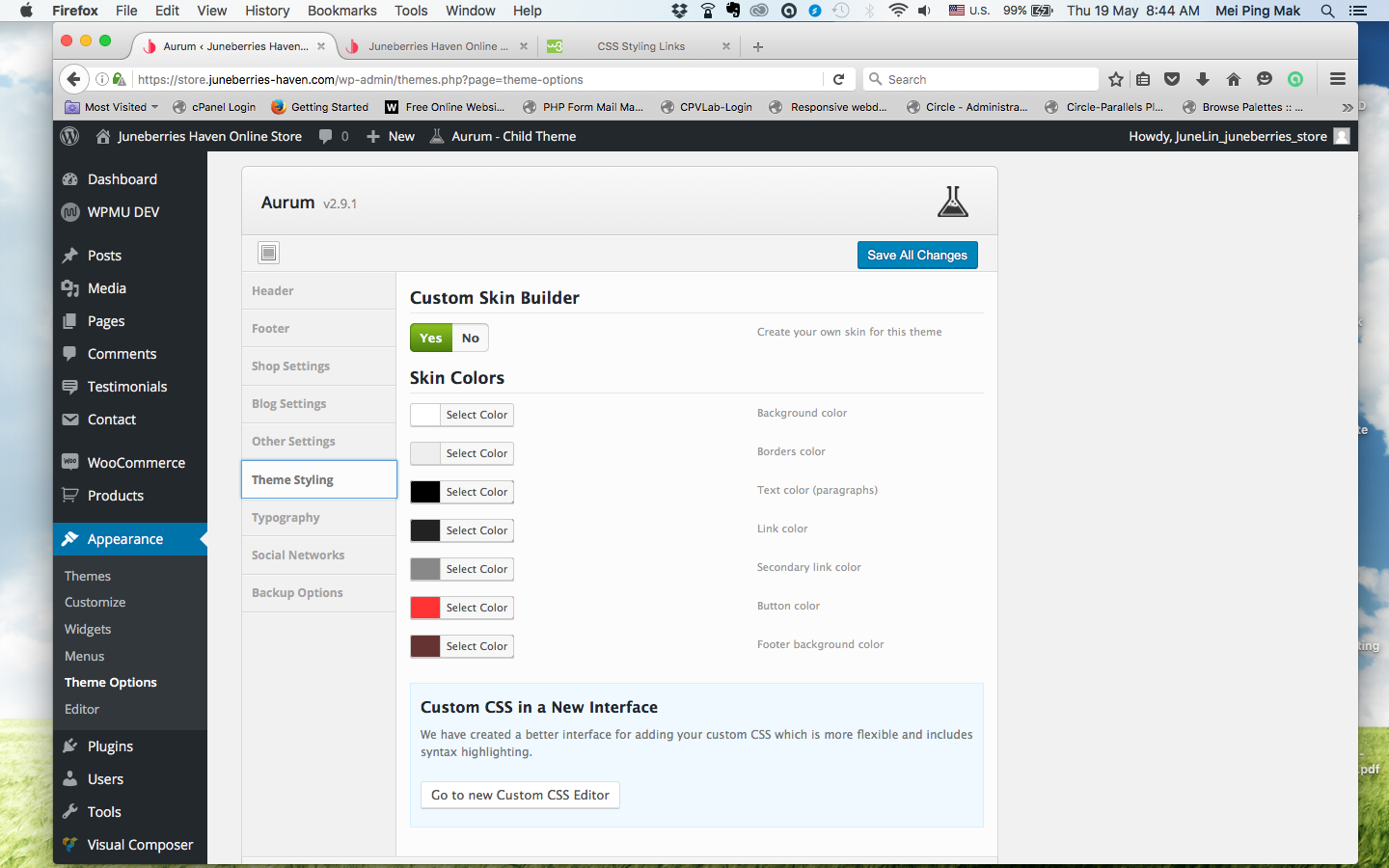
2. Change theme color to another color (#ff3333)
Please go under Laborator -> Theme Options -> Theme Styling as per showing here:
Best,
Imran
Hi thank you for your quick reply. It is reactify. Another question: how can I prevent the words from being blocked in the mini cart area…
Also featured items at this page-> https://store.juneberries-haven.com/product/hydrating-daily-facial-cleanser/
how can I change to white text. Many thanks.
Also Logo carousel for https://store.juneberries-haven.com/product/hydrating-daily-facial-cleanser/ ... the arrow is missing although I did check the button.
many thanks in advance.
Hi JC2016,
1— Can you please add the code below to Custom CSS
.header-menu .lab-mini-cart .cart_list li .product-details a {
    text-overflow: initial !important;
    overflow: initial !important;
}

.header-menu .lab-mini-cart .cart_list li .product-details .price-total {
    top: 80% !important;
}
2— Can you please add the code below to Custom CSS
body.single-product .lab_wpb_featuretab.wpb_content_element a {
    color: #fff !important;
}
3— We don’t have this issue on our theme, and it should work to you too. Can you please disable all your third-party plugins (plugins that don’t come with our theme) one by one, and check if this problem is solved.
Kind regards,
—Ylli
Many thnks… for 3… my homepage’s logo carousel is fine.. and I did not use any plugin….
4. Footer separator-> how to change to white color?
Really appreciate your help!
5. Image banner broken in Shop page. https://store.juneberries-haven.com/shop/ Hope you can assist. Many thanks.
Hi JC2016,
Glad that helped! Regarding footer color, kindly go under Laborator -> Theme Options -> Theme Styling and change the color of footer as per shown in the following:
Image banner broken in Shop page.
Upon checking, everything seems to be working fine at our end as per shown here:
Best,
Imran
Hi Imran, I meant that there is no roll over… instead the image banner’s Link is at the bottom
also I tried to use the “products” in VC… whereby I can input custom query… I tried to categorise by tags but it just keep spinning
Hi JC2016,
Can you please try to be very specific about the problem and explain it more to us, in this way we can easily understand you and give you the proper answer
Kind regards,
—Ylli
Okie, let me be more specific. For image banner for SHOP PAGE >> I would like to make it look exactly like the HOME PAGE Image Banner. Notice in the Home Page there is a pink overlay and the words are in the center. How can I recreate that?
Hi JC2016,
Hmm this is very strange, probably you have made any mistake on the Visual Composer while you tried to add image banners there. So can you please delete those banners and try to add new ones again?
Please then tell us what where the results
Kind regards,
—Ylli
Hi Ylli, I have add in the image banners but the rollover effect is not working. Then I tried to used the image banner on other pages and it is fine. My conclusion is that because it is a woocommerce “shop” page so I can’t add in carousel that way. Is there another way for me to add in the image banners? Many thanks.
Also… Here are some more qtns:
1. How can I change the url link for the Logo image? 2. How to remove product ID from product page as I only need SKU. 3. How to change the word “Additional Information’ to Ingredients? 4. On mobile the feature badge is square, not round.
Many thanks in advance.
I know this is not really your theme’s issue… just wondering how can I make coupon not case-sensitive?
Hi JC2016,
Yes i just talked with one of developers and this is exactly the problem there.
As for your other questions:
1— To do that you need to go to aurum/tpls/header-logo.php on the line 67 and change this line of code
<a href="<?php echo home_url(); ?>">
</a>
with your URL
2— Can you please add the code below to Custom CSS
.shop-item-single .item-info.summary .product_meta>span:first-child {
    display: none;
}
3— To translate/rename theme strings, you can do this via Loco Translate plugin. If you don’t have this plugin, please install and activate it in your WordPress site.
1. Then go to Loco Translate > Manage Translations
2. Click “New Language” for the current active theme (if you didn’t created it yet, otherwise ignore this step). On the new language page, choose these options – click here http://d.pr/i/1ewoc
3. After that you will be redirected to the editing screen for theme translations. Before you continue make sure this is true – click here http://d.pr/i/18h0w
4. Follow these instructions to learn how to translate strings – http://d.pr/i/1jsek
5. The changes will be applied immediately – http://d.pr/i/1ju6w
Note: Translation files will be saved to wp-content/themes/{theme-name}/languages folder. Here you have the explanation – http://d.pr/i/1lBCJ
After you make your changes, always save a backup when there is new theme update. After you update the theme (languages folder will be replaced), just move the backup files you previously saved to the same languages directory and your changes will still be applied.
4— We have done that in purpose because if it is like on PC it will create some responsiveness issues on small devices.
Kind regards,
—Ylli
Hi Ylli, thnks for the instruction… though for no. 3 -> I am asking for the single product tab… I would like to change the wording from “Additional Information” to “Ingredients”
Also, I realise that my image for the ZOOM image is not sharp. I have increase the resolution to 150 but it’s still the same. Hope to hear from you. Many thanks.
Also for shopping cart pages… is there any way to include the product weight and Size rather than in the single product page.
Another qtn: How to add hover effect on Layerslider for WP? Many thanks in advance.
Not sure if it is possible, but I installed a woocommerce plugin for trending products. The word “Featured” is purple. Not the color that I have style. Pls advise.
Hi JC2016,
1— Still the same, you can do that with Loco Translate plugin.
2— Please just play with those options until you are happy with the results, it may wary from the image that you have uploaded too.
3— I’m sorry but, this is not possible.
4— We don’t provide support for Layer Slider plugin, we just include this plugin for free on our theme. If you want to read documentation of this plugin, please just visit their documentation site.
P.S: If you have questions next time please make all of them on the same thread. Thank you!
Kind regards,
—Ylli
Hi Ylli,
Noted about asking qtns on same threads.
1. I have done the instruction for loco Translate but it is still the same. The word “Additional Information” is still there.
2. How about the purple “feature” word? I installed a plugin for trending woo commerce product. But it didn’t go according to the theme color. Pls advise.
Many thanks in advance.
Hi there,
Can you please send us your WP credentials on email? We need to investigate your problem and then get back to you with possible solution.
To send us email use this link and please write us your request again, because we receive a lot of emails on daily basis and we unfortunately can’t remember all customers requests.
P.S: Please note that we usually do not respond to emails that request support, because here is our primary support forum. We use contact form just for sending sensitive information. Also emails response time can be up to 7 business days.
Kind Regards,
Art
Hi, Good day to you.. I would like to change my navigation hover link to red… how can I do that? Also when a product is added into the shopping cart, an number will appear on top of the shopping cart item… how can I change the circle to red? Hope you can assist.
Many thanks.
Hi there,
To do this go to Laborator > Theme Options > Theme Styling and enable the custom styling, set the colors of your skin and save it, this will do the job.
Kind Regards,
Art
Hihi, I did.. but it still the same… http://store.juneberries-haven.com/screnshot/screenshot2.jpg
Hi, I found out that one of the plugin cos the color to change.
So, it’s resolved.
I have 2 more issues:
1 Topbar: Message not shown fully in mobile version 2 Product page – Sidebar is at the bottom of page
Hi JC2016,
1— Can you please add the code below to Custom CSS
@media screen and (max-width: 768px) {
    .woocommerce-demo-store .demo_store {
        height: 55px;
    }
}
2— What is the problem there please?
Kind regards,
—Ylli
For 2. The sidebar is at the bottom of the page rather than at the right hand side.
For 1. -> I just used the code you gave me, worked partially. The full message cannot be seen on the top bar. There is also a spacing inbetween. Pls advise.
For 2. The sidebar comment is about the desktop version.
Hi JC2016,
Can you please try to be very specific about the question and explain it more to us, in this way we can easily understand you and give you the proper answer
Also send reply with the links of those pages that you are referring. And please write this in one comment not 3 comments because this is not a chat area but a support system.
Thanks for your understanding
Kind regards,
—Ylli
HI Ylli, I will try to write in one comment as possible as I can because the structure of this Support looked very much like a chat area whereby I can send msg instantly by clicking reply. It is very tempting.
1. Inside my product page: https://store.juneberries-haven.com/shop-products/, the sidebar is at the bottom of the page. Pls see screenshot:https://store.juneberries-haven.com/screnshot/sidebar-product.png
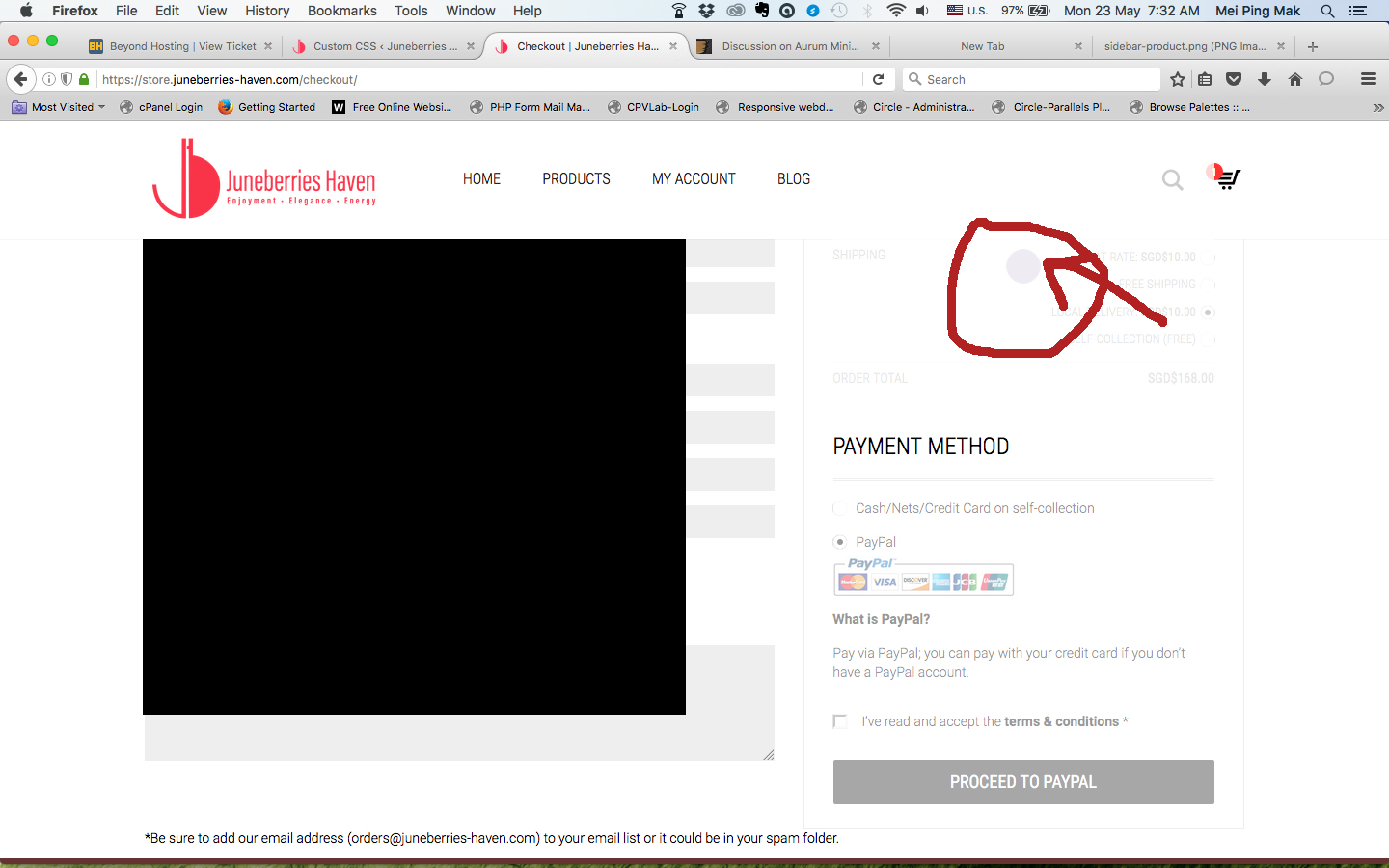
2. Would like to change color of Loading bar during checkout from purple to red. Screenshot: http://store.juneberries-haven.com/screnshot/loadingbar-checkout.jpg
Many thanks in advance.
Hi JC2016,
1— We don’t have this issue on our theme, and it should work to you too. Can you please disable all your third-party plugins (plugins that don’t come with our theme) one by one, and check if this problem is solved.
2— You can change your theme colors from the Theme Options > Theme Styling > Custom Skin Builder > Button Color
Or you can change that with CSS, so can you please add the code below to Custom CSS
.woocommerce .blockOverlay:after {
  background-color: #ff3333 !important;
}
P.S: You are using an old version of our theme (2.9.1) and the latest version for the moment is (2.9.2), please update theme first and then the premium plugins too.
The easiest way to update our themes is if you use Envato Toolkit. On this link How to update Themes and Plugins
you can learn this easy step-by-step procedure
Important: After you update the theme please don’t forget to go to Appearance > Install Plugins to update all your premium plugins to the latest version that we support.
If you can’t update LayerSlider, go to Plugins and deactivate Layer Slider. Then go to Appearance > Install Plugins, you now can update and then activate Layer Slider again.
Kind regards,
—Ylli
Hi Ylli, thnks it worked for both.
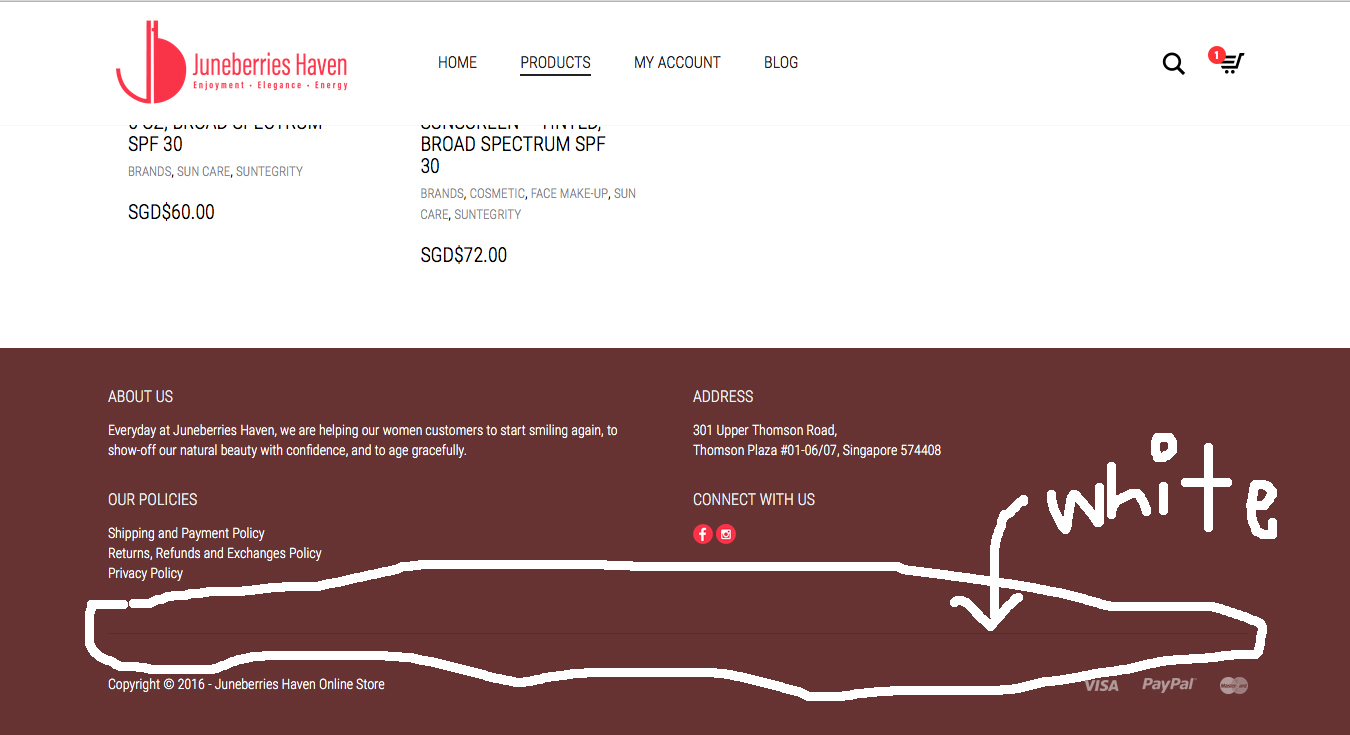
I still have 1 more qtns: 1. How can I change the footer separator to white. pls see screen shot: http://store.juneberries-haven.com/screnshot/footer-separator.jpg.
Reference URL: https://store.juneberries-haven.com
Many thanks in advance.
Hi JC2016,
Can you please add the code below to Custom CSS
footer.site-footer.inverted .footer-bottom {
    border-color: #fff !important;
}
Kind regards,
—Ylli
Hi, there is 1 issue: Whenever I tried to use the search function to search some products, the page is “blank”. Please advise.
Hi JC2016,
Please open a ticket at laborator.ticksy.com so we can help you out. Also share your site login credentials in the ticket as well.
Kind Regards,
Art
Hi Laborator,
I would like to create a transparent header like this: http://themes.laborator.co/#theme=aurum
I have tried to do it through layerslider and visual composer but it is not looking the same as the example – can you help with advice please?
thanks, Sarina
Hi Sarina,
Can you please send us your site URL first, so we can investigate your site and then get back to you with possible solution.
P.S. make sure you’ve disabled the Maintenance/Coming Soon mode
Kind Regards,
Art
site URL is http://www.sarinadiakos.com
Hi Sarina567,
Can you please send us your WP credentials on email? We need to investigate your problem and then get back to you with possible solution.
To send us email use this link and please write us your request again, because we receive a lot of emails on daily basis and we unfortunately can’t remember all customers requests.
P.S: Please note that we usually do not respond to emails that request support, because here is our primary support forum. We use contact form just for sending sensitive information. Also emails response time can be up to 7 business days.
Kind Regards,
Art
Dear Laborator team,
Hi and thanks so much for adding the transparent header for me – much appreciated! The only problem I’m having now is with the site identity and menu text – the lettering is now white instead of black and doesn’t show up against the white background of the new header. Can you tell me how to change the colour of the text back to black thanks.
Kind regards, Sarina
Hi Sarina,
Glad that helped! Kindly add the following code to your Laborator -> Theme Options -> Theme Styling -> Custom CSS field:
.transparent-header header.site-header ul.nav>li>a {
  color: #333;
}

.transparent-header header.site-header .header-menu .logo a {
  color: #222;
}
Please let us know how it goes.
Best,
Imran
I have noticed an issue on the shop page when I am on the first or last page of the shop pages. URL: https://blueskylingerie.com/shop screenshot: https://blueskylingerie.com/wp-content/uploads/2016/05/Shop-Page.png
Cheers.
Hi there,
What is the issue here please? Can you please try to be very specific about the question and explain it more to us, in this way we can easily understand you and give you the proper answer
Kind regards,
—Ylli
Oh sorry, I included a screenshot and then never explained the issue. As you can see on the screenshot there are 8 pages in my shop (I actually have 9 now), and when I am on the first shop page, the 5th shop page instead of having a number “5” is displaying ”...” and is not a clickable link PLUS, page 6 disappears. On page 2, all the pages are showing up but page 6 is displaying ”...” and is unclickable. But on pages 3,4,5,6,7 everything is fine, then on page 8, page 4 has the the same issue where it’s unclickable, and on page 9 page 4 disappears and page 5 displays ”...” and is unclickable. Quite a strange issue.
Thanks.
Hi Zach,
This is implementation of WooCommerce and its not a bug, its just an option you may or may not want to use, so if you want to show all pagination links add this code in the functions.php
add_action( 'woocommerce_pagination_args', 'pagination_show_all_custom' );

function pagination_show_all_custom( $args ) {
    $args['show_all'] = true;
    return $args;
}
Best regards,
Arlind
When I added this code to my child theme – functions.php I got this error on a blank white screen on the front-end – “Parse error: syntax error, unexpected end of file in wp-content/themes/aurum-child/functions.php on line 76”
Hi Zach,
Sorry about that, please remove the previous code and add this one, instead of add_filter I wrote add_action, so this code worked for me as well:
// Show All Pagination Links
add_filter( 'woocommerce_pagination_args', 'pagination_show_all_custom' );

function pagination_show_all_custom( $args ) {
    $args['show_all'] = true;
    return $args;
}
Best regards,
Arlind
I am trying to implement Infinite Scrolling on the Shop page and it works to some extent but the only problem is that when more products load, the class “clear-sm” is causing the layout to appear all off(not on every row, just every few rows). I know that the plugin works but I don’t know where the code is on the template that causes the conflict, nor how to fix it. here is the support thread and their response on what they believe is causing the issues with your template and how to fix it: https://wordpress.org/support/topic/wrong-selectors-or-problem-with-plugin and here is my website’s shop page: http://btltees.staging.wpengine.com/shop I look forward to getting your input on the matter, thank you very much.
Hi btltees,
In order to ignore that clear-sm class, please go to Theme Options > Shop Settings and set Masonry mode to Fit rows:
This should solve your issue.
If that doesn’t works simply set display to none for clear-sm:
.products .clear-sm {
    display: none !important;
}
Best regards,
Arlind
Hello, Thank you for your reply. unfortunately this did not fix the issue; setting Masonry mode to Fit rows makes the product rows overlap when new products are loaded and adding the snippet of code that forces clear-sm to Display None doesn’t change anything. would you like the login information to the backend to take a closer look?
Hi btltees,
Ok then, can you please send us your site URL and WP credentials on email? We need to investigate your problem and then get back to you with possible solution.
To send us email use this link and please write us your request again, because we receive a lot of emails on daily basis and we unfortunately can’t remember all customers requests.
P.S: Please note that we usually do not respond to emails that request support, because here is our primary support forum. We use contact form just for sending sensitive information. Also emails response time can be up to 7 business days.
Kind regards,
Arlind
I sent an email from admin@bethelighttees.com, please send any responses to luigibella.bella@gmail.com Thank you
Hi there,
We will get back to your e-mail as soon as we can
Kind Regards,
Art
Hi guys, Quick question: is the current version fully compatible with Wordpress 4.5.1.? I am about to update so I thought it best to first check this with you.
Hope to hear from you soon.
Thanks!
Hi there,
Yes, the theme is fully compatible with the latest version of WordPress, feel free to update
Cheers,
Art
Hey there, can you tell me how I can display the site title on the single site? or the single post?
thanks for your help!
Hi Ramhofni,
Thanks for writing in!
can you tell me how I can display the site title on the single site? or the single post?
Would you mind providing a little more description of your requirement? So that we can be of your assistance.
Best,
Imran
I want display the site title on a single site or the post title on a single post.
There was an option to type in the site name, but I think since the update it isnt there any more. Is this possible?
If I pusblish a post or a site there isnt a title (h1). Do you understand me?
Hi there,
There is still this option available but there may be a problem with your site maybe, can you please send us your site URL first, so we can investigate your site and then get back to you with possible solution.
P.S. make sure you’ve disabled the Maintenance/Coming Soon mode
Kind Regards,
Art
sorry my site is under maintenance mode, I can give you login credentials if you tell me how I can send this securely
Hi ramhofni,
To send us email use this link and please write us your request again, because we receive a lot of emails on daily basis and we unfortunately can’t remember all customers requests.
P.S: Please note that we usually do not respond to emails that request support, because here is our primary support forum. We use contact form just for sending sensitive information. Also emails response time can be up to 7 business days.
Kind Regards,
Art
Hi, do I need to purchase woocommerce plugin separate?
Hi Vneyr,
Thanks for reaching out! You don’t need to purchase WooCommerce plugin. Kindly navigate to Admin Panel -> Appearance -> Plugins and install the WooCommerce plugin from the listed plugins.
Please let us know how it goes.
Best,
Imran
Hi there,
I’m trying to update my theme on www.khulawear.com and that went fine, but I started updating the plugins necessary to continue my work and it’s giving me a fatal error:
Warning: require_once(/home/khulawea/public_html/wp-content/plugins/js_composer/config/lean-map.php): failed to open stream: No such file or directory in /home/khulawea/public_html/wp-content/plugins/js_composer/include/classes/core/class-vc-mapper.php on line 55
Fatal error: require_once(): Failed opening required ’/home/khulawea/public_html/wp-content/plugins/js_composer/config/lean-map.php’ (include_path=’.:/usr/lib/php:/usr/local/lib/php’) in /home/khulawea/public_html/wp-content/plugins/js_composer/include/classes/core/class-vc-mapper.php on line 55
Not sure what to do now and how to proceed. Can you guys help me? If I go to the domain it gives me the same failure. And can’t do anything anymore.
Help please!
Hi moniekvanerven,
I can see that you probably have solved this problem because you are using the latest version of Visual Composer on your site.
Next time after you update the theme please don’t forget to go to Appearance > Install Plugins to update all your premium plugins to the latest version that we support
Kind regards,
—Ylli
Best regards,
Eve KJ
Hi Eve,
Can you please try to be very specific about the question and explain it more to us, in this way we can easily understand you and give you the proper answer
Kind regards,
—Ylli
There are screenshots: http://tinyurl.com/hadfv25
Thank you
Hi evekj,
Can you please send us your WP credentials on email? We need to investigate your problem and then get back to you with possible solution.
To send us email use this link and please write us your request again, because we receive a lot of emails on daily basis and we unfortunately can’t remember all customers requests.
P.S: Please note that we usually do not respond to emails that request support, because here is our primary support forum. We use contact form just for sending sensitive information. Also emails response time can be up to 7 business days.
Kind Regards,
Art
Thank you very much. Now it is OK.
Best regards,
EveKJ
HI EveKJ,
Glad to hear it’s fixed now
Kind Regards,
Art
Hi There,
I tried to change my home page. But they didn’t show me the option. So can you help solve this matter please. And I cant put any Elements as well.
Many Thanks Nuwan
Hi Nuwan,
To edit your homepage login into your site and you have two methods of editing the homepage:
1. Go to the main site again, at the top there must be an dark admin bar and an option that says Edit Page, there you can edit your page.
2. In the Admin Dashboard view, go to the Pages and there you can find the homepage which you can easily edit.
Kind Regards,
Art
Hi Art,
Thanks for your reply. Yes, I did that. But my problem is I cant see any home page pictures in there. If you give me your e mail address, i can send you a screenshot. Then probably you can understand what i was saying.
Thanks Nuwan
Hi Nuwan,
Thanks for the description! Would you please provide your login credentials with the following information to support@laborator.co:
1) your WordPress user/password/URL
2) reference the URL of this thread in the email
3) briefly report the issues you have
Please note that we usually do not respond to emails that request support, because here is our primary support forum. We use contact form just for sending sensitive information. Also, emails response time can be up to 7 business days.
Best,
Imran