995 comments found.

Hi Nat,
Is there a way to implement horizontal sidebars in the theme? We have a few plugins that are showing below the content area, but we’d like to use widget areas between them (or above them).
I can see you can make additional sidebars in the theme, any advice you have would be super.
All The Best,
Hi,
You can create a custom sidebar and drop it on Below Post text area. See details here – http://strictthemes.com/manuals/how-to-add-widgets-below-or-above-article/
Regards, Nat
Thanks Nat, is there a way this custom sidebar can stretch from content area over to sidebar? For context, want to put a Billboard in there.
Hi,
The Below Post area is limited to the width of the article. You can use AD sidebar 3 for this purpose – http://dl2.joxi.net/drive/2016/08/24/0012/0377/807289/89/6a7bc1793a.jpg
Regards, Nat
Thanks for this great theme. After installing dummy content I erased all featured posts and wrote a new post and chose it as featured (stick). Unfortunately frontpage didn’t changed and still shows the deleted sticky posts. http://yeni.yakuter.com What shoud be the problem?
Hi,
Thank you for your feedback.
I’ve checked and found new posts as sticky on your website – http://dl2.joxi.net/drive/2016/08/19/0012/0377/807289/89/19928a0119.jpg
It’s about cache. It might be cache on your browser, cache plugin, or cache on your host, or cache on CDN (in case you’re using it).
I’ve noticed that blogroll is much longer than sidebars. You can change number of posts from within Settings > Reading – http://dl2.joxi.net/drive/2016/08/19/0012/0377/807289/89/99d704e7e1.jpg
Regards, Nat
Hello again, I tried everything to solve cache problem. Even I don’t have any cache aplication neighter on server nor on wordpress I still had cache problem. I looked for the database and at last I found that Yet Another Related Posts Plugin (YARPP) plugin has a cache table. When I removed that table PROBLEM SOLVED.
Now I have to find the answer to the text editor problem  There is no text aditor at admin posts page. And it can’t be changed to code editor mode. Is there a easy solution to it?
Hello,
Probably Text editor was disabled by some third-party plugin. Try to disable plugins one after another to find which one is causing conflict.
Regards, Nat
Hi There,
Is there a way to change the central content area to be 728×90 so as to support a adsense unit in article? Happy to sacrifice some of the left hand sidebar if required to support this.
Similarly, I’m trying to change the right hand sidebar (default) to be white on Single Posts, but can’t find the CSS in the stylesheet – please could you advise?
Hi,
You can drop something like these lines on Theme Panel > Style > Custom CSS:
.sidebar-position-left div.post-single,
.sidebar-position-right div.post-single {
float: none;
width: auto;
}
#stickyDiv {
display: none !important;
}

.single #sidebar {
background: #FFF;
padding: 5px;
}
Regards, Nat
Thanks Nat  Is there any way to make the post headline smaller too, so as to push the content up higher?
Also i’m afraid Nat that the above CSS addition had no effect. Best, Adrian
Hi,
I’ve checked code it works fine, make sure you’ve pasted it correctly. Let me know URL of your website and I will take a look.
This is css code for a post’s titles:
h1.post-title {
font-size: 2.0em;
}
Regards, Nat
Hi Nat,
I’ve managed to fix it, only error is that the counter and stuff has moved to the bottom of page, e.g.:
http://www.newscorner.co.uk/entertainment/olympic-memes-gold-medal-22-photos/nggallery/image/7-19/Ideally it would be great to keep the counter on page if possible, no problem if not!
I’d like to reduce the padding on sidebar between widgets, assume I can do this using padding-bottom; 10px for example?
Rest assure, 5 start rating for service coming after all of this
Hi,
These lines:
/*-- Re-styling post meta --*/

div.sidebar-position-left div.sidebar-post,
div.sidebar-position-right div.sidebar-post,
div.sidebar-position-none div.sidebar-post {
float: none;
width: auto;
text-align: center;
margin-top: 25px;
}

div.post-short-info .meta .ico16 {
display: inline-block;
margin-right: 20px;
}

/*-- Reducing margins below widgets --*/

.widget {
margin-bottom: 10px;
}
Regards, Nat
Hello. I just installed your theme and wanted to copy the demo. Installed and activated all the plugins. When I get back to TrueMag setup, the button “go to plugins” remains and i cant click it any more, the error pops up: You do not have sufficient permissions to access this page. Please help.
Hello,
I’ve installed the demo on your website.
Regards, Nat
Love you.
Rate our work – http://themeforest.net/downloads
It will take 5 seconds.
Done)
The child theme is for advanced users to make tweaks with theme. It is highly recommended to make any tweaks with original source files by using the child theme.
Regards, Nat
This is about the Title Attribute on Appearance > Menu Page – http://dl3.joxi.net/drive/0012/0377/807289/160307/51e03cb597.jpg
In case you don’t have it you need to enable on the Screen options – http://dl1.joxi.net/drive/0012/0377/807289/160307/e7edfc2ac2.jpg
Regards, Nat
I’ve been using this theme since 2014 and just did the theme update plus the STKit plugin and it caused a huge disrupt. All of the sidebar widgets were removed and put in the inactive area. Also, the STKit plugin now only has the one “edit button” rather than an “activate/deactivate” and “edit” buttons. I was able to manually go in and put back everything that was removed but I would like to know why it did this.
Also, I am having a problem displaying Header, footer and sidebar ads within an article all at the same time. I was hoping the update would take care of this but it hasn’t seem to. Would you know why this is not working? It will only display the header image if both the Above Article and Below Article is click on.
Thanks!
Hello Tom,
First of all let us say huge thanks for so long usage of our theme. We truly appreciate it.
Since v.1.3.0 Truemag comes with massive changes under hood so it might effect as you described. Most changes about re-written custom widgets and re-initialization of sidebars in accordance with modern standards, and new functionality such as One Click Installation. We’ve provided more info about that here – http://strictthemes.com/blog/2016/truemag-v-1-3-0-arrived/
In regards issue with ads on header, sidebar and footer please let me see your website and I’ll take a look.
Regards, Nat
Hi Nat, please look at dpsmagazine.com Thanks Tom. Also please CC with Sarah White, swhite@rockportpubs.com she is our designer and handles the design and technical aspects of our site. Thanks!
Hi,
I took a look your website and found Ad Sidebar #1 (header) and Default Sidebar are fine – http://c2n.me/3B9FMs3.jpg – http://c2n.me/3B9GrU0.jpg
There is nothing on the Ad Sidebar #3 – http://c2n.me/3B9GaUC.jpg
Regards, Nat
Yes, I just added. as a result, the big box in the side bar does not display now. Please check. Thanks Tom again please include swhite@rockportpubs.com in your email
Tom,
Nothing changed – http://c2n.me/3B9YHVG.jpg – http://c2n.me/3B9YKXa.jpg Check again.
We provide support on the message board. Please send the link to the comment thread to your designer – https://themeforest.net/item/truemag-ad-adsense-optimized-magazine/7493855/comments?page=41&filter=all#comment_13970694
Regards, Nat
I added a placeholder JPEG to the Below Article section in you Main Settings portion of the theme. The image does show up, however when I go to replace it with the custom code for the actual ad that needs to be there it disappears. I can’t show you b/c it will look as though nothing is there. But if you go to this link and scroll down to the bottom of the article you will see where the ad should appear (right now I have the placeholder image in): http://www.dpsmagazine.com/digital-trends/ What would cause the custom code not to show up?
Hi Tom,
JS-code exists below article and returns two ad units – http://c2n.me/3Be05LN.jpg
On the Ad Sidebar 3 the JS-code exists too, but returns error – http://c2n.me/3BdYIIb.jpg – http://c2n.me/3BdYREh.png – The reasons might be vary: invalid code, mistyping, unallowed usage etc.
For using image as ad banner make sure you’re doing it by the right way e.g. something like this – http://pastebin.com/3w4AmNjs
Also make sure you’ve disabled Sanitization – http://c2n.me/3Be1V8i.jpg
Regards, Nat
hey
how are you reaching out to let you know that i want to refund for this theme plz send me money back i am not much impressed by your theme and we are not satisfied with it kindly refund the money back or let me know the procedue
Regards
Hello,
We’ve received your request and will provide reply soon.
Regards, Nat
Are people using the Ninja Popups plugin with your True Mag template? I need a popup solution and their designs look really good.
Here’s the link: http://preview.codecanyon.net/item/ninja-popups-for-wordpress/full_screen_preview/3476479?ref=nikhilnik123&ref=nikhilnik123&clickthrough_id=765795006&redirect_back=trueHi,
UPDATED:
We don’t have such information. Since this is paid plugin we can’t test with the theme. But I’ve met this plugin in admin panel some of our customers. But I can’t give information if it works correctly.
Regards, Nat
Sorry. My mistake The answer has been updated.
Hi,
You can drop these lines on Theme Panel > Style > Custom CSS:
#footer .widget_archive > ul > li,
#footer .widget_categories > ul > li {
display: none;
}

#footer .widget_archive > ul > li:nth-child(1),
#footer .widget_archive > ul > li:nth-child(2),
#footer .widget_archive > ul > li:nth-child(3),
#footer .widget_archive > ul > li:nth-child(4),
#footer .widget_categories > ul > li:nth-child(1),
#footer .widget_categories > ul > li:nth-child(2),
#footer .widget_categories > ul > li:nth-child(3),
#footer .widget_categories > ul > li:nth-child(4) {
display: inherit;
}
Regards, Nat
and how to place the main menu on the top of the page
Hi,
You need to disable Sticky posts from within Theme Panel > Blogroll – http://dl2.joxi.net/drive/0012/0377/807289/150908/7eae4713f7.jpg
Regards, Nat
hi very good theme i want to use it for an arabic magazine RTL is spported ?
Hi,
Thank you for your interest and feedback.
It’s LTR only. Originally the theme supports LTR-languages only.
Regards, Nat
i have installed your theme on my website thedoctorsforum.com but the menu is that not the same as shown in demo, kindly check and guide me ASAP
Hi,
You need to select the Premium Menu in the Menu Settings on Appearance > Menu page – http://c2n.me/3AXb23E.jpg
Regards, Nat
hye,
I was going through the theme editor and i can’t seem to find any h tags (h1, h2 etc) anywhere. Can you help with this please?
Hi,
If you plan to tweak a styles of some tags, then you can use Theme Panel > Style > Custom page.
Regards, Nat
True Mag template support question. I would like to have my layout for my categories look like your template, which you can see here: http://strictthemes.com/truemag/category/food-and-health/
My website puts the title above every category and isn’t as efficiently laid out on the page. http://gemsisters.club/index.php/category/magazine/behind-the-scenes/
Also the entire post is being shown rather than the truncated version that your template shows. Can you tell me where the settings are to adjust this? Thanks so much!
Hi,
It depends which template you selected for blogroll from within Theme Panel > Blogroll tab. For Live Preview Template 4 has beed used – http://dl2.joxi.net/drive/2016/08/04/0012/0377/807289/89/362cdd1e5f.jpg
Regards, Nat
Good morning, I have a few questions.
1. Is it possible to have a thumbnail thats a different image than the featured image? My site is for a webcomic, and I want the posts that are featured on the home page to show the first panel of the webcomic, and then when they click on the post, they see the whole comic.
2. My titles on my posts are centered, I would rather have them left justified.
3. How can I disable the default author stuff that gets posted with a post? I want to keep the post stuff at the bottom of each post, not the stuff that gets put on automatically at the end of the post.
Site for reference. http://thesunshinebunch.com/
Thanks again!
Hi,
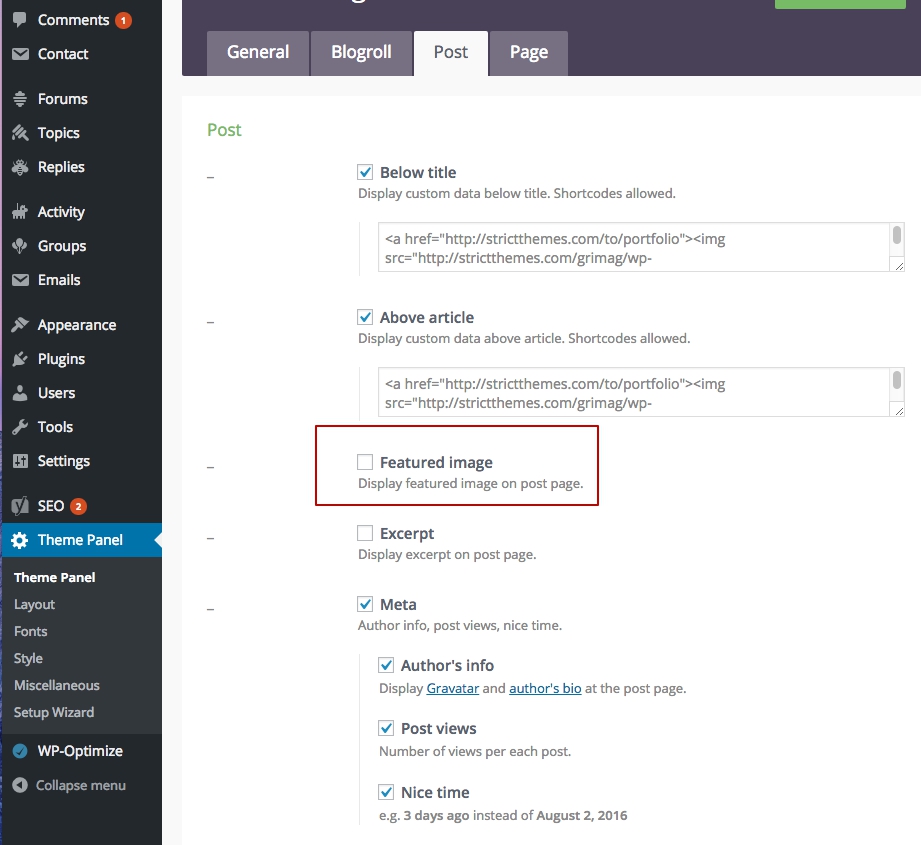
1 – You can disable Featured Image to display it on Posts from within Theme Panel > Post > Featured image – http://dl2.joxi.net/drive/2016/08/02/0012/0377/807289/89/c2988bb2bc.jpg – and insert a different image in a post – http://dl1.joxi.net/drive/2016/08/02/0012/0377/807289/89/109ad71718.jpg
2 – You can drop this line on Theme Panel > Style > Custom CSS:
h1.post-title { text-align: left; }
3 – Not sure about your question. Probably you’ve asked about Related posts, you can disable it from within Theme Panel > Post tab – http://dl2.joxi.net/drive/2016/08/02/0012/0377/807289/89/8e03aefa3b.jpg
Regards, Nat
Hm, neither of those seemed to work… For question 3, on my home page, at the end of my excerpt from the post, it shows the date and my name. And then right under that it shows the “Nice Time” post stuff. I only want to keep the Nice Time stuff.
Hi,
1,2 – It should work. If you need more assistance let me know an access details (to your WP admin) through the contact form – http://themeforest.net/user/strictthemes I will take a look.
3 – You should use excerpt metabox:
Enable excerpt metabox – http://dl1.joxi.net/drive/0012/0377/807289/151109/e5f98f665c.jpg
and drop some text there – http://dl2.joxi.net/drive/0012/0377/807289/151109/6279217313.jpg
And then disable meta from within Theme Panel > Post > Meta – http://dl2.joxi.net/drive/2016/08/02/0012/0377/807289/89/a24bcaf268.jpg
Regards, Nat
Hello. I noticed you had a help forum that I can log into but it would not accept my purchase code.
Anyway hopefully emailing you is the next best thing. I bought the True Mag theme which I love but I am selling through Zazzle so for now I need to deactivate WooCommerce and just put a link to zazzle.com on my website GEMSISTERS.CLUB. Can you tell me the steps to do that? Thanks so much!
Hello,
The forum on strictthemes.com is inactive at the moment and we provide support on the comments of the theme. So you have written in the right place
You can deactivate WooCommerce plugin on Installed Plugins page – http://dl1.joxi.net/drive/2016/08/01/0012/0377/807289/89/e07935df5c.jpg – and add the link on your Zazzle store for example on the Premium Menu using custom links – http://dl1.joxi.net/drive/2016/08/01/0012/0377/807289/89/ca09444db9.jpg
I’ve flagged your message because of shared purchase code. It’s private information. Please don’t share it.
Regards, Nat
Hi again. I just update my True Mag template. Do I delete the old child theme or keep it and reinstall it after I have installed V1.3.0? Thanks in advance.
Hi,
No. If everything okay after update, then keep it.
Regards, Nat
Hi!
My support has expired. But actually I had just upgraded Truemag theme (as always) and appeared some error. I think the process wasn’t finished. After that my widgets disappeared.
I’ve tried to do what you said in changelog but it didn’t work. “Please note you’ll have to re-arrange all widgets. In most cases you’ll find your widgets deactivated, so return that on their previous places.”
Problem solved! Forget it.
Hi,
I’m glad you have solved it. Let me know if you have more questions about new update.
I’ve flagged your message because of shared purchase code. It’s private information. Please don’t share it.
Regards, Nat
I just purchased truemag and it fails to install. It says “This theme requires the following plugin: AccessPress Mega Menu.” That was not listed in the Envato Market ad listing of requirements. Nor, can I find that plugin anywhere. Then, it fails with “The package could not be installed. The theme is missing the style.css stylesheet.” Help!!
Hi,
Thank you for purchasing.
You need to upload the theme zip only, not whole package – https://help.market.envato.com/hc/en-us/articles/202821510
Also take a look One click installation video manual – http://strictthemes.com/blog/2016/truemag-v-1-3-0-arrived/
Regards, Nat