89 comments found.

Is 1.1.4 compatible with WP 4.7.2?
Hello, thanks for asking!
Current theme version is 1.1.6, it’s available on the Themeforest and it is compatible with WP 4.7.2, please update your theme to avoid issues in its functioning. Changelog will be updated shortly, appreciate your understanding.
Yet also please note you can always see a list of updated files in each theme version in a readme.txt file. This file is located in theme root folder and is always updated with theme updates.
Kindly let us know if you have any questions or any assistance is required. Thank you!
After trying to import the LayerSlider Demo get this message… “The PHP ZipArchive extension is required to import .zip files.” what can i do?
Thanks for contacting!
Could you please submit us a support ticket so that the support team could take a look at the issue and help you? Please use the form to submit a ticket – http://cmsmasters.net/support
Thank you!
hi, i try set… php_value post_max_size 16M php_value upload_max_filesize 16M php_value max_file_uploads 32M php_value max_input_vars 5000
in the htaccess as you suggest, but send me automatic “internal server error”
any reason?
Thanks for contacting!
Extending htaccess permissions is a recommended measure yet in most cases content upload goes fine in any case. Please skip this step if your server does not allow it and import demo content. Still, should you need any assistance with this, please feel free to contact our support at http://cmsmasters.net/support
Just please make sure to add all the needed credentials when submitting your ticket.
Thank you!
why the discography link does not work in the demo?
Thanks for contacting!
Excuse us for a late response, most of our team was on a short New Year vacation, this is why requests took longer to respond. Regarding your question – I just went through a demo website again and not sure to understand what section exactly you are referring to. Everything seems to work ok on my end. Could you please provide some more details or perhaps a screenshot so that we could see what you mean?
Thanks in advance!
Hi, after I updated to Wordpress 4.7 images stopped showing on the posts, quotes, and love what you hear sections. The images are in the media library but they’re not showing on the website. Also, tried using different images, re-uploading the same image but none of that did the trick either. Could you please help?
Hi, thanks for contacting!
These errors are caused by the latest WordPress version, an update for full compatibility with Wordpress 4.7 will be uploaded shortly, and will be available for download as soon as it passes approval from Themeforest reviewers. Meanwhile you can receive the update by contacting our support – please submit us a ticket and our support agents will provide you a fix for this issue.
We highly appreciate your patience. Thank you!
Is the demo down at the moment?
Hello, thanks for contacting!
We experienced temporary server issues this is why demo site was not accessible, but the server is up again, you should be able to visit demo site now.
Thanks for your patience and understanding!
Thanks a lot and good luck!!! Luca
Hi, thanks for contacting!
Please note that Tour Dates displaying is achieved with the help of the Events Calendar Pro plugin that comes with the Events list widget with extended options. But please note that it should be purchased separately as this plugin is prohibited from third-party distribution.. In the basic Events Calendar plugin you can use Events List widget. More information about Events Calendar PRO plugin can be found here.
As much as we’d love to help, adding an image close to the date requires significant modifications, that are beyond our support policy. Appreciate your understanding.
Please feel free to ask any further questions should you have any, we’ll be happy to answer them! Thank you!
Hi,
I’ve just purchased the theme. I have trouble with the header, I would like to have an image there but I can’t get it to work. And I would like the blog to display the post in “timeline” mode. Where do I set that ?
Cheers, Tom
my site is www.three-songs.com
Hello Tom, thanks for contacting!
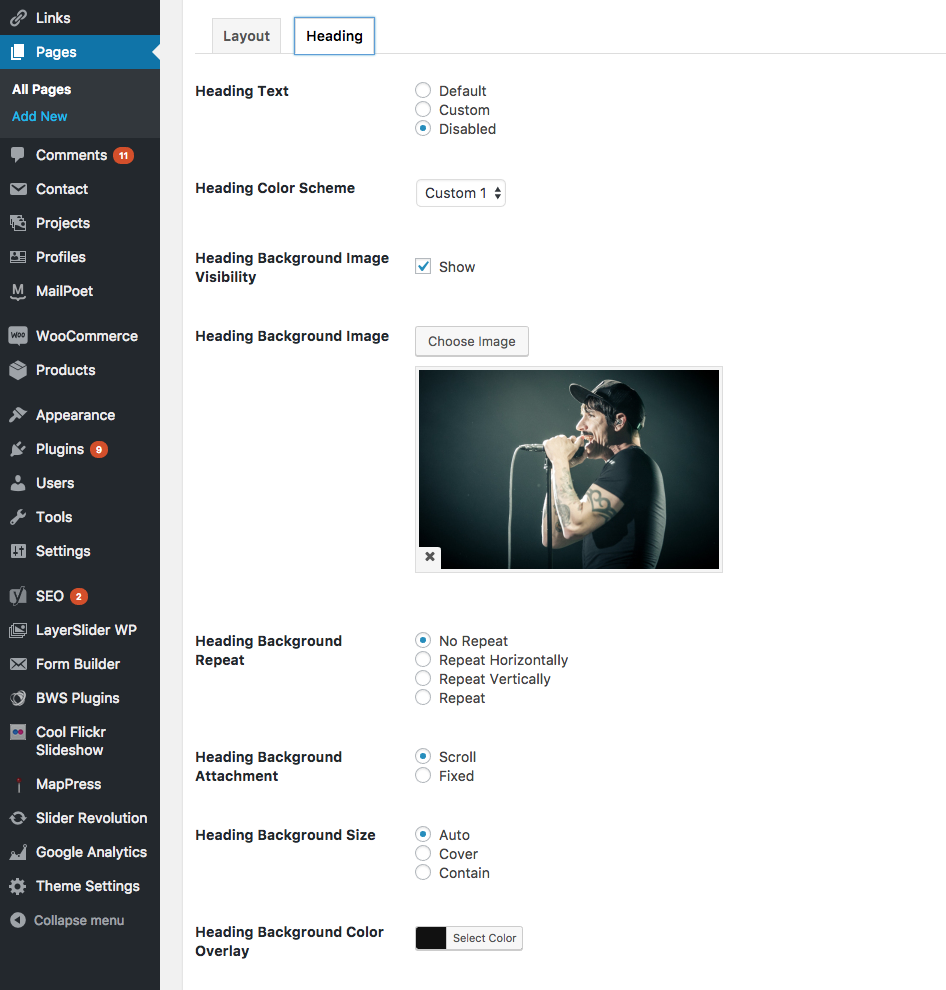
To add the image to the heading please edit the page and scroll down to the Heading options, you can set the background image here.
As I can see from your site, posts are displayed in the Timeline mode now.
If you still experience any problems, please submit us a personal request here with relevant WordPress credentials and our support agents will be happy to help you with the theme set up.
Thank you!
Hey, yes the Timeline mode is fine. However even with the header enabled I still cannot see the image.
Here is a screenshot of the settings:
http://www.three-songs.com/image/screenshot.pngThanks for the reply!
Please set the transparency for Heading Background Color Overlay to see the image, it should be helpful.
Please keep me posted about the results. Thank you!
Yes that worked thank you. But I don’t get the same result as you have un your demo. It is not centered and doesn’t scroll as the demo does.
Fixed that, the only thing left that I cannot figure out is to make the top Bar (social icons and navigation) behave like in the demo, i.e. stick to the top when I scroll down.
I tried putting this in the Custom Code area as mentioned before but it didn’t work. #header .header_top {height:auto!important;}
Fixed that, the only thing left that I cannot figure out is to make the top Bar (social icons and navigation) behave like in the demo, i.e. stick to the top when I scroll down.
I tried putting this in the Custom Code area as mentioned before but it didn’t work. #header .header_top {height:auto!important;}
Fixed that too  thanks
Glad to hear you are all set now, should there be any other questions please feel free to contact!
Had another question (yup, you knew it was coming) – The top bar where we can put a phone number in and/or social links and/or other things that is located above the main navigation at the very top disappears when scrolling down the page, can you give me the custom code to make that stay on regardless? Thanks in advance!
Hi, thanks for the question!
I can recommend you to add the following custom css code to Theme Settings – Elements – Custom codes tab:
#header .header_top {height:auto!important;}
It should be helpful.
Let us know if you have further questions, thank you!
Worked like a charm, THANK YOU!
I do have another question in regards to the homepage slider – underneath the slider is a 20px white line being styled in by the p, which has been coded in because of the script being loaded for the music player. On your dev site, it does not exist because the slider is 20px higher, however when I style it higher via css, it kills it in mobile by keeping it at that height and if I change the values in rev slider, it does not do anything. Do you have an idea on what is going on or would you like to know the dev site location and credentials? If so, where can I share the info? Again, thanks in advance and you guys have been a TERRIFIC HELP thus far!
Hi again!
We’d really appreciate if you submit us a ticket
here so that we could take a look at the issue from your end. Please make sure to add WordPress admin login.
Thank you!
Not a problem at all, I just didn’t know where to enter a ticket. Ticket is on it’s way…
Hi, thanks for the reply! Our support team works Monday to Friday, that’s why we didn’t get back to you earlier.
Could you please specify a ticket number so that we could check the progress for you? As soon as request is submitted, a user receives automatic response with company policy and ticket number. The letter might be redirected to Spam folder, please check it as well.
Thank you!
No need to apologize, I have no problem playing by the rules (or hours in this case).
Case # – 27058
They have ALREADY resolved the issue! I can’t wait to login and see what css it is that I couldn’t figure out…
THANK YOU!
Thanks for your feedback!
Glad to hear you are all set now, should there be any other questions please feel free to contact!
Hi, is the audio player locally hosted or is it streamed from soundcloud?
Hi, thanks for the question!
Using Audio Player Shortcode you need to add audio files from your media library, please see the screenshot.
If you need to embed audio from Soundcloud you can use Embed Shortcode. Please see this page to check the result.
Please don’t hesitate to ask further questions. Thank you!
Hey Guys! For the “FILTER” on the blog or the music listing pages – can we start with that open instead of closed and clicking to open? It can still close once clicked, but client would like to start it open when a visitor visits the page. Please let me know and THANKS!
Hello, thanks for contacting!
To make categories always visible and to remove “Filter” button, I can recommend to add the following code to Theme Settings – Elements – Custom Codes – Custom CSS:
.cmsms_project_filter_but {
display: none;
}
and this code to Custom JavaScript:
jQuery('.cmsms_project_filter_but').addClass('current');
Please let us know about the results. Thank you!
Thank you sir! The CSS was easy and I had that previously – it was the Java that I royally screwed up! Thank you. I was also able to adapt this to the post button as well. Have a great weekend!
Great, thanks for getting back with the results!
Please don’t hesitate to contact us in case of need. All the best from Cmsmasters team!
hi, i have a problem with the menu. i have create an arabic menu, at center of page , the problem was that when i create in the admin dashboard from up to down (in menu manger) , if i open the web site it’s left to right not right to left & at the same time when i open as phone it’s from right to left. that meen the website menu (desktop) is not the same as in phone (android) ? how can i resolve this problem
Hi, thanks for contacting our team!
As we haven’t received any similar complaints earlier, we’d kindly ask you to submit us a personal request here for deeper investigation of the problem.
Thank you!
Hi. Is it possible to put lyrics for each song? Thank you
Hi, thanks for your interest!
Lyrics can be added separately, via Text shortcode (or any similar one), but there’s no possibility to add lyrics directly to an embedded audio track.
Thank you!
Hello guys ! A friend bought your theme for me. I have a little problem. After installing the Layer Slider (It’s the only one i found in the zip), how could i add the shortcode to the homepage in order to make the slider functionning?
Hi, thanks for contacting!
To make a ready slider appear on any page please use Slider shortcode, you’ll need to select a slider to be displayed in shortcode’s settings. If you haven’t imported a slider yet, we’d advise you to do that to make elaboration easier. Demo content files for slider can be found in Demo Content – Slider Demo Content folder.
Kindly let us know if you have any further questions. Thank you!
Hi! What plugins does this theme include?
Hi, thanks for asking!
The following plugins are included in the download: CMSMasters Contact Form Builder, CMSMasters Content Composer, CMSMasters Mega Menu, LayerSlider WP, Slider Revolution. There are also some recommended plugins like MailPoet Newsletters, The Events Calendar and WooCommerce. Please note, thatThe PRO addon for Events Calendar needs to be purchased separately, as this plugin is prohibited for third-party distribution.
Please feel free to ask further questions should you have any. Thank you!
Hi, thanks for replying
I have more questions, sorry if they sound basic!
1) Main navigation and Header: can they be customized (not only color, font for e.g)? 2) Fonts: can I set a custom font (not google fonts) for main navigation / titles / etc? 3) Is the theme polylang compatible? 4) Is it “bakery visual composer” compatible too? 5) Can the TABS be customized?
Thanks again!
Hi again!
1. Menu position can also be customized in theme settings, as well as header height, for instance. And surely, colors and fonts can be easily adjusted.
2. Only Google fonts can be used with the theme.
3. We can’t guarantee Polylang plugin compatibility with the theme, but WPML plugin should work absolutely properly.
4. Visual Composer (Page Builder by wpbakery) isn’t included in the theme package and we can’t ensure its compatibility with the theme.
5. Could you please specify how exactly you would like to customize them?
Thank you!
Thanks again! 2. Not even by code? 5. For e.g, can I insert a table (festival program by days/hours/performance place/etc) inside one tab´s field?
p.s> is it working ok with wordpress 4.6?
Thanks for the questions!
2. Theme functionality doesn’t presuppose adding custom fonts via dashboard, as to any coding modifications – we can’t assist you regarding them and can’t implement them as it’s beyond our support policy.
5. Sure, there’s a possibility to add a theme shortcode (a Table as well) to a tab.
The theme is compatible with the latest WordPress version, there shouldn’t be any problems with it.
Thank you!
Thank you for the replies! I´ve already purchased the theme and works great!
Only thing is, in the TAB SHORTCODE SETTINGS, I´m inserting a table but once I go out of the “table window”, I can´t edit it again…is there a way to “re-open” the window? Thanks!
Thanks a lot for choosing our product!
As much as we’d love to help, there’s no possibility to edit a shortcode within tab shortcode, you can only change the code and its content, after editing window is closed.
Thank you!
No problem, it´s doable! Thanks!
I have a technical question because i can´t make google maps work, where shall I submit it?
Thanks a lot for your understanding!
Could you please specify the theme version you’re using? The latest one includes a field to add Google Maps API key – it can be found in Theme Settings – Elements – Custom Codes. The key can be generated here: https://console.developers.google.com
Here is a video instruction so that you can see how the key should be generated. Hope it will be helpful! Please let us know about the results on your end.
Thank you!
Thank you for the update. Could you update the changelog? Thanks
Thanks for the comment! Please check the changelog, it’s been just refreshed.
Thank you!
Hey Guys! About to make the purchase, but have a question. Does the “Releases” section have an option to allow for the user to click a subject and have only those titles relating to that subject appear? So basically like a sort function.
Hi, thanks for being interested in our theme!
You can enable such filter for Releases page, please watch a screencast showing how it will be displayed.
Should there be anything else you wanted to ask please do so. Thank you!
Just what the doctor ordered! Thanks guys, purchase forthcoming…
Yay! Looking forward to further collaboration, please feel free to contact us if you have any questions!
Thank you sir!
Hi, I am hosting live concerts and would like to make a wordpress theme with videos of the concerts (preferrably also self hosted) directly accessible on the homepage. Can I do this with your theme? Thanks a lot in advance!
Hi, thanks for your interest!
Sure, you can place appropriate shortcodes (with embedded or self-hosted videos) directly on a Home page, that’s absolutely doable.
Please let us know if you have any further questions. Thank you!
Hi there, is it possible to add Instagram to the bottom of the page? I note that Flickr is an option but I don’t see for Instagram.
Hi, thanks for asking!
You can use a plugin to add an Instagram feed, just please note, that we don’t guarantee such plugins compatibility with Music Band. Though there’s a possibility that a plugin will work properly with the theme.
Thank you!
Hey guys one last question. How can i make the website looks like the demo? Do you provide a xml demo content file?
Thanks
Hi, thanks for your interest!
Sure, .xml demo content file is included in the theme package, so you can easily upload it. Just please note, that mages will be substituted with placeholders as we have no rights to distribute them.
Thank you!