1096 comments found.
Hey @chiranjit_bera,
Just input FontAwesome code with “i class” before the name of the link in footer menu.
Screenshot: http://savepic.ru/11389787.jpg
http://savepic.ru/11341659.jpgThank you. Yes, you can do it by inputting directly fontawesome tag.

can I use font awesome icons on footer menu area? http://d53i.imgup.net/Screenshotc5d3.png
The template has no that feature at this time. Sorry.
Hi, what to do if i dont want feature image just on a specified post?
1. alphabet u is not working in search box
2. What to do if i don’t need photos to appear in some of the pages..
Like i add a paypal button in one of the page and a big blank space appears in the top of page without any image.Thanks
Hello,
1. You mean “unicode”, right? MagOne search box is work well on my demo with all characters, included unicode. If you have a problem with it, just please share me the related URL.
2. You can stop template getting first image as feature image from Sneeit Spot (mentioned in document) / Settings / Post Content
Excellent job Tien with menus and the Ads. Thank you. But there is a bug with Inner Post Ads. When add the ad code in Sneeit Spot, in the posts which we do not add the [post_ads] or in old posts where there is not the [post_ads] shows itself an ad banner after post before comments section. Show here http://www.alexpolisonline.com/2009/08/blog-post_5792.html
Hello. I added this to next update list. Thank you very much, your feedback is really useful.
To fill that the “Inner Post Ads” banner shows and to the end of static pages, before the “All pages content bottom” section.
Hello Tien,
How we use this part of the menu, or how you’re writing code?
https://s9.postimg.io/ueipizzxr/ggg.pngThanks
That’s optional and for advance users only (who understand about the CSS Classes).
Hello. Sneeit Spot not support Preview feature at this time.
Anyone encounter site freeze just when we left browser open our site for a 20-30 minute? and its never stop till we refresh the browser??
Hello. Just share your URL so I will test on my side. What is the browser you used (and version)? Thank you.
my browser is Google Chrome Version 53.0.2785.89 m (64-bit), just let the browser stay and hold(dont move cursor or anything) on my site (foundiy.com) for a minutes and its start to freeze.. and after refresh it’ll back to normal
After updating to your latest version of template, I don’t have an option to edit menu as you shown in your video. I bookmarked sneeit spot 1.5 but when I click on it there is no menu option.
What is even worse, default menu shows on the site and I can’t edit it. But I can see mine old menu in the layout window of blogger.
Don’t mind this, I had to clear cookies and restart Chrome altogether to have the effect.
hi, i already purchased your theme and applied it. But, why my post not show?
sorry im a newbie, but please guide me to fix this  till my site looks like your demo page
Hello. Please share your URL here or if you want private just send to http://support.sneeit.com
Hey buddy, help please.. i even can’t post after install this theme
Please give me right step to make a post, cause my article is not shown when i make a post
Is your blog private?
I have set to public
I have send you my team viewer ID
I checked and you have no any labels on your website.
very helpful, thank you
Hi tiennguyenvan ! you are so talented, please consider this element to add from this beautiful template by you http://i.imgur.com/6EzlNdN.jpg ... I’ve been requesting this for year but I know this might hard for you .., this element is so useful for magazine type of blog, mobile user-friendly and ultimate saving space on blog
please le me know if this element are possible to make
That’s seem not beautiful for Blogging article box. I decided that I will not apply it.
but this is an element module that people can either use the element.. , I make most of my blog as magazine, article as this template is excellent for multipurpose and receive good feedback .. please tiennguyenvan , only this element to be added to the module family
I don’t agree with that when I receive only one request. More code, slower site, I must decide carefully what I will need to update and add. I can not satisfy one buyer when hurt other ones.
it’s ok, but can this element = complex can be modify and added thumbnail ?
http://sneeit.com/wp-content/uploads/2000/07/magone-doc-01.pngNo. They are total different.
One thing more, Can you please consider to increase the content width area of MagOne on mobile phones?, it seems the width area is less wider in new version 5.1.0 as compare to version 4.3.
Can you please consider to increase Width Size on Mobile Theme of MagOne similar to old version 4.3 on your next update? Thank You.
OK. I will consider fix them in next version.
Hello Tien,
Can you please confirm if you have fixed my earlier reported issues on latest MagOne version v5.1.0? It seems i am facing these two problem on current version too.
PROBLEM # 1:
Label text is not appearing at the end of the post, just label links are showing at the end, and no Label text heading is appearing.
Label text is marked and added into Post Widget setting too, but still Label text is not appearing with Label links. You can also confirm magone demo link, their label text is appearing as “FALSE” so i think there is some coding error in magone. See here: http://i.imgur.com/CdK8hFr.png
I have also checked 3 to 4 MagOne theme blogs running v5.1.0, and Label text is also not appearing in any of those blogs too. Can you please check this issue?
PROBLEM # 2:
Archive Page Reload for Content not working in firefox
I have opt-in/enable this option in v5.1.0 i.e. “Archive Page Reload for Content”
But it seems this feature is not working in Firefox web browser, the next page doesn’t load correctly, instead the same first page keep loads everytime. Please check this issue too!
OK. I will consider fix them in next version.
Tien, have a look at image of widget please, I think it was perfectly aligned in version 5.0.4, since version 5.1.0, there is slight misalignment, left side is slightly raised as compared to right.
http://www.screencast.com/t/Ex6p7Bvan
Also, based on user’s comments, there are two types, ones that requires fixing of issues in theme, and normally those are fixed in next update, and then there are ones that requires questions based on customization, (like how can I do this) can you as well create a FAQ page in documentation and include all those how to do types of questions in that, so that others can benefit from that too.
Hello.
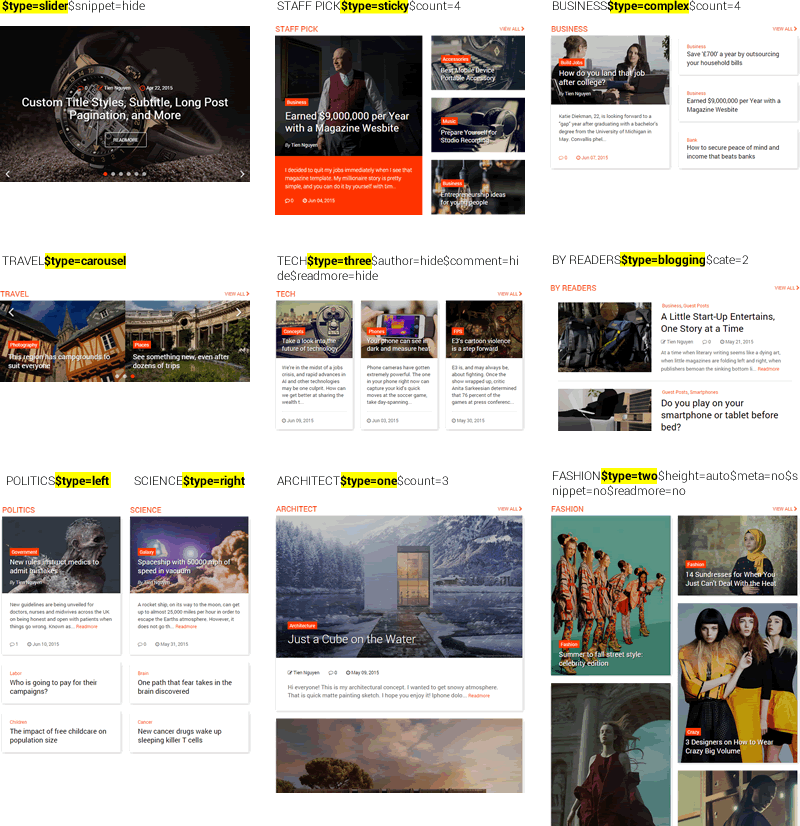
1. You can use parameter $height to adjust the thumbnail height on right side to make equal of both.
2. If you read my document in updated version, you will know I already created a forum for that: http://sneeit.com/2015/07/magone-multi-purpose-blogger-magazine-template.html#support
Perfect!!! thank you so much…
Hi, did you fix the [feature] image?
Yes. You can read release notes on item detail for more information.
Tks, can I update theme without config wiget and menu?
There is no Icon to share at the end of article. Can you fix?
1. Use Sneeit Spot to update 2. Edit Blog Post widget and make sure you enabled share buttons.
tks, I checked the Blog post and It’s already ticked!
I used sneeit to update but the menu back to your design.
And it’s working not not? Thanks.
In latest version, you will need to modify menu via Sneeti interface (you can see a button with name “Menus”). The menu on page list 1 is no longer work (I updated the document)
Thank you for recent update Tien, for your next update I have few suggestions/questions.
Question 1: Where Addthis code is entered, can we enter some other code like Shareaholic?
Question 2: If I have to use a widget to show just few selected posts, how will I be able to do that?
Suggestion 1: Now Menus are controlled via Sneeit interface, can you remove the Menu Widget from Layout? also, if someone has to remove all items from menu, and later to add again, HOME page link is not found (though adding some other and altered)
Suggestion 2: Can you as well include Photo library that can be embedded in post, in next update?
Suggestion 3: Few of my posts are larger, can you as well include another 3rd [post_ad2] in posts widget/area?
Suggestion 4 : and Finally, I have requested to update documentation with screen grabs so it is easier to understand, specially widget configuration area, or make a video on YouTube showing that.
Thank again for your continued support and efforts. 
Hello.
A 1. Use Sneeit Spot (document), in Settings / Post Content, just input your code into: Sharing Button Code field.
A 2. Group your posts into a new label, then simple showing that layout on the widget.
S 1: The widget was used because I want the menu code will appear inside a section, this Blogger rule. The widget was locked and don’t worry about mistake remove.
Home link is custom link ”/”
S 2 & 3: I will add to update notes.
S 4: I don’t get the idea, if you want to know about widget area, just access Layout
Thanks Tien, it’s your very active customer support that makes you best in blogger theme developers & support.
Thank you very much.
help needed! hello sir, please connect my pc through teamviewer. I want to show you a problem that I face after installing theme. can’t able to make like your demo blog.
Please help
Hello. I replied your email. please check.
i send you team viewer id , pass please connect my pc remotely sir, there i can better explain my problem sir. i’m waiting
Everything done. Just say your opinions about the template. Thank you.
Thanks for your instant help template is looking good as i want
Horrreeeeee Tein.. Ive bought this theme. But i dont understand using your Sneeit. Help me.
(Sorry my English is bad)
Dear brother. Sneeit Spot has tutorial videos, you can follow it. Or you can send me login info and your request detail, I will install for you.
Send info to: https://themeforest.net/user/tiennguyenvan#contact
Thanks for the purchase.
Thanks MaBro Tein, I’ll send email to you now.
Thank for update. God blessing you. Aamiin.
please look at this, in template coding no schema.org found. [ https://s22.postimg.org/g7ajxcy81/Screenshot_90.png ] i just want schema.org markup for – blog, header, wpsidebar, footer, nav and others area if possible. like others premium template have , such as – magpress, setiva, relish etc.
Hello. I am not use that for useless. I use schema for article content, the most important part of any website. If you access this: http://magonedemo.blogspot.sg/2015/04/michael-consumer-consectetur-malesuada.html
and view source then search schema.org you will understand. You can also check with https://search.google.com/structured-data/testing-tool#url=http%3A%2F%2Fmagonedemo.blogspot.sg%2F2015%2F04%2Fmichael-consumer-consectetur-malesuada.html
to see that the template already supported Blog Posts Object (hope you know it when you are talking about Schema).
The standard is following all popular item, even compare to Wordpress like Newspaper theme.
Your screenshot is about things before head tag. I don’t know why and how schema must appear there. Schema markup is for content of articles.