266 comments found.

Hi Heroplugins Team,
Nice theme, I’ve got an issue when adding the lookbook section and selecting specific lookbooks projects, it have the option to choose one Lookbook to display or the main one but it end up displaying all of them, please take a look to the preview images: http://prnt.sc/czfujj
Cheers!
Boris
Hi Boris
Thanks for getting in touch. We would like to take a closer look. Please send us a support email and we’ll gladly sort it out for you.
http://heroplugins.com/product/invogue-theme/documentation/?section=submit_ticketKind Regards, Gideon
Great! Thanks Gideon!
hello
I love your design, but when I install it I get the same error message it asks me if Im sure to do this step and links me back to the upload page, what can I do ? Do I have to edit a php.ini or php_config file ?
Hi
Thank you for the kind words:)
It might be that your php version is out of date, but please send us a support email to have a look at the error. Please include WP admin logins, so we can replicate the error.
http://heroplugins.com/product/invogue-theme/documentation/?section=submit_ticketKind Regards, Gideon
Hello Thank you very much, it worked.
I have my next question: Is the theme loading without PRE-PICTURES? Its just building the structure at the moment..
I’m glad this worked! 
If you are talking about the demo installs, then yes the demo loads the structure, elements and page layouts. It is then up to you to add in your own products, posts and designs to all areas.
Please let us know if you have any more questions or in need of assistance, we’ll gladly help.
Kind Regards, Gideon
Hi, please confirm is your theme support RTL?
Hi
We’ve worked with the WPML compatibility team for the last month and a new WPML friendly version of inVogue will be launched within the next week.
RTL will only be implemented within the next few weeks. We’ll let you know as soon as it’s ready.
Kind Regards, Gideon
I installed this theme as indicated (only the invogue.zip file) and got the following error:
Parse error: syntax error, unexpected ‘[’ in /home/content/95/11818595/html/ofallons/wp-content/themes/invogue/htheme/classes/class.backend.php on line 81
I looked through your support and comments and found that others are having a similar issue.
As you had previously mentioned to someone else, I went and check my PHP version and I am on PHP 5.3 through GoDaddy. Their hosting only allows updating to PHP 5.4 (because of stability of anything newer).
Please advise on how to get this to work. I look forward to your prompt response on getting this fixed.
Hi
Yes you are right, we would recommend PHP version 5.6 or greater and the latest version of WP.
This is a WooCommerce requirement unfortunately. https://docs.woocommerce.com/document/server-requirements/
Please speak to GoDaddy to update your PHP version. Many WooCommerce sites are currently being hosted on GoDaddy, so they must be able to upgrade the sever for you.
Please let us know if we can assist you any further, we’ll gladly help where we can.
Kind Regards, Gideon
I can’t activate the plugin (“WPBakery Visual Composer: To receive automatic updates license activation is required.”) Any ideas?
Hi
We are using an Extended License for Visual Composer that is bundled within inVogue, so there’s no need to update it form your side. We will make sure that we update Visual Composer to the latest version with every big theme update that gets pushed out. You can then simply update your theme and Visual Composer will also be updated.
There should be a new release for inVogue within the next week.
Kind Regards, Gideon
NEED HELP?
Please have a look at our Documentation section for answers. If you still can’t find what you are looking for, please Submit a Ticket for quick turnaround support.
Have a great day 
Kind Regards
HeroPlugins
Hi there,
I am using the built in form of the theme, I am getting the email just fine but I am not receiving any data that is inputed in the “message type” box – why’s that?
Hi
This does not sound right.
We would like to investigate this for you. Could you please send us a support email and also include the URL for the website.
http://heroplugins.com/product/invogue-theme/documentation/?section=submit_ticketKind Regards, Gideon
On my blog archive pages, I have several blog posts, one of which I’ve manually set the excerpt and the other which was manually created. I was under the impression ellipses would appear at the end, but they don’t. Is there a way to turn them on? Thanks.
Hi Comp-Pros
This will be added in to the theme with an update soon but if you’d like to send through a support ticket we’d be happy to help and add it in for you now.
Regards, Milos
I tried to install the theme and got this message
Fatal error: Call to undefined function is_embed() in /home/kwaku45/public_html/Fashion/wp-content/plugins/woocommerce/includes/class-wc-template-loader.php on line 45
Hi
Please make sure that you are running the latest version PHP, or at-least 5.6 or higher. Please also make sure that you are running the latest version of WordPress.
If you need any assistance, please feel free to contact us via our support, we’ll gladly help. http://heroplugins.com/product/invogue-theme/documentation/?section=submit_ticket
Kind Regards, Gideon
Hi
One more thing to have a look at is the version of WooCommerce that you are running.
If you already have a WooCommerce installation running, then please make sure that it’s the latest version before you install inVogue.
Kind Regards, Gideon
Hey, I’ve just purchased your theme and I’m not able to upload it to my WP. If I go via WP interface it says that theme is missing .css file. If I try to upload it via FTP it does upload it and once I click “activate” in WP dashboard all my website shows is the blank space with the following error:
Parse error: syntax error, unexpected ‘[’ in /home/wedowebsite/public_html/trendo/wp-content/themes/invogue/htheme/classes/class.backend.php on line 81
Let me know if you’re able to help me to get this up and running? Thank you
Hi Adslab
The error seems to suggest that the issue is with the version of PHP running on the server. Would you be able to check which version this is and we can then confirm if that is the case. If necessary I’d recommend to update to 5.6 or if possible 7.0 as these are currently the 2 up to date supported versions.
With regards to the upload through WP please just ensure you are only using the invogue.zip file which contains the theme files and not the entire package from Theme Forrest which also contains other folders.
Regards, Milos
Here’s what I got from my database company, please advise if you’re able to fix it otherwise I have nothing but ask for refund as unfortunately I can’t use this theme for some reason.
Hi Adslab, As I can see it seems to be a Wordpress setup for this website. Did you update your Wordpress version ? or did you activate auto-updates on this Wordpress setup ?
It seems an update have broken your Theme. The error is coming from your Wordpress Theme.
In order to be 100% sure about the issue, please login into the backend of this wordpress and try switching to another default Theme. The issue seems to be related to Invogue wordpress Theme, it might not be compatible with a recent Wordpress update or so.
In any case, disabling this Theme will solve your issue.
Hi
Can you please confirm that you are running PHP 5.6 or greater and that you are running the latest version of WordPress? This is a requirement for WooCommerce to run. Please take a look here. https://docs.woocommerce.com/document/server-requirements/
Please let us know if you need us to have a quick look at your environment. We’ll gladly help. http://heroplugins.com/product/invogue-theme/documentation/?section=submit_ticket
Kind Regards, Gideon
Our server running PHP 5.3.29 (cli) (built: Feb 4 2016 16:42:19) and all themes work good except this one. The wordpress is up to date. Is there away i can run the theme on our version of PHP
Hi
You would need to update PHP in order to run inVogue. PHP 5.3 has reached its end of life (in mid 2013) and is no longer a supported version so we would definitely recommend updating just for security reasons alone. With inVogue we’ve used newer features that are not available in older versions of PHP so it wouldn’t be possible to modify the theme in this case to suite the PHP version. You can find out more information about PHP versions here: http://php.net/supported-versions.php
Along with the theme we also include WooCommerce which also has a minimum recommendation of PHP version 5.6, and you can take a look at this info here: https://docs.woocommerce.com/document/server-requirements/
So we would highly recommend to upgrade as not doing so could potentially lead to other issues in future.
Please speak to us via our support line to help you further in this matter. http://heroplugins.com/product/invogue-theme/documentation/?section=submit_ticketRegards, Gideon
We did upgrade our servers however theme installed fine but once I go to the theme settings or any internal pages via dashboard it crashes with the following message. If there is no asap solution, please let someone contact me to initiate a refund. Thank you
ERROR MESSAGE:
Fatal error: Call to undefined function getTermsByTaxonomy() in /home/wedowebsite/public_html/trendo/wp-content/plugins/universal_services_plugin/universal_services_plugin.php on line 181
Hi
Please contact us via our support page and we’ll gladly look into this for you. http://heroplugins.com/product/invogue-theme/documentation/?section=submit_ticketKind Regards, Gideon
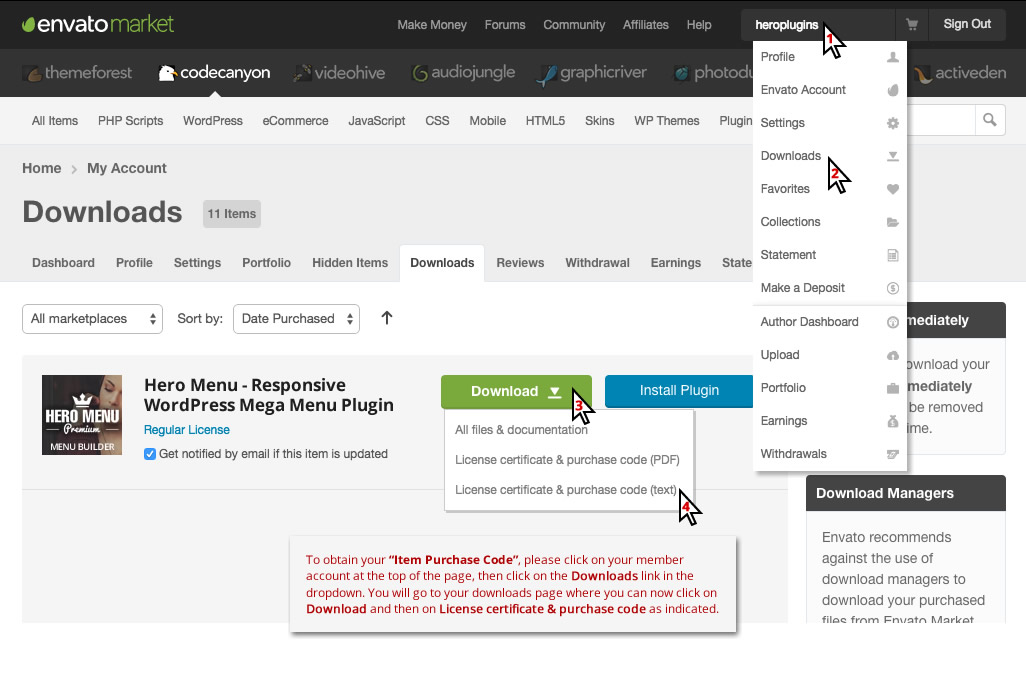
where do I get the Purchase Code?? I can’t submit a ticket without it. Thanks
Hi
Please follow this link. This is where you would find all license keys for your products. http://heroplugins.com/_codecanyon_images/CodeCanyonLicense.jpg
This example shows HeroMenu, but it works the same for inVogue. (The same for CodeCanyon and ThemeForest)
Kind Regards, Gideon
Hi Adslab
I just wanted to follow up about this as we haven’t yet received a ticket, have you been able to resolve the issue?
Regards, Milos
very bad support and communication, please do not even consider it…
Hi
We are very sorry to hear this, as we are known for great and friendly support.
Can you please tell me what your support ticket number is and when you submitted the ticket? It might also be that a ticket ended up in a spam filter on our side or your side.
Please let me know, and we’ll make sure you get the support you need!
Kind Regards, Gideon
Hi
This is just a friendly follow up, as we haven’t received any support query from you. Please let us know if you need any assistance.
Kind Regards, Gideon
Hi again, I managed to solve the issues myself. And yes you have received support queries from me, I received only one response that was Insufficient because the responder did not probably read the message, so I had to send another message to further explain; in my sencond and third message i received no response at all. Anyway, there is no point now for this. If I have any future issue i will post directly here and not in the support site that you have. Here at least you respond.
Hi Chousiadis
I really do apologize for the inconvenience and the issue you’ve experienced, we’re definitely always trying to support our customers as best we can. We’ve had a look at the ticket logs and your correspondence with our support and it seems maybe there was a technical issue where one of our replies didn’t reach you and your responses did not reach us. The last reply we received was Sep 27 13:50 and replied at Sep 27 14:33 but there was no reply after this and we had assumed the answer given clarified the issue. In future please let us know and feel free to use our support site.
Regards, Milos
HeroPlugins Support Team
Hi, great theme!! Got a few questions: 1 – On the shop page, the product title is capitalized, how can I disable that? 2 – Again, on the shop page, the product’s title is too long to fit on one line so it’s somehow faded out, I need it to go on a second line, how can I do that? Please see http://prntscr.com/cnnr9w
Many thanks, Radu
Hi
Thank you for the compliment!
The Shop heading is a global site H1 tag for all page titles. This can be changed in your inVogue Settings panel. Browse to your WP backend / Appearance / inVogue Settings / Typography. On this page you’ll find all text styling and you can change the H1 styling to “Inherit” and it will be displayed in the same way that it was typed out.
If you want only the shop heading to be different to the rest of the pages, then we can help you with some custom CSS.
For the titles being too long, we can also help you with a small line of code to wrap longer titles.
Please send us a support email and we’ll get right on it!
Kind Regards, Gideon
Thanks for the fast reply Gideon – submiting ticket now!
I would like to turn off the following on blog posts:
BY ADMIN | COMMENTS: 0 | SEPTEMBER 25, 2016
and the author box at the bottom of each post.
Can you provide a css code for this?
Hi
We’ll gladly help you with switching off “BY ADMIN | COMMENTS: 0 | SEPTEMBER 25, 2016”. Please send is a support email and we’ll supply you with the code.
http://heroplugins.com/product/invogue-theme/documentation/?section=submit_ticketSwitching off the Author’s bio at the bottom of each post can be done via the inVogue Settings panel. Please browse to Appearance / inVogue Settings / Blog. On this page scroll down to “Blog single post page” and un-tick “Author’s Bio”.
Kind Regards, Gideon
Thanks Gideon, will send through now.
Had some trouble with the form on your page.
You mean the support form on our HeroPlugins website?
Yes, it wouldn’t accept the purchase code
Ummm, the Envato API must be down. Please just send a non purchase support mail and add your purchase code in the comments section. We’ll keep an eye out for this one
Thanks, that’s what I did
Perfect!
I’ve bought a lot of themes and I can tell you this theme and the support are easily the best. Highly recommend it!!
Thank you for the kind words! It’s always great to hear from a satisfied customer!
Regards, Gideon
Hi,
Why do you advertise that the theme comes with Visual Composer if it doesn’t have all the regular modules? I’ve bought this theme because I like the design and because of Visual Composer. After I’ve installed it, surprise, I am limited to SOME modules, but not all.
I’ve tried to delete the Visual Composer and add my own, regular Visual Composer but again the theme’s VC takes over. Very dissapointed!
Please let me know how I can add additional modules.
Hi
All the modules that you see in the demo was custom built on-top of Visual Composer and is all you need to build layouts similar to the demos. Having all the standard VC components visible for users, just confuses most people not familiar with VC.
Switching on the rest of the components can be done in a very easy way. Please send us a support ticket and we’ll give you the key to switch it on.
http://heroplugins.com/product/invogue-theme/documentation/?section=submit_ticketPlease feel free to chat to us via our support line if you have any queries in future, well gladly help.
Kind Regards, Gideon
Hello. I don’t know where to change the texts placed in top of the page, login, account, etc I need change to spanish. Too i need some buttoms, example, View Product in section “Promo Slider” Thank You
Hi
This can be changed with the help of translation plugins or in the code itself.
Please send us a support ticket and we’ll gladly help you with this. http://heroplugins.com/product/invogue-theme/documentation/?section=submit_ticket
Kind Regards, Gideon
Hello !
The theme is compatible with loco translate since updated September 7?
Hi
We are currently busy finishing off a few updates to the theme. Loco Translate is at the top of the list of things to integrate when we are done.
This will be done within the next few weeks.
We’ll let you know as soon as it’s done.
Kind Regards, Gideon
Hi,
Just wondering how to use a hero image instead of a slider? I added just one image to the theme Home Slider, thinking it would work as just a fixed header image. But instead it scrolls the one image which is obviously not what I want. Any suggestions?
Thanks!
Hi
If you set up one slide only under inVogue Settings / Home Slider, then it will stay static on that one slide. Also remember to switch off “Show idle timer” under inVogue Settings / Home Slider / Slider Settings.
The other way to add an image to the header of the page is to add it on the page itself in the backend.
Browse to the home page in your WP backend. On the Right Hand Side of the page you will see a block called Page Attributes. Set the Template to “inVogue – Home No Slider Template”. Then at the bottom of this page under “Header Settings” you can now upload a background image, add some text, add a button and set the height that it should be.
If you need any assistance in this regard, then please feel free to contact us and we’ll gladly help. http://heroplugins.com/product/invogue-theme/documentation/?section=submit_ticket
Kind Regards, Gideon
Hello. I want to change the template i use today(Tyrion), is a sales website. it is easy change to this new template ? i don’t want to lose categories, products that i have entered Thank You
Hi
Theme switching should not be a problem. All products and posts will still be in their current categories and no data will be lost.
Please speak to our support team during the week, Monday – Friday if you need any assistance with this. We can have a look at your current setup first before you do the theme switch, just to make sure that all runs smoothly.
http://heroplugins.com/product/invogue-theme/documentation/?section=submit_ticketKind Regards, Gideon
OK, thank you for your answer. I’ll buy now.
thanks for the help they have given me fast, accurate answers
Only a pleasure!
If you need any assistance again in future, you know where to find us.
Kind Regards, Gideon
I’m having trouble getting the instagram feed to show. Where do I generate this access token? Do you have a URL?
Hi
You may follow these 2 URLs to get the Instagram ID and Token.
User ID http://www.otzberg.net/iguserid/ Access Token https://elfsight.com/blog/2016/05/how-to-get-instagram-access-token/If you still struggle doing so, please send us a support ticket with your Instagram name, and we’ll gladly generate the ID and Token for you.
http://heroplugins.com/product/invogue-theme/documentation/?section=submit_ticketKind Regards, Gideon
Fantastic that worked!

This item was featured on ThemeForest

Elite Author
Contact the Envato Market Help Team