

1050 comments found.

Hi guys, nice to see this get updated to pagebuilder 2, however when we updated our site to the new template and pagebuilder it messed with the design of all of our pages. Firstly, all of the content was now restricted to a width of 1200px or thereabouts instead of being full width, the row backgrounds are still full width but the content isn’t, and about half of the addons across all pages where not behaving normally or had settings change (buttons no longer had icons, feature boxes where left justified even if set to center in the settings etc). We had to restore our site from a backup back to the previous version, and will be trying again on a seperate dev site, but was there something we had missed that could have caused these problems? How do we set the page to use the full width without having to override it in CSS? (we are NOT using the boxed layout). Thanks in advance.
Hi summerland,
The problem is that with old Helix3 framework and old SP PageBuilder “fluid” width was not working for “Main Body” (Component) in your template’s admin > Layout > Main Body > Settings > Uncheck “Fluid Width”. Please, see screenshot bellow:
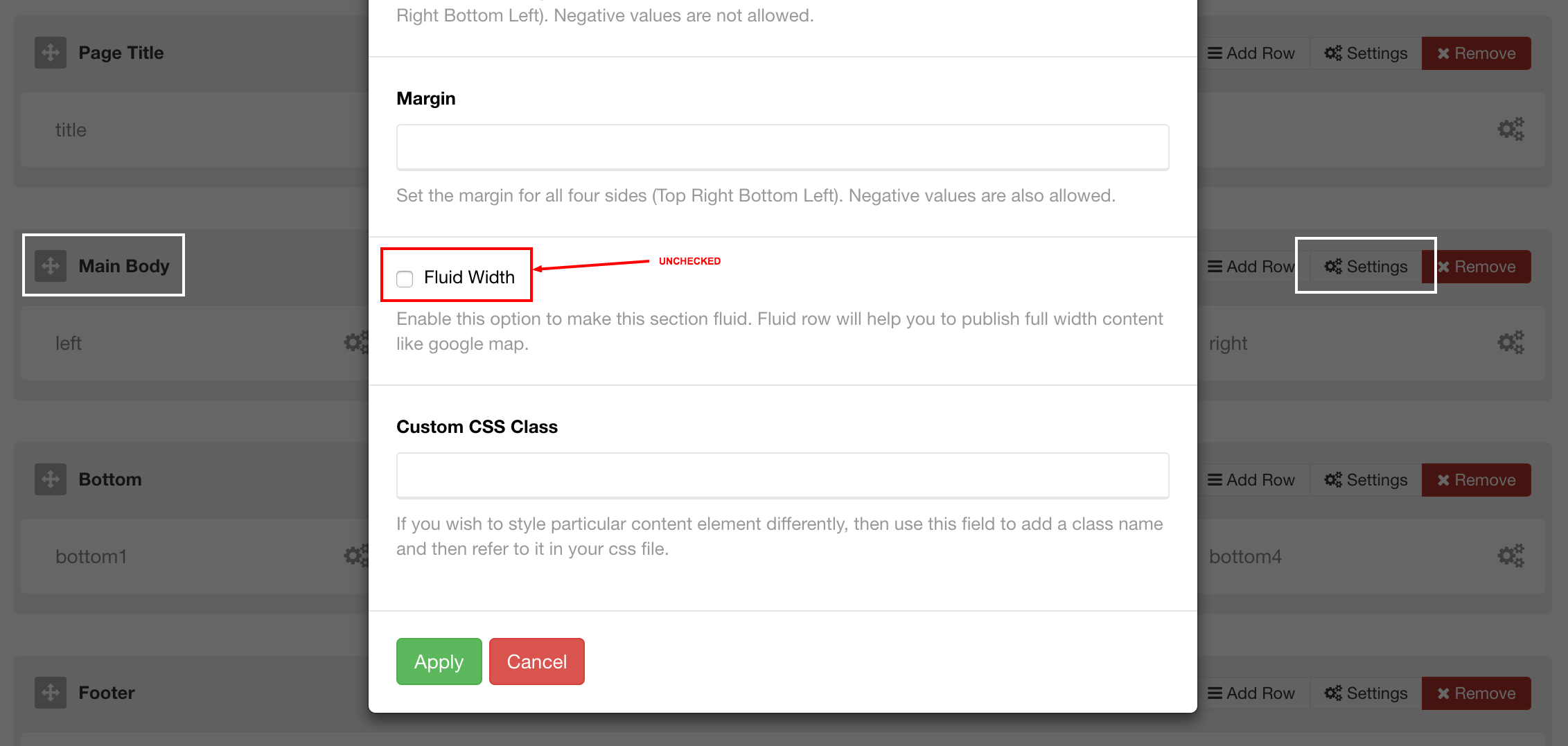
So, when you “uncheck” this Fluid Width, it will be the same as before. Now “Fluid Width” or “Container” is working properly, only thing that you need to update it on your website > template’s admin > Layout > Main Body.
Also, you can enable “Container” (or fluid layout) in SP PageBuilder’s Configuration. Please, see screenshots bellow:
When you click on “Options” in your SP PageBuilder’s admin, new window should open:

You can choose between “Container” and “Fluid” layout. These are settings for all SP PageBuilder’s pages.
I hope this will help.
Here is the screen when you open Options>

hi gays! How u update demo site http://flex.aplikko.com/? 
Hi there,
Demo site has been updated.
Hey contacted support with few questions, one is pretty important, logo is not being scaled properly on drop down menu and mobile version, could you check this? Thank you!
HAve you approached this?
Yes, I’ve sent you email.
Please indicate in the changelog what particular files were changed. Thanks.
Changelog has been updated: https://themeforest.net/item/flex-multipurpose-joomla-template/14881156#item-description__changelog
Great! Did you see that the logo on the “Coming soon” with Internet Explorer the log is moved to the left in the header and almost dissapear. I works good in Firefox but not IE. http://preview.themeforest.net/item/flex-multipurpose-joomla-template/full_screen_preview/14881156 check in IE. Can you update the css/code snippet?
I mean logo.
hi, thanks for your amazing 2.0 update! I really like the new settings for sticky menu (color).
But i still have a problem:
I hided two 3rd level menu points. They are hidden (no menu titel is shown), but the mega menu still open (the 2nd level has an icon and it open a white place, without menutype).
How can I hide hidden sublevel menu parts. I check the html code: empty li elements are shown:
any idea? I dont want use a hidden menu. i prefere the core function of joomla 3.5 (dont show menu title)
Hi xeomueller,
Why do you want to hide menu items? If you don’t need them, just disable them. The core function is to show menu title, not hide them.
Please, if you have direct questions, would you be so kind to contact us next time via support page: https://themeforest.net/item/flex-multipurpose-joomla-template/14881156/support or directly to aplikko@gmail.com?
hi Aplikko, thanks for reply. So this is a real core funtion: check the menu item: click on “link Type” there is new core function since 3.5.x Display in Menu. So no “hidden menu” is needed for perfect urls 
I want it, course i dont want have to many sublevel and menupoints. So your template works with main level item points. The menu item is not shown. 3rd level: menu point is not shown, but i see a white square…
So hopefully you can correct them in further release.
Hi xeomueller,
Megamenu (part of Helix3 framework) is showing children (sublinks), even if you choose “Display in Menu” > “No” for parent menu item. I think this is good feature. The problem is that in core Joomla menu (mod_menu) > helper Joomla native mod_menu is hiding all the sublinks, which is bad solution. I think in this case, Joomla is wrong, and you can see that if you choose “Display in Menu” > “No” for parent menu item for “Off canvas” (accordion) menu, it will hide parent link and all the children (sublinks). So is this good solution? No.
Basically, only solution, if you want to hide parent link in Megamenu and you want to show it in “Off canvas” accordion menu, including children (sublinks), is to create new custom Menu module, for Off canvas accordion and disable this nonsense “Display in Menu” > “No” from hiding children links with parent link.
What do you say?
Great template!!
I just updated and everything is working as expected. I am looking for a changelog for SP PageBuilder Pro 2.3.4 I looked on joomshapers website, and even their blog, but I can’t seem to find anything that describes what was updated.
Can you please point me to the SP PageBuilder Pro 2.3.4 changelog?
Thank You
Hi OneOrbit,
It seems that “Pro” version changelog is not listed in “Downloads” area: https://www.joomshaper.com/downloads/extension. But I found it here: https://www.joomshaper.com/downloads/extension/sp-page-builder-pro .
Ahh thank you!!
Awesome work Aplikko team.
I look forward to installing and experimenting with Flex 2.0. It’s like having a whole new template to work with.
So all the people who have been putting negative comments on here, how about showing some appreciation for all the hard work that has gone into making this update possible. There is a lot of behind the scenes work that goes on to provide a product like Flex to make sure it is the best it can be before being released to us. I’m sure most of you would rather wait for a quality product to be released than get it early and full of bugs.
This was a MAJOR update and as I’ve noticed lately from a few other template providers, they do not have to continually update their products. Several have stopped support on their templates all together.
So be grateful people or go out and make them yourself!!!!!!!
Hi, upgraded to 2.0 slick carousel plugin wont show any images as did before…  Solution?
Hi NoOneLt,
Click CTRL + Shift + R (or Command + Shift + R) to hard reload of the page. It is something with browser’s cache. It should work after “refreshing”.
True, helps… Any option to request hard reload from Joomla? Iam afraid customers will see broken version Seems like Clear Cache in Joomla helps.
Hi NoOneLt,
Browser’s cache cannot be “fixed” with template’s update. it is “personal” cache on each computer/device. SP Page Builder has also major update, with a lot of changes and they need to be “refreshed” as well (javascripts and css). I don’t see this as a problem. It is one click, isn’t it?
Again, this is MAJOR update, with a lot of new features. Just check your template’s admin and you will see some great features, for example Header’s custom height and colours, in template’s admin > Presets (tab), for each “preset”. Also, new super-flexible “Boxed Layout” is there, with custom width, background, top/bottom spacing, and many other.
For me it is not a problem, but if old cutomers visit us i cant tell everyone to Ctrl+Alt+Del Could be a “global” solution like “request refresh”
Hi NoOneLt,
How would you achieve this “request refresh” as global solution?
I cant tell you, just asking, what i want to say that page will look like broken for some users until it will reload somehow, and i can not tell everyone to use Ctrl+Shift+R
“Aplikko Author 7 days ago Flag
Hi NoOneLt,
Update is ready, just last polishing and updating documentation. It is coming this week, 100%. You will have notification (email), once it is released.”
Why not released the long time promised v 2 and then later update the polished documentation?
Its not good to promise something several times you can not follow whatever the reason for postpone the update(s)..
Cheers!
Hi svencedric_andersson,
You are right, we shouldn’t make promises.
Flex 2.0 has been uploaded (submitted) on Envato and waiting on approval. Hopefully, it will be soon, today perhaps.
One note: When you update template to Flex 2.0, you have to update SP Page Builder to 2.3.4 version as well, othervise it will show 500 Error. This is due to compatibility with SP Page Builder (2.3.4).
Kind regards
Flex 2.0 is finally here! Awesome new features, flexibility extended to a new level. Hope you’ll enjoy it!
I bought two days Flex 1.9 template and I realized now that is coming in the new version. The question is whether I am entitled to the new version will be released soon. Yes or no? I hope to not have to pay again. Are passed from YOOtheme to Flex thinking was better, in reality they are equivalent with the difference that the flex version is more emphasized. I hope in a new version that can impress as has been announced. Thanks in advance for your reply.
Hi inicorbaf,
First, thank you for trusting and purchasing Flex.
You are fully entitled to a new version (Flex 2.0), that should be released this week. This is going to be “major” release (upgrade) with some amazing features and I wish you can share some comments once it is released and you start to enjoy it. It is coming very, very soon, this week.
From his answer I thought that last week would be the version 2.0 release. There are delays?
Hi inicorbaf,
Flex 2.0 is ready. Needs to pack it and fix documentation. Please, be patient.
my patience is abundant, wait as long as necessary. My question was referring to a statement that apparive certain and specified
Hi inicorbaf,
Flex 2.0 has been uploaded (submitted) on Envato and waiting on approval. Hopefully, it will be soon, today perhaps.
One note: When you update template to Flex 2.0, you have to update SP Page Builder to 2.3.4 version as well, othervise it will show 500 Error. This is due to compatibility with SP Page Builder (2.3.4).
Flex 2.0 is finally here! Awesome new features, flexibility extended to a new level. Hope you’ll enjoy it!
Good morning I did the installation flex_1.9_quickstart_without_virtuemart but I do not see the option of shop or the virtualmart where I can see documentation?
Hi leoanchique,
“flex_1.9_quickstart_without_virtuemart.zip” is a Quickstart installation package that does not have Virtuemart (shop), but flex_1.9_quickstart.zip does. If you want a shopping system (Virtuemart), then please install flex_1.9_quickstart.zip, instead of flex_1.9_quickstart_without_virtuemart.zip. Package: flex_1.9_quickstart_without_virtuemart was made for customers that don’t need Virtuemart shopping system.
We don’t have documentation for Virtuemart, only for template (Flex). You can find documentation in your downloaded package from ThemForest.
Also, if you have direct questions, would you be so kind to contact us next time via support page: https://themeforest.net/item/flex-multipurpose-joomla-template/14881156/support or directly to aplikko@gmail.com?
Flex 2.0 is finally here! Awesome new features, flexibility extended to a new level. Hope you’ll enjoy it!
Happy 2017 guys, how are your update is going on?
Hi NoOneLt,
Update is ready, just last polishing and updating documentation. It is coming this week, 100%. You will have notification (email), once it is released.
We don’t need no educ.. documentation :))
I know, I know, but this is required on ThemeForest. Many of newbies need documentation, and this is important part (for them).
Sure, just kidding, better later than unfinished!
Hi NoOneLt,
Flex 2.0 is finally here! Awesome new features, flexibility extended to a new level. Hope you’ll enjoy it!
Really excited - does it mean it you guys need some more time and will not be released in 2016 ? thank you
sorry missed previous comment —I see -- wish you all guys a great and successful as well healthy coming new year
Flex 2.0 is finally here! Awesome new features, flexibility extended to a new level. Hope you’ll enjoy it!
Guys, you will succeed! I believe in you!
Thank you koystrubvs! This is one of the finest comments/encouragements ever!
We believe that Flex is going to go to another level in upcoming 2017! Flexibility is going to be a real “highlight” when it comes to Flex, not only “playing with words”. Just a few days away…
Flex 2.0 is finally here! Awesome new features, flexibility extended to a new level. Hope you’ll enjoy it!
Hi, how about page builder update? Planned? Btw. i wanted to ask, i bought your theme not so long ago but i have Page Builder v1.4 only?
Hi OnOneLt,
SP Page Builder 2.3.1 is going to be a part of Flex 2.0 package. We are polishing everything for update, and hoping that it will be this week. We are very exited, major Flex update is coming!
Great news and great beginning of the year, congrats! Will upgrade will be hassle free or some page rework will be needed?
We are still hoping to release new Flex 2.0 before the end of this year. Upgrade is going to be fine, no hassle. Because of major change in SP Page Builder’s code, we had to change many of addons as well, but all of them should work nicely.
Flex 2.0 is finally here! Awesome new features, flexibility extended to a new level. Hope you’ll enjoy it!
One note about update to Flex 2.0: When you update template to Flex 2.0, you have to update SP Page Builder to 2.3.4 version as well This is due to compatibility with SP Page Builder (2.3.4).
Update (install) via administrator > Extensions > Manage > Install > Upload (upload flex_2.0_template_only.zip and com_sppagebuilder_pro_v2.3.4.zip).
Thank you for a good template !!!
Flex 2.0 is finally here! Awesome new features, flexibility extended to a new level. Hope you’ll enjoy it!
One note about update to Flex 2.0: When you update template to Flex 2.0, you have to update SP Page Builder to 2.3.4 version as well This is due to compatibility with SP Page Builder (2.3.4).
Update (install) via administrator > Extensions > Manage > Install > Upload (upload flex_2.0_template_only.zip and com_sppagebuilder_pro_v2.3.4.zip).
Dears – you said – will come for sure this week – you already know the date ? thank you
Hi smothy, we don’t know the date, but this week is not yet finished, until Sunday, right? Flex 2.0 is coming up.
I know this week is not finished but thought you will also celebrate christmas and not working :)—however – thank you for your feeback and enjoy the christmas day tomorrow
Flex 2.0 is finally here! Awesome new features, flexibility extended to a new level. Hope you’ll enjoy it!
Hi guys, just a question. If I buy the template now may I have any problems to update it to Flex 2.0?
Hi Siteout,
If you buy present Flex version (1.9), it shouldn’t be a problem to update it to upcoming version (2.0). There are some major changes, in the template, but it should be working. Flex 2.0 is coming in a few days (this week for sure), so the best is to wait few more days and install fresh new Quickstart. If you buy Flex (1.9) meanwhile, it will work, but some thing are going to be different.
That’s great. I’ll wait for a few days Thank you
Flex 2.0 is finally here! Awesome new features, flexibility extended to a new level. Hope you’ll enjoy it!
Hi to the Aplikko team!
Please reply to this comment, when will flex 2. I will buy it.
Hi koystrubvs,
We are few days from Flex 2.0. I will reply to you again, once it is released.
Kind regards
Flex 2.0 is finally here! Awesome new features, flexibility extended to a new level. Hope you’ll enjoy it!


