

1050 comments found.

menu in rtl language have problem please fix that http://www.awesomescreenshot.com/image/2160799/a4f1eeaff24c15b8a5bc8edadd095578
Hi arash_khan12,
If you have direct questions, would you be so kind to contact us next time via support page: https://themeforest.net/item/flex-multipurpose-joomla-template/14881156/support?
And please, send me a link to a “live” website where this problem is.
Kind regards
Hi Aplikko I have a question: if I going to use SP Page Builder to create an article. where should I add the sort introduction (show intro text) on Latest Posts add on?
Also this is the best a way to using comments here to get the support or contact you direct?
thanks
Rock
Hi kissrockyzhou,
You can integrate SP Page Builder’s page into native Joomla article, but only in “Full article”, Intro stays the same (native). Intro needs to be done in native Joomla editor. About SPPB Joomla integration, please look at the “Did you know?” comment above: https://themeforest.net/item/flex-multipurpose-joomla-template/14881156/comments#comment_15420479 where it is explained.
For support, the best way to contact us is via this link: https://themeforest.net/item/flex-multipurpose-joomla-template/14881156/support? Comments section here is good for pre-sale questions, comments and things like that, it is not “friendly” that much for support, screenshots and formatting.
Kind regards
Hi dear, I have bought the template recently and when I installed Arabic language it works as well but the numbers still are english! why? Can you please help me? I need numbers change from 123 …. to arabic number .
Also i tried to add some external font but it did not work because even fonts did not change. I have tried to use google font in template which support arabic font with arabic number but fonts changed to arabic, all text changed to arabic as well but number still does not work. Please help me to fix it.
best regards.
Hi mahdi_jafari,
Arabic numbers are out of my support capabilities. I really don’t know how to have Arabic numbers.
Maybe you can find some tutorials online on how to use Google fonts that are supporting Arabic numbers. Perhaps this link: http://www.mikedoesweb.com/2014/arabic-web-design-and-web-fonts/ could help?
If you have direct questions, would you be so kind to contact us next time via support page: https://themeforest.net/item/flex-multipurpose-joomla-template/14881156/support?
Kind regards
Hello, really one nice template, and the e-mail support is one of a kind!! GREAT!! One question, how can I add a link to the AP Slider? I have the pics in my folder, but can’t find an option to add links to the pics… Thx.
Hi Chigolo69,
Thank you for the nice words about template and support.
If you have direct questions, would you be so kind to contact us next time via support page: https://themeforest.net/item/flex-multipurpose-joomla-template/14881156/support? Commenting section here is not “friendly” for support, screenshots and formatting. I could explain everything via email and you can share screenshots or example link, if available.
Kind regards
Pre-Purchase Question: In your live preview/demo, do you have a link where a logged-in user can “add”/”edit” products from the front-end (which is supported by Virtuemart)?
Hi TTom922,
There is no front-end editing option for VM. Virtuemart can be edited only back-end.
Kind regards
hi! use one page, but no visible sp-pagebuilder-page-tools, and not save 
Hi koystrubvs,
if you have direct questions, would you be so kind to contact us next time via support page: https://themeforest.net/item/flex-multipurpose-joomla-template/14881156/support? Commenting section here is not “friendly” for support, screenshots and formatting. I could explain everything via email and you can share screenshots or example link, if available.
Kind regards
ok! i don`t know
Did You Know?
Did you know that you can integrate SP Page Builder’s page into native Joomla article? Yes, in a few steps! Not only articles, but modules as well, via SP Page Builder module. Take a look at the screenshots bellow:
Hi, I would like to get this theme but I don´t like that templates allow to download (copy & past) the company logo. Is there any way to fix this ? For example instead of downloading the logo, download the website url.
Hi there,
If I understood properly, you would like to hide main logo from downloading (copy/paste), right? I don’t know if there is a way to do this, since the HTML code is available in every browser. Just look at the page source (code), and you will see all the images, videos, DIVs, paragraphs, and the whole “body”. Even if you install plugin that doesn’t allow “right click”, you will be able to see the HTML source code.
If you know the way to do this, please let me know.
Kind regards
Hi, There are themes that if you try to drag the logo you will get the url . That´s what I want.
Is there any way to change the code to work like that ?
Hi, there is no way to change this, because of inline images used for logo. There are 3 logos available in Flex: default, retina and mobile, and all of them are inline images.
Hi, does portfolio have “load more” button instead of paging?
Hi Caniza,
There is no “load more” button in SP Simple Portfolio, used as portfolio component in Flex, only paging.
Just a quick question…:)))) Is there a Flex CSS class for inline styled menu (on top2 positon for example…) Awesome job, BTW…:))))
Hi stanjovy,
I’ve sent you email on how to create horizontal (inline) menu.
Also, if you have direct questions, would you be so kind to contact us next time via support page: https://themeforest.net/item/flex-multipurpose-joomla-template/14881156/support? Commenting section here is not “friendly” for support, screenshots and formatting. I could easilly explain everything via email and you can share screenshots or example link, if available.
Kind regards
Dears, as you seems to be a great supporter and developer team I would like to ask you – if you know a joomla template including a forum component ? thank you. Kind regards
Hi smothy,
I don’t know joomla template with included forum component. I know that some Flex customers included Kunena forum component without problems.
We will surely included Kunena in some of the future updates. Don’t know when, but it will happen.
Thank you for your quick reply- much appreciated. Just a little pity that it still takes some time to include Kunena.
This template have also a plugin for login and registration from social account, like facebook, google plus, twitter etc.. ?
Hi Giacomo,
Flex doesn’t have login/registration from facebook, google plus, etc. Just native Joomla login/registration.
I’m trying to change header’s custom height in the Presets section, but my value gets ignored
Hi nishestudio,
Template is probably not updating header’s custom height, probably because LESS Compiler is disabled in your template’s admin > “Advanced” (tab) > Compile LESS to CSS > Yes. It is “compiling” all LESS files into CSS files into the templates/flex/css folder. You need to enable it, in your template’s admin if you want to “compile” (process) this changes. When you finish, reload page (front-end) with CTRL + Shift + R (Command + Shift + R) to refresh page without “old” cache files.
Also, if you have direct questions, would you be so kind to contact us next time via support page: https://themeforest.net/item/flex-multipurpose-joomla-template/14881156/support? Commenting section here is not “friendly” for support, screenshots and formatting. I could easilly explain everything via email and you can share screenshots or example link.
Kind regards
Thanks, i confirm it works. I will use the support page next time.
Hello.
We would like to show homepage (default) footer on all pages – everything from FACTS & FIGURES to the bottom of the page. How can we do that? If we use modules and copy this rows page is not showing correctly – footer is like boxed version.
Kind Regards, David
Hi David,
In your template’s admin > Layout > Bottom > Settings > Uncheck “Fluid Width”. Please, see screenshot bellow (it is for Main Body, but the principle is the same for Bottom, Footer or any other row):
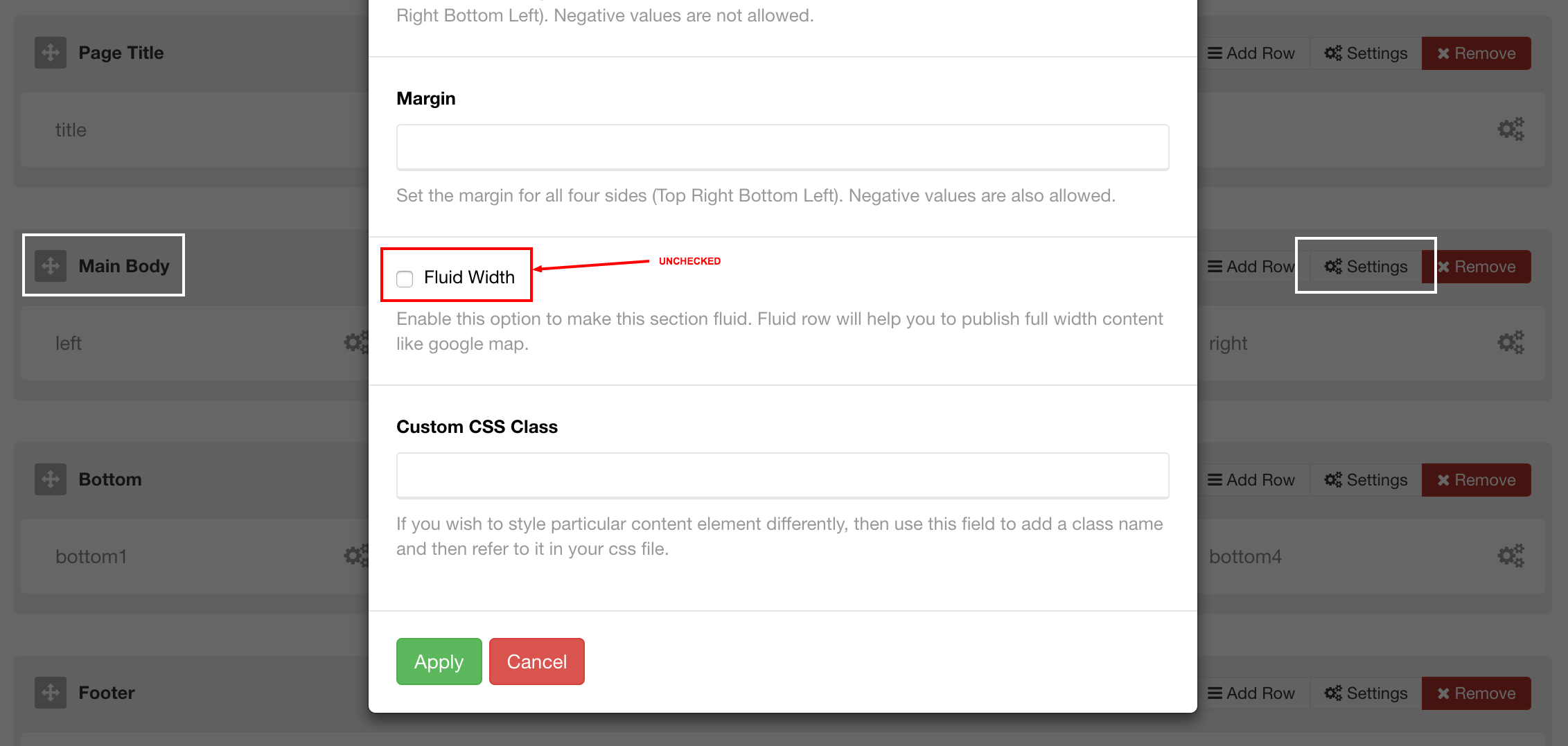
So, when you “uncheck” this Fluid Width, it will be “Container” (boxed), but if you check it, it will be “Fluid” (full width). Now “Fluid Width” or “Container” is working properly, only thing that you need to update it on your website > template’s admin > Layout > Bottom, if it is “Bottom” row with Bottom positions (bottom1, bottom2, bottom3, etc).
However, you can create new row > positions and make it specially for SPPB module(s) and assign module(s) there if you want to. But if you don’t, you have this Bottom and Footer positions.
Kind regards.
Hello.
Thank you for your answer.
We try this. But it is not working like we want.
Please take a look at this image (we set width to fluid): http://www.digipix.si/fluid.png
And there is a image of width set to no fluid: http://www.digipix.si/no-fluid.png
What we want is to have footer from homepage on all pages – that is how it looks like on homepage: http://www.digipix.si/footer.png
Please help.
Thank you.
Kind Regards, David
Hi David,
SPPB (SP Page Builder) has its own container (or fluid) class compare to template’s classes, so what is happening is container inside container, which is a bit different then “Component” area. This is “module” position. You can fix this if you apply same background to the “Bottom” row (with fluid container) in your template’s admin > Layout > Bottom > Settings and leave background and classes “empty” for SPPB page (module). Does this makes sense?
Also, if you have direct questions, would you be so kind to contact us next time via support page: https://themeforest.net/item/flex-multipurpose-joomla-template/14881156/support or directly to aplikko@gmail.com? Commenting section here is not good for support, screenshots and formatting. I could easilly explain everything via email.
Kind regards
Demo not working.. ?
Yes, it was some kind of “overload” or something. I don’t know. It is working now.
Hi guys and gratz on the theme. Very easy to install. Modern and will match perfectly with my teaching’s need.
One problem though … i think your preview has a problem. http://flex.aplikko.com/ is just not working in any browser or machine i try.
Yes, it was some kind of “overload” or something. It is working now.
Hey Everybody! Here are Real Customer Reviews From The Past 5 Days!
These amazing 5-Star reviews are fresh from our beloved customers from last 5 days!
comments
Sorry Appliko, please delete my comment
Hi sven_mones,
We cannot delete comments, but no worries, no harm done.
Kind regards
Hi Guys, firstly what an amazing template, the name says it all, Flexibility!
One issue I have is on the menu bar, the top search section, I would like to place another module item there instead of the “search” in the topsearch. I have done this allocating another module in that position, It’s working and showing on the sticky menu header but not on the main menu header?
Hi kobus4u,
I wouldn’t recommend to replace “top search” with another module, because it triggers some javascript from main.js and could cause conflict because of it. Does it have to be in Header? Header is packed with columns and already is “pushed” to the limit. Maybe it is better idea to look for another position?
Maybe you can explain more what do you want and I might help you. Screenshots and active links (live site) are welcome.
Would you be so kind to contact us next time via support page: https://themeforest.net/item/flex-multipurpose-joomla-template/14881156/support or directly to aplikko@gmail.com? Commenting section here is not a best place for support emails, but rather for comments or pre-sale questions.
Great! I will send you an email thank you 
I think, smth is wrong with the Live Preview. Screenshot (Chrome): http://i4.imageban.ru/out/2017/01/12/48b34645c3783f568a905b5b84a50971.png And the Header is not sticky too.
Hi Geistero,
Nothing is wrong. It is probably old cache on your browser, since we updated demo yesterday.
Try refreshing a page (clearing browser’s cache as well). Click CTRL + Shift + R (or Command + Shift + R for Mac) to hard reload of the page.
CTRL + Shift + R helped. Thanks!


