

460 comments found.

Hi
When I post a message in the activity page and click the media icon to upload a video, it is not attached to my post. I did this on mobile phone too.
Please advise??
Thanks
Hi,
I just replied on the support forum.
Hi What was mentioned in the forum doesn’t work, still have the same problem.
Probably you hosting account has an upload size limit. Check it out – http://www.wpbeginner.com/wp-tutorials/how-to-increase-the-maximum-file-upload-size-in-wordpress/
Hello. After clon installing, my website often occur Err connection failed. How to do that?
Hello, try do download the zip file with demo content on your desktop, upload it to the root of your wp installation and install demo content from your server.
Can you check my website ? I will pay for it
Solved. How to change auto email address?
Go to wp dashboard -> settings -> general and users -> admin
Yes i have changed. But “wordpress@mywebsite.com” sent email who get a reply. How to change this wordpress email?
Please search in google for change wordpress@domain email
Is posible to serarch members by some criteria ? Age, country, city, hair colour, education etc .. ?
Hi,
You can filter members using this plugin – https://wordpress.org/plugins/bp-profile-search/screenshots/
Hi, work with wpml? Thanks
Hi,
Yes, it’s working.
I have sent you 2 separate emails on two different occasions its been over a month now and i am getting a nothing but a silent treatment from you. Email reply would be nice so i dont have to get your attention this way. I am looking for a demo file that doesnt come with the theme download. Can you sent me the demo file on sulemandublin@gmail.com so i can get this thing like the demo rather than having to spend 2 hours try and make it look like this demo when i can just import the demo file and take it from there. Please reply me asap
Yes, I found your e-mails and as far as I remember I sent you a reply. Anyway if you install theme in child directory then make sure .htaccess contains path to child directory. An example
# BEGIN WordPress
<IfModule mod_rewrite.c>
RewriteEngine On
RewriteBase /communityjunction/
RewriteRule ^index\.php$ - [L]
RewriteCond %{REQUEST_FILENAME} !-f
RewriteCond %{REQUEST_FILENAME} !-d
RewriteRule . /communityjunction/index.php [L]
</IfModule>

# END WordPress
After restoring using your one click install demo I clicked where says:
Restore Successful! Visit your restored site [ here ]
You may need to re-save your permalink structure Here log
then when I clicked re save permalink then create error
HTTP 500 error That’s odd… the website can’t display this page The site may be under maintenance or could have a programming error. Try this
Please what can I do to make this work!!
Probably there is a problem with .htaccess file. Please check this solution – http://support.hostgator.com/articles/specialized-help/technical/wordpress/how-to-fix-the-internal-server-error-in-wordpress
Thank you.. I just fixed it! It was a problem with the .htaccess file like you said.
This is not working!!
3. Select “Restore from URL” and paste following URL:
http://www.demo2.diaboliquedesign.com/1/wpclone_backup_31st_Jul_2015_12-28PM_Com_MfLd2IrmUc.zipPlease download the latest version of theme, inside will be the new link to demo content.
Please check an e-mail box, I sent you a link to demo content.
Hi, Can you please let me know if this theme supports cover image for user profile. I did not see any cover image option. I have followed buddypress’s instructions by registering the cover image option in the functions.php file and updating the home.php and profile.php file in the member directory. The “change cover image”options in the user profile, but I do not see the upload button.
Can you please suggest me what I need to enable cover image?
Thank you.
Hi,
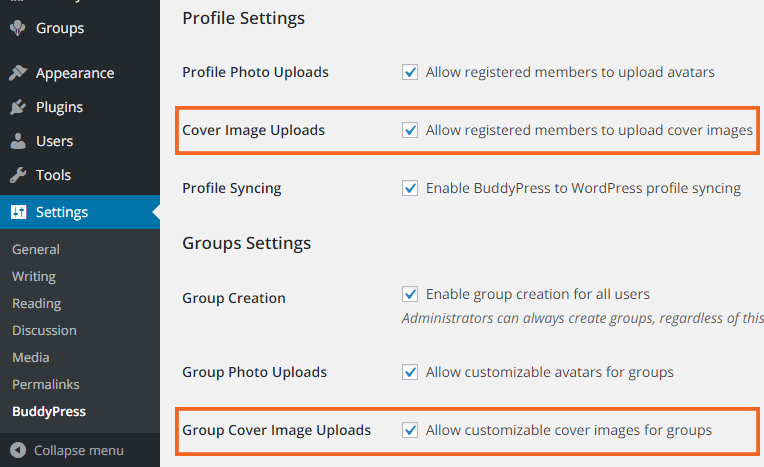
Do you see the upload button when a default WP theme is active? I hope you activated it here – https://buddypress.org/wp-content/uploads/15/2015/10/cover-image-settings.png
Yes, I have activated cover image here-https://buddypress.org/wp-content/uploads/15/2015/10/cover-image-settings.png
I see the cover page upload button when I use other themes, but it does not show up when I activate your theme.Do I need to apply any other settings? Note: I am using the latest version of your theme and WordPress version 4.6.1
Thank you.
Open wp-content/themes/unitedcommunity/members/single/profile.php
remove everything inside and paste it http://pastebin.com/xitpZ8XQ alse create cover-image-header.php file in the same forder.
Thank you.
I am using your CommunityJunction theme, not UnitedCommunity.
After following your advice,I can now see the upload button and upload image,but the cover images does not show up in the header.
What I have done so far are:
1.Open wp-content/themes/CommunityJunction/members/single/profile.php.Removed everything inside and pasted it http://pastebin.com/xitpZ8XQ also created cover-image-header.php file in the same folder.2. followed this https://codex.buddypress.org/themes/buddypress-cover-images/ instructions for standalone buddypress theme.
3. made sure cover image upload option is enabled in the settings(https://buddypress.org/wp-content/uploads/15/2015/10/cover-image-settings.png).
Note: copied all contents from \buddypress.2.6.2\buddypress\bp-templates\bp-legacy\buddypress\members\single\cover- image-header.php to /wp-content/plugins/buddypress/bp-templates/bp-legacy/buddypress/members/single/cover-image-header.php
Am I missing anything?
Thank you.
You should paste following code in functions.php – http://pastebin.com/wLsSbcaP
Recopy member-header.php to cover-image-header.php Open home.php and replace
locate_template( array( 'members/single/member-header.php' ), true );
for
                /**
                 * If the cover image feature is enabled, use a specific header
                 */
                if ( bp_displayed_user_use_cover_image_header() ) :
                    bp_get_template_part( 'members/single/cover-image-header' );
                else :
                    bp_get_template_part( 'members/single/member-header' );
                endif;
Now you have to display image so open cover-image-header.php and paste
<?php do_action( 'bp_profile_cover_path' ); ?>
This code will display path to cover image, you can display it as background or in the img tag.
How can I log In to try out demo?
There is no demo login available, all inner pages you can see on screenshots – https://themeforest.net/item/communityjunction-buddypress-theme/screenshots/7298510?index=9 if something won’t work then there is a refund policy – https://themeforest.net/page/customer_refund_policy
Hi ! I just upgraded Wordpress to 4.6 from 4.5.3 and my entire site has crashed. I have : “Fatal error: Cannot redeclare the_post_thumbnail_caption() (previously declared in /home3/greatmaster/public_html/replication2/wp-includes/post-thumbnail-template.php:244) in /home3/greatmaster/public_html/replication2/wp-content/themes/CommunityJunction/functions.php on line 1592 What can I do , please ??
Hi,
There is new version of theme available for WP 4.6 – http://www.demo2.diaboliquedesign.com/1/changelogs.txt
Hi, the buddypress avatars don’t change from black & white to colour when i hover over them like they do in the demo..?
This is all i can see in google inspection,
jquery.BlackAndWhite.js?ver=1.0:36 Uncaught SecurityError: Failed to execute ‘getImageData’ on ‘CanvasRenderingContext2D’: The canvas has been tainted by cross-origin data.
not sure what that means. I have tried disabling all plugins but it still doesn’t work ?
Regards, Luke
Hi,
Probably some avatars are from gravatar where images doesn’t have normal extension like .jpg
Paste it in myStyle.css:.frontpage-members-loop a .img_wrapper img.avatar {-webkit-filter: grayscale(100%); -moz-filter: grayscale(100%); -ms-filter: grayscale(100%); -o-filter: grayscale(100%); filter: grayscale(100%); transition:.5s;}
.frontpage-members-loop a .img_wrapper img.avatar:hover {-webkit-filter: grayscale(0%); -moz-filter: grayscale(0%); -ms-filter: grayscale(0%); -o-filter: grayscale(0%); filter: grayscale(0%);}
Hi
just bought a theme and download it , when the installation will be ?
Thanks
Hi,
There is no installation service. You can use one-click theme and demo content installation, instructions you will find in the OneClickDemoContentInstallation.txt file.
hi, I guess i explained myself wrong. How do i get rid of “on the forum” section on the front page next to the groups and lets say replace it with post relies? Also is there another way people can upload images or files on the forums instead of entering the info? Could i some how use a plugin?
Open frontpage1.php, remove everything inside
<div class="front-posts">
..........
</div> <!-- front-posts -->
create new widget area in this place.
http://themeforest.net/item/communityjunction-buddypress-theme/7298510/faqs/20619Also is there another way people can upload images or files on the forums instead of entering the info? Could i some how use a plugin?
Install this plugin – https://wordpress.org/plugins/bp-forum-editor/
hi, is there a way i can have post appear on the frontpage instead of the forum page?
Hi,
Go to Settings ? Reading, select Front page: Forum
I guess i explained myself wrong. How do i get rid of “on the forum” section on the front page next to the groups and lets say replace it with post relies? Also is there another way people can upload images or files on the forums instead of entering the info? Could i some how use a plugin?
Open frontpage1.php, remove everything inside
<div class="front-posts">
..........
</div> <!-- front-posts -->
create new widget area in this place
http://themeforest.net/item/communityjunction-buddypress-theme/7298510/faqs/20619Also is there another way people can upload images or files on the forums instead of entering the info? Could i some how use a plugin?
Install this plugin – https://wordpress.org/plugins/bp-forum-editor/
thanks
Hi, my website is up, but the images arent showing. Is there a way you can fix it? Momdadnetwork.com
Hi,
What images?
my logo and the image i uploaded to replace “A Social Network”. It appears on desktop, but not when I go on the website on mobile.
ok thanks
HEY, how do i get the icons to appear on the tile menu bar?
where do i locate the files to upload?
forget it i figured it out. where can i get free icons to replaces those?
Hi,
Please check it – http://support.diaboliquedesign.com/forums/topic/icons-set-download-link/
thanks. Also, i had wrote on the blog page and there is no where for a person to leave a comment. Would you know what may be the problem? I’m working on local host at the moment and i also put the blog page as the post page in the reading section of settings, still nothing.
nevermind, thanks
Hello, well i put my site up, but none of the images are showing. Can you please check it out momdadnetwork.com
Hi, I just purchased his theme and so far its great. I have one question though, how do i remover the image from the front page? Or the wording social network, i looked every where on the customized option, but can not seem to find it?
Hi,
It’s Welcome text (1 088px – 148px) option. If you want to remove it then upload transparent png image.
thanks
Hello, the theme is multilingual ? and can the member delete his account ? Thank you
Hello,
It’s multilingual in 99%, some images with text requires more work. Yes, member can delete own account.
Hi, this is a presale question. Can I make the forum hidden to visitors. I want to make an internal forum. I need only a signup and login page in public. Is that possible?
Hi,
Yes, of course.
How do you automaticly approve members
It’s already automatic. They have to click on the activation link.



.)
