8781 comments found.

I’m having a few issues while working on customizing my site:
1) The subtitle font on the inside pages is not changing based on my font selection for header and body (I have sans serif chosen for both, but the subtitle font is serif)
2) I would like to know how to change the kelly green accents throughout the site, as the color doesn’t go with my overall scheme
3) I’m getting an error on my listings where it should have what’s nearby. It’s saying “Fatal error: Uncaught Exception: CURL Error: Failed to connect to 2607:f8b0:4005:808::200a: Network is unreachable in ”.... then my site addresses, etc.
4) The walkability score is not showing up in my listings even though I have the API key added
Any help is appreciated! Thanks!
I’ll reply to your chat you have open shortly, thanks!
Hi Dear,
In the folder realestate-7-child, do files customization.
But Some files not effective and every files in the subfolder, For example files: /realestate-7-child/css/layout.css /realestate-7-child/css/ct-dropdowns.css /realestate-7-child/css/base.css
And read from the main path of the template files: /realestate-7/css/layout.css /realestate-7/css/ct-dropdowns.css /realestate-7/css/base.css
What should i do?
Please guide me…!
Thanks Ali
You don’t need to copy those CSS files over any CSS that you add to your child’s style.css will override everything as it takes precedence.
Hey Chris, I have been trying to make a website with your theme. I am used to building from scratch so this has strange for me. MY PROBLEM IS:
When I build the page with page builder, there is a space between the header and the top of the hero image I am using, and a BIG space between the footer and the bottom of image. Its all messed up and looks horrible. How can I fix this. I have a picture if you need to see.
Thanks man
If you could please supply a URL or screenshot, thanks!
Hello, when we can expect new update and Memberships ?
Big update coming this week in v2.6.8 with a lot of awesome new features, homepage listing carousel (preview), blog grid layout option (demo), option panel to choose the front end submission required fields (preview) and more!
My membership and packages plugin is nearing completion should be out on my demo site next week and released the week after, thanks for your patience it was developed from the ground up and I can assure its awesome!
Hello
I have several questions to ask you:
1. I can not see the Edit Profile page from the top menu options (next to Social Networks). I have created the five pages with their corresponding templates: - Edit Listing - Edit Profile - Favorite Listing - View Listing - Submit Listing
I have found in “Front End Submission” how to link most pages, but I do not see where to link “Edit Profile”.
2. Is it possible that the login in Front End is through a page and not with a Pop-up?
3. It is assumed that there is compatibility with WPML. But in the part of Front End to Submit Listing or Edit Listing, I do not see how to switch between the different languages to edit the Title of the property, the description, etc. How can I activate it?
Thank you very much Regards
1. That page is under the front end login and registration panel
2. With modifications yes, you could create a custom page template and then output both of the login and registration functions within said page, unfortunately mods like this are outside the scope of my support.
3. The front end submission doesn’t allow for multi language support as WPML doesn’t actually allow for such a thing to be done, hope you understand.
How do you suggest we keep the homes if we want them to be multi language?
Is there no way to make the Front End manager able to edit homes in different languages?
Thanks you
Regards
You have to duplicate them and translate via the back end admin thats the process put in place by WPML https://wpml.org/documentation/
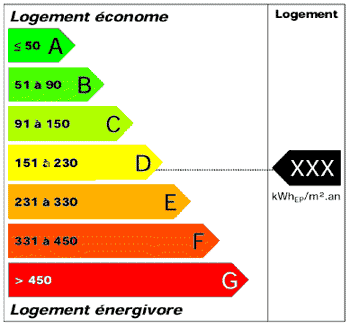
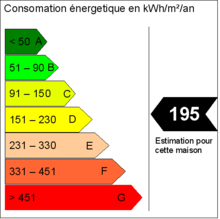
In my country (france) we need put on website every listing energy diagnostics … Like this link. How we do? Does plugin exist?
http://www.viadiagnostic.fr/wp-content/uploads/2011/10/Etiquette-energetique-etiquette-enrgie_DPE.gif https://upload.wikimedia.org/wikipedia/commons/thumb/1/11/DPE_-_EPDB_francais.png/220px-DPE_-_EPDB_francais.pngI’d recommend using the partners section for easily uploading the required logos would be your best bet.
Can you send me link? I don’t find…
It’s under real estate 7 options > homepage > partners
why partners? i want put ” diagnostics performance ernegetique”... like this….http://www.maisonmere-immobilier.fr/63-Alesia-Villa-Seurat.html how we do?
Ah, ok you’re referring to https://cl.ly/2N100L453F0N easiest would be to add that within the listings content area, there are other options but would require a child theme and some code.
I don’t understand… I have minimal child theme… Can you send me technical to put that? Thanks Im french…
It’s just the normal content area where you would say put the listings description
Hi, I have installed and customised Realestate 7 without any problems @ www.michaeljonesrealestate.com.au.
My question is…
When you display the listing results with the image on the left and the Title and details on the right the price in some cases overlays the title text.
Is there a way we can have the text formated around the price??
regards
Paul
Sounds like the price is rather large and you are limited with that layout, I’d recommend using this in Real Estate 7 Options > Custom CSS:
p.price { font-size: 11px;}
Adjusting the pixel size to whatever suits your needs.
Thank you that helped..
Are we able to reduce the square the price is in as well???
Regards
Paul
No probs! Check out http://contempothemes.com/wp-real-estate-7/documentation/#childthemes > Find any CSS property, Quickly & Easily section.
You just need to decrease the padding and you’ll be all set.
I want to enter apartments on my software and I want it to appear directly on the site when I enter them on the software.But the provider asks me what flow can treat you.Thank you
You’ll need to use WP all import with a scheduled import process using CSV or xml from your software check out http://www.wpallimport.com/tour/scheduled-imports/
Hello
What kind of flow can you treat? Because I want to take a multicast ad software.
Thanks
Not quite sure I’m following the question?
Hello, we notice on our client’s website using WP Pro Real Estate 7 is having trouble showing images in a gallery using the Gallery type Grid style.
When we first published the gallery a couple of months ago, it was working fine, but it suddenly stopped, it seems; all the images now appear one on top of the other and do not spread in a grid fashion.
How can we fix this?
We can send you a link to the page where we are seeing this, as private message.
Thanks!
BM
Hi. Things dont just “stop working all of sudden” something has changed on your site, possibly a new plugin that was added or maybe some CSS changes that are causing the gallery to not show, maybe its a script conflict. You’ll need to do some detective work and go back and see what happened and remedy it, I’d start by deactivating any non-required plugins and testing.
It could be a script conflict, use your browser developer tools > console and check for errors.
Yes, the only thing that has changed is your template, which we updated as the updates are published.
Your customer service skills need real improvement. Your answers are consistently unhelpful for us. Of course, now that your template has sold so many copies what do you care, right? Wrong! Happy Customers are always needed to make a living. Remember customer service reflects on Themeforest as well.
Again, very unhappy with your response.
I’m giving you the exact advise you need, I’ve been doing this a long time and the reviews for this theme reflect that — customer service is of the utmost priority just because the theme has sold very well doesn’t mean I don’t care about each and every one of those buyers, that’s really quite ridiculous to accuse me of something so far fetched.
Something has changed on your site whatever that is I can’t tell you because I don’t know whos been working on it or what they’ve done but 99.999% of the theme its some plugin that’s added which causes a script conflict which kills everything on the site included the slider because it runs on Javascript.
And we have bought many templates and plugins since 2010. By now, we can definitively tell when a seller wants to really help the customers.
Hi I have some pre-sale questions? 1. I want to use this theme as non-profit oraganizations’s projects listing I mean I want to list Organizations and also their projets is it possible? 2. I dont want to use any e-commerce function is it possible? I want all system is free.3. Can user search for agents like properties (I mean detailed)? 4. I want to use theme with wpml? Is it possible to list agents and listing in both language? for example agent 1 create his (account) BIOGRAPHY in engilsh but ı want to see his BIOGRAPHY (english) when german selected too. 5. Can we add custom fields to agents?
6. Can we delete unwanted fields like price, street adres etc from frontend?
Do you have admin demo?
- I don’t see any reason it couldn’t work for that purpose although it might require some modifications via a child theme.
- The payment options are off by default and only included if you have my Contempo Payment Gateways plugin activated.
- Yes, its fully compatible with WPML
- Yes, I’d recommend using the free plugin http://www.wpbeginner.com/plugins/how-to-add-additional-user-profile-fields-in-wordpress-registration/
- With modifications yes you can remove/add any of the fields by way of a child theme. :>
3. Can user search for agents like properties (I mean detailed)?
Not currently but I have this down for a future update, coming in the next couple weeks with my Membership & Packages plugin.
I need to work with euros. How is it modified?
Just go into Real Estate 7 Options > Listings > Currency type in whatever you’d like https://cl.ly/2E1d3h3m1X3Q
How can I translate the template into Spanish?
Please see http://contempothemes.com/wp-real-estate-7/documentation/#translation I also recommend using the free Loco Translate plugin https://wordpress.org/plugins/loco-translate/
I love this theme very much. Thank you. But I want to put the latest additions to the main page How can I do this?
Thanks! Did you purchase the theme on another account I’m not seeing your purchased or supported badges?
Sorry to hear that but you’ll need to purchase the theme under your own account so I can verify support, as well as you won’t get free updates. Hope you understand.
Hi Can This handle Auction listings also?
Yes, with some modifications and addition of an auction plugin you could.
My web developer informs me that he is not able to activate the payment gateway plugin which is built into the theme. “There is a payment extension of contempo-7-payment-gateway. Which i cannot activated due to fatal error of redeclare auth class.”
The website is https://www.rentbuyplaces.com User: info@rentbutplaces.com Password: Admin2017! You can look into this please.
Make sure you don’t have another plugin that includes OAuth otherwise it’ll throw that error.
Hi,
How can I create a city grid listing? (San Diego, La Jolla, Coronado etc..)
The “Add to favorites” button on the homepage appears wrong.
pilatinestate.com
- You’ll need to use visual composer for that please see http://contempothemes.com/wp-real-estate-7/documentation/#visualcomposer as well as the page builder sections of the homepage http://contempothemes.com/wp-real-estate-7/documentation/#homepage
- You just need to set the plugin up real quick takes 15 seconds http://contempothemes.com/wp-real-estate-7/documentation/#wpfavorites
Como puedo poner real state en castellano
Got this from Google Translate:
“can i put real state”
Not quite sure I’m following the question?
Hi, i am setting up the header, and i disabled the top bar. However, it appears that the “login/register” is displayed at the centre of the header. May I know how to shift the “login/register” button to the right?
Make sure to turn the login and register off via Real Estate 7 Options > Front End Login & Registration https://cl.ly/042x2z3r2i39
It seems the compare option doesn’t works On mobile phone.
The compare page isn’t currently mobile compatible but will be in a future update.

This item was featured on ThemeForest

Power Elite Author
Contact the Envato Market Help Team