

1508 comments found.

Hi, I am having a hard time finding where I can change the login information for my social media accounts? Please direct me to the right place. Thanks,
I’m not sure I understand. The social media login is not included in the theme. You have to change them on your social media websites directly.
Is there a way to manage responsive layout with visual composer? i would like to choose to show or hide some elements. Thanks
Yes, those settings are in the Responsive Options tab in the column settings.
Hi, I have a problem: when I edited a page, the visual editor is appear all broken. And all over the code lines is appear the texts: “vc_row [vc_column_text animation =” swing “] ....” but I did not perform any other plugins update And there aren’t updates to the “VELA” plugins. What’s happening?
Please make sure you have updated the theme and all plugins to the latest version. The new update of Visual Composer is included in the latest update of the theme. You have to update the theme to get it. You can find more details on updating the bundled plugins in our documentation.
Ok Thanks! Can I update the Wordpress to version 4.8 ?
Yes you can, our demo sites are also running on WordPress 4.8.
Hi Wyde,
- I’m using Vela on my website myokosnowsports.com - A couple of weeks ago the site was all working fine, and I had SSL installed. - I then changed hosting from one HostGator plan to another one, changed the DNS over etc. - Installed a new SSL with the new hosting. - HostGator has verified the SSL is installed, however when loading the page in HTTPS:// it still issues a ‘Privacy’ error (or similar depending on the browser). - Google searc result indexes the site as HTTPS and so our site is returning the Privacy screen for all visitors. - I am awaiting a reply from HostGator to see if they can shed any light on the problem. - I also found the article below: https://managewp.com/wordpress-ssl-settings-and-how-to-resolve-mixed-content-warningsAre you able to give any info as to whether the Theme etc could have any conflicts with the installed SSL (Comodo WildCard SSL)?
Thanks in advance, Tom
I also tried the ‘WP Force SSL’ plugin but it didn’t change the load.
Hi Tom,
I’m sorry for the delayed response!
This is a server issue, it’s not related to the theme. The theme is just to define the look and feel of your website. Also this theme can work with both HTTP and HTTPS, it won’t affect the installed SSL.
I see the error says “myokosnowsports.com redirected you too many time”. Try to delete the WP Force SSL first, and then access your site via HTTP instead so you can access your admin page to change the settings.
Hi Wyde,
Thanks for the support. I will follow up with HostGator.
Thanks, Tom
Is there anyway to fix this : http://imgur.com/a/t3wKQ Thanks
You have to change the code in your form as below.
Replace:<p>...</p>With:
<div>...</div>Here’s the right code to add a text field in the form:
<div>
    <input type="text" id="mc4wp_name" name="name" placeholder="Name" required />
</div>
Hi, I can’t seem to add a background image to the title are on a page. I use the title background option and select image, but the image does not show up. You can see an example here: http://77.104.144.173/~trident5/our-services-3/
There are 2 ways to set the background image of the title area.
1. Set it in Theme Options -> Page -> Title. Those are global settings and apply to every page by default.
2. You can also set it for each page in Title Options in the page edit screen. These will override default settings from Theme Options, try to edit that page and make sure you have the correct settings.
If it doesn’t work, please provide me your admin login credentials: https://themeforest.net/user/wyde#contact
I sent you an email via your contact form
Thank you for the site credentials!
I’ve checked the title background settings on your site. Both of them are working fine. I can set the default title background in Theme Options -> Page -> Title. And I can also set it for each page when I edit the page. I think that you’ve set the wrong settings so nothing has changed.
You can find the screenshots of both settings that I mentioned in your email.
thanks for the help – its working!
Hi i would like to know how i can select the color of the menu (light or Dark) for articles. https://femmesenaffairesquebec.com/2014/12/05/the-quiet/ The choosen logo is white while i want to use the dark logo. thanks
Hi,
Please make sure you’ve selected the “Dark” for “Menu Text Style” in Theme Options -> Header.
If it still doesn’t work, you have to edit your blog page, in the Header Options section, choose “Dark” or “Default” to see if it works.
Help! The slider revolution does not work on my website and is saying this activation code does not work:
c66b2537-2bf4-44c0-8737-9cc0be4aeb13
monfortcompanies.com
Hi there,
The Slider Revolution plugin is included in the theme. You can normally use it without registering the product purchase code. That option is available for direct customers who have purchased that plugin individually to access the direct support and automatic update feature.
If you’d like to import sample slider templates, you can download free sliders here: https://revolution.themepunch.com/free-slider-exchange/
And then import it in Slider Revolution page on your WordPress admin.
Hello. Is there any way to display the blog post summaries with formatting? I found on the comments page that someone else had asked last year and you were looking into it. At present the blog summary is just one long rambling line of text with no full stops or formatting at all. It looks weird.
Since you can build the blog post with the page builder, there may be some special characters and shortcodes in the post excerpt that can break the blog layout. So, we have to remove the HTML and formatting from the post excerpt to make sure it will display properly.
To display the formatting, you have to set custom excerpt with the HTML and formatting manually.
Here’s a step by step guide.
1. On the post edit screen, click on the Screen Options tab on the top right and then select Excerpt, see the picture below:
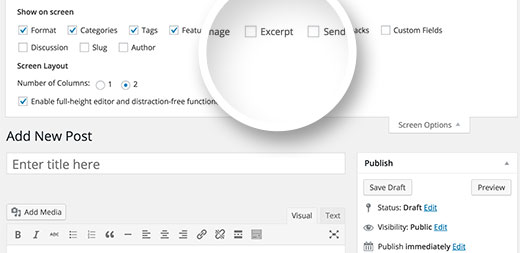
2. Build your post excerpt with the Visual mode of the editor:

3. Switch to Text mode, copy the code of the excerpt and put it to the Excerpt box:

Hello, in the following set up, is it possible to lock the menu to the top of the page? http://wydethemes.com/vela1/
Of course you can change the menu position to the top as other demos like Vela 2: http://wydethemes.com/vela2/
great – i just purchased the theme 
Thank you for purchasing our theme! Hope you enjoy your new website
If you have any questions concerning our theme, please feel free to contact us.
My site is still running very slow even after I turned AJAX off. Here is my site URL: https://www.accushield.com/ Thanks,
There are very large images and video on your website. The video in the slider have over 50MB of file size and some images are over 5MB that are too large and not suitable to use on the web.
As you can see in the picture below, the video takes over a minute to load and some images take over 30 seconds:

Here’s quick tip:
1. You have to resize those images (in the red rectangle) to reduce the download times. The width of images should be smaller than 1920px and the file size should be less than 500KB. If you have a large image please save it as JPG instead of PNG.
2. You should compress your video and please do not use a self-hosted HD video (HTML5 video), it can take over a minute to load and can take up a lot of bandwidth when many users visit your site. If you’d like to display HD video on your website, we would recommend you to use YouTube or Vimeo videos instead.
3. If you have many images or large images, you should disable “Preload Images” in Theme Options -> Page -> Page Options.
Hi I love this theme. Just one question. My client wants the laptop (full screen) version to show on ipads in landscape mode. I can’t see how to change the css so that the mobile version only appears for smartphones and tablets in portrait. Please can you help?
Hi,
I think that you’re talking about the main menu because the only difference between iPad landscape mode and laptop is the main menu, others are displaying the same.
Unfortunately, it is included in the main script file. The mobile menu will be enabled automatically when the size of screen smaller than 1080px. To change it, you have to edit the code in the main script file directly but this is not recommended because if you edit any file in the theme, you won’t be able to update the theme anymore.
However, if you’d like to change it you have to edit the file “js/page.js” as below:
Line 324 (or find the code below) and then:

Replace:
if ( $(window).width() >= 1080 ) {

With:
if ( $(window).width() >= 992 ) {
Thanks for the page-load solution, turning of Ajax did help! Final question: my site looks odd on mobile. Margins and spacing are odd and some pages overflow and text runs off the page. This is the last thing I’d like to fix on the site—what solutions are available? My site is www.accushield.com
If you’d like to create a Full Width page, you have to choose a “Full Width” page template in the Page Attribute box, see the picture below:

The Default template is suitable for the blog page but not for the Visual Composer page builder.
Hello, I am having an issue that since installing this theme, my site loads very slowly. Some pages don’t load at all, and have to be refreshed or re-entered in order to load; how do I go about fixing this problem?
Sounds like there may be a plugin conflict on your site. Try to disable AJAX Page Transitions in Theme Options -> Page -> Page Options.
If it doesn’t work please provide me your site URL.
Hi there,
I am running into some trouble creating my website, this s my very first time on Wordpress. I am happy very to attempt to work out my issues by watching tutorials.
So please can I ask you to direct me to the very best online videos that will help me better understand Vela theme, WordPress and Visual Composer.
Thank you Lesley Forssman 1de0ff7f-d479-4381-83bc-f514b3a52cde
First of all, you should import demo content so you will have predefined pages/posts. And then use the Visual Composer to edit those pages.
You can find the step by step guide on how to import demo content and to use the theme including Visual Composer in our documentation.
Anyway, here’s video tutorials for WordPress: https://en.support.wordpress.com/video-tutorials/
and Visual Composer plugin: http://vc.wpbakery.com/video-tutorials/
Also, you can find other useful links for WordPress and Visual Composer in our documentation.
Thank you, I will look into this. Your response is very tonal, you should perhaps consider a milder approach on a professional platform!
My apologies, I will improve this. Thank you for your feedback.
Hi i am having an issue with the menu header: i cant see the menu until i scroll : http://www.andrewgermain.ca/femmeenaffaires/adhesion/
You’ve disabled the Transparent Header setting so you have the white background for the header menu. Unfortunately, you’re using the Light style for the menu so the menu text will be white too.
There are 2 ways to work around this:
1. If you’d like to use the Light style for the menu text, you should enable the Transparent Header in Theme Options -> Header.
2. If you’d like to have the white background for the header menu, you should change the “Menu Style” in Theme Options -> Header to “Dark”.
Hello,
I am trying to install the required Wyde Core plugin for the Vela theme that I purchased—I keepp receiving the error message: “Can Not Install Plugin – Destination Folder Already Exists”. How do I go about installing this plugin so my theme will work?
Sounds like you already have it installed. In the Plugins list, try to deactivate it first and then delete it from your plugins list. If it is not available there, you have to delete it from cPanel File Manager or FTP directly. Delete the folder “wp-content/plugins/wyde-core” on your server.
After you delete it, you will see a notification message on your WordPress admin to install it again.
Hi guys, after the latest updates, the logo is displayed differently on our site.
http://bit.ly/2s981Vn
1. The main logo in the header is okay, until the sticky header appears. The sticky header for some reason is too narrow now and the logo is off a bit on the bottom.
2. On tablet and mobiles, the main header logo is again, too big. Can’t remember how is it before (main logo reduced or sticky logo) but it was correct 100%.
Can you help to solve these please?
Thanks in advance,
M.
Hi there,
Thank you for the site URL!
Both issues are related to your custom CSS. Your custom CSS sets the maximum height of logo to 125px so it is too big for the sticky header and mobile menu.
To solve this problem, you should edit your custom CSS in Theme Options -> Advanced -> Head Content as below:
Replace:
#header #logo img{
    max-height:125px;
}
With:
#header #logo img{
    max-height:85%;
}

#header:not(.mobile):not(.fixed) #logo img {
    max-height: 125px;
}
Hi! In the Admin Backend Testemonials, Portfolios and Team Members is gone. How to get this entries back? Greetz from Germany! Manuel
Go to Plugins and make sure the Wyde Core plugin is activated.
Hi! Wyde Core is not in the installed plugins list but still in folder wp-content/plugins. How to get it back to the list? Many thanx! Manuel
This theme requires Wyde Core plugin to work.
If it’s in the folder “wp-content/plugins” but not available in the installed plugins list, you have to delete it from that folder first.
Once you delete it, you will see a notification message to install it again. If the notification was dismissed, you can go to Appearance -> Installed Plugins to install it.
You can find more details on how to install Wyde Core and other bundled plugins in our documentation.
That’s it, now it works! Thanx and have a great weekend!
Hello,
I you contact because I installed(settled) the theme on the www.amrcconsulting.com site and I notice two bug.
1 – When I am on the homepage and when I click on ” everything to see ” a blank page displays. I have to make F5 so that the contents arrive.
2-The portofolio does not post(show) photos in the good categories. They are visible in “all” but not in detail. The more I add of photos and the less I see it on the site.
Can use me to solve these two bug?
Cordially
1. We have never seen this issue before. There may be a plugin conflict. Try to deactivate other plugins to see if it works.
2. When you add/edit the portfolio post, you can set the category in the Portfolio Categories box in the right hand side. Also, please make sure you’ve set the Featured Image for all portfolio posts.
If it doesn’t work, you can PM me your site URL and admin login here: https://themeforest.net/user/wyde#contact


