1690 comments found.

Good evening
I purchased your theme yesterday and upon installing the theme today I see that it is not nearly as customizable as I thought, and as such does not meet our needs.
I am respectfully asking for a full refund. I am including my purchase code below and look forward to your prompt response.
Thank you for your help.
Stephanie May
8332194c-a27e-4c54-8248-9e48043e2ff2 7 Sep 2017 REGULAR LICENSE
Hello again – we’ve decided to keep and use this theme so please disregard my request for a refund. Thank you and I apologize for the confusion.
Hello Stephanie,
Sorry for this late response. I am glad you choose our theme for your project. Please do not hesitate to ask for any questions or issues you might have.
Kind regards
Hi there, I am not the most advanced in coding and I don’t see a simply option to change the color of the main menu for the site and for the main text. How can I do this? I want to change it to #1c1c1c.
Thanks
Hi there,
You can easily control your site fonts and their colors from Bakery > Typography.
Kind regards
Hello,
We purchased 2 months ago the last version of bakery. Following your instructions, we imported the demo shop content. Anyway, there are a lot of conflicts inside the site. Seems like Visual Composer isn’t working: sidebar widget sometimes disappeared; grid templates don’t show correctly; a lot of pages imported doesn’t show up, there is only the shortcode of vc; the shop page (and others) shows modules but when we try to modify it (both in backend and frontend editor) they are empty; pagination is missing on shop page; layout and design totally messed up;
Eventually we have a lot of screenshots.
These are only few examples of what we just noticed.
We think that there are conflicts between plugins versions, but we don’t know how to fix them.
Thank you for your support
Hello,
Thank you for your purchase as well as contacting us.
According to your description most probably the demo import was not fully successful. If that is the case, then you can try to re-import the demo content but first make sure you have the right server configuration i.e. max_time_exectution to 300 and memory_limit to 256M and reset the database using WordPress Database Reset plugin. If not, please provide us via here your site URL and WP credentials so we can take a closer look at that and see what we can do for you.
Best regards
Hello, thanks for the support. We have already done that 2 or 3 times, but it doesn’t work. We have the right server configuration. We just sent you by mail the credential. Thanks. You will find the pages of the demo in the trash.
Hello, we’re still waiting. Nothing happen since 6 day ago. We really need an URGENT fix to the conflict, or if it isn’t possible, we’d like to ask for a full refund. Site is not working properly, and we need it.
Hello,
First, sorry for the delay.
I am happy to inform you that all your issues have been fixed. Almost all of them were related to WooCommerce plugin, since you named the plugin folder differently from the one the theme was expecting. We made all the necessary modifications and everything now seems to be working well. Please check them and let us know you feedback too.
Kind regards
Hello, thank you for your help. Now everything works fine
Glad to hear that! Please feel free to write us again for any other issues. Thanks and cheers!
Hello sir my contact form not working(map and contact form) i fill the all settings for bakery>contact My message alert is successful but not received my mail please support me solution
Hello,
Please make sure you have correctly configured the settings from Bakery > Contact. If everything is fine there then please provide us via here your WordPress credentials so we can take a closer look at your issue.
Kind regards
Hello Sir my Map page(map and contact) is working only home page but not working Contact Us page. please your support.
Please provide us your site URL and WP credentials via here. We will take a closer look at that and get back to you. Thanks!
Hello sir yesterday i sent my WP credential but no reply..
Hello sir yesterday i sent my WP credential but no reply..
Hi,
Apologies for the delay. Your email was marked as spam by our email server.
We took a look at your site and all you should do is generate a key here and insert it under Bakery > 3rd Party > Google Map API Key.
p.s. You’re using the theme for two different sites which means that you should have purchased two theme copies. Next time please provide us both of your purchase codes so we can verify your purchases.
Thanks and cheers
Is the Bakery theme, WooCommerce compatible?
Yes, Bakery theme is fully compatible with WooCommerce. Here you can view the demo featuring WooCoomerce.
Thank you for your interest!
Bakery theme has just received a new rating for Customer Support.
“I had some issues with what I thought was the theme, but turned out to be a problem with the host. Milingona was gracious enough to weigh-in and help me with the problem, restoring my faith in the theme and creators. Highly recommend, based on my experience. Thanks, guys!”
Click here to get your theme copy now!
Hello. Our site version and theme versions are up to date, however, the media grid is not working in visual composer. Any ideas? Just started this week.
Hello,
Most probably that is due to a conflict with a 3rd party plugin. Please send us via this contact form your WP credentials and we will take a closer look at that.
Kind regards
Hi there… I thought a visual composer license was included with the purchase of this theme. Our site now says we need to update visual composer but that we need a valid license to update.
Hi,
It is true that Visual Composer plugin is included with the theme but the activate option is available only for those who have purchased it directly. To update it you should wait until we release the new theme version which among others will include the latest version of Visual Composer and other included plugins. If you need it urgently please write here to get a copy of it.
Thanks and cheers
Thank you… no we don’t need it urgently. We will wait for the updated theme to be released. Do you know when that will be?
Waiting for the new theme version is better for you because of any compatibility issues that could be shown. The new theme version will come during the upcoming month.
Thanks and cheers!
Hi. Is there a search capability for products, I guess from the menu would be best?
Hi,
Of course, search function for products is already built and implemented in the theme. You can see it in action using the following links for each of the theme demo:
- http://themes.milingona.co/bakery/shop/shop/
- http://themes.milingona.co/bakery/default/products-with-sidebar/
Kind regards
UPDATE: In case you decide to buy the theme now, we will implement for you the search capability in the menu for free.
Thank you for your reply. One more question. My client is a little old school. When viewing like here:
http://themes.milingona.co/bakery/shop/shop/is it possible to display the product name under the picture. I know that it shows up when you hover over the photo but she thinks people will leave the page if they can’t find the name of the product they are looking for under the photo Thank you..
No problem, we can make the product name to be shown under the product thumbnail too. Just get in touch with us via here after the purchase and the support team will be ready to help you out.
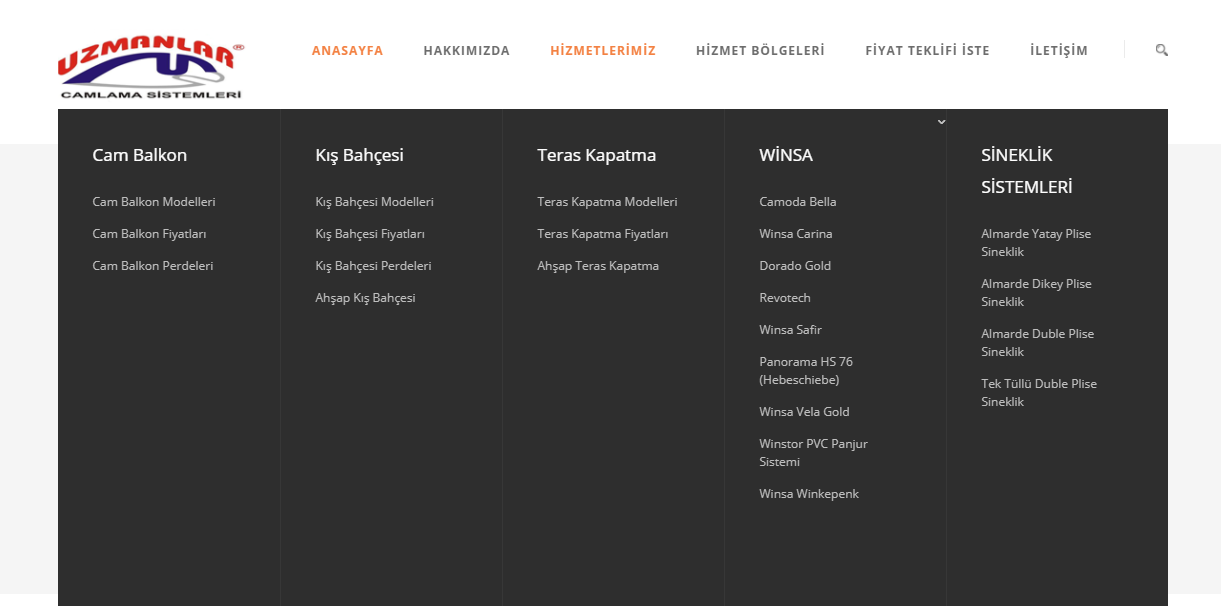
How can I make the menu section like the picture That is to say, four sub menus https://i.hizliresim.com/r2GbYM.png
That is the so-called mega menu which is not supported by theme currently. We’ll consider adding it in the upcoming big theme update.
Cheers!
Can i see the RTL version of the website?
Hi there,
There is no RTL theme demo available but here is a link of an RTL site built with the theme: http://bit.ly/2w0Uc0B.
Thank you for your interest!
Hello, great theme guys! I just have a problem with map, order & contact form. I dont get the enquiry mails when people send through order and contact form.and the map is also have some error as Sorry! Something went wrong. This page didn’t load Google Maps correctly. See the JavaScript console for technical details.
What may be the problem, and how can i fix it please? Thanks in advance
Hello,
1. For contact and order form issues please make sure you have correctly configured the settings under Bakery > Order Form and Bakery > Contact.
2. To fix the map issue please generate a key here and insert it at Bakery > 3rd Party > Google Map API Key.
Kind regards
Hi,
good theme, i have a couple of questions,
1. In Home or About us, there is a testimony slider, where does the testimony come from? and where can i find the page where customer can input the testimony? 2. i have a trouble uploading image due to the size of it, so which folder in FTP that i can upload to? so the images show in the media library ?
Hi,
1. There is a Testimonials custom post type which you can use to add all your testimonials. The CPT can be accessed from the Admin area > Left main menu > Testimonials > Add new.
2. You should upload all your images under the respective /wp-content/uploads/ folder.
Kind regards
Hey, I have a problem the portfolio items are not showing in category. I need to upload the items today, how do I fix that?
Hi Andrei,
Just replied via email too. If the issue is still present please reply with your WP credentials so we can take a closer look at it.
Kind regards
i get en error “Record not found” when selecting demo Home or Home V2 pages as static home pages.
thanks
Hi,
That means that the selected slider for display is not available. Looks that there were problems with the demo content import because the one-click demo import should have imported also slider demo content. To fix it you can try to import only slides as in demo by importing ‘includes\options\inc\extensions\wbc_importer\demo-data\default\bakery-main-slider.zip’ file from Revolution Slider or create a new slider from scratch.
Warm regards
Sir,i have purchased this theme.but when i am installing it on my website its not being installed as same as when i purchased it..kindly help me out with this
Hi,
Thank you for your purchase.
Please make sure you have set you maximum time execution to 300 and memory limit to 256M. Otherwise, please feel free to provide us your WordPress credentials and FTP details via here so we can take a closer look at your issue.
Best regards
Sir,i have purchased this theme.but when i am installing it on my website its not being installed as same as when i purchased it..kindly help me out with this
Hi,
Thank you for your purchase.
Please make sure you have set your maximum time execution to 300 and memory limit to 256M. Otherwise, please feel free to provide us your WordPress credentials and FTP details via here so we can take a closer look at your issue.
Best regards
Hi there,
Sorry for this late response. We were on summer vacation.
That is the so-called mega menu which is not currently supported by theme. We’ll consider adding it in the upcoming big theme update.
Thanks and cheers
The theme is working great. I have two questions where I searched through the comments and couldn’t find where you posted the answers.
1) On the product images where you hover over the product and the box with the 3 icons shows. I would like to make that always show.
2) The main menus at the top. Currently you need to hover over a menu item to see the drop down sub menus. I would like this to happen onclick to make it easier for touch screens to see the drop downs.
Thank you
Hi,
Thanks for your kind words and apologies for the delay. We’ve been on summer vacations!
1. To make the hover state display always over the product please use the code below in Bakery > Custom Code
.vu_product-item .vu_pi-container {
    opacity: 1;
}
2. Unfortunately, that is not possible because extra code customization is needed.
Thanks and cheers
Horizontal Scrollbars for Mobile is not working. How can I enable it? http://groovingourmets.com/drivers-schedule/
You should add ‘table’ class and a div wrapper with the class ‘table-responsive’ in order to make responsive the page above. See the following example:
<div class="table-responsive">
 <table class="table">
   ...
 </table>
</div>
Kind regards