

507 comments found.

Hi,
Demo import not working. PHP configuration is ok.
Thanks,
Any help?
Is there any error message? If you have other plugins installed, try to deactivate them first, and then try to import demo content one by one to see if it works. See more on how to import demo content one by one in our documentation.
If it doesn’t work, please provide me your site URL and admin login credentials: https://themeforest.net/user/wyde#contact
Hi,
Demo import not working. PHP configuration is ok.
https://kzdireitodigital.com.br/2017/wp-admin/ webmaster Mv79p048bhPurchase code: 0a2615db-f1bf-4b18-955d-7623f76011d4
Thanks,
I’m sorry but the theme support is only available for users who have purchased this theme.
Please contact us from the account that purchased this theme.
Hi,
we are using a custom woocommerce shop page. The page structure (Visual Composer) looks like this: 1) VC row with textblock 2) VC row with “Shop Page” 3) Several other vc rows with text and images
Unfortunately this produces PHP fatal errors: Allowed memory size of … exhausted in shortcodes.php and class-wp-query.php. As soon as we delete the “Shop Page” row the page is generated successfully, but of course the products are displayed at the bottom of the page, instead of in between the content rows.
Our PHP settings are quite high: WP memory limit 256 MB, PHP post max size 64 MB and so on. Should be enough for a WooCommerce page with ~100 products. Do you have any advice for us? Thanks a lot in advance.
Sounds like you’ve set your custom shop page as default WooCommerce Shop page too.
A WooCommerce Shop page is a product archive page. It automatically displays products from your site. You couldn’t add any other content elements into that page.
If you’d like to create a custom shop page, you should add new page and build a page with Visual Composer, and then add a Shop Page element to display the products. However, please DO NOT set this page as Shop page in WooCommerce -> Settings.
Thanks, this solve the issue! One more question (hopefully): Is there an easy way to add the “Shop Sidebar” widget to all category pages?
Actually the shop page and all category pages should display the “Shop Sidebar” by default as you can see on our demo below. You don’t need to set it for each page:
Shop page: https://wydethemes.com/aoraki/shop/ Category page: https://wydethemes.com/aoraki/product-category/clothing/ https://wydethemes.com/aoraki/product-category/bedroom/However, the categories page use all settings from default shop page (as you set in WooCommerce -> Settings). If you’re using a custom shop page, you have to create default shop page too, and then in the page edit screen set the Side Bar for both shop page and custom shop page to “Shop Sidebar”.
Thank you! Your service is truly amazing.
Hi,
is it possible from the wordpress designer to have a normal blog list page but when you go to the full detail of a post, the format of the blog has a page format ? I guess what i’m trying to do is just keep the blog list format but change the redirect link (or maybe to be able to create my own type of blog ?)
I’m kind of stuck here, can you help ? Thanks
The blog single post template (full detail of the post) is a built-in WordPress template. It displays the post details with comments as you can see in any other themes including default themes from WordPress.
Here’s a quick guide to edit the single post template:
1. Make sure you’ve installed and activated aoraki-child-theme.zip.
2. Open a File Manager on your webhost, copy the file “wp-content/themes/aoraki/single.php” from Aoraki theme folder to your child theme folder “wp-content/themes/aoraki-child-theme/single.php”.
3. Edit that file in your child theme to fit your needs.
Hey again,
We followed your instructions but can’t quite figure it out.
We want our template of a blog post to be like a page (“about me” for example). Is there an easy way to do that ?
Thanks for your help
Actually you can build the blog post content like you did with a page. You can enable the page builder on the blog post so you can add other content elements to the post like your About Me page, here’s a quick guide. In admin screen, go to Visual Composer -> Role Manager, choose Custom for the Post types and then select “post”.
However, if you’re still using default template of the blog single post. It always displays the post content in a Boxed layout, the Full Width section won’t work on the blog single post. Also, the blog single post template is different from the page template. It displays the blog details with comments and other blog post modules (i.e. next/previous posts, related posts) by default. You will need to disable those modules in Theme Options -> Blog -> Blog Single Post.
Only way to display the blog post details exactly like a page is to edit or change the single post template as I provided. There may be some plugins that can help you easily to change the single post template, try to find them on WordPress plugins.
Hi there, I have a display problem with the blog : exerpt in blog list AND plain text in single post are without right limit : - https://usts.fr/blog/ - https://usts.fr/hello-world/ I tried to edit with WP and VC editor, nothing change. Could you please help me ? Many thanks
By default, WordPress generates an excerpt automatically by selecting the first 55 words of the post. Unfortunately, your blog post text is not valid. Each word should be separated by space. If you put the text without space, it will be just one word for WordPress.
Of course, it doesn’t work even if you switch to any other themes including built-in WordPress theme called “Twenty Seventeen”.
Make sure you put the correct words to your blog post.
Perfect, it works ! Thanks a lot 
Hello there, I have a non relevant space to the right on mobile version of this Aoraki website : https://usts.fr Do you have a fix ? Many thanks
Hello there,
I just tried it with my iPhone but couldn’t find that space on your site. Everything looks good on my end. Could you please show me any screenshot of this issue?
Thanks for you answer ! You can scroll to the right in responsive view : https://usts.fr/scroll-right.png On my Samsung smartphone too.
I also tried it with my Android phone but I couldn’t scroll to the right at all. Everything is working fine like it did on my iPhone.
I just tried it on both iPhone and Android phone but I couldn’t find the logo (USTS) in the right top as the screenshot you provided. Both of them are working properly. I think that there may be something wrong with your browser.
Anyway, if you’re using an Android browser on your smartphone, we would recommend you to use a Chrome for Android instead. The Android browser doesn’t support some modern CSS standard and this theme doesn’t support that browser either, see more in the “Compatible Browsers” section on the product details page: https://themeforest.net/item/aoraki-multiconcept-business-wordpress-theme/19652714
Ok thanks a lot, you’re absolutly right. It’i only a problem with the Admin Wordpress topbar.
If it doesn’t work only when you’re logged in as admin. There may be a plugin conflict on your site, try to deactivate other plugins to see if it works.
Ok thanks a lot !
Hi, I have been trying the solutions that you provided to make single posts narrower, but it wasn’t´t what I was looking for. What I really need is to have single posts narrower WITHOUT a sidebar. This change needs to be made without changing the wide of pages, just posts. Thank you for your help.
Try adding custom CSS below to Customize -> Additional CSS to see if it works:
.main-content .w-main {
    max-width: 800px;
    margin: auto;
}
See more on how to add custom CSS to your WordPress site here: http://www.wpbeginner.com/plugins/how-to-easily-add-custom-css-to-your-wordpress-site/
How can i change the line-height for the body parameter in CSS?
You can add custom CSS below to Customize -> Additional CSS section:
body {
     line-height: 1.5;
}
You can also change from ‘1.5’ to a size in pixels such as ‘18px’.
See more on how to add custom CSS to your WordPress site here: http://www.wpbeginner.com/plugins/how-to-easily-add-custom-css-to-your-wordpress-site/
Hi, i have load theme and then i have try to load theme demo content but not work, the error is: “The package can not be installed. There is no style.css style sheet in the theme.” Why? Thanks.
To import demo content, you have to install the Aoraki Demo Content plugin first. That is a plugin, you have to install it in the Plugins screen, not in Appearance -> Themes like a theme.
Please follow the instructions on installing that plugin in our documentation.
Hi! I have pursached aoraki theme an I have one question, please
i will like to know how can I change he width of blog posts. where is the CCS code to change this and if it can be any other effect in the layout. Thanks a lotThe blog posts always stretch to full the blog page area. There are a couple of ways to change the width of blog posts.
1. Change the blog posts layout. If you’re using a Standard layout for blog posts, your posts will be bigger than other layouts. Also, if you’ve selected the Masonry layout you can increase the number of columns so the posts will be smaller.
2. Change the blog page layout. If you’re using a full-width page, the blog posts area will be always full the browser width. If you’d like to maje it smaller, go to Theme Options -> Blog, choose “Boxed” for the Page Layout.
3. Add a sidebar to the blog page. If your site displays the blog page without sidebar, your blog posts will be very large.
If this is not what you’re looking for, please provide me more details or just send me your blog page URL.
Thanks Wyde, for your answer.
The option 1 your propose it is only for the blog post listed not individual. The option 2 it is already done. The option 3 we dont like for the effect of the side bar
In fact, I need to reduce the width even with the Boxed option applied. But only for the blog, not for the rest of the website.
Here your have and example: http://www.eluniversodecris.com/moda-sostenible/
Thanks a lot!
Thank you for the link!
Looks like it’s in a maintenance mode. I couldn’t access it.
Anyway, here’s the blog single post with sidebar: https://wydethemes.com/aoraki/blog/living-water/
I think the post area is not big for me. However, if you’d like to reduce the width of the post area, here’s a quick tip:
1. Go to Theme Options -> Blog -> Blog Single Post, choose Left or Right sidebar so your blog single post will have sidebar that makes the post area smaller too.
2. Add custom CSS below to Theme Options -> Advanced -> Head Content:
<style type="text/css">

    @media only screen and (min-width: 992px){
        .left-sidebar:not(.full-width) .w-main {
            padding-left: 15%;
        }

        .right-sidebar:not(.full-width) .w-main {
            padding-right: 15%;
        }

    }

</style>
The code above will add the space between post area and sidebar so the post content will be smaller. You can also change the padding value from 15% to others to fit your needs.
If it doesn’t work, please disable the maintenance mode or provide me the login credentials in the contact form: https://themeforest.net/user/wyde#contact
Hi! I will like to know how can I change he width of blog posts. where is the CCS code to change this and if it can be any other effect in the layout. Thanks a lot
The blog posts always stretch to full the blog page area. There are a couple of ways to change the width of blog posts.
1. Change the blog posts layout. If you’re using a Standard layout for blog posts, your posts will be bigger than other layouts. Also, if you’ve selected the Masonry layout you can increase the number of columns so the posts will be smaller.
2. Change the blog page layout. If you’re using a full-width page, the blog posts area will be always full the browser width. If you’d like to maje it smaller, go to Theme Options -> Blog, choose “Boxed” for the Page Layout.
3. Add a sidebar to the blog page. If your site displays the blog page without sidebar, your blog posts will be very large.
If this is not what you’re looking for, please provide me more details or just send me your blog page URL.
Hello! I just purchased your theme 97086e40-bd31-41cb-b9d1-3a2e25f52c0f – 6 Sep 2017 but I can not install it. When I try to upload the aoraki.zip, wordpress gives me an error message saying: Are you sure you like to do this – try again. When I try again it happends the same. Do you now what could be the problem? Thank you!
Sounds like your WordPress site has the low PHP configuration limits, see more here: https://shopkeeper.wp-theme.help/hc/en-us/articles/206679679-Error-Are-you-sure-you-want-to-do-this-Please-try-again-
You should increase the maximum upload file size as the link above. Also, you should increase other settings as we provided in our documentation to make sure you will be able to import demo content too. See more on importing demo content in our documentation.
The easiest way to chnage those PHP limits is using the PHP Settings plugin: https://wordpress.org/plugins/php-settings/
Hi, I’m trying to install the theme realized by you but I get this error:
“Theme installation from uploaded file: themeforest-19652714-aoraki-multiconcept-business-wordpress-theme.zip Unpacking the package …
Installing the theme …
The package can not be installed. There is no style.css style sheet in the theme.
Theme installation failed. “
After you download the main package from ThemeForest, you have to extact the zip file first. You will see the documentation inside there. Please follow the instructions in our documentation on how to install the theme.
Hi, I follow the instructions but I make the same mistake! Missing file style.css. WordPress version: 4.8.1
solved! thanks for your assistance
Hi, I’m trying to install the theme realized by you but I get this error:
“Theme installation from uploaded file: themeforest-19652714-aoraki-multiconcept-business-wordpress-theme.zip Unpacking the package …
Installing the theme …
The package can not be installed. There is no style.css style sheet in the theme.
Theme installation failed. “
If you’ve downloaded the main package from ThemeForest, you have to extact the zip file first. You will see the documentation inside there. Please follow the instructions in our documentation on how to install the theme.
Hi, I follow the instructions but I make the same mistake! Missing file style.css. WordPress version: 4.8.1
Theme update breaks Wyde shortcodes.
Hi there. Yesterday I tried to update my Aoraki theme. Everything seemed to work, except for the Wyde shortcodes. After the update they are displayed as plain text and aren’t selectable in the backend anymore. I had the same result when updating via backend or FTP. I restored my website from a backup.
Could this be a bug in the update?
Kind Regards
Make sure you have updated Wyde Core and all bundled plugins too.
After you update the theme, if there is a new update available for the bundled plugins, you will see a notification message to update them. Click on the link in the notification message to see the update list.
Ah, I missed that somehow. Everything works now, thanks!
Thank you for your site credentials!
However, all comments are public so in the future if you’d like to provide the site credentials, please send them in the contact form in the link below: https://themeforest.net/user/wyde#contact
Anyway, after checking your site. This is a server PHP issue. Your webserver is running on the old version of PHP 5.4 that is not compatible with many plugins and the new update of WordPress.
As you can see in WordPress system requirements, the recommended version of PHP is 7.0 or greater: https://wordpress.org/about/requirements/
You have to upgrade your PHP to solve this issue.
thanks!
Hi, i have buy your theme, now i have imported on subfolder of my website http://www.mogg.it/newsite/ but home demo not visible. Only loading for few minutes. I attend your reply. Thanks. Paolo
Sounds like there is a PHP error on your site. Make sure you’re using the PHP 5.6 or greater. Anyway, the recommended version is PHP 7.0 or greater as you can see in WordPress system requirements: https://wordpress.org/about/requirements/
Hello, my friends have buy your theme. Now i want to create new site with your theme, i have installed the demo, but i not see a demo page HOME – MAIN DEMO, there is the example? Paolo
Hello,
I’m sorry but the theme support is only available for users who have purchased this theme.
Please contact us from the account that purchased this theme to make sure you’re currently in the correct product page that corresponds to what you have purchased.
Hi,
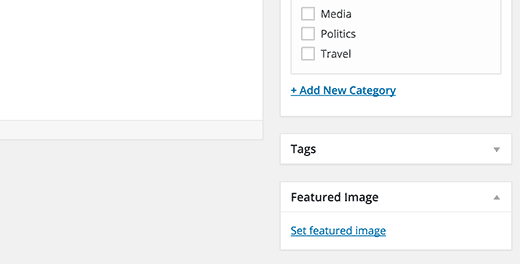
Where do I go to set the photos for the people who have testimonials? Thanks!
Thank you!
Hi,
It’s the Featured Image box on the right hand side when you edit the Testimonials on your WordPress admin page, see the picture below:
Hello! I really love your theme and like to purchase it, but I would have a question to fonds and colours for header and background. What options do I have here? I couldn’t see anything about that in the preview. And is it possible to use the video background in the blog section as well? Thank you very much! Nina
Thank you for your interest in our theme!
You can change the font and color for the header as well as other parts on the page.
Also, here are the header and background options:-Multiple Text Scrolling Animations -Parallax and Fadeout Background Effects -4 different sizes -Full Screen Background -Video Background -Image Background -Color Overlay
Those options are only available in the backend when you login as admin to manage your website.
Of course you can also use the video background in the blog section.
Cheers!



