38442 comments found.

anyway to open image links and column links in a new tab
Hey steveok,
Yes – when you add in a link for the single image element within the page builder, a new field will display called “Link Target”. However this option is not available specifically for column links at the moment
Cheers
My down arrow is missing (sf-sub-indicator) on my mobile menu. Any thoughts on how to remedy this?
Hey tencatefabrics,
Could you please share your URL in regards so I can take a look?
Cheers
If my theme skin is ascend does that make a difference?
Hey tencatefabrics, it depends on what settings you have selected for the Off Canvas Navigation menu itself
with nested modules, and I can execute any of the projects that are presented in your demonstration ? and the question of the license: the license is granted to the primary domain + subdomain of type xxx.domain.com?
Hey,
Please see my response to your previous comment in regards
Cheers
Hi Support Team. Is there a way to center the contents in the flip-box after I add a nectar-shortcode for button in it? Currently it all aligns to left, even though the column and flip-box is set to center all content.
On second thought, it’s not the alignment, The text and the buttons seem to be leaving margins, to left, even though margins/padding are set to none.
Hey ajaysoin,
Please share your URL where the boxes can be seen so I can take a look into the setup to assist
Cheers
Hello
There is a intro text in the post grids under the feature image and title . I cannot locate where that text coming from exactly.
http://themenectar.com/demo/salient-startup/blog/Thanks
Hey breakfast1905,
By default the excerpt will be displayed under the title in the masonry classic enhanced blog style. An excerpt can either be set manually using the excerpt field in your posts, but if it isn’t then the snippet will be created from the first text that appears in your post.
Cheers
Hey, I have some trouble with measuring nectar buttons by the Google Tag Manager, and GTM exactly does not read variables like ClickText or ClickURL. Can you fix it?
Hey radekcho,
Please share the URL in regards where the button exists that you’re trying to add these things to
Cheers
radekcholewinski.pl
Hey radekcholewinski.pl, I initially thought you were just trying to attach a JS event to the buttons, but you shouldn’t need to do that for the clicktext trigger in GTM – have you reached out to their support for clarification on what could be preventing it? Since you’re not using animated page transitions, there’s no custom events Salient is attaching to page links that could possibly interfere
i made transparet navi bar but if i did, the head contents have padding from the top so couldnt set with 80%... how can i make no space between top and banner or page. my site is claredog.com
Hey,
You can sort this by selecting the “Material” skin in the Salient options panel > general settings tab
Cheers
Hey, where did the game theme go?
Hey imaginetastyweb, i’m not quite sure what you’re referring to – can you kindly be more specific?
Cheers
Sorry. You had a gaming theme/demo a couple weeks ago but now it’s not listed in the demos. Did you guys remove it?
Hey, all the demos that have existed are still available to see from the main promo page. We’ve never created a gaming focused demo so perhaps you might be confusing the theme with another?
Huge issues with the latest version update, there seems to be a JS problem. Incompatibilities with Revo Slider as well. ( have the theme purchased with my companies account, sorry for commenting with this one)
Hey manesisnet, since there’s currently no confirmed issues like this, any specific information you can provide would be helpful for troubleshooting. Could you please share your URL where these issues can be seen?
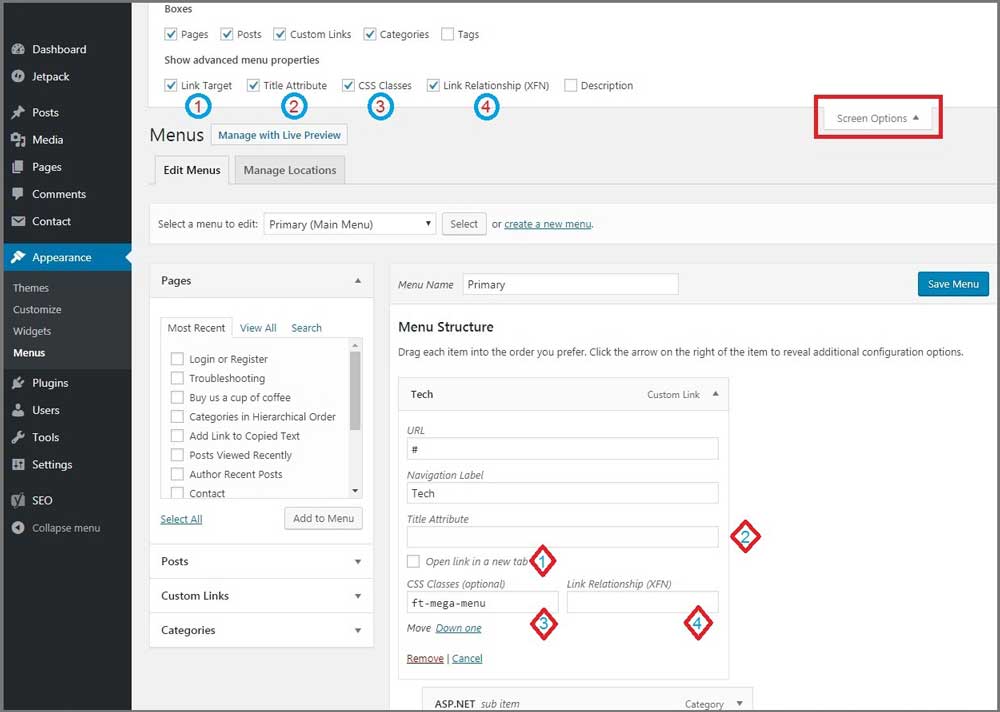
and… i should make my one menu in navi bar, link to new page (open new browser) but there is no option in menu set. nomally I saw before but can not in here.
Hey meeromee88,
Using the screen options tab when editing you menu, you can enable various attributes such link target and more
Cheers
hi,,, actually i wanna make head navigation BG color to 80% transparent but in the option has no option how can i do ?
Hey meeromee88,
There is an option for that in the Salient options panel > header navigation > logo & general styling tab called “Header BG Opacity”
Cheers
Hello,
How do I active HOTSPOTS/TOOLTIPS?
Please advise
Hey doriansuarez,
The element inside of the page builder called image with hotspots will allow you to do so
Cheers
I recently updated this theme. My home page had a nectar slider and then a testimonial slider followed by recent projects. Now nothing is displaying under the nectar slider. I have a header, the nectar slider and the footer w/widgets. Has anyone else had this issue? I feel like I must be missing something simple.
Hey kelleyvictoria, please share your URL so I can see what’s going on
Cheers
Thanks, do you have the other elements (testimonial slider, recent projects etc) in separate rows from the Nectar Slider? If not, they would indeed disappear when using the parallax option on the slider – if you already had them in separate rows, please reach out via the contact form on my author page with your admin credentials so I can take a further look to assist https://themeforest.net/user/themenectar
Cheers
Ahhhh, okay I see that now. I put them in their own rows and they show now. My second row is a testimonial slider and there’s a little white space on each side. Is there a way to get rid of that? I should be a full width section.
Hey, can you verify that in your Visual Composer settings in the admin panel you have the option “Disable responsive content elements” turned off?
That fixed it. Thanks so much! Always so helpful!
You’re welcome 
Embeded videos in video post no longer display after the last update… How do i fix this?
Hey simontornvall,
Make sure you don’t have the option on for “Hide Featured Image on Single Post” in the Salient options panel > blog tab
Cheers
Hello.. hope you are well. On https://buildmywordpresswebsite.com the homepage info boxes… I am looking to have all of them be the exact same height – 200px. How can I achieve this? Thanks so much.
Hey cece101,
If you set the row holding the columns to the equal height option it will make them all the same height – however if you need them to be a px value, it would require custom css. Are you trying to make this occur for both rows of columns on that URL?
Cheers
yes. sorry if that wasn’t clear. There are currently 2 rows of 3 and I might add 1 more row of three info boxes. The goal would then be for all 9 to have the same height. I have already set each row at equal height option but the individual rows are obviously not the same height, i.e. all 6 current info boxes should be at the same height – around 200px high. Not sure how to accomplish this. Thanks.
On the homepage right below the top slider… there are 6 columns which the goal would be to have them ALL the same width and height. They aren’t the same height and I can’t figure out how to make them the same height. The bottom left column especially is a bit small. Thanks! https://buildmywordpresswebsite.com
Hey the only column i’m seeing that’s out of sync with the other is the one with the text “OUR STORY….. More Text Here…”, it appears that there’s a custom top/bottom margin set of 25 px. Can you try removing that from the design option tab?
Cheers
yes… if you remove that… which I just did… you see the top 3 columns are now a different height than the bottom three columns. i actually want all 6 to be the same exact height. Thoughts? I need both rows of columns to be the same height.
I’m seeing that each of the two rows are successfully setting all the columns within them to to same height, there’s no way to get equal height between multiple rows, for this custom css would be required to set a min height
Been a Salient user for a long time! I really appreciate all the updates and modernization.. however, I updated my theme and all my Gradient Section Overlays disappeared (even though it’s still active in the visual composer) – I had to put a CSS quick fix because this is my company site and we need it to be functional.
My retina logo’s have also disappeared. I have reuploaded them and cleared cache.. nothing is working!
Please help! The site is: http://www.envisageny.com
I decided to revert back to a back up …. Apologies for the inconvenience. But in the future I would like to update without any issues.
Hey epik,
these are both not known issues with 8.5.x, however If you can update to the current version and provide me access to your setup via the support forum or email – i’d be more than happy to troubleshoot them for you
Cheers
Is there a way to change the “Site Name” to use the “Page Title”? So when you go onto a different page it changes the title in the header. Thanks
Hey DIGIDUCKUK,
That would require a mod to the nectar_logo_output function within the functions.php file
Cheers
Hi! Is it compatible with the Ultimate Member plugin? Thanks!
Hey goldengooseevents,
I haven’t personally tested with that plugin but can’t see why there would be issues
Cheers
Hi TedBot I encounter the same problem.. After I edit the hotspot settings in Visual composer…I close the hotspot settings …and then save the page…It Works 50%.. The hutspots I added are not visible on the website unfortunately…Is there someone who knows how to deal with this problem..
Hey tmgdigitalstudio,
please share your URL in regards where this can be seen so I can assist as I can’t replicate on the current version http://themenectar.com/demo/salient-promo/image-with-hotspots/Cheers
this is the URL: https://impulse.click....... After I edit the hotspot settings in Visual composer…I close the hotspot settings …and then save the page…It Works 50%.. The hutspots I added are not visible on the website unfortunately…Is there someone who knows how to deal with this problem..
Hey, please open a ticket in regards with your admin credentials and share the ticket ID here once you’ve done so. This way we can log in and inspect the setup further to find out why it’s not populating https://themenectar.ticksy.com
Cheers
I tried for an hour now to get the off-canvas navigation from this demo, but I don’t know how. All the off-canvas menu options I tried don’t look like your demo: http://themenectar.com/demo/salient-blog-dark/ How can I get that cool move-to-side-and-shrink animation?
Hey Hellmachine,
You need to make sure the “Material” skin is set active in the Salient options panel > general settings tab and then set your off canvas navigation style to “Slide out from right”
Cheers