38447 comments found.

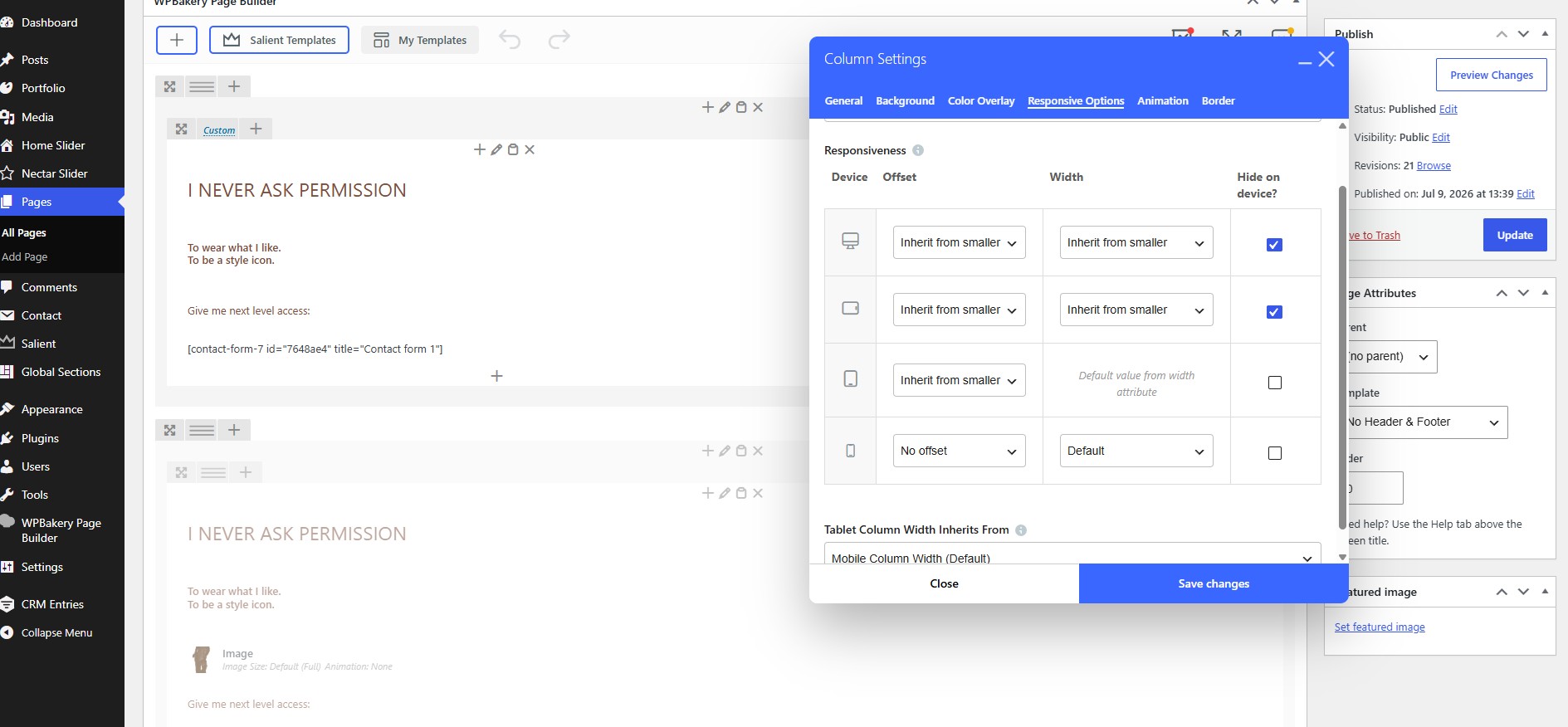
Hello there  There sems to be a bug on the responsive options. I show/hide Columns on mobile/desktop they still appear but just white space. Example below (had to add a ID and display none on mobile in oorder to not show it, but you can see on desktop it displays on the bottom: https://takemetothenextlevel.co.za/
Hey Richard
That space is coming from the parent Row element because the Full Height option is enabled.
You can also responsively hide or show the Row using the Device Visibility option under Row Settings → Advanced.
Kind regards
No, it is set to Full Height but the space at the bottom is coming from the second row below which has been set to Mobile device view only under Device Visibility options. See screen shot: https://takemetothenextlevel.co.za/wp-content/uploads/2026/07/Screenshot-2026-07-10-155603.jpg
It looks like the second Row itself hasn’t been set to hidden for the desktop viewport. Only the Columns inside it are hidden, which is what you’re editing in the attached screenshot.
To hide or show the entire Row on a specific viewport, you can use the option at the bottom of the General Settings tab when editing the Row element, as shown here: https://ibb.co/1VL8FvW
Ahh, I see now! Thank you for your help. Ill use those settings from now on.
An issue with the Mega menu and Multiple Headings Within One Column.
It does not highlight the column heading on hover.
Here is a screenshot: https://snipboard.io/AtNIog.jpg
Here is how it should be: https://snipboard.io/rgcm4p.jpg
Salient Version: 18.2.1
Hey tonevski,
Can you share the website URL so that I can take a look?
Thanks in advance
Sure. What’s your email?
You can reach out via the contact form on our ThemeNectar page here.
Kind regards
also how to reduce the height of the carousal / carousal item ?
Hey anazkhan,
There are a few different carousel scripts available in Salient, but assuming you’re using the Carousel element with the Flickity script, the height of the items is determined by the elements inside the carousel. In other words, the carousel grows to match the content height.
Have you tried editing the element settings inside the carousel to adjust their heights?
Kind regards
yes im using the flickity carousal ,eventhough the content height is smaller it is using a default height which is higher
We would be happy to take a closer look at your URL if you would like to open a ticket in the future.
Kind regards
When I change any settings , like accent color or font , the menu letters disappear ,and some of the content details ,why this happen ?
Hey anazkhan,
Are you using a recent version of the theme, and have you disabled third-party plugins to test for conflicts?
Since there are no known issues similar to what you’ve described, we’ll need to take a look at your website to help troubleshoot. Please open a ticket on the support forum here: https://themenectar.ticksy.com/
Thanks in advance
support is over ,so cannot post in support forum , I have one more doubt that is it possible to use one demo menu design in another demo content ?
Hey anazkhan, You’ll need to set the theme options to match the demo you’re trying to copy the menu style from. You can import the theme options from any demo, review the settings, and reuse parts of them in other setups.
Kind regards
Hello,
We have taken over the management of a larger number of older basic websites from a previous agency. These sites are currently using a mix of different outdated free themes, and we are planning to migrate all of them to the latest version of Salient. We will cover the initial cost of the licenses.
What process would you recommend for this?
Should our company purchase all licenses at once through our Envato account and then assign/register one license per website as needed? Or would you recommend creating a separate Envato account for each website and registering the license individually through each account?
This involves at least 20–30 licenses, so we would like to handle it in the smoothest and most scalable way possible.
Is there any reason not to purchase all licenses through our company account and distribute/register them one by one for each respective website? From our perspective, that seems like the most efficient approach.
Thank you in advance for your guidance.
Hey Disti,
The most practical approach would be for your company to purchase the licenses through your company Envato account, provided that you purchase one separate Salient license for each individual website.
For 20–30 websites, purchasing all licenses under your company account and maintaining an internal record that maps each purchase code/license to its corresponding website would be the right process.
Kind regards
For smooth handling of Salient updates, is the best approach to install the Envato Market plugin on each individual site?
The goal is for each site to have a completely separate license/update connection, so updates can be shown and managed independently in the WordPress admin panel for each site.
I assume the preferred setup would therefore be to use a unique token for each site/license, rather than one shared token per Envato account? Will each token be connected to the respective purchase ID/purchase code for that specific site?
Hey Disti,
Yes, installing the Envato Market plugin on each site is the recommended approach. Each install will have its own independent update connection, and Salient updates will show in each site’s WordPress admin separately. The bundled plugins (Salient Core, Salient WPBakery) also receive their updates through the theme itself, so no extra setup is needed for those.
One token per site is also correct, though tokens are tied to your Envato account rather than to individual purchase codes. The benefit of separate tokens is that you can revoke any single one at build.envato.com without affecting your other sites.
Kind regards
Thank you for the clarification.
One concern we have is that we would not want the full purchase history from our company Envato account to be visible or accessible through the Envato Market plugin on each individual client site, simply because the token is connected to our Envato account?
Is access to the Envato Market plugin limited to WordPress admin users only?
Also, if a client later decides to move their website away from our management, would it be possible to transfer the Salient license to them, or would they need to purchase a new license under their own Envato account?
Kind regards
Hey Disti,
The token itself is account level, so it does technically grant access to the account’s purchase list through the Envato API. Within WordPress, the Envato Market plugin does offer a way to limit what’s shown: instead of connecting the full account on the main tab, you can use the “Single Item” tab and add only Salient by entering the token and item ID. The plugin will then only display and update that one item.
The Envato Market plugin is only visible to Administrator level users, so editors, authors and other roles cannot access it.
On the license question, Envato unfortunately does not support transferring a license between accounts. If a client leaves your management, you can hand over the purchase code, which they can continue using for support verification and the site can keep running the theme under that license. However, if they want updates connected to their own Envato account, they would need to purchase a new license.
Kind regards
The flickity static height slider on the image gallery widget is being glitchy. When it transitions on and off the page in the masked area they ‘jump’ on and off the page. But not all of the images do it, only some. Some transition perfectly.
Please see video showing: https://www.awesomescreenshot.com/video/54186912?key=06bf4d682553a97b30688ea83333b979
The page it’s on is: https://aqua-emu-169241.hostingersite.com/
Hey UtopiaDM,
That appears to be happening because your carousel doesn’t contain enough items to create a seamless loop with your current sizing settings. If you add a few more items, it should be able to loop without that issue.
Kind regards
Hello, We have a woo-commerce site set up using your theme and my client would like the terms and conditions checkbox to appear on the checkout page, currently it only has a statement with no checkbox, how can we add that so the customer needs to click on it? Thank you
Hey ricrucial ,
When you use the block-based checkout instead of the legacy shortcode for the checkout display, you can edit all sections using the block editor. If you open the Checkout page for editing and select the “Terms and Conditions” inner block, you should be able to toggle the “Require checkbox” option under the block’s settings.
Note that the block’s settings can be opened by clicking the “Settings” button in the editor’s toolbar. It is the second button from the right at the top.
This screenshot should help clarify the explanation.
Kind regards
Hi team! Is there a compatibility update coming for woocommerce 10.9? Is it safe to update woocommerce in the current Salient version? cheers
Hey Aggravated_Badger!
Salient is already compatible with WooCommerce 10.9.x If you’ve encountered any specific issues, please let us know.
Kind regards
Hey Team, I noticed that when I try to hide a column on just mobile, while the content remains hidden, there is still a pretty big gap where the content used to be despite 0 padding, 0 margins, etc. Is there a way to hide the column completely, including the gap it creates? Thanks!
Hey AkeatsKes!
It sounds like you may need to hide the parent Row element rather than the Column itself. You can use the “Device Visibility” field in the Row element settings to control this. If that doesn’t apply to your setup and you need other sibling columns within the row to remain visible, please share the URL where the space can be observed.
Kind regards
Hi, are there any upcoming sales planned for Salient? Thanks!
Hey Disti!
There are no sales coming up in the short term. We typically only run Black Friday and holiday sales.
Kind regards
Adding custom script with specific type attribute to individual page head
Hi,
I’m using Salient theme with WPBakery Page Builder and need to add a JSON-LD structured data block to the <head> of a specific page only.
The block I need to inject looks like this:
<script type=”application/ld+json”> { ... JSON content … } </script>
The issue is that WPBakery’s built-in “Custom CSS & JS” panel (under the JS tab → “Custom JavaScript in <head>”) wraps whatever I enter in plain <script> tags without the type attribute. This means I cannot add a script with type=”application/ld+json”, which is required for Google to recognize it as structured data (Schema.org).
My questions: 1. Is there a way within Salient or WPBakery to inject a <script type=”application/ld+json”> block into a specific page’s <head> without it being overridden or wrapped in a plain <script> tag? 2. Is there a Salient-specific hook, page option, or template field that allows raw HTML injection into the <head> on a per-page basis?
I’m trying to avoid editing theme files directly or using additional plugins if possible.
Thank you for your help.
Hey sizar2,
You could add the script to the Raw JS element to include your own script tag, and have it load only on the specific pages where you add it.
However, there’s no built-in way within WPBakery to add scripts to the head with custom script tags. For that, you would need to add a snippet to your child theme or use a snippets plugin.
Kind regards
Is there a way to get the same kind of parallax effect as this page for GTA6?
https://www.rockstargames.com/VISpecifically, when you scroll up and down the page, you’ll notice the overall experience: it goes from full screen, where your mouse scroll dictates movement on the background image (the guy and girl and the bg of the city skyline).
I’m not sure what that effect is called, but curious if I can pull something similar off with the salient theme components and settings?
Hey JayCarver!
That appears to be a video that plays based on the scroll position. We don’t currently offer something like that in Salient, but we do offer something similar in our other builder, Nectarblocks.
I’ve added this idea to our wishlist for potentially bringing something like it to Salient in the future.
Kind regards
Hi, I was just wondering how to setup the photography masonry layout like https://themenectar.com/salient/photography/. I’m using the Quantum layout but for the life of me, I can’t figure out how to make it so when you click a project, it opens a gallery vs the image and description that’s currently there. In the portfolio drop down (https://themenectar.com/salient/), under project style, it shows photography but that isn’t in the salient templates.. unless I’m missing something. Thank you!
Hey eugenelee223!
You can add an Image Gallery element set to the “Image Grid style” for the Gallery Type. Here is the relevant documentation on setting that up: https://themenectar.com/docs/salient/galleries/
Kind regards
Quick question: if i add Facebook Pixel to the site and turn dealy Js load time on on Salient, will that mess things up with Pixel? Or does it apply to Salient files only?
Hey toolbox101,
No, the Delay JavaScript Execution theme option only applies to scripts loaded by Salient, to avoid any third-party compatibility issues.
Kind regards
Hey guys.
Just a quick one. I think the Nectar slider might need a little bit of attention in terms of performance/loading images etc.
As it stands I don’t think they have preload/fetch priority etc?
Hey jbennett360,
That plugin does not currently use preloading for the images, but i’ve noted the idea on the wishlist.
Kind regards
Hi, I have a new client and they use the theme Salient. But they do not have any themeforest or envato login – maybe was the previous designer which they don’t have access to. So my issue is this, I installed their payment gateway plugin and it said this before we can start using it. It says “ur theme (Salient Child Theme) contains outdated copies of some WooCommerce template files. These files may need updating to ensure they are compatible with the current version of WooCommerce. Suggestions to fix this:
Update your theme to the latest version. If no update is available contact your theme author asking about compatibility with the current WooCommerce version.
If you copied over a template file to change something, then you will need to copy the new version of the template and apply your changes again.
” Specifically, wp-content/themes/salient/woocommerce/checkout/form-checkout.php Version 3.5.0 is out of date. The core version is 9.4.0 wp-content/themes/salient/woocommerce/checkout/review-order.php Version 3.8.0 is out of date. The core version is 5.2.0 wp-content/themes/salient/woocommerce/checkout/terms.php wp-content/themes/salient/woocommerce/content-product.php Version 3.6.0 is out of date. The core version is 9.4.0 wp-content/themes/salient/woocommerce/content-single-product.php wp-content/themes/salient/woocommerce/loop/add-to-cart.php Version 3.3.0 is out of date. The core version is 9.2.0 wp-content/themes/salient/woocommerce/loop/loop-start.php wp-content/themes/salient/woocommerce/myaccount/form-login.php Version 4.1.0 is out of date. The core version is 9.9.0 wp-content/themes/salient/woocommerce/single-product/product-image.php Version 3.5.1 is out of date. The core version is 10.5.0 wp-content/themes/salient/woocommerce/single-product/tabs/description.php wp-content/themes/salient/woocommerce/single-product/tabs/tabs.php Version 3.8.0 is out of date. The core version is 9.8.0
How do we do this if we do not have the license number of the current theme or a login? Do we have to buy the theme again, and connect envato and then update the theme and it will have all new files? Please help. Thank you so much.
Hey socialmedia2212, you will need to update your copy of Salient in order to get the latest WooCommerce overrides and remove that warning message. The only way you will be able to update is if you have access to the Envato account that holds the license for Salient, or if you purchase a new license.
Once you have a license, you can use any of the methods listed in our documentation to update Salient: https://themenectar.com/docs/salient/updating-salient/
Kind regards
Hello! Quick question before I purchase: Can the scrolling effect on the Harbor theme (https://themenectar.com/salient/harbor/) be used on the Signal theme (https://themenectar.com/salient/signal/)?
If not, then would the color change of the Signal theme upon scrolling be used on the Harbor theme?
I love the display of both! Thank you!!
Hey susansampaioco!
Yes, you can use sections from any demo as desired. All demos are fully customizable, and you can easily include elements from other demos by inserting the desired sections from the Salient Studio Template Library.
Kind regards
Thank you!
You’re welcome!
Hi guys, Small feature request – for the Page Sub Menu it would be great if you could customize the title for small screen devices for each instance. I realize you can change the string, but that’s site wide.
I’ve got a couple of instances on different parts of the website, but each requires a slightly different title for the drop down title.
Thanks!
Hey ND81! Thanks for the feature request. I’ve noted the idea on the wishlist
Cheers
A quick question: is there a global setting that turns all main content links into animated underlines? I am talking about links in paragraphs, not CTA format.
Hey toolbox101,
Not in the current release. The “General Link Style” theme option does not provide an option for an animated underline on regular text links.
Kind regards
Hey Team Nectar, would it be possible to add a mobile option for the minimum height in the Nectar Simple Slider? That would be really helpful.
I also wanted to ask whether an additional option for horizontal scrolling on mobile devices could be added. That would be great as well.
Thank you for your great work on the Salient theme <3
Hey Layoutmachen!
I’ve noted the idea for turning the minimum height into a responsive field for the Carousel element.
Could you please clarify which element you’re referring to for horizontal scrolling, and explain in a little more detail what you’re trying to achieve that isn’t currently possible?
Thanks in advance
Thanks for noting the idea about making the Carousel element’s minimum height a responsive field — that would be very helpful.
I’m referring to the “Sticky Content Section Horizontal Effect”. What I’d like to achieve is that this horizontal scrolling effect also works on mobile devices, instead of being disabled or displayed as a normal vertical section.
So ideally, users would be able to swipe/scroll horizontally through the section on mobile as well.
Thanks
Thanks for clarifying, Layoutmachen!
Cheers