28333 comments found.

Why do not you fix the adblock with the element “Banner” ? I can’t see anything when I turn on Adblock and I believe a lot of my customers are using that add on.
Hi there,
The banner should be displayed with AdBlock on. Please send a link to your site via support and we’ll look into it.
Hi,
Since the recent updates (3.5 & 3.5.1) I am getting the following error message in the product area of WC.
Fatal error: Cannot redeclare class WC_Settings_Products in /home/mosaicvi/public_html/wp-content/plugins/woocommerce/includes/admin/settings/class-wc-settings-products.php on line 449
Does anyone have a fix for this?
Kind regards,
Benji
Hello Benji, sorry for the trouble.
Please shoot an email via support and we’ll look into it.
Hi
After the woocommerce updation 3.3.1 There seem to be a problem with “Quick view” when trying to click the add to cart button on the quick view pop up window then its redirect into product page.
Does anyone have a fix for this?
Kind regards, sarun
Hi Sarun,
Go to WooCommerce > Settings > Products > Add to cart behaviour and enable Redirect to the cart page after successful addition
No on without activating Add to cart behaviour the add to cart button on the quick view popup on woocommerce 3.2.6 will work like its redirect the same page.This function is not working on woocommerce 3.3.1.
This site have woocommerce 3.2.6 = https://www.thecosmeticbox.com.au/ This test site woocommerce 3.3.1 = http://thecosmeticbox.wphero.io/ (password=wphero@123#)
You check these two site then you will see the difference
Please reply me..
Hello Sarun,
I have reported the issue to the development team and are awaiting a response in regards to the issue.
Hi again, we have investigated a bit. Seems like WooCommerce changed this. We use default WooCommerce functionality. We will try to see if there is something we could do to fix this.
I would like to know how I can display the product page to full width?
Hi there,
You can achieve using a custom Product page http://docs.uxthemes.com/article/245-how-to-create-a-custom-product-page
Dear,
I found a little bug that I wanted to report.
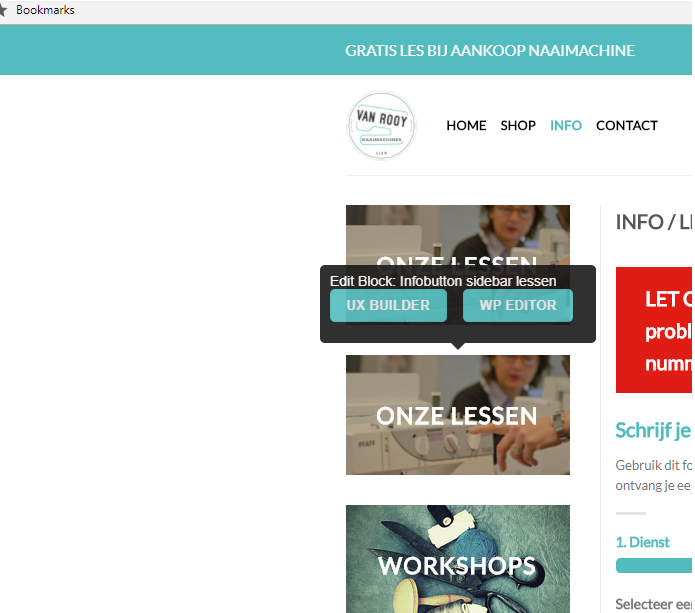
When making a widget and you’re using “Flatsome Blocks” to show blocks in the theme, there’s a little bug where normal user (not logged in), can also see the “Edit Block” popup, as shown here:
https://i.gyazo.com/0f4643bf2a39a4d5499d36d8bd7bd922.pngIt is only when I use an HTML element in the widget that the popup disappears for non admins.
Hi there,
Please send a link to your site via support and we’ll look into it.
Dear,
I just wanted to address that there’s a little bug in the widget system. I can’t make a ticket via support since our support license ran out.
Also if other people come looking for this problem, they might up ending reading this message which will make their day a lot easier!
Cheers!
Hi,
After I have updated the latest version. UX builders and Advanced Options appear blank. I have tired deactivate all plugin but the issues still there.
Hi there,
Please shoot an email via support and we’ll look into it.
Hi I currently have flatsome 3.5.1 i have a new domain I wanted to know if it would be possible to migrate my my entire store/theme to this new domain if I purchased the license on the new domain. Do you provide support for this?
Hi there,
Yes  You can be able to transfer the license for one domain to another. Ensure to remove all Flatsome files from the old domain.
Will support be able to help me with this? I am not the most technical person when it comes to this.
Sorry, we only sell a theme. You need to get help from a developer or some local technical WordPress person to help you out.
Hi,
I have two questions.
1. How do I change the search settings so that posts/pages show before products, or all three appear with no preferential order? Now it always shows products before anything else
2. How do I remove the price from widgets such as “products by rating” or “recently viewed products” and from the product sliders found on UX Builder?
Thanks in advance for your help!
Hi Dave,
1. You will need to edit the theme files to achieve this.
2. You can write some CSS to hide the price on these elements.
Hi,
1. Yes, I thought that would be the case, but I haven’t been able to find the appropriate theme files to edit (there was no widget section in templates folder). Please, could you tell me the name and location of the file I will need to edit?
2. OK, I’ll see if I can find how. I wasn’t able to find the class type in dev tools on widget elements. If you could tell me what that would be, that would be great.
Thanks for your help
Hi Everyone,
In case anyone faced “UXBuiler Hanging” or Not Loading...Please follow these steps to unblock it:
- Check your browser to make sure your website not blocked by Adblock (plus).
- Check your .htaccess files and make sure you don’t block “X-Frame-Options”.
- Check your website Firewall “Not block frames or Javascript”.
- Try to increase your WP memory limit: define(‘WP_MEMORY_LIMIT’, ‘256M’);
Files to check:
- wp-config.php
- .htaccess.
(note if your website in a subdirectory make sure you enable both main directory and subdirectory X-Frame-Options).
I am writing this because I love Flatsome and happy to help people who missing its great tools and options
Have a nice blogging
Thank you for sharing this
Hi, I am having an issue since I updated the theme, there is a ajax thing that is adding my products to the cart instead of opening them when I click in the button.
I realized what is causing this, it is in the file /flatsome/inc/woocommerce/structure-wp-product-box.php line 151.
esc_attr( $product->is_type( ‘variable’ ) || $product->is_type( ‘grouped’ ) ? ’’ : ‘ajax_add_to_cart’ ),
I replaced for this
esc_attr( $product->is_type( ‘variable’ ) || $product->is_type( ‘grouped’ ) ? ’’ : ’’ ),
and now is working good.
Since you told me that is not supported because in your opinion this is a plugin 3rd party problem, even when this problem never happened before with your theme and is tested in other themes and is not happening either.
I would like to know how I should add this file to the child theme.
Thank you.
Hi there,
You will write a snippet that removes the action add_action( ‘flatsome_product_box_actions’, ‘flatsome_product_box_actions_add_to_cart’, 1 ); and add the updated action in your functions.php file.
We will have this fixed in next minor version So you don’t need to add it to a child theme.
We have investigated a bit. This is default WooCommerce behavior. You need to disable the “Add to cart” button if you don’t want this. Then your users will click the product to get to the product instead.
Sorry, how that can be a default Woocommerce behavior if I tested this in 3 different themes included a previous version of Flatsome and it works perfectly. I already explained this in a email contacting with your support and I received only a general answer for someone that don’t even took the time to look into it. That person assumed that the problem was from the plugin and is been so unhelpful, and that’s why I wrote in here, hoping that this way is more effective.
I am using the plugin ‘custom boxes’ the support department of this plugin already took the time to verify if the problem was in their side and they told me that is an issue is. and I quote: “redirection to the cart is due to ajax application from the theme”.
After your email support didn’t listen to this at all, I went throught and I figured out that making that change in the /flatsome/inc/woocommerce/structure-wp-product-box.php line 151 that I described at the beginning solve the problem (I don’t know by the way if this solution is having other consequences, as far as I could test is not).
If you kindly tell me either way how to set this in the child_theme of, even better, look a solution to fix it in your next minor version that could be awesome.
You can see the different in the redirection between the current Flatsome version and the Twenty Seventeen theme, you can see that Flatsome is adding ‘ajax_add_to_cart ’:
Here is how is in Flatsome Custom Your Box
I already updated last Flatsome version and this is not fixed at all as you promised. Your support email is very annoying and it is far to be helpful. I am waiting them to answer me for 2 weeks.
Simple products have always been just added to cart instead of going to the product page.
Did you try to disable it WooCommerce > Products > General and look for “Add to cart behaviour” ?
How can I add space between menu item?
Hi there,
We have a setting for this in Theme Options > Header > Header Main > Navigation > Nav Spacing
They not changing. why?
Depends where you have your navigation. Is it on bottom or main? Maybe you need to go to “Header bottom” instead.
Hi,
I think I have found a bug in new version: “Open Cart dropdown when product is added to cart” is working only in archives not in product pages.
By the way, when “ajax add to cart” feature is enabled we get “view cart” when a product is added, what about if client wants to add a new item? I have tried some codes to get this done but they are not working with flatsome…
Thanks a lot
Hi there,
Please ensure that you are running the latest Flatsome (Version 3.5.1) and WooCommerce (Version 3.3.1). This is working well over here.
Hi, thank you. It is the other way round, sorry. Cart is opening in archives even when option set to NO.
And what about the other question? Any ideas? When “ajax add to cart” feature is enabled we get “view cart” when a product is added, what about if client wants to add a new item? I have tried some codes to get this done but they are not working with flatsome…
Thanks again
Good Morning, i’m just star too use your template, and is very cool template i recommend a lot. I have a question (and more in a futur ):
I have add contact in a header bottom, background red (it’s ok) but a style stay in gray for a letter. i have change a “NAV color” in white (like for shop menu in a first party of this header bottom. for this link s ok is white).
If i move a contact in top header they letters are in white is ok.
How i can change this color text in header bottom please. Thanks in advance.
Hi UX themes no answe rfor me, please ?
i found a solution alone, but i don’t understand why you don’t have answer me, i paye for a support and i received no answer from you….
Hello!
How can I show product meta on product page separately (eg I want to show SKU after title, but category and tags – after add to cart button) ? is it possible to use meta in shortcodes?
thanks!
Hi there,
i’m afraid there is no setting to separate this.. You will need a bit of customization for this.
Hi After updating my theme Woo-Commerce custom fields are not working. All custom fields under functions.php (child theme)
Thanks in Advance
Hi there,
I’m afraid you will need the help of a developer to look into the issue.
Yes, really sorry about this. This must be related to latest WooCommerce update and not the theme.
The theme have Portuguese of Portugal (PT-pt)
Yes
Hi, my nav bar is white and when I first load the site the text doesn’t appear and only shows up in black when I start scrolling down (when it turns into the sticky nav bar). How can I make the nav label text black?
Hi there,
Please send a link to your site via support and we’ll look into it.
BUG: when i put my script in Advanced > Global Settings > Header Scripts, my code uses a regex function which contains some backslash characters ”\”, and somehow the system remove all the backslash characters ”\” and it causes the code to be not working. If I click “Save All Changes” the first time, everything works fine because the code is saved, but it would be shown without all the backslashes. When I then, for example, edit some CSS in Custom CSS and click Save All Changes again, the code in Header Scripts would be saved, too, but without all the backslash ”\” characters. Please fix this issue.
Hi there,
I will share the issue with the development team. In the meantime, you can use this plugin https://wordpress.org/plugins/header-and-footer-scripts/
I updated to 3.5.1 and now the icons in the header are missing. I cleared the cache and that did not fix the issue. Any ideas?
Hi there,
Please send a link to your site via support and we’ll look into it.
Hi, great theme, but I have a problem:
How can I add a sorting dropdown menu in pages with products displayed by category with Visual Composer element???
Here you can see an example: http://devanila.com/categoria-bdsm/
In shop page we have the dropdown, but it doesn´t work in other pages.
Please, we need help.
Thanks in advance 
Hi there,
The sorting dropdown is added to the WooCommerce Category pages by default. To place this in custom pages, you will need a bit of customization.

This item was featured on ThemeForest

Power Elite Author
Contact the Envato Market Help Team