3574 comments found.
When are you going to get working on an update for Woocommerce 3.31?
Hi robertsachristan,
We are currently working on Kalium update, next week will update Aurum to make it compatible with the latest WooCommerce..
Kind Regards,
Art from Laborator

The custom image logo does not appear in my aurum theme (v 2.14) no matter what type of image I upload. The text does appear. I have tried removing the text and only uploading an image for the logo and it still does not show. I am working from the child theme as well. No custom css modifications have been made.
Hi sosickinc,
We use comments section of the theme only for a pre-sale questions. Please just write a ticket on our dedicated support center and support team will assist you.
Kind regards,
—Ylli
Thanks I have submitted a ticket.
Hi there,
I wanted to share a little isue with Woocommerce bundled prodcts plugin. When we add optional products, the updated price comes before “Total” mention.
Thank you again for this great theme!
Hi Benoblog,
Has this issue always been there or it has recently appeared after any update?
Kind Regards,
Art from Laborator
Hi,
I think this issue appeared after last Woocommerce update.
Kind regards,
Hi Benoblog,
Probably the problem has been caused by the update of WooCommerce so stay tuned as we will soon release a new theme update, we think it will be available next week.
Kind Regards,
Art from Laborator
Great!
Thank you.
Kind regards
I just installed the demo content for Aurum Fashion Content and the header does not display. I have already installed and activated the LayerSlider WP plugin. The error message is “The slider cannot be found. Please make sure that you’ve used the right shortcode or method insert the slider, and check if the corresponding slider exists and it wasn’t deleted previously”.
Hi sosickinc,
There seems to be a small issue with the slider, can you please send us your site URL and WP credentials on email? We need to investigate your problem and then get back to you with possible solution.
To send us email use this link and please write us your request again, because we receive a lot of emails on daily basis and we unfortunately can’t remember all customer requests.
P.S: Please note that we usually do not respond to emails that request support, because we only provide support on dedicated support center. Also emails response time can be up to 7 business days.
Kind Regards,
Art from Laborator
I just deleted the Layout Slider from the Home Page and re-added another one with the updated Layout Slider plugin, but unfortunately I had to pay for the updated Layout Slider plugin which is now versions 6.6.8
Hi sosickinc,
Premium plugins don’t allow us to give customers our license number, so on each premium plugin (such as WPBakery Page Builder and Layer Slider) update we release a new update to our theme with the latest version of that plugin included, and customers don’t need to worry about that,
You never need to purchase any premium plugins that comes with our theme, you can purchase them only if you need their support or want to use their extra features.
P.S: We use comments section of the theme only for a pre-sale questions. If you need our support, please just write a ticket on our dedicated support center and our team will assist you.
Thanks for your understanding!
Kind regards,
—Ylli
Hi There, I Bought your theme long times ago. Theme is perfect. Thanks for that. I would like to ask you whether I can use your theme photos on my web page.
Thanks Nuwan
Hi Nuwan,
As you may know, the theme images are not included in the demo content packages as they are only for showcase purposes, so if you want to use them you will have to download them one by one.
Kind Regards,
Art from Laborator
When should we expect a new version with WooCommerce 3.3.1 support?
I just updated WooCommerce as didn’t see your note about not upgrading and there is no easy to downgrade it now.
Hi banar,
WooCommerce 3.3 has been released, we have started to work on updating Kalium, an update that will support WooCommerce 3.3. Update should be ready soon.
Next theme updates that will support WooCommerce 3.3 are Aurum and Oxygen, we hope the update will be available by next week.
Kind Regards,
Art from Laborator
Thank you for your reply. Could you please provide us an ETA?
Hi banar,
As we mentioned that information on this article too, if everything goes as we have planned we will release an update to Kalium theme that will support WooCommerce 3.3 and then we will start to work on Aurum theme too.
We don’t have an ETA for the moment but surely that it will happen through this month.
Thanks for your understanding!
Kind regards,
—Ylli
Roger that! Thank you.
Hello,
1. Can I make the purchase of the item with a person’s credit card and that the license and handling have a different person?
2. Can I do what I show in the photos with your theme with the mobile version?
- Categories of 2 columns in mobile version https://imgur.com/a/mdaU4
- When I select a product thumbnail image gallery https://imgur.com/a/Jh0yz
- When I select a slider product with related products https://imgur.com/a/ZLDva
3. I check the demo with an iphone 6s and it’s not responsive, why? https://imgur.com/a/4UJ4t
4. The theme updates for how long are they?
Thank you
Sorry, I am using the translator
Hi there,
1. This is an Envato related question, please contact Envato support for this as we do not handle the purchase methods, they know better how it works and if you can have this.
2. I don’t really understand what you want to achieve.
3. Because you have not removed the dark top selector at the top, remove that and you will see that the whole theme is responsive 
4. They are frequent as the plugins included in the theme release new updates and we have to update the theme too, since it has to be compatible with the plugins.x
Kind Regards,
Art from Laborator
Hello,
Excuse me, I do not know how I can be clearer. I check the photos I send? It is indicated what I ask.
Your theme can do what I show in the photos in the mobile version?
Please check the photos
Categories of products in 2 columns https://imgur.com/a/mdaU4
When I see a product show related products in slider https://imgur.com/a/ZLDva
When I see a product, show the other thumbnails https://imgur.com/a/Jh0yz
Thanks for your time and help.
Hi again,
1. That is possible only by using the Custom CSS as it is not in the theme features.
2. Yes, the related products are available on each post and that is a WooCommerce feature not that the themes offer it, watch the video to see them: https://d.pr/v/FlJdYS
3. Not possible.
Kind Regards,
Art from Laborator
Thanks for your reply
My question is related to the mobile version, not pc.
Is it possible to have a slider of related products as I show in the photo in mobile version? https://imgur.com/a/ZLDva
Thank you
Hi anfaguz,
The same will appear on mobile too, but not as a carousel but as normal related product.
Kind Regards,
Art from Laborator
I saw in the movie the possibility of installing the demo content, but then to eliminate it as you do? Thank you
Hi Maldestro,
Can you please try to be very specific about the question and explain it more to us, in this way we can easily understand you and give you the proper answer.
Thanks!
Kind regards,
—Ylli
Hi Maldestro,
Thanks for your reply.
Now I understand your question very well. There is not any alternative for this for the moment, so if you one demo-content and then you want to try the other one you need to reset your Wordpress installation by using this plugin Wordpress Reset (By Matt Martz) and then activate the theme and try to install the other demo-content again.
This will delete your pages and reset your Wordpress installation.
For the moment there is not any other alternative for this, and for sure we will check if there is any alternative in the future to integrate it with our theme.
Thanks and have a great weekend!
Kind regards,
—Ylli
Thanks Ylli, thanks for information. Regards Gaetano
You’re welcome Gaetano
Kind regards,
—Ylli
Hola, Puedo realizar la compra del tema con la tarjeta de crédito de una persona y que la licencia y manejo lo tengo una persona diferente ? Gracias
Hi there,
Can you please write in English? Thank you!
Have a great Saturday!
Beat Regards,
Ylli from Laborator
Hi After updating i get strange sorting in the shop see https://imgur.com/a/p193t
running latest wp and woocommerce 3.2.6
Hi hansp,
Please make sure that you are using the latest theme update. For more info and the changelog please read Aurum release notes.
P.S: We use comments section of the theme only for a pre-sale questions. If you need our support in the future, please just write a ticket on our dedicated support center and our team will assist you.
Thanks foe your understanding!
Kind regards,
—Ylli
hi, it was the latest version i tried from 18th of januari
Hi again,
We will need to see the site live at least and see if there is any error.
Kind Regards,
Art from Laborator
Hi there,
Right after updating Woocommerce (3.3.0), the products are no more displayed on the website. Will you soon release a new version of the theme?
Thank you
Kind regards
Oups, I’ve just see your article about WC updates. I’m sorry for the inconvenience.
Happy to hear that you found out the answer to your question
There seems to be an issue after updating to the new WooCommerce. Product Categories keep showing on the shop page. Need a fix.
Hi, how can i have category view like this?(Under shop) Instead of just a list. I mean I want 4 horizontal subcategories http://dikdemir.com/Products___Aurum.png
Hi edikdemir,
As we have wrote on our item page:
We would include the Uber Menu for free with our theme but we are not permitted to do this because they do not provide Extended Licenses, so you must purchase it separately.
Here is the plugin page: UberMenu (MegaMenu) and for further info please use author link, UberMenu Documentation , is easy to understand.
Here I added the video that will teach you how to set it up like in our demo site: https://www.youtube.com/watch?v=0R-m8RvvjGM
P.S: We use comments section of the theme only for a pre-sale questions. If you need our support in the future, please just write a ticket on our dedicated support center and our team will assist you.
Thanks for your understanding.
Kind regards,
—Ylli
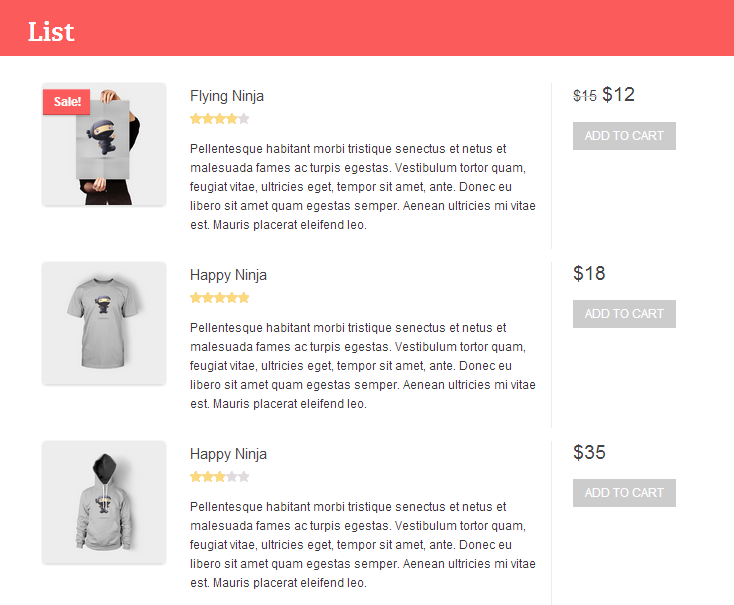
Hello, is it possible to have like a “list view” of products? For example if I’m in a category and there is 10 products, so each of them would be visible one per line with description, something like this: https://s3.envato.com/files/134770522/dp/List.png
Is it possible to do this with your theme?
Thanks.
Hi idealwpthemes,
Unfortunately we don’t have this feature in our theme, we will look forward and see if we can add it in the upcoming updates since it seems to be a nice feature for the theme.
Kind Regards,
Art
Hi
I can’t find “search results” section in “other settings”: Posts, Pages, Testimonials, Products.
Has anyone an idea why?
Thank you!
Hi dishyagency,
Aurum doesn’t have this option.
You can find Kalium Documentation on this URL http://documentation.laborator.co/item/aurum
P.S: We use comments section of the theme only for a pre-sale questions. If you need our support, please just write a ticket on our dedicated support center and our team will assist you.
Kind regards,
—Ylli
Hi There, I have a pre-sales question: can I use a different logo for the sticky header (like similar logo, but other color) Thanks in advance!
Hi webgeluk,
For the moment this is not posaible but this feature is on our to-do list for future updates.
Best Regards,
Ylli from Laborator
Thanks for your reply. By when do you think this feature will be available?
Hi webgeluk,
We don’t have any ETA when this feature will be available, so we don’t have a proper answer for this.
Kind Regards,
Art
I just want to do product demonstrations, I do not want to sell, it is possible. This for theme. I want to show the product. I do not want to sell. http://themes.laborator.co/#theme=aurum
Hi eyupguzel,
Thanks for your interest on our theme.
Yes for sure, we offer Catalog mode and you can activate this option on Theme Options > Shop Settings. To see the options visually please see this short video: Aurum Catalog mode.
Have a great day!
Kind regards,
—Ylli
hi, we would ask if the theme have the ability of holding 18000 books and if the user can reserve the book also we would ask about the book how we added and make the cover of book like what you show in the demo and what should be the format of book and so on Best Regrads
Hi iislb,
Thanks for your interest on our theme.
— Yes our theme is powered by WooCommerce plugin and on their 3.0 update they wrote that the plugin can handle very large amount of products.
— As for the reservations, I don’t think that WooCommerce offers any feature like this, but there are some plugins that can add this ability to WooCommerce.
— WooCommerce and our theme offer options to set your image dimensions so you will not have problem on this.
Kind regards,
—Ylli
Hi, I have got a problem, one day to the other i cant put neither product image nor post image
Hi there,
We use comments section of the theme only for a pre-sale questions.
If you need our support, please just write a ticket on our dedicated support center and our team will assist you.
Thanks for your understanding!
Kind regards,
—Ylli
I can´t send you a ticket because I need to renew the support. But I think that is a error in the theme, and I think that we don´t need to pay to this type of error.
Hi MultiGaming,
Please explain the issue more, so we can see what the issue can be, try including images or videos if possible.
Kind Regards,
Art
I can´t put neither product image nor post image, like you can see in this Gyazo (https://gyazo.com/cdd6512198e258ecdfd28c4a33671580) this is for product image, and the same happens with post image.The last errors (https://gyazo.com/98a7e87f779e3ceca926fbf131a6df00?token=4608c1988811e94f8f54c12f1716e105) happened in 26-Oct, and this error happened last week. Thanks you
Hi again,
Can you please send us your site URL and WP credentials on email? We need to investigate your problem and then get back to you with possible solution.
To send us email use this link and please write us your request again, because we receive a lot of emails on daily basis and we unfortunately can’t remember all customer requests.
P.S: Please note that we usually do not respond to emails that request support, because we only provide support on dedicated support center. Also emails response time can be up to 7 business days.
Kind Regards,
Art
I send it thanks!
Hi,
Is it possible to add text below the contact form and address also when the Contact us page template is selected?
Hi kasparjarve,
Unfortunately not, the contact page can be used with the template you see and it’s not possible to change the it’s layout through theme options.
Kind Regards,
Art