7929 comments found.

Hi, I want to know. I can use this theme to create a drug store.On how much it is difficult to change. Maybe you have another option if this theme is not suitable for creating a drug store.
Hello there,
Thank you for your interest in our theme. You can create any type of store using this theme. If there are any special requirement that makes a drug store different from a normal store, please let me know I will answer if that requirement can be fulfilled or not.
Hope this answers your question. Let us know if you have any other questions.
Thanks, Ibrahim
Who can help me in the creation of the site. I think that I myself would not be able to set up working drug store
Hello again,
Unfortunately we are unavailable for customisations requests. You will have to get it done through a third-party.
Let us know if you have any other questions.
Thanks, Ibrahim
Hi, Do you have lessons for this theme?
Here is our documentation : https://transvelo.github.io/docs/electro/
Hope this helps. Let us know if you have any other questions or need further help.
Thanks, Ibrahim
I noticed that the products do not have “tags” or “product tags”. May I know if this was just an oversight of not showing them in the demo, or this theme really does not have “product tags”? Many thanks. I love the theme and am planning to purchase real soon. I am just VERY concerned about the product tags
Hello there,
Thank you for your interest in our theme. The theme does display tags and other meta information just below the description in the description tags.
Hope this answers your question. Let us know if you have any other questions.
Thanks, Ibrahim
Using WooCommerce 3.2.6 From version 3.3.0, the site slows down. What to do? All plugins and theme updated.
Especially slowly works when moving to the category and subcategory of goods.
Hello there,
Thank you for purchasing our theme and for reaching us. I am not sure what is causing the issue. Can you please email our support with your WP admin details and FTP details ? I will check what the issue is.
Thanks, Ibrahim
Where to send information?
Hello there,
Please email our support from here : https://themeforest.net/item/electro-electronics-store-woocommerce-theme/15720624/support
Thanks, Ibrahim
Hey guys, I have two issues: 1. The zoom capabilities are not working on the new products I add 2. I can’t remove the title from the pages I create, top center of the pages I create the name of the page is written in big leters
Hello there,
Thank you for reaching us. Can you please give me your website URL to check the issues ?
Thanks, Ibrahim
this is the page were the title o is shown, you can click on the item displayed to see that the zoom function is not working: http://www.qlbessia.com.ar/neumaticos/145pulgadas/
Hello again,
You should not be create pages to display products. Your products are displayed automatically in their categories archive and shop archive.
Image zoom works only if you have a higher res image for the single product.
Hope this helps. Let us know if you have any other questions or need further help.
Thanks, Ibrahim
I’m still having trouble importing the dummy data, I noticed that when I check the “download & import file attachments” box it doesn’t work, I get an error 500 page from HostGator, but when I don’t check the box it works fine, is it an issue if I do this without checking the box?
Hello there,
Thank you for reaching us. Error 500 is a common error message. You can find details about the error in your error log which you can send me and I can tell you what exactly is causing the error. The most common reason is the memory exhaustion error which happens when your host allows you low php memory_limit. You can install this plugin : https://wordpress.org/plugins/wordpress-php-info/ and after activation please navigate to Settings > PHP Info and search for memory_limit. If it is less than 256M, you need to contact your host and ask them to increase.
Hope this helps. Let us know if you have any other questions or need further help.
Thanks, Ibrahim
but when I don’t check the “download & import file attachments” box the files get downloaded, but I don’t know if this will bring issues later
You also need to set your execution timeout to 60s. Checking the option will download all images from our server and it takes time depending on your server’s bandwidth.
You can use Appearance > One Click Demo Import > Import to import everything automatically.
Ok, but what I’m saying is that the images and all the dummy data have been successfully imported but I did it without checking “download & import file attachments” box, because trying to download the data checking the box was not working. My concern is that having done this without checking the box might bring issues later on
Hello there,
You don’t have to do this anymore. You can simply use the one click demo import.
Hope this helps. Let us know if you have any other questions or need further help.
Thanks, Ibrahim
Hey guys, I’m having trouble with the megamenus set up, I can’t find where I should add new sub sub categories and how to create the megamenus, furthermore, I don’t know what the jumbotron is, could you please help me a bit? thanks!
I made some progress on this issue as I can now introduce the static blocks to my menu, but now instead of appearing link it should, the text is all spread out and goes very far down the site’s page
Hello there,
Thank you for purchasing our theme and for reaching us.
1. We have explained step-by-step guide to adding a mega menu dropdown here : https://docs.madrasthemes.com/electro/topics/navigation/building-megamenu-dropdown/
2. A jumbtron is static block which can be added before a shop or product category page.
Hope this answers your question. Let us know if you have any other questions.
Thanks, Ibrahim
that link was great, thanks for the help!
i want to add another product category and display like mobile nad tablets mengamneu but it can’t display as in theme
Hello there,
Thank you for purchasing our theme and for reaching us. I am not sure if I understand your question correctly. Can you please help me understand your question with a screenshot ?
Thanks, Ibrahim
Hi i am trying to make new menu with our product. but static block looking soo different.. pls visit this domain.. look at once on all department menu.. http://dakshahandicraft.com
The width of the mega menu is set by adding a special class to the parent menu item of the mega menu item. We have documented the special classes here : https://transvelo.github.io/docs/electro/setup/advanced_megamenu_dropdown.html#6-making-the-megamenu-dropdown-as-3-half-of-the-width
thanx for your reply..!! but still not working.. pls can u fix it for me..!! user: admin PW: admin@123
I checked your website and you have not added any special classes to the parent. Please add.
can u please specify class name here??
didnt find it.. where i have to set it.. pls specify if possible
Ok Done Bro… thanx..!!!
Hello again,
The class name is yamm-tfw and you will have to add it here like we’ve documented : https://transvelo.github.io/docs/electro/setup/advanced_megamenu_dropdown.html#6-making-the-megamenu-dropdown-as-3-half-of-the-width
Hi! Two issues: 1. My product page’s images are pushed to the right, there is a blank space, like one-third of the page at the left. I’m using the V1 header and style. 2. I’m not able to translate my site to Spanish, I operate in Argentina, therefore this is essential. I installed Poedit but I can’t find the languages files in the downloaded folders. Thanks!
Hello there,
Thank you for purchasing our theme and for reaching us.
1. Can you please explain with a screenshot ?
2. The theme is translatable and we have included all the strings with the pot file. You can use a plugin like loco translate to translate the theme into your language. You can find instructions here : https://docs.woocommerce.com/document/woocommerce-localization/#creating-custom-translations-with-loco-translate
Our only additional instruction would be to save the translations in “System” folder instead of “Author” folder.
Thanks, Ibrahim
Hi,I bought these theme but I am unable to see the Visual composer plugin in the settings. Can you please help me with same?
Hello there,
Thank you for purchasing our theme and for reaching us. Visual Composer is bundled with the theme and is now named as WPBPage Builder ( formerly Visual Composer ).
Hope this helps. Let us know if you have any other questions or need further help.
Thanks, Ibrahim
Is it normal that there is no separate Child theme in my folder? I just uploaded the whole zipped file and it worked, will this bring problems later on?
Hello there,
Thank you for purchasing our theme and for reaching us. Child theme is required only if you want to make customisations.
You can download 2 packages from ThemeForest.
1. Theme Package – This is the WordPress theme package. 2. Complete package – You will find the child theme inside this as well as the theme package.
Hope this answers your question. Let us know if you have any other questions.
Thanks, Ibrahim
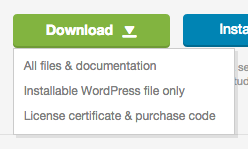
I only see one download link
- All Files and documents is the complete package
- Installable WordPress file only is the theme package
I found it, btw, that link is of a PNG file
Yes. That link is to explain the download options.
Good afternoon, I just uploaded the theme and the child theme and the page just stops working. Any ideias why this is happening?
Thanks,
Jorge Lopes
Hello there,
Thank you for purchasing our theme and for reaching us. Can you please tell me which page is not working ? Please email our support from here : https://themeforest.net/item/electro-electronics-store-woocommerce-theme/15720624/support with your WP admin details. I will check.
Thanks, Ibrahim
Hello again,
Is their a function on electro to add thin banners on top of the header as the attached image? http://prntscr.com/iydz2rThanks!
Hello there,
Currently there are no options to add banners to the top. You can however custom code it to achieve this.
Hope this answers your question. Let us know if you have any other questions.
Thanks, Ibrahim
Hello,
On the product page can we switch the order of ’ accessories / description / review / specification ’ ?
https://prnt.sc/iycu36We want the order to be as below; Description / Review / Specification / Accessories
Thanks!
Hello there,
Thank you for reaching us. You can re-order product data tabs using custom PHP coding like explained here : https://docs.woocommerce.com/document/editing-product-data-tabs/ or use a plugin like this : https://wordpress.org/plugins/wpb-woocommerce-custom-tab-manager/
Hope this helps. Let us know if you have any other questions or need further help.
Thanks, Ibrahim
Hello, two issues. first, I’m not able to download the dummy data, the error message says this: File is empty. Please upload something more substantial. This error could also be caused by uploads being disabled in your php.ini or by post_max_size being defined as smaller than upload_max_filesize in php.ini..
Furthermore, when following the steps for the Megamenu setup, the static blocks pages is empty.
Hello there,
Thank you for purchasing our theme and for reaching us. Dummy data is not empty. You can check the file. You should probably contact your webhost about this.
Alternatively you can use Appearance > One Click Demo Import to import all the dummy data.
Static blocks will have content only if the import is successful.
Hope this answers your question. Let us know if you have any other questions.
Thanks, Ibrahim
Thanks for answering, unfortunately when I tried the solution you propose, it told me this: Error: Internal Server Error (500)
Hello there,
Error 500 is a common error message. You can find details about the error in your error log which you can send me and I can tell you what exactly is causing the error. The most common reason is the memory exhaustion error which happens when your host allows you low php memory_limit. You can install this plugin : https://wordpress.org/plugins/wordpress-php-info/ and after activation please navigate to Settings > PHP Info and search for memory_limit. If it is less than 256M, you need to contact your host and ask them to increase.
Hope this helps. Let us know if you have any other questions or need further help.
Thanks, Ibrahim
I contacted my hosting provider and they told me this: Will check for the php.ini, this is the only one I can resolve. I do sincerely apologize, but this issue falls outside of what HostGator Live Support is able to troubleshoot and resolve. While I have tried my best to find a resolution to the issue you are experiencing, unfortunately, it appears I have exhausted all avenues that I have in live support to get your issue corrected. I recommend contacting a professional web developer or a development support forum for your software.
I don’t know what to do…
I understand. You can email our support with your WP admin details. I will check.
Hello, can I decline the adaptability and show the desktop version on all devices?
Hello there,
Thank you for your interest in our theme. No, there is no option to disable responsiveness. You may have to custom code it manually.
Hope this answers your question. Let us know if you have any other questions.
Thanks, Ibrahim
Thanks for quick answer! Is it enough to remove @media queries in style.css or the template uses bootstrap grid?
Unfortunately is it not enough to just remove @media queries. We also use bootstrap. So you will have to remove from there as well. Its quite a lot of custom code to do.
Hello again,
We want to transfer products from our old site. (We used Avada Theme and have about 900 products.
Can we transfer categories also? Is there a plugin or a safe method to execute? So that our site will be stable even after the transfer?
Thanks!
Hello there,
Thank you for reaching us. I do not have experience in migrating from Avada and hence I do not know the answer to this question.
However in general there are lots of ways to transfer and you can start from here : https://codex.wordpress.org/Moving_WordPress
But If you are simply switching the themes from an existing website, nothing will be lost. I suggest you to use a staging server to make the update.
Hope this answers your question. Let us know if you have any other questions.
Thanks, Ibrahim
Awesome Thanks!
Hi,
I need to make the header a bit smaller. Like the menu bar height, etc.
Kindly support.
Hello there,
Thank you for reaching us. Can you please clarify which header you are using ?
Thanks, Ibrahim
Hi,
For the homepage: https:// switch . com.kw (remove spaces please), the top bar with the menu is consuming a lot of space. We need to make it a bit shorter so that the banners and all can be highlighted.
Hello there,
You can add this CSS code to remove the padding around top bar :
.top-bar { padding: 0; }Hope this helps. Let us know if you have any other questions or need further help.
Thanks, Ibrahim
Hi,
How do I make the height of the menu bar less. Is there any custom code for it? Also, I need to make the logo short by around 20%. Kindly support.
Thanks
Hello again,
You can add this code to reduce logo spacing :
@media (min-width: 768px) { .header-logo { width: 20%; } }Thanks. And for the menu bar. I feel there is some scope to remove the free space in the menu bar. Any code for it?
I am sorry you will have to write custom coding to do that and would take time for us. We are currently unavailable for customisation requests. I am sincerely sorry.
Okay. Thanks anyways
Hi again,
I’ve noticed a difference between the search bar on IE & Chrome.
Attached an image fyr.
http://prntscr.com/ixwfmkKindly let us know how to fix it 
Thanks!
Hello again,
Thank you for reaching us. Can you please clarify which version of IE you are using ? Please try in IE Edge.
Thanks, Ibrahim
Hello again,
http://prntscr.com/ixxb2r this is the IE version we are using.It works great on EDGE but some of our customers use regular IE for shopping so we usually test on chrome and IE.
Let us know whats up!
Thanks!
Hi Again,
How can i make the menu text bold? I notice the top 3 verticle categories on Home-V1 are bold. We want to make the sencodnary nav bold too.
Thanks!
Hello again,
Thank you for getting back. Please add class “highlight” to the menu item that you want to appear bold. Ref : https://docs.madrasthemes.com/electro/topics/navigation/to-make-the-menu-item-as-highlight-or-bold/
Hope this helps. Let us know if you have any other questions or need further help.
Thanks, Ibrahim
Hello,
We ran into another issue.
We’ve set our first revolution slider but we cant see the image on mobile for some reason.
Is there a setting we need to make in terms of admin / size? Any other info would be great!
Thanks!
Hello again,
The slider is a user-generated content. The theme does not modify the style or CSS of the slider generated. The slider works independently based on how the user builds it. Hence it is upon the user to make sure the slider built is responsive. You can check the responsiveness within the Slider Revolution itself and make sure the it is responsive on all screens. Ref : https://drive.google.com/file/d/0BxmC16gQK81fVzdmLU10SVFDM00/view?usp=sharing
Hope this helps. Let us know if you have any other questions or need further help.
Thanks, Ibrahim
Ok, we’ll try thanks!