

22384 comments found.

Hello. I have read on this forum about how to add mail chimp pop up forms. Should I understand that the code mail chimp suggests can not be used on the theme as it is and it has to be rewritten ? Thank you
Hi,
Unfortunately the issue isn’t with the theme but with Mailchimp and how they write their code, it actually breaks a lot of sites. Otherwise I would apply a fix in the theme. But it’s very easy to still use their forms by simply rewriting their code so that it’s correct like such – https://gist.github.com/wpexplorer/c0d725c219e1163214d20dbca75e8b55 – so this is the code you would paste into your site header (can be added under Theme Panel > Custom Actions > wp_head) and just change the uuid and lid to match that from the code provided by Mailchimp.
- AJ
Hi, I am using your theme for a woocommerce site and need to enable searching products by SKU on frontend. I checked 2 plugins and 2 scripst and none of these work. Are you using custom solution for search? How could I enable searching by SKU?
Hi,
Total doesn’t use any custom search functions so any properly coded plugin should work.
I downloaded and tried this one – https://wordpress.org/plugins/woo-search-by-product-sku/ – and it works for me, I also inspected the code and it’s done the right way.
- AJ
For me it does not, but I am using a shortcode to have search form in the top bars (https://wpexplorer-themes.com/total/docs/topbar-searchform/) may this be a reason?
Oh..Yes, that would cause an issue because this form doesn’t just search products which is needed. The shortcode simply calls “get_search_form” but WooCommerce search requires a custom hidden parameter to add ?post_type=products to the search url.
If you add the following to your child theme’s functions.php file it should instead grab the woocommerce search:
add_shortcode( 'searchform', function() {
    ob_start();
    if ( function_exists( 'get_product_search_form' ) ) {
        get_product_search_form();
    }
    return ob_get_clean();
}, 999 );
So you are replacing the default shortcode with your own output.
- AJ
Hi AJ,
I’m thinking that the Total Search Bar module in Visual Composer needs a little tweak.
As it is, everything is able to be customized, even down to the translucency, with one exception – the ‘Submit’ button – which has options for colour and transparency, but no option for swapping out ‘submit’ with an image.
Should there not be a ‘design’ option within this module that lets you substitute an image into the ‘submit’ buttons place, just as there is a ‘design’ option to change the background of the search box itself?
Or even a place to upload an image into the search bar would do.
Hi,
The issue is that it’s not semantically correct or possible to add images inside HTML buttons. The only true way to use an image for a button is via advanced CSS knowing the dimensions of the image making it too complex for an inline module setting.
That said…you generally don’t need images for anything these days with CSS3 you can customize any button to look how you want it to, no need for a background image. I previously gave you some code for this in your last reply, but to be honest you can achieve a very similar pink button affect without an image and just using CSS 
- AJ
Instagram widget stopped working. “Instagram has returned invalid data.”
Hi,
This was a known issue from a recent Instagram update. Make sure to update your theme to the latest version so you have the fix:
- https://wpexplorer-themes.com/total/changelog/
- http://wpexplorer-themes.com/total/docs-category/updates/
- AJ
Hi, loving your Total theme, really easy to use and get great results. Just one question:
I’m using vertcal header style 6 (fixed) and want to center the menu text in the header. It’s left aligned by default, how do I change it please?
Thanks!
Great, I’m glad you like it!
You can center the text easily with some CSS like this:
body .navbar-style-six .dropdown-menu > li {
    text-align: center;
}
And if you want to center the links and remove the padding use this instead:
body .navbar-style-six .dropdown-menu > li {
    border: 0;
    text-align: center;
}
You can also adjust the padding between the items like this:
body .navbar-style-six .dropdown-menu > li > a {
    padding: 5px 20px;
}
How to add CSS: http://wpexplorer-themes.com/total/docs/making-css-edits/
- AJ
Awesome, works well, thanks for the swift reply!
Hi, just a small question. I tried to import the Demo http://totaltheme.wpengine.com/glitzglam . Some pages are imported, but The Woocommerce Shop template and my account page etc. is not imported, I had a clean install
I double checked and it’s definitely included in the sample data – https://bit.ly/2DWoQZx (if you search for account on the xml file you can see it).
Did it not import or did it just not get set in the WooCommerce settings?
- AJ
Thank you for the reply, even with expired support
Well I managed to import the Woocommerce product sample data and homepage by doing it manually. But the first time I did it via the easy importer tool, but that one did not imported the Woocommerce Sample data en Custom homepage of (http://totaltheme.wpengine.com/glitzglam) anyway, fixed it now.
Thanks Vidal
Very strange!
By the way if you ever have issues you can also test this out – https://wordpress.org/plugins/one-click-demo-import/ – via their manual import function. And downloading the files from github. This plugin is using a beta version of the next WP importer which can be a bit faster and I am considering adopting it myself in Total in a future update
- AJ
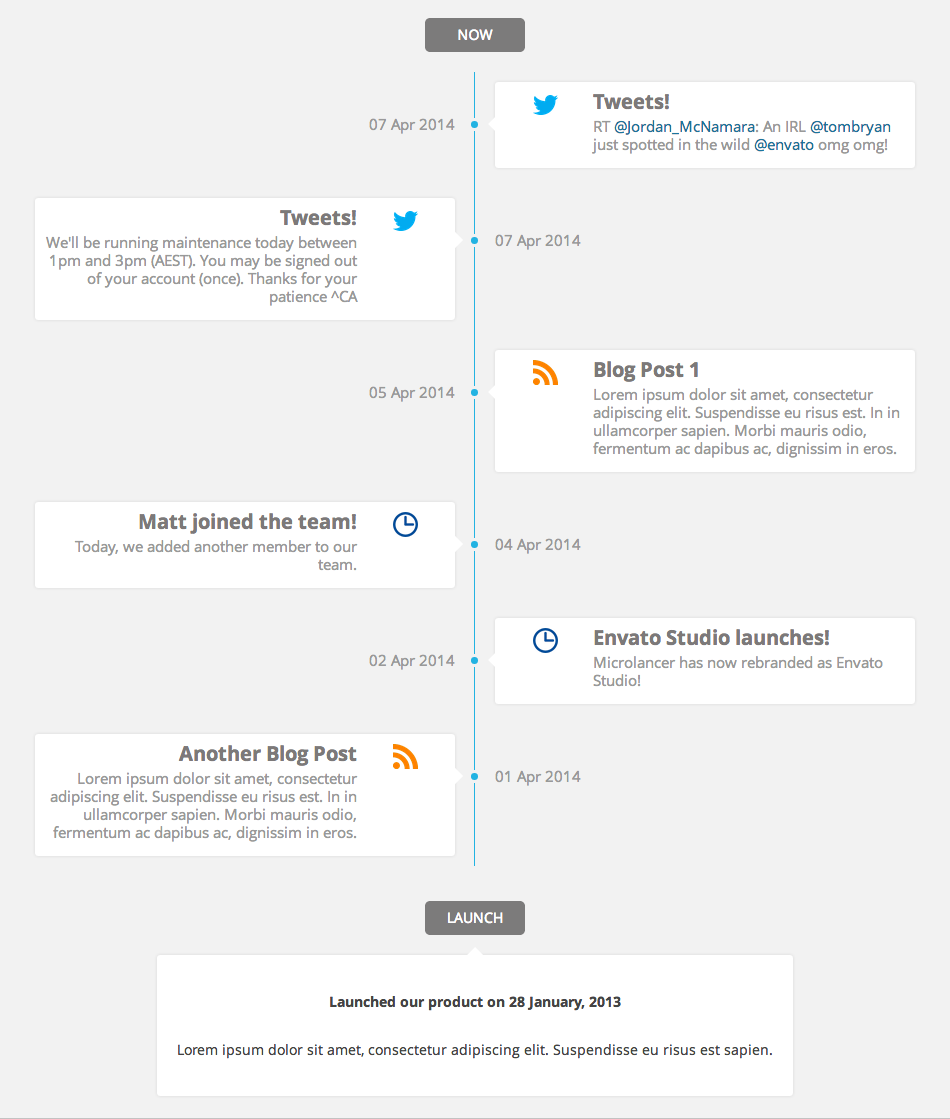
Hi, do you have these two features? 1) Timeline (https://s3.envato.com/files/88743829/1.1%20Images/1.png) 2) image hotspot (hover over image to see info)
Hi,
Actually neither of these are built into the theme, however, I do have on my todo list to add an image hotspot function in an upcoming update. There are plugins out there you can use though for both.
I think I could add the timeline as well in a future update as I think people would like it, are you looking to have a timeline of posts and social media like the attached image? That would require some deep API integration which may be a bit too much bloat for having inside a theme.
- AJ
Hi AJ, thanks for the reply. Hope to get these features in your next update.
I have used some other theme as well, and they do include these two features. Because i have a website that needs timelines and image hotspot and all other features that your theme has. So for this coming website, i think i will have no choice but to use the other theme first  Hope to hear the update from you soon
Hi ,In Page header tab when i change and saved Overlay Header Dropdown Style to another style, it alway return to “Black” style. How can i fix this thanks
Hi,
I can’t recreate this issue myself: https://cl.ly/qSXN (tested both the main style which is white by default and the dropdown style which is black by default).
Do you have any code in your child theme to modify the meta data or any plugins active that may be causing a conflict? Such as a plugin for saving custom fields?
- AJ
Do you have any recommendations for plug-ins that will allow user-submitted posts that also work with Total? I see from searching prior comments that you often recommend Gravity Forms and its add-ons but all I need is very basic functionality and don’t need the rest of what GF offers for the price. Was hoping you might know of other plug-ins that work (or don’t work) with Total to save me some time experimenting. Thank you!
Hi,
I personally don’t know of any that I could recommend but doing a quick search this plugin has very good ratings – https://wordpress.org/plugins/user-submitted-posts/
Any plugin coded correctly should work with Total since Total doesn’t make any modifications to core WP functions like adding/saving posts or tweaking front-end forms.
- AJ
there is a known bug on the iphone x with forms that my site is experiencing with the search form within the responsive menu. The bug can be seen at https://github.com/Semantic-Org/Semantic-UI-React/issues/2266 and they say that soon this bug will be fixed. Do you have any suggestions until then? thanks
Usually you can fix this by forcing a larger font size. Where exactly are you having the issue? So I can give you the CSS to try.
- AJ
as in the link that I sent the cursor for the text that I type into the text box is below the text box
Correct, but the theme has multiple options I just wanted to know what mobile style you are using and search so I can test accordingly. If you can share the URL that would be best. Thanks!
I just want to make sure we are testing the same exact search field.
- AJ
sorry, brain freeze on my part. the link is http://galmedpharma.com – open the side menu when in responsive mode on an iphone x and you will see the issue in the search box. The site resolves correctly on the ipad and the iphone 6+
Oh, sorry I have so many customers I sometimes forget what username belongs to what site
Yes, I see the bug but it seems like there is nothing that can be done to fix it but wait for the iOS fix. If you instead enable the search inside the header via a search icon as mentioned here – https://wpexplorer-themes.com/total/docs/creating-mobile-icons-menu/ (see bottom section) does it work better?
- AJ
Hi, I had installed the latest version of wordpress, woocommerce and the theme Version: 4.6.1.
I tried to update the “Products Per Page” on theme > customize > woocommerce > shop & achive.
I entered 13 in “Shop Posts Per Page” but nothing changes? and I can see pagination on shop page.
No changes worked on this setting page?
What should I do?
Thanks in advance.
Hi,
I tested locally and I don’t see any issues and no other customer has mentioned this before, so I don’t believe it’s a theme issue.
Were you using the theme previously and you updated? If so, this issue could be caused by having some outdated files on the server. How did you update? Via FTP?
- AJ
Hello there! I’m working on a new site that will be heavy with video (almost exclusively video). I wonder if you have a recommended demo/template to that would showcase multiple videos best? The idea is that some of the video will be produced by me, other videos will be user-submitted. There will be various “channels” or categories: Sports, Community, Government, Education, Business, etc. If you’ve built some of the templates with video in mind, I would love to take a look at those as a starting point before starting to customize everything.
Hi there,
First of all I recommend adding a new post type for your videos – https://wpexplorer-themes.com/total/docs/adding-custom-post-types/ – and custom taxonomy for “channels”.
For user submitted content I generally recommend Gravity Forms due to it’s extendability, customizability and support.
No in terms of showcasing them on the live site, it really depends on what you are going for. Personally I would recommend showing them as grids or carousels on the main site but only showing the featured image (for speed reasons) and showing the videos on the singular page via these fields – https://wpexplorer-themes.com/total/docs/adding-custom-post-types/ (enable the Post Metabox Settings when creating your post type).
So in terms of organization everything will be well organized in the backend then you just need to figure out how to showcase them which depends on the style you are going for. Did you have any sites in mind for inspiration?
- AJ
Thank you! What’s the difference between using the “Video” post format and create a custom post type? Is it that I can customize the styling options more that way? If so, that makes sense.
I forgot to mention that some of this video will almost surely be embedded from different sources (Facebook, YouTube, Instagram, and possibly elsewhere). It might make sense for me to do post types for each source, but I can play with that.
I don’t have anything in particular in mind. I do think a grid may make sense, but I love larger images, so I’m not sure I would stick with a grid. And I just had a thought—would it be possible to color code videos by taxonomy? For example, sports is orange, city government is blue, schools are grey, etc.? If that were possible, a grid combining all the videos might work, because visually, a visitor’s eyes would go to what they’re looking for more easily. (Maybe custom post types would be necessary for that?)
As for examples, just looking around, I do really like this sort of look: http://preview.themeforest.net/item/socialplay-media-sharing-wordpress-theme/full_screen_preview/5530973?_ga=2.237578048.1705222245.1522091143-1491116966.1516211303
I prefer dark over light for a video theme, I think. And I think having a featured video is important (which I'm sure is possible with Rev Slider). But I also think a mosaic look for the rest of the videos would be a cool way to display them. On the demo above, I love the way the video is embedded over a featured image, and I like that search is featured prominently.Hi,
The difference is if you use a custom post type then all of them will be separate from the standard posts in a different section of the admin (like the built-in portfolio, staff or testimonials in Total). Generally your standard posts would be used for a blog and keeping it separate is easier to manage.
However…if your whole site is videos then using the standard posts and NOT a post type does make sense and you can take advantage of built-in archive functions for the blog like the load more or infinite pagination.
And you can just add a custom taxonomy named “Sources” so you can tag your videos if you wanted if they are from different sources (facebook, instagram, etc).
In terms of color coding taxonomies this wouldn’t be very hard. You can either use a plugin like this – https://wordpress.org/plugins/wp-term-colors/ – and create a custom block to display your category/tags with inline CSS for the colors – https://wpexplorer-themes.com/total/snippets/custom-blog-entry-blocks/
There are quite a lot of options in the Customizer to alter the theme colors if you want a dark style and for anything missing you can always use CSS (let me know if you need help).
- AJ
I’ve been sidetracked for a week, and haven’t had much opportunity to work on this site, but you’ve been very helpful (as always)! Thanks so much for your responses. I’ll send a link when I have it done (if I don’t send a link with a help request before then ).
Hi A.J.
How can i do that kind of text? https://drive.google.com/open?id=1VnOuzGCkS0CfL1QQbXRCnXohxfVYe-OkI’m using portfolio with redirection to pages and i want to create something like on the picture above with custom colors. How can i do this. Is it possible?
Hi,
You can enable the category tag overlay when inserting your portfolio grid like this – https://cl.ly/qRpv – then you can use a little custom CSS on the site to give them unique colors.
- AJ
Thank You for a reply A.J but there is no media tab on my custom page settings.
Oh, sorry it pasted the wrong screenshot, that one was for another customer
This is what I meant to send: https://cl.ly/qXjf – to enable the category overlay tag over the image.
- AJ
No problem
I’ve tryied to change it with css but I was able to change all tags to one color only.
Can you tell me what exactly i have to change or add in custom css?
Thank you
Hi,
Each entry has unique classnames for the categories they are in that you can target on your CSS. Example: https://cl.ly/rXPk – so as you can see each entry has a classname in the format of cat-{id} so you can target your CSS according to the category it’s in.
If you share the URL you are working with I can provide some sample CSS as it depends on the modules you are using, etc.
- AJ
Here is a URL http://www.cgsmash.pl/kursy/
Hi support, when using the PORTFOLIO plugin, when clicking on a “featured image” on the portfolio banner, how do I get it to link to a pdf file and open that in a new window, instead of going to the .jpg page? I have added the .pdf link into the REDIRECT (Enter a URL to redirect this post or page) box, but that doesn’t seem to be enough and instead, when clicking the featured image, it opens the featured image in large ..
Hi,
If you are displaying the portfolio items via the Portfolio Grid or Post Types Grid make sure the link option is set to go to the post and not lightbox – https://cl.ly/qSXU
- AJ
Thanks so much guys, that worked. Another question: how do I make the link open in a new tab ?
There is a link target option on the general settings tab – https://cl.ly/qfxX
Wonderful, thank you!
Of course! If you need anything else, let me know
Hey guys, thanks for the quick reply. I just tried this option – the link target gives me either “Default” or “Blank” – none of which opens the link in a new tab. What am I missing?
“Blank” means new tab
Oh snap – now it is working. I guess I didn’t save. Muchos Gracias
Hi AJ!
Just wanted to say thank you for helping me with my website and your prompt responses to my inquiries. I love the way theme looks and functions and I’m absolutely thrilled with it!
Thank you again for your support,
Joanna
https://bit.ly/2DR53dUHi Joanna,
First of all thank you for the kind rating! I hope you had a lovely weekend
Your site is very cute! If you need anything else let me know.
- AJ
Hello again,
I’m having some trouble getting social sharing buttons to show up on the bottom of my blog posts and pages. I have already activated: customizing>blog> social share AND customizing>general theme options>social share I would like to keep the little round icons and get rid of the Square ones.
I did have the WP Social Sharing Plugin activated, and when I deactivated it, both sets of icons went away.
Help?
Thanks! Melissa
Update – the problem now only seems to be on my homepage – I’ve gotten the small round icons to show up on the blog & every other page!
Hi Melissa,
First of all I hope you had a wonderful weekend.
So it sounds like they are disabled on Pages which you can enable under Customize > General Theme Options > Pages just like on the posts you need to enable the block – https://cl.ly/qS9N
In the next update though I’m adding a little filter so that you can globally enable social share via a child theme if needed outside of the “block” settings.
- AJ
Thanks AJ!
Week is off to great start
Ok, the social icons are activated for pages and blog, but still coming up empty on my homepage! Anything else I could be missing?
Have they been disabled by any chance in the page settings? – https://wpexplorer-themes.com/total/docs/page-settings-metabox/
That’s the only thing that would stop them from showing up.
- AJ
I need both columns to stretch with their own color background but the content needs to be inside the content wrap and not stretch (centered on screen) is that possible: see this link left column stretches to screen: https://cl.ly/0z373P0n2k21
Hi,
The issue is you can’t stretch the columns without stretching the content inside the columns. The best solution would probably just be to center the text in each column.
I honestly can’t wrap my head around how you could ever stretch the columns but keep the text positioned inside the wrapper, did you have a live example of a site doing that?
- AJ
Hello,
I want to have text carousel in one of the columns. And that text needs to be a dynamic (from the Database) how can I get it??
Hi,
You could create a custom post type to hold your text – https://wpexplorer-themes.com/total/docs/adding-custom-post-types/ – then use the “Post Types Carousel’ module to display the content from the custom post.
- AJ
Hi AJ.
After updating from 4.5.5.1 to the latest version, i am having these strange results for full-height rows when i resize the window (https://prnt.sc/ivd7gc). The top row is a video and the bottom one is the mobile fallback image (row background).
Unfortunately, i had to revert back to 4.5.5.1 and i do not have an online version for you to check.
Any ideas? Thanks.
Hi,
If you were using the “Hidden on Desktop” visibility setting this is a known bug which has already been fixed for Total 4.6.2 which I hope to release today or tomorrow. If you aren’t using that setting you can send me the code from the page so I can test to make sure there isn’t any bug in the upcoming update – https://wpexplorer-themes.com/total/docs/share-page-content-troubleshooting/
- AJ
Hi Wanted to check that the licence included within the Total Theme for both Slider Animation and Visual composer were the full licences
please can you confirm KR Andrew
Hi Andrew,
The bundled Slider Revolution and Visual Composer (now named WPBakey page builder) are both the full plugin code in their unmodified form.
However, both of these plugins do offer some premium features only available if you buy your own copy of the theme.
- AJ



)