507 comments found.

Hello, I’m having trouble with top header navigation. I have “sticky menu” enabled in Theme Options, but it still disappears when I scroll down the page. I’d like the menu to always be visible and accessible, no matter my location on the page. Can you help me, please? Thanks!
Hello,
That is what this theme works. The sticky menu in this theme will appear when you scroll up like a mobile application.
If you would like it to always be visible, you will need to add custom CSS below to Appearance -> Customize -> Additional CSS:
.header-menu.w-fixed.w-invisible {
    -ms-transform: translateY(0);
    -webkit-transform: translateY(0);
    transform: translateY(0);
}
There are some issues with portfolios. Portfolio-items build before a certain date behave normal. Newer portfolio-items (grid) make problems. The “post-navigation” depends no longer on the category. I have tried to deactivate post-navigation>
.single-wyde_portfolio .post-nav { display: none !important; }
This works for the older portfolio items in every category, but not for the newer ones. Anyone can help?
Actually, the post navigation doesn’t depend on the category at all. It will display all portfolio posts from your site in reverse chronological order (from newest to oldest) even they are not in the same category of the one that you are currently viewing. I have no idea why it is working with the older ones.
Anyway, if you would like to deactivate/remove the post navigation on the single portfolio, you can disable it in Theme Options -> Portfolio -> Portfolio Single Post -> Post Navigation.
Hi there,
I accidentally installed the One-page demo (after installing the Creative Agency demo)
Now, there is no way for me to change the homepage of the site. I want to switch back to a Multipage theme where I can select the homepage manually. How can I do this? Any help would be greatly appreciated! Cheers,
My client purchased the theme, I can provide purchase code.
In Settings > Reading > I no longer see the option to select a front page: https://www.dropbox.com/s/6kpc68wpxe508ac/Screenshot%202018-06-08%2011.35.37.png?dl=0
Figured it out -> the homepage was in draft mode so it didn’t show in the Settings panel.
Sorry for the late reply!
Anyway, happy to hear that you have figured it out!
Hi. Wondering if Aaoraki (or Overlap) have landing or sales page capability? (I need to be able to make a sales page without navigation links.) Any suggestions? If not within these themes, perhaps with a plugin? I am looking at Leadpages and Instapage but wonder if this is necessary. Thanks for any recommendations on creating a sales page with Wyde Themes! Lea
You can hide both Header and Footer in the Aoraki (or Overlap) Options on the page edit screen, you will have a page without navigation and footer.
Perfect thank you! I’ve been thinking of so many different ways…meanwhile this is so simple! Thank you for a shortcut : )))))
You’re welcome 
I’ve added Portfolio Carousel to one of my pages to display my images from my case studies. On desktop, it works just fine. However, when viewed on mobile, the images flicker and I can’t scroll through them. Do you have any idea what might be causing this?
I’m referring to this page viewed on mobile: http://www.diviningpoint.com/our-work
Thank you.
This is a bug of the new update of the Owl Carousel plugin that’s included in the theme.
Thank you for reporting this issue, we will fix it in the next update.
Hello,
I’ve purchased the Aoraki them and installed the most recent update. I have a Team Members section on my About page, but am having an issue with scrolling through the bios.
When I click on a team member bio, a lightbox opens and I can “click and drag” through all of the content, but there’s no scroll bar…i.e., scrolling is not intuitive and I’m worried that site visitors won’t know what to do.
Can you help me display a side scroll bar on team member bios, please?
Thank you!
Hello,
Thank you for reporting this issue, we will show the scrollbar in the next update of the theme.
However, you can fix it right now by adding custom CSS below to Appearance -> Customize -> Additional CSS:
.w-scrollbar {

right: 0px;

}
Hi, any update regarding infinite scroll? still doesnt work. Thanks!
It has been fixed in Aoraki 1.2, and it’s working on our demo site: https://wydethemes.com/aoraki/shop/
Thanks! Another question: Can i display menu item descriptions in your theme? Thanks!
We’re sorry but the theme couldn’t display the menu item description by default. You will need to install the third party plugin or edit WordPress navigation walker class as the instructions in the link below:
http://www.wpbeginner.com/wp-themes/how-to-add-menu-descriptions-in-your-wordpress-themes/Thanks, but i have difficulties with step 3: What we need to do now is find wp_nav_menu() function in your theme (most likely in header.php) and change it like this. I don’t find this part, can you point me in the right direction, please? Thanks!
function aoraki_nav_menu_item_title( $title = '', $item = null, $args = array(), $depth = 0 ){

    if ( $item && !empty( $item->description ) ) {
        $title .= '<span class="menu-description">'. $item->description .'</span>';
    }

    return $title;

}
add_filter( 'nav_menu_item_title', 'aoraki_nav_menu_item_title', 10, 4 );
Then you can add custom CSS to style.css to set the text style for the menu description like below:
.menu-description {
    display: block;
    text-transform: capitalize;
    font-weight: normal;
}
Well if i do that, the description is wrapped inside the “a-tag”. I would like to display it above & outside the actual menu link…
Check out this page, it might be what you’re looking for: http://themefoundation.com/menu-item-descriptions/
Hello,could you teach me:
1.how to make the title in the center of the pic https://imgur.com/a/JzZfnKw 2.How to disable the porfolio’s title uppercase? https://imgur.com/a/QIFfjHf 3.how do I insert the porfolio navigation in pages by “shortcode” or coding? https://imgur.com/a/NHoVCoD 4.how to add social media icon? Cos I wanna add “Weibo” https://imgur.com/a/EKfZ3Mdps:Does this message show to everybody?
THANK YOU
1. We’re sorry but each hover effect comes with its own styles, it’s pretty hard to edit. If you’d like the title in the center, I would recommend you to use the Zoom In Fade effect instead: https://wydethemes.com/aoraki/portfolio/portfolio-grid-full-width-4-column/
2. You will need to add custom CSS below to Appearance -> Customize -> Additional CSS to disable the capitalized title of the portfolio:
.w-item > figure .entry-title {
text-transform: none;
}
3. The portfolio navigation is only available on the single portfolio page. You couldn’t insert it to other pages. However, if you’d like to move it to other sections on the single portfolio page, you move the code below to other sections when you edit the template file of the single portfolio (templates/portfolio/) in your child theme:
aoraki_portfolio_nav()4. You can add custom function below to functions.php in your child theme to add Weibo to the Social Media options:
function aoraki_child_get_social_icons( $icons ){

    $icons['fa fa-weibo'] =  'Weibo';

    return $icons;

}
add_filter( 'aoraki_get_social_icons', 'aoraki_child_get_social_icons' );
After you add it, you will see the Weibo in Social Media settings in Theme Options -> Social Media.
Of course, all comments are public, everybody can see them.
If you’d like to send a private message, you can send it in the contact form in the link below:
https://themeforest.net/user/wyde#contactThe slider is included in the Home page, as you can see in our demo: https://wydethemes.com/aoraki/onepage/
On your site, you should add the Home page to the Primary Menu in Appearance -> Menus. Otherwise, you will need to add a slider to your Services page instead.
Thank you!
Hi I would like change phone number and email in sliding bar. how do it ?
thanks
You can change them in Appearance -> Menus. Select the Contact Info menu to edit the menu items one by one.
Hi I would like change text di “RELATE PROJECT” in portfolio Single page. how you do it ?
thanks
There are 2 ways to change it.
1. Edit the template file in your child theme. Copy the template file from the aoraki theme folder “wp-content/themes/aoraki/templates/portfolio/related.php” to your child theme folder “wp-content/themes/aoraki-child-theme/templates/portfolio/related.php”. Then edit it to change the that text.
2. Translate the theme, install the Loco Translate plugin ( https://wordpress.org/plugins/loco-translate/ ) to translate the theme so you can edit any static words in the theme.
I can use poedit ?
Sure, if you have POEdit you can translate the POT file from your computer before uploading it to your web host.
After you extract the theme zip file “aoraki.zip”, you will fine the file “aoraki.pot” in the folder “aoraki/languages/”.
You can find the instructions on how to translate the theme by using POEdit in our documentation.
Hi again, i really love the template! It works absolutely great. But: Is it possible to display the woocommerce Search results the same way as the shop archive page looks? Thanks!
Sure! If you’re using a Product Search widget in the Shop sidebar, it will display the search results on the shop archive page instead of default WordPress search page.
In Appearance -> Widgets, add a Product Search widget to the Shop Sidebar.
On default WordPress search page, not only products but everything that matched your keyword will be there, so it displays the results in the list.
Hi, i think this theme has a problem with Constant Contact official plugin, https://wordpress.org/plugins/constant-contact-forms/, please if you can check, install the plugin and edit a page, look how Aoraki Options are displayed wrongly.
We’re sorry but this is a plugin conflict issue. That plugin is not included in the plugins support list so we couldn’t answer why it doesn’t work properly with the theme.
However, we will look into this and get back to you when we have any solution.
In the meantime, we recommend you to deactivate that plugin when you’d like to edit the settings in the Aoraki Options to work around this issue.
I received notification of an update to Aoraki. What is the easiest way to maintain updates? Can this be automated? Or do I have to do it manually? If manually can you give me a bit of direction? I’ve done this before with one of your other themes, but it always makes me nervous! Thank you, Lea
Sure, you can download and install the new update automatically in Appearance -> Themes on your WordPress admin. If you have installed the Envato Market plugin on your site, when there is a new update available to download, you will see a notification message and a link to download and install the new update in Appearance -> Themes.
You can find more details on how to install and use that plugin in our documentation.
perfect, thank you!
Hello Team: I hope you guys would be doing well. I received an email today that the Aoraki Theme is updated and I was asked to download the updated version from the Theme Forest website. My question is that do I have to download and reinstall the entire theme or is it just a particular file that needs to be updated. Second question is that if I update the theme with the latest version what will happen to the customizations that I have made so far.
Thanking you in advance.
Regards.
You will need to update the entire theme. The theme update won’t affect your current data and settings. When updating WordPress theme, it will replace the whole theme folder on your web host so please do not edit any files in the theme folder directly.
If you’ve installed the Envato Market plugin, you can update the theme in Appearance -> Themes, you will see a notification message and link to update it if there is a new update available to download.
You can find more details on how to install and use the Envato Market plugin in our documentation.
Thank you very much.
Hi is it possible, to display the “standard” breadcrumb also on woocommerce shop pages (archive/category) ? I have the breadcrumb inside the Header-Background-Image and i would like to display the breadcrumb underneath the image. Thanks
Hi,
You will need to add the code below to functions.php in your child theme to show default breadcrumb from WooCommerce plugin:
function aoraki_wc_remove_breadcrumb(){

    if( is_product() ){
        remove_action( 'woocommerce_before_main_content', 'woocommerce_breadcrumb', 20, 0 );
    }else{
        add_action( 'woocommerce_before_main_content', 'woocommerce_breadcrumb', 20, 0 );
    }

}
add_action( 'wp_head', 'aoraki_wc_remove_breadcrumb' );
Thanks, that worked for the shop pages. Now if i have a standard page, how can i move the breadcrumb also to underneath the header image? Thanks!
If the page header is disabled, it will display as a breadcrumb bar like the one below:
https://wydethemes.com/aoraki/blog/be-happy-for-this-moment/You can show 2 breadcrumbs inside the header and below it only on the shop archive pages because WooCommerce plugin also have its own breadcrumb.
However, it will appear in different positions on the portfolio pages according to the portfolio layout.
but will it work with a template override? Which file has to be adjusted? Thanks
/* Remove breadcrumbs from other locations */
function aoraki_hide_breadcrumb(){
    return false;
}
add_filter('aoraki_show_breadcrumb', 'aoraki_hide_breadcrumb', 100 );

/* Add it before the main content (after the page header) */
function aoraki_add_breadcrumb_bar(){

    aoraki_breadcrumb();

}
add_action('aoraki_before_content', 'aoraki_add_breadcrumb_bar');
Unfortunately, in the current version you couldn’t display 2 or more breadcrumbs on the same page because it doesn’t support. So, the code above will remove it from other locations first, then add it below the page header.
Hi . I have a problemi with portfolio page. When I select “portfolio grid with space” doesn’t load the page … look the site : https://www.studio-mastrandrea.com/portfolio-photoset-3-columns/
please help me. thanks
Hi,
I’m sorry, it seems like there is something wrong with the Portfolio Grid with Space layout. Thank you for reporting this issue, it will be fixed in the next update.
In the meantime, you will need to choose other layouts to work around this.
Hey there, I’m trying to edit something on a friend’s site who has this Aoraki theme and wondering if there’s somewhere where you specify the size for the header “cover” image? Thanks.
The size of the header image depends on the size of the header. You can choose the header size in Aoraki Options -> Header -> Size on the page edit screen.
Also, when you choose “Cover” for the Background Size, it will automatically resize the background image to cover the header area, even if it has to stretch the image or cut a little bit off one of the edges. So, the background image should be bigger than 1440*600px.
However, in the future please contact us from the account that purchased the Aoraki theme because the theme support is only available for users who have purchased our themes.
Hi, is there any way to change the Header-Banner on each product category (woocommerce) seperately? I can set up a default header backrgound-image in theme options, and also a different one on each page. But is there a way to switch images on a product-category in woocommerce? Thanks
Nevermind, solved it by css But: Is there a way to display the category title on woocommerce archive pages instead of the Wordpress-Site Name?
Great job! Of course, that is not available in the theme options, you will need to use custom CSS.
In this theme, the product archive pages display the same page title as the shop page. To display product category title on product archive pages, you will need to add the code below to functions.php in your child theme:
function aoraki_get_product_category_page_title( $value, $post_id, $meta_key, $single ){
    if( $meta_key === '_w_page_title' && function_exists('wc_get_page_id') && $post_id = wc_get_page_id( 'shop' ) && ! is_page( wc_get_page_id( 'shop' ) ) ) {
        $value = single_cat_title( '', false );
    }
    return $value;
}
add_filter( 'get_post_metadata', 'aoraki_get_product_category_page_title', 10, 4 );
Hello Team! I need to solve two problems: 1. I would like to know how can I change the navigation on my site because every time when I do click on my different page they show me the information in the same ONE PAGE HOME. How can I remove the static homepage?
2. How can I customize my front page with this dynamic demo https://wydethemes.com/aoraki/home/home-main-demo/
Thank you very much for your support.
1. It sounds like that you’re using the One Page site, you will need to disable the One Page Website in Theme Options -> Page.
2. That is a Main Demo home page, you can import it in Theme Options -> Home, choose “Main Demo” so you will receive the main demo home page and the main sliders at the top of the page including the settings exactly the same as that page.
Thank you very much for your support now I already solve my problem. Just two more questions, 1)How can I change the line color bellow when I use TITLE HEADING option in WPBAKERY page builder.
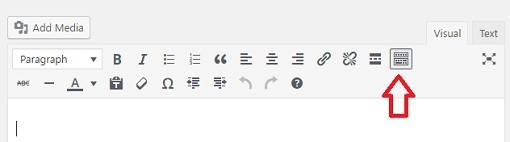
2) How can I change the text color when I create a TEXT BLOCK because I don’t find this option.
Thank you again.
1. The color of that line is always the same as the theme color scheme.
To change it, you have to change the theme color scheme in Theme Options -> General -> Color Scheme.
However, if you’d like to change it to different colors from the theme color scheme, you will need to add custom CSS like below to Appearance -> Customize -> Additional CSS:
.w-heading.heading-10:after {
    background-color: #000 !important;
}
2. It’s in the 2nd row of the editor’s toolbar, select the “A” button to change the text color. If your toolbar have only 1 row, you will need to click on the Toolbar Toggle button to show it, see the picture below: