97 comments found.

Why am I getting this message upon install and how can I fix it  ....nothing like buying a theme and getting silly errors on the first install. Not a good sign.
An error occurred while installing The Denorious Extensions: Download failed. Not Found.
Downloading installation package from http://fluentthemes.com/wp/fluent-themes-updated-plugins/the_denorious_extensions.zip
Hi there, Thanks for contacting us.
For security purpose we change the plugin download source time to time. When you started installing Theme bundled plugins you should find a Notification saying ‘Please verify your purchase code’. If you verified your purchase code by clicking on that link, you should have already got the correct Download link of The Extensions plugin.
However, please contact the Support Team, and they will manually verify your purchase code themselves and provide you the correct download link of the plugin.
Best regards, Fluent-Themes
BTW, yes my hosts allows any downloads from any server. It’s a dedicated server.
BTW, my hosts allows any download from any server. It’s a dedicated server and if you go to the link itself, you will see you have a 404 error. Please rectify this so I can use the theme or I’ll request a refund.
Ok, fixed. You shouldn’t even have this plugin as a part of the backend setup. Just show a huge message that say’s VERIFY PURCHASE and download the plugin. People are assuming you can download and activate the plugin.
using home page 2. When I change the slider from 2 to 1…..it doesn’t show up at all. When I change the number of slides back to 2, it shows? How can this be fixed?
Hi there, Thanks for reaching us again.
Please contact the Support Team, and they will get back to you with the solution of your issues within 24-48 hours.
Best regards, Fluent-Themes
It’s okay just used a static image….Can you answer below about the post type. Can’t find it anywhere.
Hi there, Thanks for reaching us again.
As I informed you before, please contact the Support Team, and they will get back to you with the solution of your issues within 24-48 hours. Denorious theme is supported by the Support Team only (it is mentioned in the support page).
Best regards, Fluent-Themes
Hi, I installed the dummy data but the header area with contents in green, blue, and red background are not displayed properly. Please how can I fixed it? Thanks!
Hi there, Thanks for reaching us.
Please contact the Support Team, and they will help you within 24 hours.
Regards, Fluent-Themes
Presale question: is the purchase/theme licence bound to domain name in any way? I’m interested in buying the theme, but I will develop the site on dev/staging server first and then move it to the actual domain/hosting.
I wouldn’t want to get the template license “locked” to a staging url.
Hi, Thanks for your interest.
No, you are not bound to lock the license to a staging url. You can use the license for only 1 website. That means, when you use the licensed theme in your staging site, you can’t use the theme in your actual site. Once you remove the theme from your staging site, you can use the theme in your actual site. So, basically you should do is: Use our theme in your staging site first, and then remove the theme from the staging site and finally use the theme in your actual site. For this, you do not need to purchase separate licenses.
Regards, Fluent-Themes
Hi, my download folder didn’t come along with any plugins.
Hi there, Thanks for reaching us.
If you take a look at the 1st minute of the Video Tutorial of Denorious NonProfit WP Theme, you will understand how to get the plugins and install them in your WordPress.
If you still have any confusion, please contact the Support Team, and they will help you within 24 hours.
Regards, Fluent-Themes
I watched your video, but my download file did not include the zipped plugin files that are shown in the video. I just have denorious and denorious-child zipped in the download folder
Hi, Thanks for reaching us.
The support team got your email and replied you already with required plugin download links.
Regards, Fluent-Themes
Do you support oembed or iframe widgets? I want to enable direct donations through MightyCause: https://blog.mightycause.com/support/how-do-i-use-the-donation-widget/
Hi, Thanks for reaching us.
The support team got your email and replied you already. Please check your email inbox. If you still have any questions, please reply through your email to the support team.
Regards, Fluent-Themes
The purchase code is not working for me while verifying it. I cannot install The Denorious Extensions
Hi, Thanks for reaching us.
The support team got your email and replied you with the download link of the plugin. Please check your email inbox.
Thank you, Fluent-Themes
I have not received the email yet. Could you please verify if the email is correct ?
Hi, This is your email (siyadmhmd@gmail.com), right? If you are not seeing any email from us in your inbox, please check your “spam” folder. Sometimes emails reach to “spam” folder for unknown reasons.
Regards, Fluent-Themes
Hi… Just had a presale question:
We would like to use the Give Wordpress Plugin for processing donations, as it supports multiple payment gateways. Does the theme support the Give Plugin?
Hi, We didn’t try that plugin with the Denorious theme, so we are not sure about that. But, if the plugin is built by following all standard coding method provided by WordPress, it will work with all Premium WordPress Themes.
Regards, Fluent-Themes
Is it possible to have the Make an Offline Donation link on your donation form go to the contact page or removed completely? Thank you in advance.
Hi, Thanks for reaching us.
“Make an Offline Donation link” is ready there to take offline donations from donors now. If users want to connect the Offline Donation link to the contact page, we will take that request as consideration and implement that option in the future versions of Denorious theme.
Regards, Fluent-Themes
Required Plugins not downloading:
Download failed. cURL error 35: gnutls_handshake() failed: A TLS fatal alert has been received.
Plugin not activated. A higher version of WPBakery Page Builder is needed for this theme. Please update the plugin.
Hi there, Thanks for reaching us.
Your hosting provider maybe not allowing any download from outside servers. Please contact the Support Team and ask for the required plugins. They will send you all the plugins directly through your email.
Regards, Fluent-Themes
I am unable to find “Donation” form. can you please assist me with that?
Hi, The “Donation Form” is a built-in feature of Denorious theme. You just need to ensure that “The Denorious Extensions” plugin is installed and activated in your WordPress. After that, please open to Documentation in a browser and look for this “How to make a working Donation Form?”. The instructions with screenshots to create your donation form is given there.
If you still have any questions, please contact the Support Team and they will help you within 24-48 hours.
Thank you, Fluent-Themes
I can’t get the import to work its say “Failed to import “Party Dress – M”: Invalid post type product_variation” just an example.
Hi, Thanks for reaching us.
The WooCommerce data won’t be imported if the WooCommerce plugin is not installed and activated in your WordPress. The example you provided ‘product_variation’ is WooCommerce data, that is why that data failed to import. You must install and activate the WooCommerce plugin if you want to get the WooCommerce products data imported in your WordPress. You can download the WooCommerce plugin from here.
If you still have any questions, please contact the Support Team and they will help you within 24-48 hours.
Thank you, Fluent-Themes
I am looking to purchase Denorious wp theme. Does it come with demo contents?
Hi, Yes, Denorious wp theme comes with demo contents.
Thank you, Fluent-Themes
how do i remove the name Denorious Nonprofit Theme from my blog posts?
Hi, Thank you for reaching us.
The page heading for the blog posts page is coming from the Site Title (Settings > General page). You can change it from there.
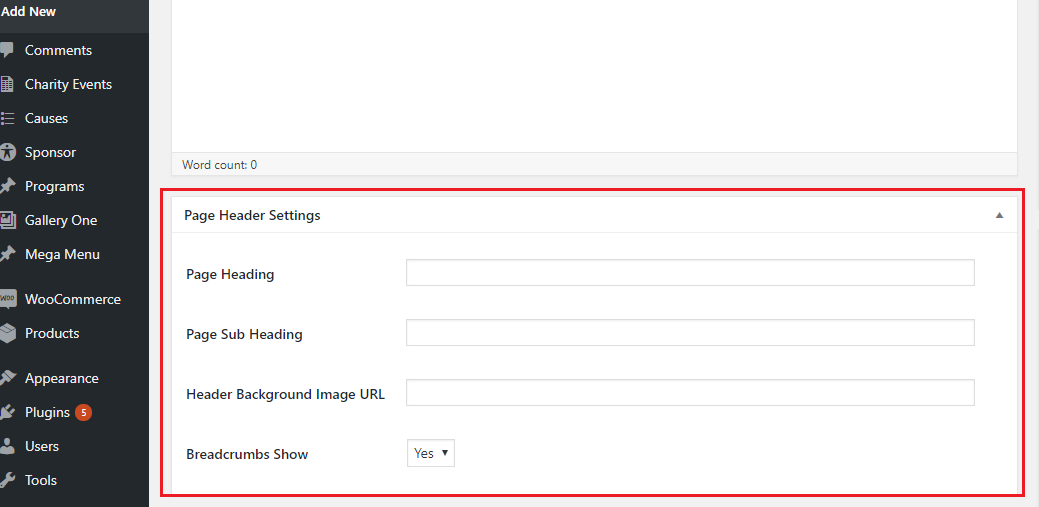
And, if you need to change the page heading for individual pages, you can do that from the ‘Page Heading’ option field given below the page editor of each page. Please take a look at the screenshot given here to know more.
Regards, Fluent-Themes
POST
How can I override the existing payment options and instead display payment options added through plugins?
Hi there, Please contact the Support Team, and they will help you within 24 hours.
Regards, Fluent-Themes
Is there a way to add fields to the FT contact form or do I need to use Contact 7 and create my own form? Thanks in advance.
Hi, You can use the following fields in the FT Contact Form: 1. Name Field 2. Email Field 3. DropDown Option 4. Radio Option 5. Checkbox Option 6. Subject Field 7. Message Field
If the above ones are not enough, then you need to use Contact Form 7 plugin to create your own form.
Thank you, Fluent-Themes
Does this theme come with current version of WP Bakery?
Hi, WPBakery plugin’s latest version will be there with the theme. But, you will not have any license of WPBakery. You will be able to use the plugin without license. And, whenever WPBakery publishes an update, we provide that update to our customers too.
Thank you, Fluent-Themes
Thank you very much, I understand. meant to ask if all WP bakery templates are available and if the menu can be sticky?
Hi, We are not sure which templates you are talking about. The page templates you are seeing in our Live Preview? Yes, they will be there with our theme’s demo data. Once you import our demo data, you will get all the pages of our Live Preview in your site. And, then you will be able to manage the content of the page using WPBakery plugin page builder.
Regards, Fluent-Themes
Thank you. I have already purchased your theme. The templates I am referring to are those within the WP Bakery Builder itself. I have used it in another theme and found it offered many page element templates like predefined content layouts, etc. Thank you so much for such quick and honest replies. That makes me feel more comfortable that I have selected your theme.
HI there. Could you please advise: 1) Does the theme support updates for fundraising campaign? So campaign authors can provide more info for their donors (attach photos, videos etc.) 2) In your demos I found only 1 example of presentation of causes, do you have more of them? 3) Can I add image/video gallery in cause
Thanks
Hi there, Thanks for your thoughtful questions.
1. Campaign authors cannot provide more info for their donors right now. But, we are working on this and in the future versions this feature will be included.
2. There are 2 variations of ‘Causes’ right now:
i) http://fluentthemes.com/wp/donor/causes-style-1/
ii) http://fluentthemes.com/wp/donor/causes-style-2/
3. Yes, you can add image/video in single cause pages.
Regards, Fluent-Themes
hello please how to i affix a widget but the side ? i need to populate the right hand side of my site with articles post and events
Hi, Please contact the Support Team and provide your item purchase code to them. They will get back to you within 24 hours.
Regards, Fluent-Themes
Can the donation and woocommerce support stripe?
Hi, The WooCommerce support all popular payment gateways including Stripe. And, the built-in donation form supports PayPal, Credit Cards and Offline Payment.
Thank you, Fluent-Themes