70 comments found.
We have the latest version of the theme and Wordpress installed. All plug-ins are up to date. Content Composer in no longer working – just displays CMS shortcodes. How to fix?
Hello, thank you for contacting!
There are no known issues with the latest theme version functioning. Please make sure to use 1.2.8 theme version ( it is available for download on Themeforest), update plugins and clear cache, it should be helpful.
Should you have any questions please submit a request at https://cmsmasters.net/help-center/ with a link to your site and relevant WordPress and FTP credentials and our support agents will take care of it.
Thank you.
Thanks for getting back to me. I realize that support for this item has expired, but I have updated versions of Wordpress, theme, plug-ins, php, etc. but the CMSMasters page builder will not load. I have cleared cache, tried multiple browsers, computers and still no luck. https://snipboard.io/1RyXT4.jpg
Hi again, please note that it is hard to say what is going wrong without investigating from your end. Please submit a ticket to https://cmsmasters.net/help-center/ with your credentials and our support team will investigate the cause of the problem.
Thank you!

Is there an ETA for updates that will support Wordpress 5.7.x? Hosting provider autoupdated us to 5.7 and now we can’t edit the site again. seems like a long lag time between updates to support new Wordpress releases.
Hello, thank you for contacting!
The current theme version (1.1.6) that is available for download on Themeforest is compatible with the current WordPress version (5.7.1) Please make sure to use this theme version and don’t forget to update theme plugins and clear your browser cache after the theme update.
Should you need our further assistance – please submit a request at http://cmsmasters.net/support/ with a link to your site and relevant WordPress and FTP credentials and our support agents will gladly help you.
Thank you.
Thanks for the quick reply. We are on 1.1.6 I also just re-installed it just to make sure there wasn’t an issue with the previous install, we still get a white screen when trying to edit content on the Visual Composer. I’ll submit a support request at the link provided. Thanks.
You are welcome!:)
Hello – The Content Composer is no longer working on our site: https://www.lawsonvalentine.org
All plugins are up to date. Tried to disable Guttenberg still no luck.
Hello, thank you for contacting!
There are no known issues with the current theme version functioning and there is a need to investigate the problem you have from your end. Personal assistance is provided via tickets system – please submit us a request at http://cmsmasters.net/support/ with a link to your site and relevant WordPress and FTP credentials and our support agents will take care of the case.
Thank you.
Content Composer just loads a blank white page – stopped working.
Not sure how or why but the combination of turning plugins on/off as well as installing a few new ones plus the updates seemed to do the trick. Site is working fine for now. thanks.
Hello again!
Thank you for getting back – pleased to know that the issue is solved. Please don’t hesitate to contact our support team at http://cmsmasters.net/support/ if you have any questions.
Thank you.
This issue has again cropped up on the site after uploading to the latest version of WordPress the Content Composer no longer loads/works. https://www.lawsonvalentine.org
Hello!
There are no known issues with the latest theme version (1.1.9) functioning. Please check Appearance/Theme plugins tab and make sure that all plugins are updated. In case the problem remains actual please submit us a request at https://cmsmasters.net/support/ with the link to your site and relevant WordPress and FTP credentials for deeper investigation.
Thank you!
Hello,
I have purchased the theme the go fit theme i have sent the purchase code to you and i am still waiting for the refund exchange deal you promised. waiting for you your kind acknowlegedment on the refund request sequel to our discussion. this is my second message please respond to me.
Thank you!
Hello, thank you for contacting!
We didn’t receive any requests from this user account (chima123) previously.
Could you please specify what questions do you have concerning the Eco Press theme functioning (you contacted us on this theme page). Our support team is always ready to help you and answer your questions – please feel free to contact us at http://cmsmasters.net/support/
Thank you.
Could you please let me know if this theme is multi lingual? Thanks!
Hello, thank you for contacting and for your interest to the theme!
The theme is compatible with WPML plugin that allows to build multilingual sites. We should note that the plugin isn’t included in the theme archive and should be purchased separately.
And sure you can translate the theme to the needed language. There are no ready language files, but you’ll need to take only a few steps to translate your website to the needed language. It will be rather easy to translate the theme as it comes with a .pot file. Basically, this is a list of all words and phrases that are present in the theme, and you will need to go through it and add translations for them. Theme documentation contains a rather detailed instructions on translating your website.
Should you have other questions please feel free to contact our support team at http://cmsmasters.net/support/
Thank you.
I have used several themes but these theme has been really good and perfect for my project. Support has been good. Of course the response time can be improved but I guess that is also based on time zone.
Hello, thank you for contacting!
Thank you for the feedback! It is very important for us to know that our customers are satisfied with our themes and support. We try our best to make your work with the theme pleasant and easy.
We try to get back to our customers at the earliest, but because of the queue it may take up to 24-48 hours to answer the request and we highly appreciate your patience.
You’re always welcome to contact our support team at http://cmsmasters.net/support/ if you have any questions or need our assistance!
Hi, does your theme support WPbakery Page Builder?
Hello, thank you for contacting!
The theme comes with a custom Content Composer created by our developers for content adding – the tool that is proved to be handy and convenient. Drag’n’drop function provides great flexibility of settings and shortcode options. Shortcodes can be easily added, edited and rearranged. Our visual content composer allows to place any shortcode/section to any part of the content area. You can modify content according to your requirements.
We didn’t test WPbakery Page Builder functioning with the theme and thus can’t guarantee its compatibility, appreciate your understanding.
Should you have other questions please feel free to contact our support team at http://cmsmasters.net/support/
Thank you.
Hi, I recently bought your team and after following all instructions on demo import, I am still having issues. I have raised support ticket 15 hours ago but no response. What is is your response time?
Hello again!
We try to get back to our customers at the earliest but because of the queue it may take up to 24-48 hours to answer the request, appreciate your patience.
Pleased to inform that your requests are answered at the moment, check please.
Please don’t hesitate to contact our support team at http://cmsmasters.net/support/ should you have other questions.
Thank you.
pre sale Question.. is theme support video Slider?
Hi, thanks for the question!
The theme comes bundled with two slider plugins – Slider Revolution and Layer slider, which are included for free. You can use this sliders to create the video slider. Here you can see the instruction for Slider Revolution: https://www.sliderrevolution.com/documentation/slide-background/, and for the Layer slider: https://layerslider.kreaturamedia.com/documentation/#builder-layer-media
Please feel free to ask any further questions!
On the mobile version the retina logo image is aligned at right and not at the center. I had to switch to the original theme and again to the child version of the theme to solve other problems with the top bar, but cannot solve this one.
Hello, thank you for contacting!
The issue you have isn’t a typical one, we didn’t receive similar complains from our customers and can’t replicate it on our demo site. It is difficult to recommend anything without seeing the problem – please submit us a request at http://cmsmasters.net/support/ with a link to your site and relevant WordPress and FTP credentials and our support agents will take care of the case.
Thank you.
Hi any chance for the theme updates for compatible with new WP version?
Hello, thank you for contacting!
Updated theme version that is compatible with current WordPress version is available for download at the moment.
Should you have other questions please contact our support team at http://cmsmasters.net/support/
Thank you.
Thanks.
You are always welcome!:)
Bug on the Blog Timeline: under the resolution of 767px the layout “timeline blog” breaks up. I see a big space under every article and I see a double scroll bar. I see this in your demo too: https://eco-press.cmsmasters.net/timeline-blog/ What can I do to correct this problem? Thank you.
I found a solution with this css code: @media only screen and (max-width: 768px) { .blog.timeline .post { top: auto!important; left: auto!important; }
Hello, thank you for contacting!
Thank you for pointing on the issue – on our demo site it is fixed at the moment. Needed fix will be included to the next theme update.
Should you have other questions please contact our support team at http://cmsmasters.net/support/
Thank you.
Expecting a New feature in Editor ( Popup Button ) to show the form in popup
Hello, thanks for contacting!
The theme doesn’t suppose to function in a mentioned way and as much as we’d love to help desired result requires customization that is beyond our support policy because there is a need to modify theme files and the way it works. Appreciate your understanding.
Should you have other questions please contact our support team at http://cmsmasters.net/support/
Thank you.
*Please note, that according to the Envato rules all support (except updates) is provided within first 6 months after the purchase. At the moment your support has expired. We advise you to extend support to continue receiving assistance.
Where do you specify the link that goes with the Donate Button in the header?
Hello, thanks for contacting!
Donation button links on the donation page by default. If you need to set the Donations page with the form like on our demo: http://eco-press.cmsmasters.net/donate-confirmation/ please proceed to Settings -> Donations and choose Donate Confirmation Page from the drop-down list
To edit the Donations page please proceed to Settings -> Donations -> Form and choose all needed settings
Should you have other questions please contact our support team at http://cmsmasters.net/support/
Thank you.
*Please note, that according to the Envato rules all support (except updates) is provided within first 6 months after the purchase. At the moment your support has expired. We advise you to extend support to continue receiving assistance.
Hi,
Love your theme !
We would need an extensive amount of members imported with csv in the website.
There are three types of paid memberships (and a free guest login with restricted access), with different formulas, and different page-parts & event-forms they can access.
Each year the members need an automatic mail with a link to renew their membership. Then they can pay on the website with their account and a credit card.
The events need an automatic e-mail reminder after they submit and buy a ticket And again another one week before. Each member type has certain different options which he can choose.
Is this possible with your theme ?
Could you code those functions for us when we pay you for custom development ?
Thanks
Hello, thanks for contacting!
Desired functionality isn’t available via theme settings, though you can use some third-party plugin for this purpose, we just can’t recommend you any as we didn’t test third-party plugins compatibility with the theme.
We should note that we don’t provide paid services and don’t make customization on the order, thank you for understanding.
Please feel free to contact our support at http://cmsmasters.net/support/ in case you have other questions.
Thank you!
When enabling SSL there are elements within this theme that still call an insecure http file reference on your demo site. This is causing the content composer editor to not load. How can this be resolved?
Here is the file: http://demo.eco-press.cmsmasters.net/wp-content/uploads/sites/2/2016/06/04-300x169.jpgHello, thanks for contacting!
The gray images are used as a placeholders, they are imported with the demo content and you can delete them from your media library.
If you still experience any problems, please submit us a personal request at http://cmsmasters.net/support/ with relevant WordPress and FTP credentials and our support agents will be happy to help you.
Thank you!
That is not the case. That wouldn’t be an issue if it was demo content…
Note, this is literally loading this content from your demo site: http://demo.eco-press.cmsmasters.net/wp-content/uploads/sites/2/2016/06/04-300x169.jpg
It gets loaded into a custom field called cmsmasters_heading_bg_img
Thanks for your reply!
I can recommend you to proceed to the Theme Settings – General – Content – change the Heading Background Image by Default: https://www.screencast.com/t/MDKLvl1FBWjF and save changes. Please also change the Heading image in the Page Options while editing the page: https://www.screencast.com/t/JFHcgkTd .
For deeper investigation please submit us a personal request here and our support agents will investigate your case. Just please make sure to add all the needed credentials to your ticket.
Thank you!
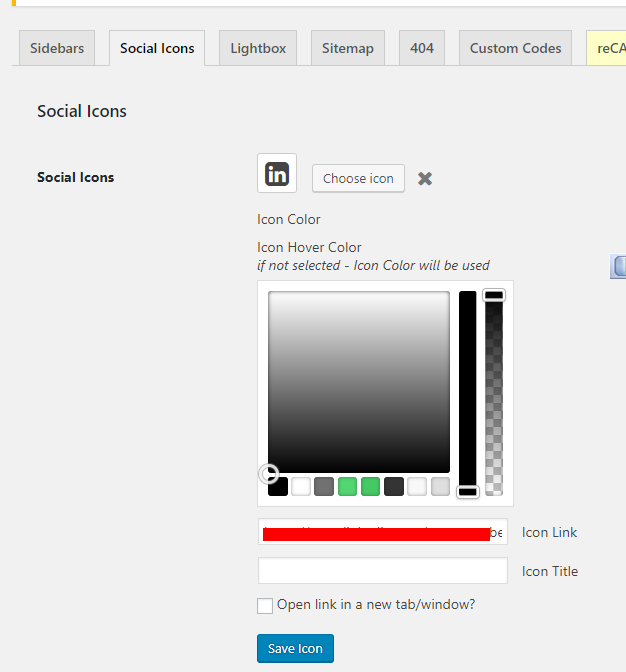
Social icons link changing not working.. it showing a color picker just
Can’t change the link https://i.postimg.cc/L5HnvMmk/screenshot_422.png
Hi, thanks for contacting!
Please make sure to use the latest theme version (1.0.8). The issue you have is caused by the WordPress 4.9 version, and there is a need to update the theme, please download the newest archive from the Themeforest.
The easiest way to update the theme is to rename the old theme as eco-press-old in your wp-content/themes folder. Then you will be able to upload the new theme eco-press.zip via the WordPress admin panel and activate it.
After the theme update, please proceed to Appearance > Theme Plugins, and update all the suggested plugins. Please note that you might need to clear your browser’s cache in order to see the changes.
If you still experience any problems, please submit us a personal request at http://cmsmasters.net/support/ with relevant WordPress and FTP credentials and our support agents will be happy to help you.
Thank you!
I can’t figure out how to set Events to show by Photo or Maps. The demo installed points to your site and no Event pages are created. Also, no Maps or Photo options are added in the View By buttons of the event list. Just by month, day, etc.
Hi, thanks for contacting!
Our events view is achieved with the help of Events Pro plugin. But please note that it should be purchased separately as it’s not included to the theme package, we have no rights to redistribute it: https://www.screencast.com/t/EymspB998Gh . You can either use a free version of the events plugin, or purchase a Events Calendar PRO addon that extends events functionality even more. Both free and pro versions are styled for the theme.
More information about linking to specific event views can be found here: https://theeventscalendar.com/knowledgebase/linking-to-specific-event-views/ .Thank you!
Hi, does the theme support Hebrew language?
Hi, thanks for the question!
Sure, RTL languages are supported! The theme has ready rtl.css file, which is used, when RTL language is selected for the website.
Please feel free to ask any further questions should you have any, we’ll be happy to answer them! Thank you!
Hi, I have one question: How resolve this? https://goo.gl/f1rYdb
Hi, thanks for contacting!
As the problem is a specific one, we need to see what happens on your end. Please send us a request at http://cmsmasters.net/support/ and our support team will investigate your case. Just please make sure to add all the needed credentials to your ticket.
Thank you!
Hi. I just installed your theme. But I couldn’t find any instructions how to install the child theme. Could you please send me the link for the documentation about the child theme installation? TIA
Hi, thanks for contacting!
Here you can see video about installing the theme and child theme: http://cmsmasters.net/installation-importing/
Please note that the child theme is needed only if you need to edit the theme files. In case if you do not need such customization, child theme installation is not necessary.
If you still experience any problems, please submit us a personal request here with relevant WordPress and FTP credentials and our support agents will be happy to help you with the theme set up.
Thank you!