1939 comments found.

Has the issue with the theme not being mobile friendly to Google been fixed yet or is it under way? Rankings are tanking because of this :/ It seems to have to do with the menu, Google says 1. Clickable elements too close together 2. Content wider than screen and the google mobile test preview looks off. Hope this is a priority. Constantly checking for a theme update….
Hi.,
Our theme is fully responsive. You can check it on your mobile device to see. Use this link …
http://responsivedesignchecker.com/checker.php?url=https%3A%2F%2Ftrendytravel.dttheme.com%2F&width=1400&height=700If you still have any issues, kindly send us some screenshot/video where you have the issue. So that we will check the issue.
Thank you, we look forward to helping you!
Regards., DesignThemes Support.
Hi there. I am trying to change the currency on the hotel plugin however the currency is not working. Please assist
Hi.,
Kindly send us the clear screenshot for where do you change the currency symbol and where the currency symbol not changed. So that we ca get a clear view then we will help you better.
You need to change the currency symbol in two places.
1) Go to dashboard > Trendy Travel (Theme options) > Search > Currency
http://prntscr.com/ksqejw2) Go to dashboard > Woo-commerce > Settings > Currency options > Select your Currency then only it will affect in your packages section
http://prntscr.com/ksqepm http://prntscr.com/ksqetsRegards., DesignThemes Support.
Hi there… I have managed to change it. Thanks for the help
I would also like to remove the footer links at the bottom: https://drive.google.com/open?id=1uqUlAXqR_NbmTEQpzyZGRS8RNUy9X1n3
Hi.,
Thank you for contacting us.
It seems that, you need to assign the menus from Dashboard Appearance > Menus > Manage Locations > Header Menu as Primary Menu and Footer menu as Secondary Menu then only it will show correctly in the footer section with footer menu items.
http://prntscr.com/ksz6v9 http://prntscr.com/ksz6xl http://prntscr.com/ksz70kIf you wish to remove the footer links at the bottom:
Just add this css code in Dashboard > Trendy Travel > Integration > Custom Css. Change the color as per your needs.
`#footer .footer-links { display : none; }`
If you have any queries, found any difficulties, facing any kind of issues or need any support for this theme, please feel free to contact us. We are always ready to help you.
Ratings for Trendy Travel theme
Thank you for giving us the opportunity to serve you better. If you really like our theme and happy with our support, please feel free to give us your best rating (5/5 stars) which would be much appreciated and helpful for us to proceed support you all forever 
Please take one minute to share your feedback by clicking on a rating, visit below video link for how to rate our theme:
http://recordit.co/YqdTBuEJRmThanks in advance.
Regards., DesignThemes Support.
Hi there… I would like to know how I can remove this layout option section. Please see screenshot: https://drive.google.com/open?id=1qIcN4m_ZJK_09bvGIZ7tqfCT3ZfJIIl-
Hi.,
Thank you for contacting us.
You can disable Style Picker from Dashboard > Trendy Travel > General > Others > Disable Style Picker > Yes > Save All. Please have a look.
https://snag.gy/GIMK1C.jpgIf you have any queries, found any difficulties, facing any kind of issues or need any support for this theme, please feel free to contact us. We are always ready to help you.
Regards., DesignThemes Support.
Hi. Thank you very much for your assistance
Hi.,
Thank you.
If you have any queries, found any difficulties, facing any kind of issues or need any support for this theme, please feel free to contact us. We are always ready to help you.
Ratings!!
Thank you for giving us the opportunity to serve you better. If you really like our theme and happy with our support, please feel free to give us your best rating (5/5 stars) which would be much appreciated and helpful for us to proceed support you all forever
Please take one minute to share your feedback by clicking on a rating, visit below video link for how to rate our theme:
http://recordit.co/YqdTBuEJRmThanks in advance.
Regards., DesignThemes Support.
Hi, I experience an issue with “designthemes-core-features” plugin. I have installed Trendy Travel – Tour, Travel & Travel Agency Theme on wampserver and when I’m trying to activate above plugin then everything goes down.
Could you give an advise how to resolve this issue please?
Error link : https://1drv.ms/f/s!Ak2ERd5pPb0lnh_vSNxZ6raFBXHD
Hi.,
Kindly enable the debug mode under the file path /trendytravel/wp-config.php
Ref : http://prntscr.com/kr8380
Now it will display the error kindly send us that screenshot. And also make sure that you have assinged the server requirements properly ,
Ref : http://support.wedesignthemes.com/knowledge-base/server-requirements/
Regards., DesignThemes Support.
Hi.,
Did you checked your server requirements ,
http://support.wedesignthemes.com/knowledge-base/server-requirements/We have checked our theme in local and it working fine.
Regards., DesignThemes Support.
Can we remove this part on mobile? https://www.screencast.com/t/Ro08MgYo9E
Also, can we float the menu on mobile?
Hi.,
Thank you for contacting us.
1) Get into Admin panel > Appearance > Trendy Travel Option > Integration > General > Custom CSS > Enable Custom CSS > Yes > Paste the below css code inside the text area > Save All.
.dt-sc-one-third .entry-meta { display: none !important; }
Please refer the attached screenshot : http://prntscr.com/kpc6dg
2) Sorry we don’t have that option.
Thank you, we look forward to helping you!
Hi rsriram,
Thank you for your reply.
1) I have tried to follow your directions, but it didn’t work for some reason. Can you please help me check again?
2) No worries, it’s fine.
Thank you. I look forward t your reply.
Hello there, I have a trip site. I use the theme Jannah on this site but I do not like this theme. Do you think your theme will be compatible with my trip site?
Internet address: https://www.geziyerler.com/
Hi.,
Thank you for the interest in our theme and contacting us.
We have designed our Trendy Travel theme based with Tour, Travel & Travel Agency Theme. the theme i always compatible with your requirements.
If you wish you can check our theme front end and back-end option by requesting demo.
Kindly request a demo from the following link. An activation email will be sent to this email address. After the confirmation you will be redirected to WordPress Dashboard.
http://trendytravel.themessupport.com/request-demo/
Refer: For Ex: LMS WP theme
If you have any queries, please feel free to contact us. We are always ready to help you.
Looking forward your purchase happily
Note: The mention demo link will be available for 48 hours only.
Regards., DesignThemes Support.
Hi! After the latest update there is an issue with the blogs on mobile. 2 errors when testing it on Googles mobile friendly test. I tested “The great budda” blog post on the demo site and it says “Site not mobile friendly” 1. Clickable elements too close together and 2. Content wider than screen. In Google webmaster tools I am starting to see a lot of mobile friendly errors. I thought it was just my site, but testing the official demo site it has the same error!
Hi oliver07.,
Thank you letting us know. We will update it in our next version.
Regards., DesignThemes Support.
Hi,
Do you offer free demo installation after purchase?
Hi.,
Thank you for the interest in our theme and contacting us.
Yes, We have offer a setup service as free of cost for basic installation and import the dummy data.
If you are looking for basic installation and setup only means we can able to help on this with free of cost. Just purchase the theme then send us your site credentials (WordPress admin login (Domain Name, Admin username and Admin password) & FTP access login details ( FTP Host, FTP Username, FTP Password)) immediately via the right bottom form located @ http://themeforest.net/user/designthemes So that, we can imported all the dummy data and make the required settings for you.
If you have any queries, please feel free to contact us. We are always ready to help you.
Regards., DesignThemes Support.
Hi,
Thanks so much for your prompt and positive response. I’ll get back to you soon.
Best regards
Hi.,
Thank you.
If you have any queries, please feel free to contact us. We are always ready to help you.
Regards., DesignThemes Support.
Hi,
I successfully installed the theme on my domain!
Pls, I would like to know how to replace the logo…
Hope to hear from you soon.
Thank you.
Hi.,
Thank you for contacting us.
Kindly, Update the Logo /Retina logo from Dashboard > Trendy Travel > General > Logo / Retina Logo
Logo size 234 X 88 px
Retina Logo Size : 468 X 176 px
Note : Update the Logo Retina logo from Buddha panel > General > Retina Logo, so that the mobile layout shows the retina logo. The retina logo should be exactly double the size of normal logo. If your normal logo is 100×200. Then your retina logo should be 200×400.
If you have any queries, found any difficulties, facing any kind of issues or need any support for this theme, please feel free to contact us. We are always ready to help you.
Ratings!!
Thank you for giving us the opportunity to serve you better. If you are happy with our theme and support, Please help us by taking a few minutes to tell us about the service that you have received so far. Your 5 stars has a crucial part in our overall rating! Hoping for a 5 star rating from your end
Please visit below video link for how to rate our theme:
Waiting to see your fantastic 5 stars rating.
Thanks in advance.
Regards., DesignThemes Support.
Hi.,
Thank you for your interest on our theme.
Sorry you can’t integrate your own search module , into our search module. If you need you can use your search module alone via customizing the core file to add your script.
Regards., DesignThemes Support.
This template supports my website https://nagantour.com ? can the design use the current design? and does it support the WP Bakkery plugin?
Hi.,
Thank you for your interest on our theme.
We have our own design , you can display the page content like your reference but you can’t customize some designs like header view ,
Refer : http://prntscr.com/kf5tfg Yes , our theme compatible with WP Bakkery plugin but you cannot edit the Demo contents with Visual Composer. You can create new pages with Visual Composer plugin.
Note : And you can’t integrate our theme with that your current site design.
Regards., DesignThemes Support.
hi, how to change button colors. Theme is very complicated
Hi.,
Thank you for contacting us.
Get into Admin panel > Appearance > Trendy Travel Option > Integration > General > Custom CSS > Enable Custom CSS > Yes > Pasted the below css code inside the text area > Save All.
.dt-sc-button { background: #000 !important;}
.dt-sc-button.green { background: #000 !important;}
.dt-sc-button.too-small { background: #000 !important; }
.dt-sc-button.small.green { background: #000 !important;}
input.dt-sc-button.small { background: #000 !important;}
Note: You can change the background color value as per your need.
If you still have any issues, kindly send us some screenshot/video where you have the issue. So that we will check the issue.
Thank you, we look forward to helping you!
Ratings: If you are happy with our support, kindly rate us. Have a look at the video for the rating process. http://recordit.co/YqdTBuEJRm Hoping for a 5 star rating from your end
i have requested for sending updated plugins of visual composer. but sorry to say that i have not get any reply from your side
Hi.,
We have already sent the latest version of the plugin files to this mail (erparveen@hotmail.com) on JUL 26, 2018 10:22 AM. Please check the mail also in spam folder.
If you have not received any mails regarding latest version of the plugin files, Kindly, send us a message through the right bottom form located @ http://themeforest.net/user/designthemes So that, we will send you the latest version of slider files.
Regards., DesignThemes Support.
Another quick question. Is there any shortcode to insert social icons? I don’t want to use dt_sc_team as this will bring up photo. Kind regards,
Hi.,
You can use this shortcode [dt_social /] or
[dt_social text=”We’re social everywhere. Come let’s meet here.” target=”_blank” /]
If you have any queries, found any difficulties, please feel free to contact us. We are always ready to help you.
Regards., DesignThemes Support.
Hi Team, Could you please tell me how to make dt_sc_team play like carousel? See the below: http://prntscr.com/k9wpwe Thanks, Thanh
Hi.,
Sorry as of now we don’t have that option.
Regards., DesignThemes Support.
I have added my purchase key and I was supposed to get an activation email. That was yesterday. I received NOTHING. It wont let me register again and it wont let me get a new password. I really NEED support because in places post type, whatever text is in wp backery page builder column shows on top of images!
Hi.,
We have updated your password and sent to your email id nmavro73@gmail.com . Please have a look at it.
Kindly send us some screenshot where you have met the issue , so that we will help you better.
Regards., DesignThemes Support.
Per-Sale.. Dose your theme support RTL ?
Hi.,
Thank you for the interest in our theme and contacting us.
Yes, Our theme supports RTL languages.
If you have any queries, please feel free to contact us. We are always ready to help you.
Regards., DesignThemes Support.
How to make Hotel Booking same payments by woo commerce? is there any way?
Hi.,
Thank you for your interest on our theme.
Our hotels payment modules are integrated with PayPal. So, you can use the PayPal option alone. Kindly refer the below link,
http://support.wedesignthemes.com/knowledge-base/trendy-travel-payment-modules/Regards., DesignThemes Support.
ok now can I add every thing to woo commerce then integrate it with tabs search by custom code? cos I just need to be sure we can add to search some options I show this Design to customer in my company and need they ask for more options cos they don’t like the way you used with hotels cos only use paypal so i need to make every thing using woo commerce if it possible
Hi.,
Thank you for your interest on our theme.
Sorry it is not possible.
Regards., DesignThemes Support.
so its no way to edit search by any mean ? how it could be ?
Hi.,
Thank you for your interest on our theme.
No , you can customize our search option via the core files , so you should have WordPress and php knowledge to customize the hard code. Because it will be a custom work for us. But as of now we all are quite busy in other works so we could not take custom works.
Regards., DesignThemes Support.
Hi, how can i delete the default map in the sidebar of the place in Places Post? I would remove that item.
Thank you
Hi.,
Thank you for contacting us.
Get into Admin panel > Appearance > Trendy Travel Option > Integration > General > Custom CSS > Enable Custom CSS > Yes > Pasted the below css code inside the text area > Save All.
`.list-hotel-map { display: none; }`
Please refer the attached video : http://recordit.co/Wy3dTU8NQ9 Note: You can change the value as per your need.
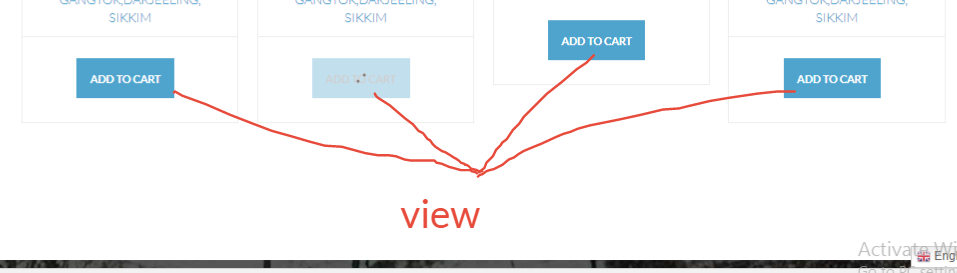
hello support i want to change all the package where its displaying, add to card button to view into view package and it link to package page hear is the screen shoot https://snag.gy/AnueyK.jpg
product image is displaying weird, while hover it displaying small please guidehttps://snag.gy/AOVou1.jpg
Hi.,
1 ) Kindly refer the below knowledgebase link for how to change the add to cart link
2 ) Kindly send us the page link , so that we will help you better.
Regards., DesignThemes Support.
when i pest those code in my child theme its not working
Hi.,
Kindly, send us your WordPress admin login and FTP login credentials through the right bottom form located @http://themeforest.net/user/designthemes .So that, we will check and have a clear look from our end.
Regards., DesignThemes Support.
i call me vé máy bay
Hi.,
Kindly send us your query in detail, so that we can get a clear view then we will help you better.
We you need from that link. we can’t get it. Please be more specific.
Regards., DesignThemes Support.
Hi, I am looking to start a holiday hotel booking business for sri lanka. I have already registered my business, domain name and hosting. I am looking for a wordpress theme to set up my website. your theme looks very good. I have few questions. 1) I noticed it has tours and Cruise and rent cars. Even on the search option. Can I customize this only for Hotels/Accommodations? 2) Does it allow hotel owners to sign up and list their property? Or do I need to list them? 3) I saw lot of payment options. When a booking is made and customer makes the payment. Who receive the money? Does it go to hotel owner or me? 4) Can the payment by the guest for a booking be break down. Where the commission amount/deposit is paid to me online and the balance is paid manually to hotel owner? 5) Can you explain how the booking process works. Is it as follows. a) hotel owner list the accommodation. b) Guest come and make a booking. c) email goes to hotel owner and guest and me regarding new booking. d) Hotel owner logs in to his dash board and approve/decline booking e) guest and me receive email regarding booking. f) if booking is approved. guest logs into his dash board and pay the booking fee. g) email goes to me and guest with booking detail and confirmation.
Is there a dash board a can see all the bookings. Where I have admin control. Thanks
Hi.,
1 ) Please be more specific about yur query with some screenshot so that we will have a clear look from our end.
2 ) No , admin have to enter the hotel details.
3 ) Payment goes to admin .
4 ) As of now we don’t have commission scale option.
5 ) As of now we don;t have hotel manager concept in our theme. Admin have to handle the all functionalities.
Regards., DesignThemes Support.