1070 comments found.

Hi there, how can I remove/hide the date and category in single blog pages
.single-post .post-list-content .wrapper-meta{display:none!important}
I need to change the background of the image where the comments appear generates me an error and deactivates the security padlock, http://topperutravel.com/wp-content/uploads/2017/02/bg-review.png
Hi. We add custom CSS in Theme Options -> Custom CSS
How can i remove book now tab? I want just send ENQUIRY tab
https://imgur.com/a/EL4Oyg8Hi. You go to Theme Options -> Tour Settings -> Single Tour -> Form Booking and choose Show Custom Form
Hello,
I created 2 attributes that are with the greek name and i use them in the “Search tour” bar.. I used WPML to translate them in english , but the translation dose not appear in the english “Search tour” bar menu. Instead the things words that appera are in Greek. I used WPML and searched with the taxonomy translation and also with the WPML string translation.I also used Loco translate to translate some texts , but i don’t think that i ever changed the attribues names throught loco translate Any thoughts why this happens?
Hi ydeliyia, Please create a topic on http://support.physcode.com My developer will support you
Ok. Thank you .
Can I move the logo for the middle of the menu? Meaning 3 options, Logo, 3 more options.
Hi. Current the theme doesn’t have the option to do it, but we’ll custom it for you
Do I have always to have PayPal or I can only show payment by card or other method of stripe?
Hi. You can use all payment gateway of WooCommerce
Hi, try to see demo : ” Error establishing a database connection ” Please check.
Thank your feed back. We have update it
Hello. Is there any way that i can translate the enquiry form? I have loco translate but can’t find it. Also i use WPML . I also can’t find it in the widget area
You go to WPML -> String Translate in Select Strings with domain you choose admin_texts_travelwp_theme_options and translate contact form 7 https://prnt.sc/jre3wb
Thank you very much .That did the trick.
I would like to deactivate the search button of the main page and the contact page
Hi, You can use Widget Logic to hidden search button on home page and contact page
HOW TO CHANGE LOS BANERS http://www.topperutravel.com/wp-content/uploads/2016/10/sidebanner-tour.png
Hi, You can change it in Appearance -> Widgets
I want to know if is fully woocommerce integrated and WPML compatible. Best regards.
Hi, Our themes have WooCommerce integrated and Compatible with WPML
Hi! Pré-Sale: -You can add fields, such as date and quantity in the enquiry form? -Is it possible to remove the Anything field from the search form? -Below the inquiry form can I add widgets normally? -Can I edit the form Book the tour?
I await replies to proceed with the purchase… Thanks.
Hi
- You can add fields, such as date and quantity in the enquiry form => You can add some fields as Select, Quantity, Radio, Checkbox on the function Tour Variation, don’t have type date.
- Is it possible to remove the Anything field from the search form => Yes, it possible because of we provider option for you can set it.
- Below the inquiry form can I add widgets normally => Yes, you can do that
- Can I edit the form Book the tour? Yes you can override it.
Thanks.
Hi There, We are wanting to add some additional fields to the booking form – are we able to do this? Fields such as Phone Number, Food Allergies, Weight, etc
Hi lightboxit.
Please create topic on the http://support.physcode.com/forums/forum/travelwp-wordpress-theme/ We will create an example for you can do that.
Thanks.
Thank you for your reply – I would but your registration never works – we have tried again and in the past but no luck. We have sent a few emails also but no reply…
Oh we’ll check email again and reply for you via email
Thanks.
I can put schedules on the tours, shift tomorrow afternoon and evening and I would like to know if I can place specific days on a tour, for example, if I just wanted to give a service on Monday, Wednesday and Friday there is a way to generate that, thanks
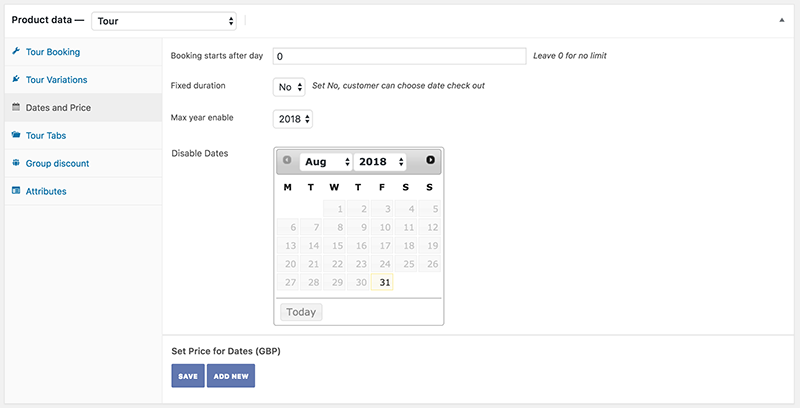
Hi. You can choose Disable date. and choose price for date in Date & Prices http://docs.physcode.com/wp-content/uploads/sites/4/2017/02/dates-price.png
After purchasing I have only 2 issues. First of all CURRENCY – I want to change it to USD. I don’t want GBP. But I can’t find anything in settings to do it. Secondly There are 5 text inputs in main page to search but in my template there is only 2 text inputs
1. Change Currency. You go to WooCommerce -> Settings -> Currency options
2. You can see Video in http://docs.physcode.com/travelwp-wordpress-theme-documentation/#create-attribute
Great Thanks!
donde se cambia Copyright © 2017 Travel WP. All Rights Reserved.
en la parte de destinos no sale los circulos con los paises ,sale solo vacio destinos
queda de esta manera ,errores con los enlaces y algunas partes no han sido importadas , reviselo www.topperutravel.com
cuando le doy clic al menu destino me manda aquihttp://travelwp.physcode.com/home-4/destinations/ y eso quiero configurarlo y me da un enlace externo
change 2017, Please go to Theme Options -> Footer -> Copyright Text, Please speak in English, we do not understand what you say
en el home en el menu la opcion destination me deriva a http://travelwp.physcode.com//home-4/tour-destination/brazil/ y no a mi , no encuentro tampoco en paginas esa informacion para modificar llamese brasil,canada, cuba , no puedo modificar,espero su ayuda
Hi. You go to Products -> Attributes -> Destination and choose Configure terms
Hi there, It mentions you can have separate prices for adults and children. I need to be able to show up to 3 prices and I need to customise the names of those prices: eg. golfer twin share, golfer single and non-golfer twin share. Is that possible? Thanks
Hi, You can use Tour Variations to create prices http://docs.physcode.com/travelwp-wordpress-theme-documentation/#how-to-create-a-tour-2
Other concerns include 1.I want the first menu i.e contact info 0123456789 opening hours,address 1010 Moon ave, New York, NY US and Login/ Register to show when this site is opened on mobile screen 2.Woocommerce deposit is a must have for me is there away I can customize the booking section to have it?
1. Show topbar top on mobile. You can add custom CSS below to Theme Options -> Custom CSS @media (max-width: 767px){ .header_top_bar { display: block; } } 2.Current Woocommerce deposit not working with plugin travel-booking
Most long haul travellers do not pay full amount on instant booking and payment gateways do not like it either especially when you are applying for a credit card merchant account because of chargebacks ,for booking made 6 months prior the deal is always to pay a deposit then settle the remaining amount when they arrive,I understand that travel booking plugin doesn’t work with woocommerce deposit but is there a way a developer can customize this theme to have it(woocommerce deposit),I really really need it
Hi Blasiosafaris
Sorry about that. We tried to fix to run that plugin, but something run errors can make system travel error. The current developer still tries to fix. So when it complete, we’ll deploy new version and reply for you.
Thanks.
Hi Blasiosafaris
We updated the new version Travel theme compatible with plugin WooCommerce Deposits – Partial Payments
Thanks.
Hi, how can i put menu above slider revolution. Default menu with white background?
How can i translate DESCRIPTION AND ITINERARY?
https://imgur.com/a/kFRYUOV- Menu above slider. Current our theme don’t options - Translate. You can use Loco Translate Plugin to translate it in Plugin WooCoomcer, travel-booking and theme travelWP http://support.physcode.com/knowledge-base/how-to-translate-wordpress-theme-plugins/
I want menu on homepage like on others pages. To be white not transparent
oh, You go to Theme Options -> General Settings -> Transparent menu home page you choose No
Hello,I like your theme and is planning on purchasing it,however,I would like some clarifications on what’s possible with the booking section,I see there are a variety of payment method eg Direct Bank Transfer,Check Payments and Cash on Delivery,but not credit card,I would like to know if I can add a credit card payment method and link to a payment getway of my choice?
Hi, You can use all payment method of WooCommerce