226 comments found.

some issues I am running into with “Team Members”. this is the page we are working on: http://dml1.digitaliwayhost.net/~newlifechurchnf/leadership/
1.) how do we adjust images to not be greyscale and just stay color? 2.) the default image size is THUMBNAIL for that grid, how can we adjust so that it is at lest medium or possible make it FULL so we can custom cut the image showing better quality? 3.) when clicking on the person you go to the bio but there are no bread crumbs to get back, can that be enabled or possible a back button? 4.)when on the persons bio the page says PEOPLE can it say LEADERSHIP and how do we do that?
thank you
Hello there,
Thank you for reaching us.
1. Please use below CSS to remove greyscale. .team-small .member a>img { filter: grayscale(0); }
2 & 3. Regarding this questions, Please email our support from here : https://themeforest.net/item/bethlehem-church-wordpress-theme/12619468/support
4. Please add this custom PHP code to your child theme’s functions.php file and change People text. https://gist.github.com/ibndawood/97a54b11c8e3349e4d41a4e5b7101d27Thanks, Farook
Thank you the function and css worked great. I submitted a request to the developer as you requested for 2 & 3.
sermon meta info needs to be removed – see this example – ; http://dml1.digitaliwayhost.net/~newlifechurchnf/sermons/sacrifice-elder-amy-mclaughlin/ how do we remove the text ABOUOT SITEADMIN and also the author name?
in the footer of the site there are social link that need to open in a new window but do not, how can we enable that?
Hello there,
Thank you for reaching us. Please add this custom PHP code to your child theme’s functions.php to remove author information and open social link in new tab.
https://gist.github.com/farookibrahim/54b29d4a20488c570044cc8c4c1e75b0 https://gist.github.com/farookibrahim/fffde049bdae7fd4d06d1d34952e5108 https://gist.github.com/farookibrahim/83b94b57e327c9c0479fHope this helps. Let us know if you have any other questions or need further help.
Thanks, Farook
thank you that worked great!
for sermons there are social media icons to share to twitter, facebook, google plus. google plus does not work and I would like to remove that. what is the process to remove that icon?
Hello there,
Thank you for reaching us. Please add this custom PHP code to your child theme’s functions.php to remove google plus icon.
https://gist.github.com/farookibrahim/f5be50d7b6080494bcc4efe02412e934Hope this helps. Let us know if you have any other questions or need further help.
Thanks, Farook
excellent, worked perfect!
HI, I’m using header 7, how do I change “Give Online”, to just “Support”? I also want to change the URL
Hello there,
Thank you for purchasing our theme and for reaching us. Please add this custom PHP code to your child theme’s functions.php and change values to customize the header 7 links.
https://gist.github.com/farookibrahim/3816cdfe3d60280f491d4f0822be9be8Hope this helps. Let us know if you have any other questions or need further help.
Thanks, Farook
Can you tell me where and how to remove the Google+ and Twitter icons from the Blog Recent Posts widget on the Bethlehem Theme home page please? I’ve looked all around but don;t seem to be able to find how to do it! Thanks
Hello there,
Thank you for purchasing our theme and for reaching us. Please add this custom PHP code to your child theme’s functions.php to remove social links.
https://gist.github.com/farookibrahim/cbdd83a90c407ac1df116c5ab8708de7Hope this helps. Let us know if you have any other questions or need further help.
Thanks, Farook
How do I remove Fax on the footer style 2
Hello there,
Thank you for purchasing our theme and for reaching us. Please add this custom CSS to Appearance > Customize > Additional CSS to remove Fax from footer style 2:
.footer-2 footer.site-footer .footer-widgets .footer-widget-4 {
    display: none;
}
.footer-2 footer.site-footer .footer-widgets .footer-widget-3 {
    border: none;
}
Hope this helps. Let us know if you have any other questions or need further help.
Thanks, Farook
How can I change the color scheme to different color other than the ones available?
Hello there,
Thank you for purchasing our theme and for reaching us.
To change custom primary color, please navigate to Bethlehem > Styling > set “Use a predefined color scheme” to No and please follow steps mentioned there.
If you have any issues, please email to our support with your custom color code. We will help to generate custom color.
Hope this helps. Let us know if you have any other questions or need further help.
Thanks, Farook
Hello! How can I remove shop carousel from Home2 page? And where should I paste a youtube link for video post in the blog? Thank you!
Hello there,
Thank you for purchasing our theme and for reaching us.
- You can disable shop carousel from Bethlehem > Shop > Stores Carousel.
- Please install this plugin Classic Editor and edit blog post you will have option to add video link.
Hope this helps. Let us know if you have any other questions or need further help.
Thanks, Farook
Thank you, it was very helpful!
ok there is a issue now on my website, I changed a wp.config.php and added this line in my public html define (‘WPLANG’, ‘pt_PT’); and it just breaked my site.
pages dissapeard, content dissapeard… and then I removed the line again and it stills the same. Please take a look, almost everything dissapeard
I can give you my cpanel login if you need it
please ignore this, i have everything is set back.
I just need your help on how i can translate this theme with wpml once i have downloaded the file .po file and edit it how do i upload so the website will read the translated language?
Thanks
Hello there,
Glad your issue is resolved.
The theme is translatable and we have included all the strings with the pot file. You can use a plugin like loco translate to translate the theme into your language. You can find instructions here : https://docs.woocommerce.com/document/woocommerce-localization/#creating-custom-translations-with-loco-translate.
WPML is required only if you require a multi-lingual website.
Hope this helps. Let us know if you have any other questions or need further help.
Thanks, Ibrahim
Thank you, also did you check my theme issue regarding full width for donation page
Hello again,
We are releasing an update today to fix this issue.
Thanks, Ibrahim
I need also this removed, i already edited and set the settings etc but it won´t dissapear
https://imgur.com/a/vJ8bpw5Hello there,
Thank you for purchasing our theme and for reaching us. Are you able to remove this block ? Please clarify.
Thanks, Ibrahim
is fixed, thanks
Please tell me how do I center content in the donation forms:
http://missaocristo.com/donations/education-books-for-poor-kids-2/Please tell me how do I remove the 0 number from donate form and insert a text like ” insert amount” so when people click it, it will dissapear and people choose the amount they want
Thanks
Hello there,
Thank you for purchasing our theme and for reaching us. You are using a layout with left sidebar and without any widgets. Hence the empty left sidebar. You can set the layout as “Full Width” in Bethlehem > Donations > Layout. Ref : http://transvelo.github.io/docs/bethlehem/theme_options_panel/donations.html
Unfortunately 0 is a placeholder and cannot be removed via options. You’ll have to use custom coding to do that.
Hope this helps. Let us know if you have any other questions or need further help.
Thanks, Ibrahim
Hello, I only see right or left side bar and not full width
Please take a look:
https://snag.gy/13IKDR.jpgI see what you mean. I can temporarily give you a solution via CSS now. Please give me enable your website and I will check and give.
Thanks, Ibrahim
send you e-mail, thanks
Great theme, I like it!
Hello there,
Thank you for reaching us. Glad your are liking our theme. Please do not hesitate to reach us if you have any questions related to our theme.
Thanks, Ibrahim
sorry, try now
also the donate button does not show in mobile
Please try now, I need this fixe
Hello again,
The mobile menu is a separate menu location called “Handheld Menu”. You can create a new menu from Appearance > Menus, include a link to “Donate Now” and assign it to Handheld Menu location in Manage Location.
Hope this helps. Let us know if you have any other questions or need further help.
Thanks, Ibrahim
Thanks Ibrahim, but in the mobile version in your demo it shows that big donate button. Why it won´t show on mine? Is it because of the logo? Is there a way to remove the logo to be shown in the handheld menu or just have showing text in handheld menu?
That might resolve the problem if it is
Thanks
I can see the donate now button : https://drive.google.com/a/transvelo.com/file/d/1llK1L1z3HKnVLSuVJjZIFu2OnO6f9VIb/view?usp=drivesdk
Please let me know what you see.
I see it now too, I added the link to a new menu, now I see it too.
Can you also tell me how do I center the content in a page? For example take a look here: http://missaocristo.com/index.php/donations/
Thank you very much for your help
Hello again,
The area in the right is for sidebar. Do you not want to have a sidebar ? You can choose the layout in Bethlehem > Donations > Donations Layout and choose “Full Width”.
http://transvelo.github.io/docs/bethlehem/theme_options_panel/donations.htmlHope this helps. Let us know if you have any other questions or need further help.
Thanks, Ibrahim
Sorry but the theme is not looking well on mobile phone, the header has been missing, can you please check this??
Thanks
Hello there,
Thank you for purchasing our theme and for reaching us. Can you please clarify what exactly you are referring to ?
Thanks, Ibrahim
once I uploaded a logo the donate button dissapeard and the menu is not in the same color too
site is: missaocristo.com without www
thanks
Please tell me how do I translate the donate page settings.. I really need to translate it and I need to remove the achieved/green bar
Also how can I make the pop up open when they reach this page?
https://demo2.chethemes.com/bethlehem-v3/?post_type=give_formsso that my visitors don´t have to click 3 times to make the donation
Thanks
Hello again,
Thank you for getting back. The theme is translatable and we have included all the strings with the pot file. You can use a plugin like loco translate to translate the theme into your language. You can find instructions here : https://docs.woocommerce.com/document/woocommerce-localization/#creating-custom-translations-with-loco-translate
Use this custom CSS to hide the progress bar :
.donations-loop .donation-info .give-goal-progress, .donations-loop .donation-info .goal-progress { display: none; }Unfortunately the behaviour of donation cannot be changed. Hope this helps. Let us know if you have any other questions or need further help.
Thanks, Ibrahim
How I translate with polylang? I don´t use the one you mentioned
Thanks
Ok I fixed and translated. Thanks.
Please tell me how do I change the header menu and the color menu
Hello again,
Glad your issue is fixed. Can you please clarify which header you are using ? You can change the menu from Appearance > Menus. Are you referring to color or background color of the menu ? Also let me know your website URL, I’ll suggest custom CSS to change the color.
Thanks, Ibrahim
website is missaocristo.com and I would like to change the header and footer color
please check this http://missaocristo.com/category/noticias/ this category is supposed to show posts with the featured pictures however it says ” Oops! That page can’t be found. ” also my donate button is not taking me to the donation forms
I have been trying to lunch my website live so people can acess it
Thanks
Hello again,
Thank you for the details. The menu and the footer has the same color as your primary color chosen in Bethlehem > Styling option. You can change the color from the option to choose your own color.
Here is the custom CSS to change the background color of header and footer :
body.bethlehem-style-3.header-6 header.site-header .header-nav-menu, #colophon.site-footer { background-color: #000000; }404 error happens because of incorrectly configured permalinks. Please navigate to Settings > Permalinks and “Save Changes” to regenerate permalinks. If the issue doesn’t resolve, please set to default for all options and test again.
Hope this helps. Let us know if you have any other questions or need further help.
Thanks, Ibrahim
Hello thanks, I did set the permalinks however the donate now button is not w orking and just redirecting to the home page http://missaocristo.com/
I guess someone messed up with my website, because he was adding a pop up on that button and he reversed the code, now the button doesn´t work and it doesn´t take to the default demo page where I can edit it…I need help with this so I can lunch my website.. Can I give you the login details and you check it? Or how do I set this
Hello again,
Have you setup donations page ? Please clarify.
Thanks, Ibrahim
no I haven´t, can I just give you the details of my website? The donate now button just ttake me to the homepage, nothing else. please see missaocristo.com
Hello again,
Yes, please email our support with your WP admin details, I will setup the donate now button.
Thanks, Ibrahim
I had to reinstall it so it won´t be necessary. Can you please give me the xml file of this demo https://demo2.chethemes.com/bethlehem-v3/
So that I can install my site as the demo in the link and change what I need?
Thanks
Hello again,
Once you’ve installed dummy content. You should follow these steps : http://transvelo.github.io/docs/bethlehem/setup/general.html#setting-the-home-v3-page-as-homepage
Hope this helps. Let us know if you have any other questions or need further help.
Thanks, Ibrahim
thank you very much! Can you please tell me how do I center the text of any page? For example the donation page
http://missaocristo.com/index.php/donations/Instead of our ministeries here: http://missaocristo.com/
How do i make it display latest posts?
Thanks
So overall I´d like to know:
How to center text of any page How do I make the in home page where it says ministeries to show latest posts How do I move the position of my logo and up it a little? I need to climb it a little in site menu.
Thanks
I´d like to make my page posts like this: https://demo.mythemeshop.com/s/?theme=Schema
how can i make them with the same background color too
Also how do I make the logo more to the left side, because the donate button is just messy because of the number of pages in my menu and because of the space between them the donate button went down
Hello there,
Your website does not load and I am unable to see any links that you’ve stated.
Thanks, Ibrahim
Hello, please tell me how do I remove the social icons?
Also I need to put pictures below the titles, right now they are set up automatically above the titles.
Thanks
Hello there,
Thank you for purchasing our theme and for reaching us. Can you please clarify the social icons in which part you are referring to ? Is it the blog or shop ? The same for titles as well. Please do clarify where exactly.
Thanks, Ibrahim
This social icons http://missaocristo.com/sermons/
I would like to have them in the sermons page but remove them from the posts
See this page: http://missaocristo.com/category/noticias/
the pictures are show first and only after it shows the title and I want to reverse that, so it will show first titles and after the picture
please see this: http://missaocristo.com/2019/01/16/test-3/
Picture shows first, But I want the title shows first.. Thanks
Hello again,
Thank you for getting back. All your links show a “Coming Soon” page. Please let us know how to get around it and I’ll provide you with the custom solution for your requirements.
Thanks, Ibrahim
try now, thanks
Hello again,
Thank you for the details.
1. Please add this custom PHP code to your child theme’s functions.php to remove social icons from blog posts : https://gist.github.com/ibndawood/4f24bd6c929c9b89801f4aa1e3dd3315
2. Please add this custom PHP code to your child theme’s functions.php to show featured image below header in single blog post : https://gist.github.com/ibndawood/d19c744594c5d33b8ac3f6314bc62134
Hope this helps. Let us know if you have any other questions or need further help.
Thanks, Ibrahim
Thank you very much it did!
- Now please tell me where do I change the donate button text and add for example a heart icon below the text?
- How do hide page titles?
- In this page instead of saying Noticias is saying blog while my category is noticias and not blog http://missaocristo.com/category/noticias/ is there a way I can remove category and only have missaocristo.com/noticias ?
Thanks!
Also pictures are to much big, I would like them to be set all with the same size please
Please see here, all of them get different sizes whenver I set as featured image
http://missaocristo.com/category/noticias/Hello again,
1. You cannot remove categories from the URL as they are the base for WordPress. You can configure it from Settings > Permalinks. Ref : https://themerella.com/remove-category-wordpress-urls/
2. Are you looking to translate ? If yes, The theme is translatable and we have included all the strings with the pot file. You can use a plugin like loco translate to translate the theme into your language. You can find instructions here : https://docs.woocommerce.com/document/woocommerce-localization/#creating-custom-translations-with-loco-translate.
3. You can hide page titles from page options. Ref : https://transvelo.github.io/docs/bethlehem/setup/building_pages.html
Hope this helps. Let us know if you have any other questions or need further help.
Thanks, Ibrahim
Hi, i have the shop carousel set to show on every page. The only problem is is that it shows up on the shop page and so it has the same content. Is there a way to not have it show on the shop page? Thanks!
Hello there,
Thank you for purchasing our theme and for reaching us. I am not sure if I understand your issue correctly. Can you please help me understand your issue with a screenshot ?
Thanks, Ibrahim
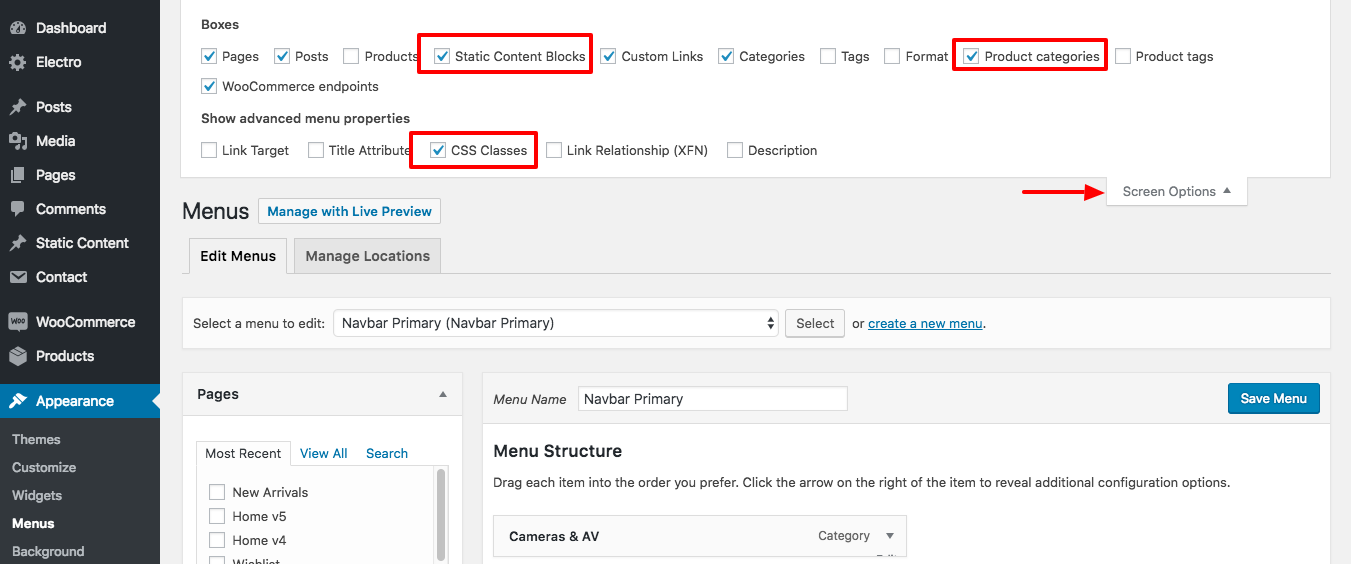
Hi, I created a new static block in order to create a new submenu. How do i add this to the menu? The dashboard does not have a way of adding static blocks to the menu. Thank ou
Hello there,
Thank you for purchasing our theme and for reaching us. Static blocks and Product Categories need to be enabled from “Screen Options” on the top-right corner of Appearance > Menus screen. Ref : https://docs.madrasthemes.com/electro/wp-content/uploads/sites/6/2018/04/enable-static-content-css-classes-product-categories.png
Hope this helps. Let us know if you have any other questions or need further help.
Thanks, Ibrahim
Hello, i tried performing updates for plugins and even the update for wordpress and everything is failing. Why is that? I can’t update anything. This is the error message I’m getting for trying to update wordpress software – Downloading update from https://downloads.wordpress.org/release/wordpress-5.0.2-new-bundled.zip…
Download failed.: The checksum of the file (d41d8cd98f00b204e9800998ecf8427e) does not match the expected checksum value (79068b83036a46f8d408e8f83a6eed56).
Installation Failed
Hello there,
Thank you for reaching us. A checksum mismatch means the file downloaded is not complete or is corrupt. This is a WordPress update message and not really a theme problem but a host problem. I suggest you to contact your hosts and ask them about this.
Here is another user with similar problem here : https://wordpress.org/support/topic/checksum-error-when-updating-to-wordpress-4-9-4-en_gb-automatically/
Hope this helps. Let us know if you have any other questions or need further help.
Thanks, Ibrahim
Just bought it, great theme!
Do you have the picture like the demo: https://demo2.chethemes.com/bethlehem-v3/ ?
Can you please tell me also the font letter of the picture where it says bethlehem church?
Thanks
Hello there,
Thank you for purchasing our theme and for reaching us.
- We do not have the right to distribute the images, we only have the right to use them commercially. Hence our dummy content will contain only placeholder images instead of actual images. Actual images take lot of time to import and usually breaks the importer causing error 500 and other issues. Also your website could be slapped with a DMCA notice in future if they find out about using copyrighted images. It is safer, better and faster to use placeholder images instead of actual images.
- We used indie font there.
Hope this helps. Let us know if you have any other questions or need further help.
Thanks, Farook
Thank you, my website is this http://missaocristo.com/ can you tell me where is the option to change the header below the main picture and the donate button color?
Thanks
Hello there,
Thank you for reaching us.
You can change header from theme options Bethlehem > Header.
Please use this custom CSS in Appearance > Customize > Additional CSS to customize “Donate Now” button color:
.site-header .donate-btn {
    background-color: #3498db;
    color: #fff;
}
Hope this helps. Let us know if you have any other questions or need further help.
Thanks, Farook
Hello! We love your theme, but it seems we’re having a couple of compatibility issues with WP 5.0. Do you happen to be working on an update for the theme to make it more compatible with 5.0?
Thank you!
Hello there,
Thank you for purchasing our theme and for reaching us. Can you please email our support and let us know about your issue along with your WP admin details ? I will look into this issue.
Thanks, Ibrahim
Organizer & Venue Field’s Greyed Out in New Event since the latest Bethlehem update.
Hello there,
Thank you for purchasing our theme and for reaching us. Can you please email our support with your FTP and WP support, I will look into this issue.
Thanks, Ibrahim