149 comments found.

Hi..my Theme Options window is blank…looks like a JS error. I’ve tried deactivating plug ins one by one and it doesn’t help. Any idea here?
Hi, your support period expired 2 years ago. You’d need to renew this first via the Downloads section of your ThemeForest account – then submit a ticket via the ‘Support’ tab at the top of this page including your site link and WP login details so that we could investigate.
So you won’t help even though I never once used my support when active? I gotta pay 41 dollars to get a little thing looked at?
Hi , I am not able to edit text block content . The content is in vc format. The element of Row in this theme is as “VC-row” . My wp version is : 5.2.2 and wp bakery version is 6.0.2 . I am totally stuck ,I am not able to edit a single word of the text block . Please suggest something.
Hi, I’ve replied to one of your other messages you sent us. Colm
but that solution is not working . I have tried all possible ways . Installed classic editor as well . Can we have a quick chat ?
Sorry we don’t provide chat support. I sent you a response to one of your other messages asking you to do a separate clean install on your server – can you reply to that message showing me the issue occuring on the clean install? Thanks, Colm
any update coming up?
Dear support, how to create this grid blog page -> https://themedemo.commercegurus.com/success/blog/?newslayout=grid-news&blogsidebar=none please advise
Theme Options > Blog Settings.
FYI – Your support period for the theme has expired. For continued support you’ll need to renew this via the ‘Downloads’ section of your ThemeForest account. Thanks.
I have just renewed the support
1. the Post Masonry Grid from WPBakery (6.0.3) is still not loading the all the posts (lazy loading) after upgrading to 6.0.3 version. After loading 30 – 90 posts, it will just hang and not continue loading the rest of the posts. The filter tags, which is enabled are also missing at the top too. They mentioned is the theme issue. You can try out here -> https://bit.ly/2X6coVL
For the default grid blog post, how do i exclude some posts?
Support is accessed via our helpdesk – comments are generally for presale questions only. Submit a ticket via the ‘Support’ tab at the top of this page. Thanks.
ticket created
How can I add Instagram under the “Share” ? currently there are only FB, Twitter, Linkedin and email.
Hi – Instagram’s API doesn’t allow you to share a link on it. It’s not possible.
Are we getting any theme updates for WPBakery Page Builder 6.0.4?
6.0.3 is the latest release – see the changelog at the bottom.
https://codecanyon.net/item/visual-composer-page-builder-for-wordpress/242431It’ll be included in the next theme update once it has been tested that it doesn’t break anything in the theme.
WPBakery Page Builder 6.0.5 has been released. Any updates?
17.07.2019 – ver 6.0.5 – Fix: LESS vendor folder available – Fix: All Media in Text Block works properly
15.07.2019 – ver 6.0.4 – Fix: Element API works properly for 3rd party elements – Fix: Post grid filter displayed properly – Fix: Custom CSS editor does not remove ”\” – Fix: Directory name typo for Instagram filter files corrected – Fix: Templates import API does work correctly – Fix: Row design options settings for elements in templates works properly – Fix: WooCommerce cart element works properly – Fix: Option “Save as a template” for a row is available – Fix: Elements edit form displayed correctly – Fix: Warning message for PHP function `htmlspecialchars` – Fix: Custom post types taxonomies work in Post Grid element – Fix: Revolution Slider output content properly
We’ll need a bit of time to test this update and be sure that it doesn’t introduce any problems. Once done, we’ll add it to the next theme update in a couple of weeks.
When is the next update for the theme? Wordpress 5.2.3 is out too
The theme works perfectly with the latest version of WordPress. We’ll be bringing out a minor update later this month.
Can’t find where to change the content for the Menu html content like ‘Get in Touch’ address etc under About Us top menu in your Success theme I bought.
Go to: Appearance > Menus. Click Screen Options on the top right and make sure ‘CSS Classes’ and ‘Description’ are ticked.
https://commercegurus.freshdesk.com/a/solutions/articles/12000019638-set-up-a-mega-menu-manuallyjust saw the latest update. i am using the child theme. Do i need to update the child theme as well, or just the main theme will do?
The latest release was an update to the main theme only.
WPBakery (6.0.3) post masonry grid (lazy loading setting) is not working properly. After loading out a few posts, it just hang there and will not continue loading other posts. I realised this issue after upgrading to version 6 of WPBakery. They mentioned that it was the theme issue. There may be issue with Redux Framework, which was stated – https://codecanyon.net/item/visual-composer-page-builder-for-wordpress/242431/comments?page=1013
Please assist to into this. Thanks.
I’ve downloaded the latest update but getting this notification “An update is available for LayerSlider WP!
You have version 5.6.10. The latest version is 6.0.5.”
Also the slider has stopped working on my site. “LayerSlider: multiple jQuery issue
It looks like that another plugin or your theme loads an extra copy of the jQuery library causing problems for LayerSlider to show your sliders. Please navigate on your WordPress admin area to the main page of LayerSlider and enable the “Put JS includes to body” option within the Troubleshooting & Advanced Settings box.”
Any ideas please
Can you follow the theme update guide. Note the step regarding disabling the plugin first.
https://commercegurus.freshdesk.com/solution/articles/5000630667-how-do-i-update-the-theme-Thanks, sorted now.
dear support, any update on the theme any time soon to support WPBakery Page Builder for WordPress 6.0.1 ?
the post masonry grid is not working properly on the theme after update to the latest WPBakery Page Builder for WordPress 6.0.1.
WPBakery 6 just came out yesterday. In my experience this is usually followed up with more minor releases to fix new bugs discovered. I’ll be testing this next week, and will include it in the next theme release once complete. The current 5.7 version with the theme is stable.
please work on it. WPBakery support mentioned it is the theme issue causing the post masonry grid issue not able to load all the posts fully.
I bought an earlier version of this theme, and was going to upgrade my site to php 7.3. Does the latest version of this theme support php 7.3?
We’re running 7.2 on our theme demo site server at the moment – it’s on my list to check everything with 7.3. I’d hold off for now.
Hi,
I have problem with permalink, I change to / postname / but i have page error 404, why ?
Hi,
now to display blog page like this please ? https://themedemo.commercegurus.com/success/blog/?newslayout=grid-news-twoThanks for help.
Theme Options > Blog Settings.
Great theme. But I am unable to update layer slider. May I please get your help?
Hi, updates for this are included within theme updates. We’re currently testing this release, and once complete, will include it in the next version of the theme. For any other support questions – please use the ‘Support’ tab at the top of this page.
I’m having problem using this theme whit shopify, what can i do please?
Success is a WordPress theme. Shopify is a completely different platform. They’re not compatible.
WPBakery needs an update. How do I handle that? Do you push updates globally or do they have to be requested?
Hi,
Just follow the steps in the update guide.
https://commercegurus.freshdesk.com/solution/articles/5000630667-how-do-i-update-the-theme-
Hi, not looking to update the whole theme, just the WPBakery plugin that comes with it. This is what it says on their site – How to update and receive support if I do not purchase a direct license? In such case, you need to wait for your WordPress theme author to update WPBakery Page Builder on their side and push it to you. Also, support related questions should be addressed to your WordPress theme provider.
https://kb.wpbakery.com/docs/faq/can-i-update-wpbakery-page-builder-if-i-have-purchased-it-in-a-theme/Hi,
Updates to plugins are only provided via theme updates. The changelog is at the bottom of the main theme page. The most recent update (March 3) contains only updates to WPBakery and LayerSlider.
Hi there, with the new wordpress update the theme has problem with the blocks system. Where can I get support about that?
Thank you.
Hi there – submit a support ticket via the ‘Support’ tab at the top of this page. Thanks.
How to edit this header text http://prntscr.com/m005tz
Hi there!
Can you try importing these additional custom fields – https://commercegurus.freshdesk.com/support/solutions/articles/12000009817-i-m-missing-a-show-hide-page-title-option-and-a-secondary-title
You’ll be able to edit it then.
Best
Simon
How to edit this about menu http://prntscr.com/m0n3ip this contact details and post can not be edited in menu option?
Hi there – please see the theme’s documentation – https://commercegurus.freshdesk.com/a/solutions/folders/12000002611
We have an article on editing the mega menu within it.
Regards
Simon
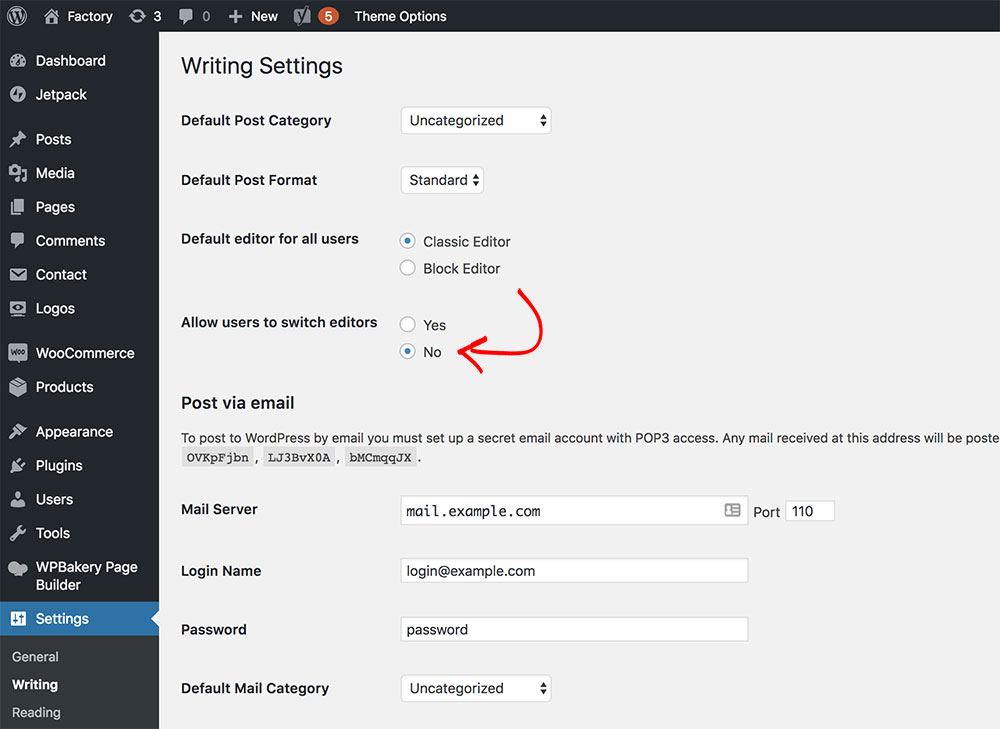
Updated to WordPress 5 and using WPBakery/Visual Composer?
Install the free Classic Editor plugin from the official repository and tick an option within Settings → Writing. See screenshot.
I have just purchased the Success theme. But i do not see te page tittles option.
I get this error whenever i try importing;
Import WordPress Failed to import “Page Title Options”: Invalid post type acf Failed to import “Secondary Title”: Invalid post type acf
What can i do?
Hi there,
Please follow these instructions to resolve your issue https://commercegurus.freshdesk.com/support/solutions/articles/12000009817-i-m-missing-a-show-hide-page-title-option-and-a-secondary-titleBest, Colm
Hi,
is it possible to display a top bar on the top like your another theme : https://themedemo.commercegurus.com/fintech/ ansd if yes, how to do that ?
Thanks for help.
Hi Olivier,
No, the two themes are built differently – Success doesn’t come with a top bar.
Your support period has also expired over a year ago.
Simon
Hey guys, heads up we included the Success theme in our roundup of best Wordpress themes for consultants: https://www.gaintap.com/blog/5-wordpress-themes-for-consultants/
Cheers!
I am unable to find how to alter the text that appears in the drop-down hover menu below the ‘about’ tab. Where is the content located so that I can edit? Thank you!
Hi Matt,
Re: top mega menu – this should help:
https://commercegurus.freshdesk.com/solution/articles/12000019638-set-up-a-mega-menu-manuallyRe: bottom feature – that’s a widget. Appearance > Widgets > Below Content Area
Regards
Simon