4766 comments found.
I have such a problem in mobile. menu is shifting. please help.
https://i.hizliresim.com/zGpvEY.jpgHi,
I cannot access your website, because I get 404 Not Found, sorry! If you need more technical assistance, please open a new topic at our support forum from here -> https://forum.tagdiv.com/forum/newspaper/
Thank you! Catalin L.

How to make every image uploaded can adjust the size automatically?
Hello,
Our theme uses a thumbnail system that adjusts the image size to fit all containers properly. Images added to the post content however, will show up in the size you upload them in.
If you need further assistance our support team will be happy to help with any requests on our official support forum at https://forum.tagdiv.com/forum/newspaper/
Thank you! Bogdan B
yes if the image is larger, but if the image is smaller, it can not fit to container
Hi,
Unfortunately, the theme has no system to increase images if they are shorter than the thumbnail, sorry! For more technical assistance, please open a new topic at our support forum.
Thank you! Catalin L.
Does this theme have AUTO LOAD NEXT POST option?
Hello,
Thank you for your interest in our themes. Newsmag does not have auto load next posts, but our Newspaper theme does: https://tagdiv.com/infinite-loading-for-single-posts/
Thank you! Bogdan B
What is the difference of Newsmag vs. Newspaper and how much work is it to port a site from Newspaper to Newsmag?
Hello,
Both themes share the same core but the functionality is dfifferent as they do not share the same options and features. Please read this guide: https://tagdiv.com/newspaper-vs-newsmag-how-to-choose-the-perfect-wordpress-theme-for-your-project/ as for ‘porting’ a site, it should be smooth between the 2 themes apart from the elements that are not present on both themes. Some pages that contain elements from newspaper that are not present on newsmag will have to be adjusted.
Thank you! Bogdan B
hello i want to ask about newsmag4 why my widget instagram (in footer newsmag theme panel) not updating the picture?
And Td composer after we edit something is like infinity loading
Hello,
Please read this forum topic regarding the Instagram issue: https://forum.tagdiv.com/topic/add-content-does-not-open-instagram-data-does-not-load/
If you need help with the composer, please contact us vioa email at contact@tagdiv.com and provide a link to your site and wp-admin so we can login and investigate why this happens. Please also provide your envato purchase code for verification. You will need to have active theme support on your envato account.
Thank you! Bogdan B
Hello tagDiv, i already sent you an email, pls check asap
Same issue as many have had over the years!
Instagram data error: Instagram html data cannot be retrieved
both with tagdiv widget and with tagdiv td_block_social_counter, neither work
Hi,
Sorry but the Instagram started blocking user IP’s for various reasons. When this happens, the theme widgets can no longer access the Instagram account to pull in the required data. There are lots of such reports as it affects more and more people. Sorry but at the moment when this happens, you will not be able to use the theme Instagram widgets. Also please note that we are not seeing any purchased tag on your account so if you purchased the theme from another account, please contact us from that account. You will also need to have an active support period on your account as mentioned here https://themeforest.net/page/item_support_policy
Thank you! Bogdan B
How do i completely disable the view count. i have tried everything.  someone please help me site https://maudhui.co.ke/wp-admin user: admin pass: Dalbit@321 – here is my email – oscar@maudhui.co.ke
Hi,
The option is found here: https://www.screencast.com/t/6E8YZNuOLc Please do not post your login credentials here as it is a public comments section and everyone can see your login credentials.
If you need further assistance our support team will be happy to help with any requests on our official support forum at https://forum.tagdiv.com/forum/newspaper/
Thank you! Bogdan B
Hey tagDiv team, I’ve recently run in to an issue with my tagdiv composer. Up until a week ago I styled my whole fine. I was working on my home page yesterday. Any change I make in tagdiv composer does not reflect on my web page now. I’ve saved, deactivated plugin, uninstalled plugin and other items to try fixing it.
Also I’ve tried creating an account at https://forum.tagdiv.com. I get this message “You’ve already created an account using this item key. Please use your email to recover the password.” I’ve never signed up at tagdiv so I don’t know why I’m getting this message. I even humored your system and tried using my usual email accounts to signup. Nothing worked!
Hello,
Sorry to hear you face problems with our theme. You already created a forum account when you activated the theme. The theme activation requested your email address so it created a forum account automatically. If you need to track down the account please contact us via email at contact@tagdiv.com and provide your envato purchase code so we can find the account created with the key. Also provide wp-admin in the email and a link to this conversation or a mention of the issue faced so we can login and investigate why this happens.
Thank you! Bogdan B
Thanks for getting back to me. I found the issue. It was because I used TD Composer and Elementor together to design my home page. They don’t work well together.
Not sure if TD Composer has a way to place text and a button on a banner image, so created just the banner section with Elementor. That specifically caused TD Composer to malfunction. I will still contact you tagdiv via contact@tagdiv.com so I can find how and if it’s possible to style my banner image with text and a button. using TD Composer.
This theme i have bought it before 3 day, but now am trying to install, its giving me error message, am unable to install this theme, can you guys please help me through
Sure, please contact us via email at contact@tagdiv.com and provide wp-admin so we can login and investigate.
Thank you! Bogdan B
Hi, i’m using Travel PRO on my newspapers installation
None of the options on THEME COLORS in theme menu is changing colors on the actual site.
changing one by one with css is not optimal.
can you help me with that?
Hello,
If you need assistance our support team will be happy to help with any requests on our official support forum at http://forum.tagdiv.com/forum/newsmag/
Thank you! Bogdan B
How can I fix the default post and default category being created on my website?
Hello,
Please read this guide: https://forum.tagdiv.com/installing-demos/
If you need further assistance our support team will be happy to help with any requests on our official support forum at https://forum.tagdiv.com/forum/newspaper/
Thank you! Bogdan B
Hi, I purchased another 6 month of support yesterday, but in the tagdiv forum still get the message “It looks like your support has expired!”. Could you help me please, to get access to the forum, since I have some serious problems after updateing to 4.9. Thnx
Hello,
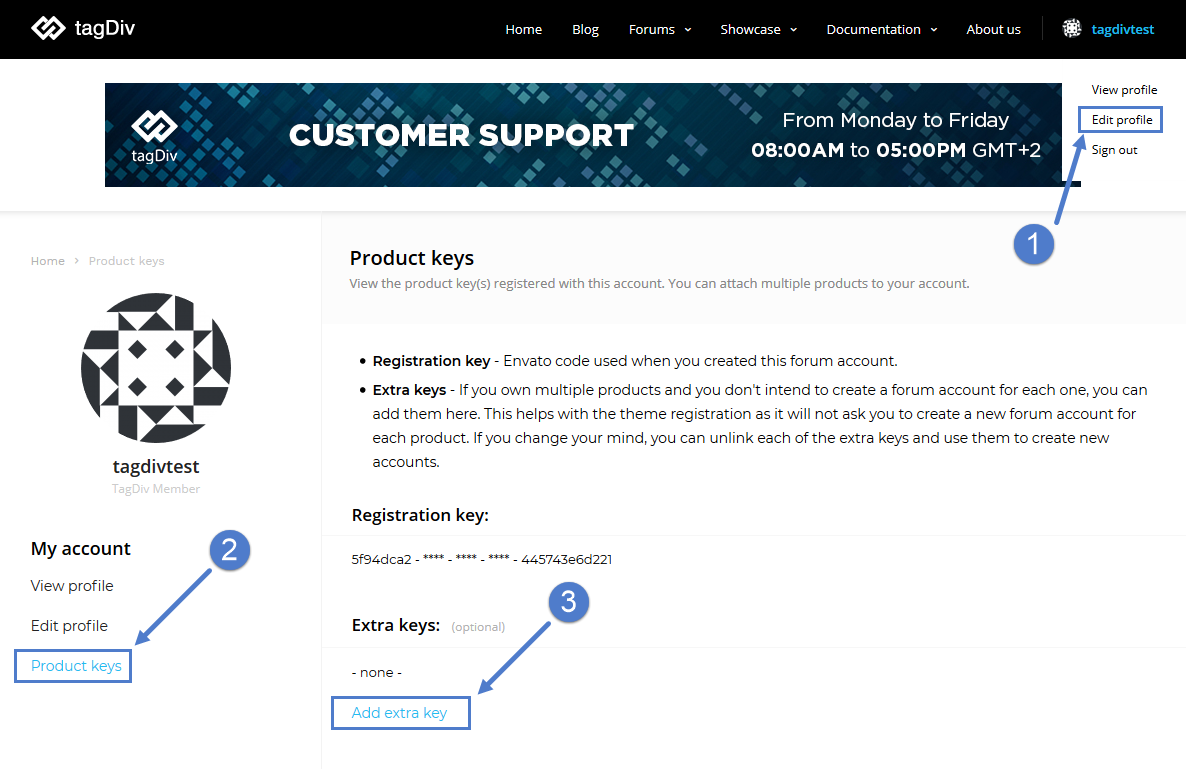
Please make sure your envato key you have support on is associated to your forum account. If it’s not, you can add another key to your account using the extra key option: https://forum.tagdiv.com/wp-content/uploads/2015/05/extra_keys.png If this is not the case, it could be your browser cache. Please try from another browser or clear your browser cache like this guide mentions: https://kinsta.com/knowledgebase/how-to-clear-browser-cache/
Thank you! Bogadan B
Hi, my problem is, that there is no (current) envato key. Just the one from my original puchase, which is not valid for support anymore (from 2016). I expect to be able to download a current key from envato, but there is none ( I contacted their support already, but no reply yet.) I already sent a mail to contact@tagdiv.com this morning where I attached my purchase receipt and ask my support question. I would appreciate if you have a look into it.
Hi,
Replied via email.
Thank you! Bogdan B
Hi pre sale question. Can I add a background image to the header?
Hi,
This option is available on Newspaper theme, also using newspaper theme you have a lot more control over the layout of the theme
Here is a preview to the Newsmag demos -> https://demo.tagdiv.com/select_demo/select_demo_newsmag?utm_source=live_preview&utm_medium=click&utm_campaign=demos&utm_content=NM_demos_button#demos and here is one preview for Newspaper demos-> https://demo.tagdiv.com/select_demo/select_demo_newspaper?utm_source=live_preview&utm_medium=click&utm_campaign=demos&utm_content=demos_button#demos
Than you! Alex N.
Check out what our customers feel about using Newsmag!
You should work more on newsmag than newspaper if you really want to push this newer theme. Otherwise chosing newsmag is betting on the wrong horse and newspaper anyway is old.
Hello,
Thank you for your suggestion.
Hello, I’ve seen from other commenters that your theme supports the standard WP capabilities. We’re setting up a custom user role, and are wondering what capabilities are needed for someone to access the Newsmag Theme Panel.
Hello,
Our theme uses the default user roles and capabilities of WP as shown here: https://wordpress.org/support/article/roles-and-capabilities/ The capabilities the theme panel is built around are as follows: https://www.screencast.com/t/3ksZQ9rL5eL
If you need further assistance our support team will be happy to help with any requests on our official support forum at https://forum.tagdiv.com/forum/newspaper/
Thank you! Bogdan B
Perfect! thank you
Hey! Is there gonna be Cloud Templates added to this theme in the near future?
Hello,
At the moment there is no decision taken in this regard so I cannot provide a definitive answer for now. It will prove difficult to implement cloud library templates into Newsmag but who knows what the future will bring.
Thanks. Bogdan B
solved
Hi,
We are glad you solved the issue. Feel free to contact us if you need our help. You can try our support forums at https://forum.tagdiv.com/forum/newspaper/
Thank you! Bogdan B
I’m running 4.7. Can I use the patch available in the full download of 4.9.1 to simply patch ‘update’ the theme and plugins? If not, where can I get the files for 4.8 and 4.9 from to run those patches?
Hello,
Sorry but there was no patch between 4.8 and 4.9 as there were important file structure changes and when such versions come out, a patch is not recommended and not provided as the theme files need to be deleted and the new version installed fresh in order not to create duplicates of the theme files. Please use this guide and install your theme without any patch: https://forum.tagdiv.com/search/update/
Please note that you will need to renew your theme support if you need further assistance: https://help.market.envato.com/hc/en-us/articles/207886473-Extending-and-Renewing-Item-SupportThank you! Bogdan B
After upgrading to latest version, all the images on responsive (mobile version) are now gone??
I see an AMP plugin was included with the latest theme update. I think that’s the issue. I’m turning that off until that can be researched more.
Hello,
The amp implementation was not changed in the last theme update. You can check the change log to see the changes made. As for the image problem we are not experiencing any issue as described.
If you need us to investigate why it is happening on your end, you will need to renew your theme support as the support is a time limited factor: https://themeforest.net/page/item_support_policy
Please use this guide to renew your theme support: https://help.market.envato.com/hc/en-us/articles/207886473-Extending-and-Renewing-Item-Support
Thank you! Bogdan B
Thank you. We disabled the AMP plugin and the tagdiv mobile theme and all responsive images immediately appeared on mobile. That was the conflict. Thanks.