944 comments found.
Hi,
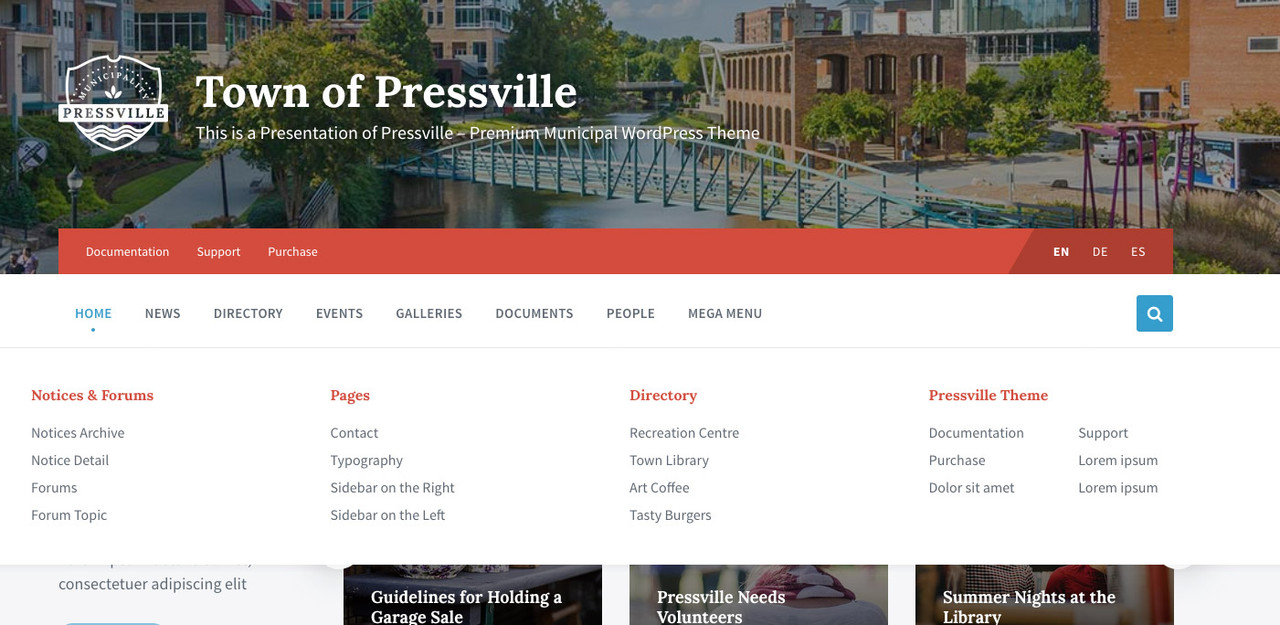
I would like to ask the following. Can we have a column in megamenu that breaks into 2 columns? Like the last (4th) column i am showing in this image: https://ibb.co/0mZBwYY?
thank you so much in advance!
Hi,
megamenu layout cannot be changed, however you can achieve something like this with some custom CSS.
Lubos
Hi,
Thank you. May i please have directions on how to achieve this?
thank you
I am sorry but you will have to contact me via an account with which you have purchased the theme to get support. I though that was just a pre-sale question.

Hi—I’m working on the homepage using Gutenberg. In fullwidth w/o title layout, Pressville blocks look great, but if I add any other item (like paragraph block), layout makes it fullwidth. How can I align a paragraph block with the other Pressville items?
Hi,
unfortunately, that is how the fullwidth layout works. However, you can try to add “lsvr-container” class to the block which you do not want to stretch.
Lubos
Hello,
I made Pressville a child theme, and now I’m trying to add custom javascript in the “function.php” of the Pressville Child directory. My child theme directory is in the follow path: ”.../wp-content/themes/pressville-child”
At this location, I edited the “function.php” file and added this just bellow the comment /* Add your code after this comment */:
add_action( ‘wp_euqueue_scripts’, ‘load_js_assets’ ); function load_js_assets() { wp_enqueue_script( ‘my-js’, get_stylesheet_directory_uri() . ’/js/my-js.js’, array( ‘jquery’ ), false, true ); }
I then created a folder in that directory named “js”, and a script file in that directory named “-my-js.js” (.../wp-content/themes/pressville-child/js/my-js.js). The file contain that line: alert (‘Hello!’);
For a reason I dont understand, the script wont load. In the source code console I can’t even find it… Any idea how to fix it?
Thanks a lot! Your theme is awesome btw!
Hi,
I am sorry but your support has expired. Please renew your support if you need my assistance (you can do that under your ThemeForest account / Downloads).
Lubos
Oh,
Sorry I didn’t noticed support expired. It’s now renewed.
Thanks! It looks ok from your description. Please share your URL so I can take a look.
www.nouveau.ville.amqui.qc.ca
Please share a screenshot of your functions.php file. Feel free to use a PM for that if you want to keep it private (just write something via the form, I will reply to your email and we can continue there).
Hi, have you received my reply to your PM?
Yes and I did replied to it… Anything didn’t worked well?
I did not get it. Have you tried to send the .php file or just a screenshot?
Hi, Lubos.
How about adding an alternative map to the theme (OpenStreetMap)? 7 months have already passed since you wrote about these plans. Do you have any news?
Google maps require a subscription plan. And the cost of the service is not small now.
Thanks a lot for the fast and beautiful theme.
Hi,
I am still open to add it, I just didn’t have the time to implement it yet. However, from my understanding, if you use latitude/longitude instead of the exact address, the google maps should work fine even with the free plan. Anyway, I would love to add an alternative maps provider, but I can’t give you any ETA on that. It won’t happen in the next moth or two for sure though.
Lubos
Thank you for the answer. I’m really looking forward to using an alternative map instead of Google Maps.
Hi, Lubos!
Thanks for the last update.
What about your plan to add an alternative maps provider instead of google maps?
Hi,
maybe next year, bur I am not promising anything. I want to add this feature, but right now I can’t guarantee it will happen at all. It is really not a simple feature to add. The fact that so far only two or three people are requesting this is not helping too. I simply can’t dedicate tens of hours to implement something 99% of buyers won’t use. But again, I would like to have it too.
Lubos
Hi,
not sure if it is still relevant for you, but I just wanted to let you know that you can now use Open Street Map and Mapbox instead of Google Maps.
Lubos
Hey! Thanks for sending the installation instructions. I got the site looking pretty much how I want it. May have a few more questions over the next couple of weeks. Below two quick ones…
1. How do I change the font size of the Site Title and Tagline that appears on top of the header image?
2. How do I change to link color on the Main menu and secondary menu?
Hi,
1.) use this custom CSS:
.header-titlebar__title { font-size: 3.5em; }
.header-titlebar__description { font-size: 1.5em; }
2.) use this custom CSS
.header-menu-primary__item-link,
.header-menu-primary__dropdown .header-menu-primary__item-link,
.header-menu-primary__megamenu .header-menu-primary__item-link { color: #FF0000; }
You can insert the custom CSS under Appearance / Customize / Additional CSS.
Lubos
Hello,
First, thank you for your beautiful theme.
I have a question, Is it possible to show the header image only in the homepage ?
It could be great to hide the header image in the Directory page for exemple to show only, in first position, the white menu, then the map, then the grid. or in a place page : first, the white menu, then the images slider .. etc.
I hope you could help me. thanks
Hi,
you can try this CSS to display header image on home page only:
.header-titlebar__background,
.header-titlebar__overlay { display: none; }
.home .header-titlebar__background,
.home .header-titlebar__overlay { display: block; }
If you need something more complicated, you will have to hire a developer for that since customization is not included in the support.
Lubos
Also, you can use this CSS to change the header background color:
.header-titlebar { background-color: #FFF; }
Hi, is it possible to remove the date on the news posts on the front page? We’ve had confusion from people who think that if something is posted on August 8, it means that’s the day of the event (for example). Thanks!
Hi,
I am sorry but your support has expired, please renew it under your ThemeForest account / Downloads if you need my assistance.
Also, please note that support is provided only for the latest version of the theme (currently 1.10.0), so make sure to update (if you haven’t already).
Lubos
Hello.
1) Where is the option that enables the display of the category description on the archive page of entries in this category? 2) What about breadcrumbs – why is there for any page the item is displayed: News? 3) Where is the option that disables the display of the image of the record on the page of this record (by default – you always display the image of the record before the start of the text after the header – how to disable it?)
Sorry for my English…
Hi,
1.) there is currently no such option, however I will be adding this feature in one of the upcoming updates.
2.) not sure I understand your question. Are you missing the breadcrumbs, or you want to hide it?
3.) are you talking about standard (blog) post or some other post type? You can currently hide the featured image for directory listing pages only. However hiding it for any other post type can be done with some simple CSS. Just let me know which post types you have in mind and I can provide you with the code snippet.
Lubos
1) it is strange why in 2 years of the existence of the theme – no one wrote about this earlier? )))
2) About breadcrumbs, let’s say I’m on the category page: “Articles” – there should be 2 items in the breadcrumbs menu: “Home” and “Articles”, and now there is always “Home” and “News” – where does this item come from “News”? I don’t have such a section even on the site – but in bread crumbs there is always a “News” link – is this probably some kind of mistake?
3) you understood me correctly, but the lack of such a simple option in the theme settings is just a couple of lines of code. Please do me a favor, please add an option in the next update – do not force your customers to write a CSS code in a theme purchased for $ 64, ok?
4) how to configure the output of grid-style entries (in three columns) with the sidebar on the left?1.) well most people probably don’t need it, however I am well aware that it is missing and it will be added.
2.) News = Articles. Simply change the title of your “page for posts” page defined under Settings / Reading.
3.) it is not like this is a highly requested feature. You can’t expect to have every imaginable option built-in. It is definitely not hard to add it for sure, I just haven’t saw enough requests for it yet. That said, I can add it in the next update, no problem. BTW, I haven’t forced you to do anything, I actually offered to give you the CSS myself which is not even included in the support.
4.) are you talking about regular posts archive page? If so, Appearance / Customize / Standard Posts
1) ok, thanks – we will wait
2) And if not Articles? For example, I have the category “Stocks”. She is in the “Finance” category. When I am on the page of the “Stocks” category, there should be the following path in breadcrumbs: “Home / Finance / Stocks”. And now there: “Home / News.” If I select the “Promotions” page in the settings – as you say, then instead of “News” I will always say in the breadcrumbs: “Promotions”, and I have many categories – not just “Promotions”. What to do? The breadcrumb functionality is not working correctly for you – it is tied to only one variant of the category name – but there may be several of them and this is a normal ordinary situation.
4) thanks, it worked!
The breadcrumbs do not show the title of the current page, because the title is already displayed under the breadcrumbs. So in your case, the breadcrumbs should read “Home / News / Finance” and under the breadcrumbs you have “Stocks” title. “News” is the archive page of your articles, it will always be in the breadcrumbs, why it shouldn’t be? You are probably not realizing that this theme supports more than just regular posts. For example if you are on a directory listing page, the breadcrumbs would be like “Home / Directory / Some category”. If it was just “Home / Some category” then it would be confusing, don’t you think?
I mean you are the first buyer who have issues with breadcrumbs in this theme and I am using the same script for all of my themes so I am pretty confident it works correctly. Maybe it doesn’t work like you are expecting it to work, that is fair, but it works exactly as it was intended to work. I mean if you simply want to hide the default archive page link in your breadcrumbs (which is always the second link) it can be easily done with some CSS, it just doesn’t make any sense to hide it.
The first time I meet a theme with such problems. Usually, if I am on the entry page from the category: “Articles”, then in breadcrumbs I have the way: “Home / Articles”, but if I am on the entry page from the category: “News”, then in breadcrumbs: “Home / News” – at the same time, News and Articles are different sections on the site and are not connected with each other! You get to do this is not possible in the subject. This is bad! I bought more than 20 different topics here on this site – and for the first time I meet a topic with such a strange logic of the breadcrumbs menu.
Okay, I don’t want to strain you – since I am the first, then everyone else is happy with everything. Just tell me, in order to save my time – how can I completely turn off your breadcrumbs – to use breadcrumbs generated by a third-party plug-in for example instead?
I do not agree with your logic. Categories are definitely related to the archive pages. And as I’ve said, this is especially important since this theme uses multiple post types. I mean imagine you would have a “Lorem Ipsum” category for posts but also for directory listings. By your logic, the breadcrumbs would be “Home / Lorem ipsum” for both posts and for directory listings even though those are completely different taxonomies which just happen to have the same name. Just because other themes keep it more simple doesn’t mean my solution is wrong. I simply don’t understand how giving your visitors more options to navigate the site is a bad thing.
Anyway, the best way to hide it would be to copy template-parts/breadcrumbs.php file to your child theme (preserve the folder path) and just erase its content. Alternatively, you can just hide it using this CSS:
#breadcrumbs { display: none; }
Also, if you are not happy with the theme just let me know and I will issue you a refund. I am open for any constructive criticism, but calling certain features bad just because they do not fit your particular use-case is not it.
Just the logic of your breadcrumbs is not very standard.
Okay. Thanks for the feedback to my questions. I will not make a return – I like the topic, although there are drawbacks.
Thanks for the help.
To hide something through the CSS code is somehow not professional)
Ad logic: Well I agree that it is not standard, but I do not agree that it is bad. From my point of view, it is more advanced than breadcrumbs in most other themes.
Ad CSS: I agree, that’s why I told you how to do it via code as well. I mean you can’t expect to have a dedicated option for something 99% users will never use.
Hi again Lubos. Is it possible to increase the size of the header logo, a bigger size than the 300px Logo Max Width?
Hi,
sure, try this:
body .header-titlebar__logo { max-width: 400px; }
Lubos
Hi Lubos I put the code on the: Appearance/Customize/Additional CSS but it is not working. Can you help me? thanks again.
Try this instead:
@media ( min-width: 1200px ) {
body .header-titlebar__logo { width: auto; max-width: 400px; }
}
body .header-titlebar__logo { max-width: 400px; }
Hey, kindly help me with the CSS to do the following:
1. Increase the size of the picture displayed when people are viewed under mysite.com/people. e.g. Increase it to 300300
2. Increase the size of the picture displayed when I put the lsvr people widget on a page. The pictures of the people are tiny. e.g. I want to increase it to 200200.
Looking forward for the CSS. Thank you.
Hi,
1.) try this:
.lsvr_person-post-archive .post__thumbnail-link { max-width: 300px; }
2.) try this:
.lsvr_person-list-widget__item--has-thumb { min-height: 200px; padding-left: 215px; }
.lsvr_person-list-widget__item-thumb {  max-width: 200px; }
Please note that customization is not included in the support. Please hire a developer if you will need any additional help with some CSS.
Lubos
Thank you.
Hi,
I left a message regarding some issues we are having with updating the theme. I have not had a response as yet.
We kindly request your assistance with this.
Thanks,
Rolland (rolland.lucas@brixtec.com)
Hi,
I’ve already replied to your comment two days ago, here it is. If you want support by email then please send me a PM please.
Lubos
Hi, i would to print past events on pressville event widget, add ?period=past&order=desc not working on my page. this option is only available on event page ? And i translate all file .po but when there are 0 events, it’s display “There are no events” and not my translation.
Thx for this work!
Hi,
that works only on events archive page. Have you translated all LSVR plugins as well?
Lubos
How do I remove the comment section from showing on my posts? I’ve switched off everything I can find but it’s still showing on the news post pages.
Hi,
under Settings / Discussion. However for existing posts you may also need to go to Posts, select all of them, set Bulk Actions selectbox to “Edit”, hit Apply and then you can set Comments to “Do not allow”.
Lubos
Hi,
We have had some issues with the latest update. After our update, the Admin is not able to log in.
The website is: https://fishhawktrails.com. Please note that we are also using the User Pro plugin with this website.
We have currently reverted this update from the live website and implemented it on the Staging site here: http://eje.b78.myftpupload.com/wp-admin.
Looking forward to your help with this.
Thanks,
Rolland ~
Hi,
have you updated all the LSVR plugins as well and tried to clear your cache? Have you made any code customization via a child theme? If so, have you checked the complete changelog to see if any of the files you may be overriding haven’t been changed? It appears like you are overriding the footer.php template. There were some notable changes made in the last update to it. You can also enable the WP debug mode which will most likely revael a PHP error message.
Lubos
Hello,
I just purchased your Wordpress theme and after trying to install it, all I can see is code. It doesn’t look anything like the live demo on the Envato website. I’ve installed the theme, plugins and updated everything there is to update with no change.
When I look in the page tab the only pages I have are ‘Footer’, ‘Home’, ‘Privacy Page’ and ‘Sample Page’, all of which look the same (just white page with code).
I have absolutely no idea as to why the theme isn’t working, please help.
Kind regards,
Matthew
Hi,
please share your URL where I can see your site.
Lubos
Hey. I bought the pressville theme and can’t get it to look like the demo. It just looks like a regular blog site. Maybe because I already had content on my site. If I pay you to install the theme, do you make it look exactly like the demo?
Hi,
while installing on the fresh WP installation is definitely recommended, having some old content shouldn’t matter that much. Have you followed the documentation? I am sorry but I do not offer installation services. However if you are having problems with a certain step, just let me know. You can start by sharing your URL so I can see what is the current situation.
If you really prefer someone else to do it, you can hire a freelancer at studio.envato.com.
Lubos
Hi Lubos My client wants a blank header, just the logo and a slogan on a white background. So please let me know how can I change the colour of the secondary text, disable the dropshadow effect and also adjust it’s size.
As for the footer is it possible to adjust its height size? And also is it possible to display the social media buttons on the right side?
And a last request can you recomend me a compatible plug-in for caroussels (slideshow) in the gutenberg blocks?
Thanks for your help
Hi,
ad header: try this CSS:
.header-titlebar__description { text-shadow: none; color: #FF0000; font-size: 1.5em; }
ad footer: try this CSS:
.footer__inner { padding: 120px 0 75px 0; }
ad slideshow: I am sorry but I can’t recommend anything specific
Lubos
Thanks Lubos, it worked fine
Hi,
I just purchased your template. How do i load demo content ?
Having having trouble with my installation. I got the theme to install but the plugin installations keep failing
Hi,
which plugin? Feel free to share a screenshot.
Lubos
How do I add a screenshot in the comments? I’ve installed the theme to a wordpress staging site hosted by godaddy that the client provided a link and login for. I think this may some how be causing the problem…I’m receiving the following error message.
Unpacking the package… Installing the plugin… Could not create directory. /home/content/p3pnexwpnas15_data02/93/42729093/html/wp-content/plugins/lsvr-directory/ Plugin installation failed.
Don’t need to share the screenshot, that error message is enough, but if you will need to do it in the future, you can use services like Post Image where you can upload your image and share its link.
That error definitely is a hosting issue. Godaddy is infamous for very poor experience when it comes to running stuff like WordPress. Anyway, you can just install plugins manually then. Download the full package from your account, unzip it, open the Plugins folder, unzip all the .zip files and upload the folders via FTP under wp-content/plugins. Then go to your admin / Plugins and activate them.
The thing is that if the hosting can’t handle even such a trivial task as an automatic plugins installation, it is likely you may experience more issues along the way. Maybe not, but it is a possibility, so just keep that in mind. If you could persuade your client to change the hosting to something more decent, you will potentially save yourself a lot of headache. There are plenty of articles about it on the net, for example this one. At least make sure the installation is running on PHP 5.6 or higher with 128MB of PHP memory available.
which hosting service would you recommend?
wpengine.com has good reputation for hosting WP sites. Basically anything other than GoDaddy I guess.
Hello!
I love your Pressville theme (Unique WordPress Theme for Municipalities).
But I have a few questions. I will be glad to your answers, as I have little experience.
1. Is it necessary to buy additional plug-ins after the purchase of your theme to make the site function as in the demo example?
2. I’m new to licenses for themeforest.net. And I don’t understand what is included in the Regular License for $64. Will the theme be updated if a year has passed since the purchase? Do I have to pay again for the theme updates or after the purchase it will be updated for free?
Thank you for your answers.
Respectfully, Dmitry
Hi,
1.) Everything you see on the demo comes with the theme, except for images, those are copyrighted so they cannot be redistributed. Also Google Maps usage may require a billing plan, but that is the same for all software which uses Google Maps API nowadays. You do not have to use maps functionality of course. You can do some googling on this topic (Google Maps API billing), as this is not a theme-specific matter.
2.) You will receive updates for as long as the theme will be sold on ThemeForest, unless Envato changes some rules on this which is unlikely. I do not plan to move from ThemeForest in any foreseeable future either unless, again, Envato makes some changes which will force me off this marketplace. The important thing is that the price includes support for only six months. If you will need help with the theme after this period, you will have to renew the support (but this has nothing to do with updates, you will have access to them even with expired support). Please read more about it here.
Lubos
Thank you very much for your answer.
A couple more questions:
1) Are “Forums and Notices” also included? 2) Is there a Russian translation of the theme? Or do I need to translate the theme files?
Thanks a lot.
1.) Forum is handled via bbPress plugin which is free. Notices are included.
2.) You will have to translate the theme yourself.
Feel free to read through the documentation so you can learn more about inner workings of the theme.