

1508 comments found.

Hi, a very simple beginner question: I’ve downloaded the last update zip.file for Vela. How can I update it into wordpress? Many thanks!
You can find the instructions on how to update the theme in the documentation: https://wydethemes.com/vela/documentation/#update
Hello people
Is it possible to use the Vela: Info Box but add an icon that I created in png?
I have another problem.
When I create text normally and make lists, it looks very nice with an arrow. But within the FAQs, that list does not appear that arrow.
How can I fix it?
Sorry for the late reply!
1. Unfortunately, only vector icons (font icons) are allowed, you couldn’t use PNG image in the icon library.
2. The arrow icon of the list is included in the Text Block only. Instead of using the FAQs, you have to use the Accordion so you can add a Text Block to display the text and list with an arrow.
Hi,
I’ve had to pay to renew support because we updated to the latest theme to make it compatible with php 7.2 or 7.3 but when we try to update the following plugins we get the error “Download failed. Forbidden”
Wyde Core WPBakery Page Builder Slider Revolution
Apology for the delayed response!
It sounds like your web hosting doesn’t allow your WordPress site to download the bundled plugins from the remote server. It might be a web server configuration issue, you may need to check your web web server configurations or contact your web hosting admin to help you out.
However, you can upload and install those plugins manually in the Plugins screen on your WordPress admin. All bundled plugins are included in the main download zip file. After you extract the zip file, you will find those plugins in the folder “Plugins”, you can see more details here: https://wydethemes.com/vela/documentation/#package-content
Hello,
huge thanks for the beautiful theme. This is the second time I’ve used it for a client.
This customer has two different logos for the English and German version. How can I use different logos in the different language versions? I use WPML for the two language versions.
Thank you so much for your support, Bettina
Apology for the late reply!
Unfortunately, you can set only one logo for one WordPress site. I’ll get back to you with a solution as soon as possible.
Thank you for choosing our theme!
Is there anyone who can help me to adjust the font menu color settings? I cannot find it within Vela options (only font itself, not the color), not in Customizer… it’s the only thing I need.
You can choose between Dark and Light for the menu text color under Vela Options -> Header -> Menu Text Style on the page edit screen.
However, if you would like to change it to other colors. You may need to add CSS snippet below to Appearance -> Customize -> Additional CSS to achieve this:
.top-nav a,
.social-icons a,
.nav > ul > li > a,
.menu-cart > a,
#search,
#header.mobile .mobile-nav-icon,
#header.mobile.fixed .mobile-nav-icon,
#header.mobile #nav > ul > li > a,
#header.fixed #nav > ul > li > a,
#header.fixed .nav-wrapper .menu-cart > a,
#header.fixed .nav-wrapper #search {
    color: #0089ff;
}
If it still doesn’t work, you may need to send me your web address.
Hi
Is this the same theme as Vela by 1.1.1 and I want to upgrade it to current version. should it be no problem. what do we have to do to get new version? and if we need help can you help us upgrade on siteground?
Hi,
Thank you for contacting us!
However, please contact us from the account that purchased the Vela theme to make sure you’re currently in the correct product page that corresponds to what you have purchased.
Hello ! Thank you for this amazing theme ! I have issues with slider revolution. I have created 2 modules with the plugin. I am displaying the first one on my website, and i no longer need the second one. 1) I want to modify the first slider, but it does not appear in my modules list. In fact, only the second slider appears, whereas the first one exists, since i can see it on my website !! 2) i can’t delete the second slider : when i click on the arrow to open the options, the arrow change its orientation but nothing appears… The only thing i can do is modify this slider…
I have tried to delete the pluging and reinstall it manually, but lots of warning messages appeared like ” Warning: “continue” targeting switch is equivalent to “break”. Did you mean to use “continue 2”? in /homepages/33/d542006712/htdocs/fit-and-coach/wp-content/plugins/revslider/includes/output.class.php on line 3708”... So i restored a back-up of the folder…. and now we are back to my first problems!
Can you help me please ?
This is a compatibility issue. Sounds like the current version of Slider Revolution plugin on your site is not compatible with PHP 7.3.
You will need to deactivate then delete it from the Plugins screen. After you delete it, you will see a notification message to install it again. Click on “Begin installing plugins” to install the new version.
Also, please ensure that you’ve updated the Vela theme to the latest version (2.0.5.1).
Hope this helps!
Unfortunately, it doesn’t work… There was no warning messages, but i still see only one slide in the plugin page (and obviously, not the one i need to modify but the second one…..) =/
After you delete that plugin, if the notification message doesn’t show up, you will need to navigate to Appearance -> Install Plugins to find the bundled plugins list. And then install the new version of Slider Revolution plugin.
If it still doesn’t work, you may need to send me your WordPress admin login details. You can send a private message through the contact form on our profile page here: https://themeforest.net/user/wyde#contact
Hi, Is this theme been discontinued?
Does it work with WordPress 5.2.4?
We usually update the theme to fix bugs and to make it compatible with the new WordPress and all bundled plugins.
Of course, it is compatible and working properly with the latest update of WordPress (5.2.4).
Our demo site is also running on WordPress 5.2.4: https://wydethemes.com/vela/
Hello! I’m trying to import the demo content. I’ve tried bulk upload but it failed, then I try import them one by one…but it still stuck there… I’ve also edited the upload size in php.ini…but seems doesn’t work. What should I do?
max_execution_time = 300

memory_limit = 128M

post_max_size = 32M

upload_max_filesize = 32M

max_input_vars = 5000
If you’ve imported other content types, you don’t need to select them again but only Media, and then choose a demo to import.
Also, you should have only the theme bundled plugins (including Overlap Demo Content plugin) while importing.
If you have any other plugins on your site, we recommend deactivating them before importing to avoid plugin conflicts.
However, if you couldn’t import Media, you can skip that option and then select only Settings to import the theme settings to your site. So, you may need to edit the pages and posts using WPBakery Page Builder to replace the blank demo images with yours.
If it still doesn’t work, you may need to send me your WordPress admin login details through the contact form on our profile page: https://themeforest.net/user/wyde#contact
Hello there,
Thanks for all the support you have given so far. I am nearly ready to launch my website.
I have a few outstanding questions still;
1. How to change background image on the contact form module
2. Which css file contains the body text code? Where to increase paragraph font?
3. How to only show a subset of the testimonials. Eg testimonial category: “outsourced digital marketing” on corresponding page?
4. How do I centre the tabs?
5. How to make the forms align better? I have used the center text in the edit area (as per your last support ticket to me) but not all contact form 7 fields are responding to that.
Thanks for your help in getting me this far.
Jen
Hello,
1. You can set the background image in the row or column settings. Edit the row or column, select the “Design Options” tab and then click on a plus icon in the “Background” setting, please check out the image below:

2. You can change paragraph font in Theme Options -> Typography -> Body. Also, you can use a “Custom Heading” element instead of a “Text Block” and change the “Element tag” to “p” so you can set the font size for that paragraph.
3. In the Testimonials Slider settings, click on a “Build query” button in the Custom Posts setting and then put a testimonial category name into the “Taxonomies” field.
4. You will need to add the following CSS snippet into Appearance -> Customize -> Additional CSS to center the tabs:
.wpb_tabs .wpb_tabs_nav {
    text-align: center;
}

.wpb_tabs .wpb_tabs_nav li {
    display: inline-block;
    float: none;
}
5. Unfortunately, the Contact Form 7 plugin doesn’t have an easy way to align the form fields. You may need to add custom CSS to achieve this. If you would like you can send me the link to your contact form so I can take a look and provide a CSS snippet to adjust it.
Hi there,
Thanks for these tips. I am 90% done now 
Few more items….
1. Forms
Your offer to assist with the contactform7 is great. Not sure how to send you a link to the contact form as this thread appears to be public? Do you need back end access you mean, or do you want to see the forms so you see what needs to be done?
2. Links behind icons
I make sure of icons several times and don’t always want to add a content line for a button with a CTA. There are times I want that icon to be clickable. How do I achieve that?
3) Copy across pages
I have built certain elements on a page. I can see a duplicate function within the page, but many times I want to replicate that single element to another page. Is it possible to do so without having to start again on a different page?
Thanks
Jen
1. Of course, this thread is public. You can send a private message through the contact form on our profile page here: https://themeforest.net/user/wyde#contact
However, to provide the CSS snippet to adjust the contact form fields I will need to check the contact form on your front end and don’t need to login to your back end.
2. You can use a Vela:Icon Block or a Button element instead so you will have a clickable icon. You can also use them with a Custom Heading element to have icons with text like a Vela:Info Box.
3. Here are the instructions on how to copy an element to another page:
- Switch to the Classic mode first, then select the Text mode and copy the shortcode of that element. For example: [vc_custom_heading font_container=”tag:h3|text_align:center”]
- Insert that shortcode into the Classic mode of another page. Then switch to the Backend Editor to edit it with the page builder.
Hello,
I was hoping could you give me some guidance on this page:
http://dev2.trafficact.com.au/business-digital-strategy-services/A few questions:
1) How do I centre the two CTA buttons. AKA 1) book a consultation and 2) try one of our other services. Both are a button box. What code do I put in to centre these? 2) How do I reduce the white space between the text…. “help you create a process-driven strategy to overcome them”, and the 8 icons below that?
Thanks in advance for your support.
jen
Hello,
1) To center those buttons, you will need to change the “Text Alignment” in the column settings to “Center”:
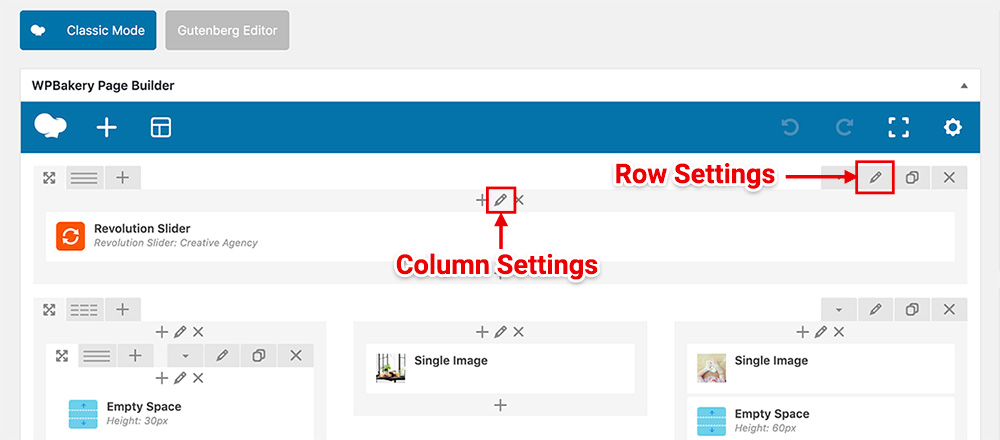
2) You can choose the “Padding Size” in the row settings to reduce the white space between rows. However, I suggest to move that text to the same row as those 8 icons so you don’t need to reduce the white space between them.
I think it was a mistake with the permalinks. Solved!
Glad to hear that it has been solved
I am having trouble sorting my products. I sell area rugs and each listing has multiple variations. When someone arrives at a PLP page, I want to be able to sort by price and size of rug at the same time, but the sort isn’t able to differentiate the variations within each listing, so if someone sorts low to high by 8×10 size, it’ll display the lowest price of the smallest rug. Very deceiving. Can you please help?
Sorry for the delayed response!
However, the product support is only available for customers who have purchased our theme. Please contact us from the account that purchased the Vela theme to make sure you’re currently in the correct product page that corresponds to what you have purchased.
Hi guys. I am using Vela for Shopify and I have the following problem:
On mobile, when the user clicks the menu item “Tea” they get redirected to the collection ” Tea”, but if they click on the dropdown arrow, they can choose the from subitems “Green Tea”, “Black Tea” etc.
I’d like it so that when the user clicks the menu item “Tea” that they get the same dropdown as when they click on the arrow.
Looking forward to your reply! Ilya
We are sorry but this is Vela WordPress Theme. We are not an author of the Vela for Shopify. You will need to contact the author of your product directly.
We are sorry but this theme doesn’t have a page format like that. You may need to use a blog page and display the posts with promo coupon codes in the list layout like this demo: https://wydethemes.com/vela1/blog/blog-medium-image/
However, the blog posts don’t have a button to apply a promo code automatically. That means, your customers will need to apply the code manually on the Cart page. You will find more details on how to use coupons with WooCommerce here: https://docs.woocommerce.com/document/coupon-management/
Thank you, that is helpful.
Ok I actually tried doing this and can’t figure it out. Do you have instructions on how to create a page like the one in the demo?
We are sorry but the product support is only available for customers who have purchased our theme. Please contact us from the account that purchased the Vela theme to make sure you’re currently in the correct product page that corresponds to what you have purchased.
Hello,
I have a probleme in “vela-demo-content.zip”, the file “style.css” is not present. please can you send me the file “syle.css” for this zip.
thanks.
Sounds like you uploaded that zip file in the wrong section. The vela-demo-content.zip is a plugin, you have to upload it under Plugins section. You can find the instructions in the documentation: https://wydethemes.com/vela/documentation/#import-demo-content
hello, how can I hide the page title in a woocommerce product page?
Hello,
Sorry for the delayed response!
By default, the single product page uses the same settings from the Shop page. Here are the instructions to hide the page title on the product page:
1. Navigate to Pages on your WordPress admin.
2. Edit the Shop page then you will find the Vela Options at the bottom of the edit screen.
3. Select the “Title Area” tab, then change the “Display Title Area” to “Hide”. This will hide the page title on the shop and product pages.
However, if you would like to hide the page title only on the product page. You will need to add the PHP code into functions.php in your child theme. Here are the instructions:
1. Please ensure that you have installed the Vela Child theme. You will find it in the main zip file, see more details here: https://wydethemes.com/vela/documentation/#package-content
2. Navigate to Appearance -> Theme Editor, select the Vela Child theme to edit.
3. Add the following code into Theme Functions (functions.php):
/**
 * Removes the page title from the single product page.
 */
function vela_hide_product_page_title( $show_page_title = false ) {

    if ( function_exists( 'is_product' ) && is_product() ) {
        $show_page_title = false;
    }

    return $show_page_title;

}
add_filter( 'vela_has_title_area', 'vela_hide_product_page_title', 50 );
Hope this helps!
Thanks! The first option was already set to hide. The PHP option worked perfectly! Thanks again for your help
Thanks. I am currently running version 2.0.3 of your theme – is this the most recent?
Also, is this compatible with the latest WPbakery, which I believe is now over version 6?
When you say I need to update all the bundled plugins, how do I do this? Do I have to purchase separate lisences from WPbakery and slider revolution (which I beleive were bundled?
Thanks for you help Adam
The most recent update of the Vela theme is 2.0.5.1, it comes with the latest update of WPBakery Page Builder plugin (6.0.4).
After you update the theme, you will see a notification message to update WPBakery Page Builder including other bundled plugins. You will find the instructions on how to update the theme and bundled plugins here: https://wydethemes.com/vela/documentation/#update
Hi – I purchased your theme with WPbakery code – c79cd7e7-a8e8-4588-b071-803426b05fa5
I rceently updated wordpress and it seems that I have lost the ability to use WPbakery to build pages.
All my exisitng content seems to be in code – not blocks. There is a WPbakery elemts at the bottom of the editing page (below all the existing content), but even if I try to create a new block with that, it doesnt show up when I update the page.
Please help – thank you
adamyoung1@yahoo.co.ukwordpress version 5.2.3 Vela theme WPbakery version 5.4.5
You will need to update the theme and all bundled plugins to the latest update to make them compatible with WordPress 5.x, as seen in the changelog: https://themeforest.net/item/vela-responsive-business-multipurpose-theme/9793377#item-description__update-log
You can find the instructions on how to update the theme in the documentation: https://wydethemes.com/vela/documentation/#update
Hello, I’d like to know how do I move mobile (hamburger) menu to the right side of the header?
Hello,
Try adding the following CSS snippet to Appearance -> Customize -> Additional CSS to see if it works:
#header.mobile .mobile-nav-icon {
    right: 0;
}

#header.mobile #shop-menu,
#header.mobile #search{
    float: left;
}


