16332 comments found.

Theme Showing installation error
Hi, we need more info than that, please share some screenshots.
Best Regards.
Hello, I am trying to update the shop and template. After updating the shop from 2.2 to 2.3 I uploaded the last Journal template. The error is that front.php has not been replaced. I looked in the downloaded template folder and front.php is not there! Could you please check?
Best regards, Dan
P.S. Sorry for double post.
Hi, this depends on what Journal version you use, in Journal 3 there is no front.php file included anymore so I believe you want to use Journal 2 which can be downloaded from https://www.journal-theme.com/v2/download/
Best Regards.
Perfect. Thank you!
front.php is missing from archive for 2.3
Hi is there any way to send the content from the popup contact for directly to emails? I am aware that my support is expired however i an now working on our site and needed to know this
Hi, those will go to the email address you have in the Opencart system, it’s not possible to add a custom email in the module itself.
Best Regards.
Thank you very much
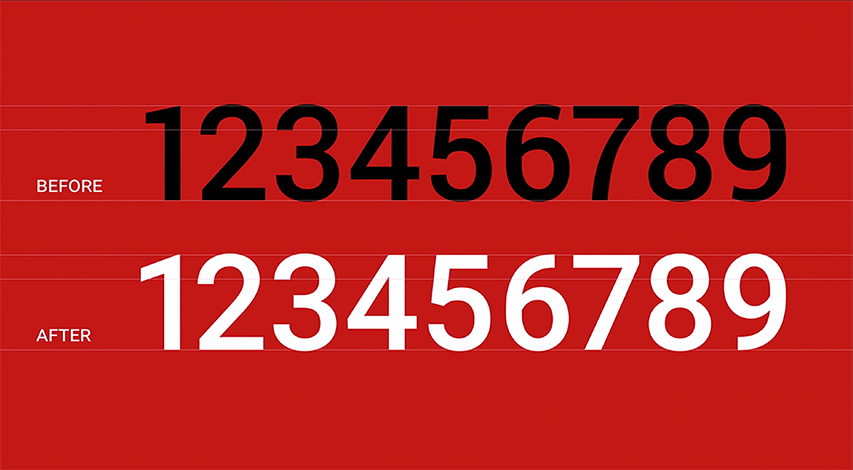
In Journal 3 I noticed that the Roboto font (numbers) aren’t looking the same as on Google Fons… after some search I noticed it looks like the old version of Roboto https://typographica.org/wp-content/uploads/2011/10/Roboto-figure-changes.png
Hi, the Google font library will be updated in our next update.
Best Regards.
Thanks!
Is it possible to use slide revolution?
How to leave the menu on the left?
Hi, that is not available in Journal 3 unfortunately. To move the top menu on the left you’d need to assign that top menu in the Secondary Menu section of you header.
Best Regards.
A dumb question. How do I change the color of menu links? and how do i change the hov color.
I’m still very lost in the documentation. http://prntscr.com/plsvs2
Hi, those are styled in the main menu style, it’s using a Menu Item style. For more info please file a ticket on our support page and consult with our developers.
Best Regards.
Where can I turn off countdown on discounted products? Thanks
Hi, please look in Journal > Skins > Edit > Countdown…
Best Regards.
Is there Russian in the Theme?
Hi, Journal supports any language but they are not included, you’d have to install your own language in the Opencart system, check this docs page out: https://docs.journal-theme.com/faqs/opencart/language/
Best Regards.
my support is expired I never used theme just going to install and getting issue please advice.
Hi, we need more details than that, some screenshots, steps to replicate your issue…
Best Regards.
I’ve installed Journal3 on second store all is good except on product url its giving 500 Error, i tried to submit a ticket but it says on username that its expired.
Hi, using Journal on multiple stores requires multiple regular licenses to be purchased, one for each store.
With each license you get 6 months of support which can be used for any of your stores, so if you intend to use Journal on multiple stores please buy a new license and file a ticket on our support page with the new purchase code.
Best Regards.
I just did.
and please note that I am using Journal3 for second store only, default store is using different theme with totally different design and stuff.
Thank you. Just file a ticket on our support page and consult with our developers.
Best Regards.
Did that please check and respond.
Our developers will respond when your ticket comes up in the queue. We shall respond within 24h, depending on how long the queue is.
Best Regards.
Hi, We recently moved our servers and now everything works instead of journal backend. The frontend is working fine.
Whenever we try to goto any journal backend link we get:
Fatal error: Uncaught ArgumentCountError: Too few arguments to function Template::__construct(), 1 passed in /var/www/html/admin/controller/module/journal2.php on line 13 and exactly 2 expected in /var/www/storage/modification/system/library/template.php:24 Stack trace: #0 /var/www/html/admin/controller/module/journal2.php(13): Template->__construct(‘template’) #1 /var/www/html/admin/controller/module/journal2.php(224): ControllerModuleJournal2->render() #2 /var/www/storage/modification/system/engine/action.php(79): ControllerModuleJournal2->index() #3 /var/www/html/admin/controller/startup/router.php(26): Action->execute(Object(Registry), Array) #4 /var/www/storage/modification/system/engine/action.php(79): ControllerStartupRouter->index() #5 /var/www/html/system/engine/router.php(59): Action->execute(Object(Registry)) #6 /var/www/html/system/engine/router.php(52): Router->execute(Object(Action)) #7 /var/www/html/system/framework.php(397): Router->dispatch(Object(Action), Object(Action)) #8 /var/www/html/system/startup.p in /var/www/storage/modification/system/library/template.php on line 24
Ive tried clearing caches automatically as well as manually using ftp but still the same issue.
Can you please guide me on what to do here?
Opencart version: 3.0.2.0 journal theme version: v2
Hi, we are not aware of such issue, please file a ticket on our support page so we can take a closer look at this.
Best Regards.
it wont let me post on support page saying support expired.. but i shouldn’t have to pay for a bug which wont even let me use my purchased item.
also if you could tell me a way to download v2 files again? so maybe i can try reinstalling it?
That is not necessarily a theme issue since it works fine for many thousands of people. There could be any number of interferences from your particular setup, custom mods, 3rd party extensions, etc. There’s no way to know for sure without looking at your setup.
You can download the latest J2 version from this link: https://www.journal-theme.com/v2/download/
Hello, wanted to ask how to create a Collections page (a grid with collections that I can style), that will contain multiple collections with products linked to their collections respectively. Thank you
Hi, not sure how you mean exactly, please file a ticket on our support page and provide more details and some examples.
Best Regards.
I will try to explain more here, before submitting a ticket. OC will sell clothes. All the clothing products are separated into its categories, based on their type of clothes (t-shirts, sleeves, pants etc). What I want to do, is to create clothing collections. Lets say I prepare a new winter collection, which will contain pants, a t-shirt and a sleeve. I will assign these products to their product categories, but also to my winter collection. Basically, a collection page is just another category. The next step is to create a separated page that will unite all the collections I have on a single page, preferably as a styleable grid, so the customers and see all the collections on a single page. How would it look? A big hero image with some text for every collection. Hope it clarifies a bit what I want to achieve.
Hi, there is no such feature in Opencart unfortunately. But you can create custom product modules with products from those categories (via rules).
You can also create custom information pages and add your modules to those pages, however those aren’t category type pages, cannot have a filter module or pagination.
Perhaps there is a 3rd party extension available for this but we’re not aware of one, please see Opencart extensions page: http://www.opencart.com/index.php?route=extension/extension
Best Regards.
Hi, how do I disable/hide/remove the search bar from just the mobile header?
Hi, please file a ticket on our support page and consult with our developers.
Best Regards.
Hi, how to edit the text of the search result page. The title that says “products that met the search criterias”? Can’t find it at journal/styles/search as the other texts are, it seems to be hidden somewhere else. Thanks for a great product!
Hi, that may be in Journal > Skins > Edit > Search…
Best Regards.
Thanks for reply, but it’s not there either (I’m using 3.0.29) Br Artur
You should update the theme to the latest version. There are title styles there, you apply a title style for that text.
Best Regards.
Hello dear, How can i change the duration of Add to cart popup? Thank’s.
Hi, should be in Journal > Skins > Edit > Notification.
Best Regards.
hello guys on checkout page every time load second image, that’s is not necessary, the results are some times checkout page is very slow on big commerce shops.
Origin: start -> require_once -> Router:dispatch -> Router:execute -> Action:execute -> ControllerJournal3Startup:index -> Loader:controller -> Action:execute -> ControllerJournal3Product:second_image -> Proxy:__call -> Loader:{closure} -> ModelJournal3Product:getProductsSecondImageSELECT
product_id,
image
FROM oc_product_image
WHERE sort_order = (
SELECT MIN(sort_order)
FROM oc_product_image AS p
WHERE p.product_id = oc_product_image.product_id
)Hi, that’s probably an issue related to one of your installed extension which triggers a clear cache event when accessing the checkout page so the second images must be regenerated instead of being loaded from cache, check your installed extensions / events first.
Best Regards.
On journal 3, when a customer goes to checkout and chooses to sign up (not to check out as guest), when a coupon is entered it doesn’t work. Please check this.
Hi, we are not aware of such issue, please file a ticket on our support page so we can take a closer look at this.
Best Regards.
I have a question. How can I update the FontAwesome library for my template.
wow your theme systems is awesome and the docs are 100% I found out how to import my own font icons.
Great to hear that, cheers!
Hi, i need a new license but i want for this one an invoice. Is that possible? Thanks in advance
Hi, sure you receive an invoice from Envato, should be in your account on your downloads page.
Best Regards.
After the last update the stock status (opencart value) is no longer displayed. I have seen that if I set no text (in the settings page) the word “in stock” appears anyway I would rather have the status set to opencart. I had purchased an extension that can assign multiple stock statuses but this works only if the theme allows to show the opencart stock status.
In the settings of the product page I have enabled the display of the stock but I have not entered any text. Why does the word “in stock” always appear?
Hi, make sure you have the latest version and your issue should be solved after. If not, please file a ticket on our support page so we can take a closer look at your setup.
Best Regards.
Hi, do you have demo Admin panel link? Thank you
Hi, sure, any demo admin can be accessed with user/pass: demo/demo
https://www.journal-theme.com/1/adminBest Regards.

This item was featured on ThemeForest

Power Elite Author
Contact the Envato Market Help Team