

130 comments found.

Hello,
I just purchased your theme but when i want to setup the widget pages, the page is not working very well. I cannot add or see the placeholders for the widget areas.
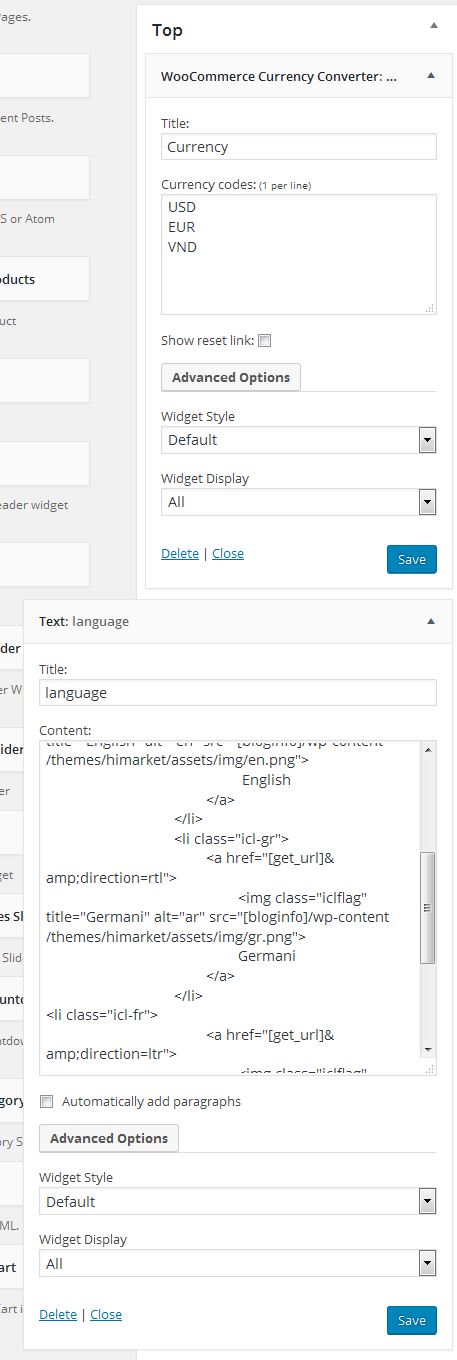
http://www.smartaddons.com/images_amazon/sw-wordpress-images/sw-themes/sw-himarket/theme-config/top-lang-backend.pngThis is from the manual, for example, there is no ‘TOP’ in my Widget admin section.
Thanks
Hello,
Thank you very much for your message.
If there is any question or difficulty, you can create a ticket and send us your site’s info and issue at the Support System: https://support.wpthemego.com/?p=open
After checking, it will be easier for our technical supporter to follow and help you.
Thanks,
Respectfully, I don’t like the look of the page builder that’s integrated with this theme (even though I like the look of the theme itself). Is it possible to use either the native WordPress page editor or Elementor with this theme?
Hello,
Thanks for your interest in HiMarket design.
Currently, the theme well supports WPBakery Page Builder only and it will be hard to use with the WordPress page editor or Elementor now.
We will plan to update our theme to work well with Elementor in the future.
Thanks,
That’s too bad, as I really don’t like WPBakery, but thanks anyway for your reply.
Thank you for your reply. We plan to update our theme in the coming time. Really hope that after that, we have chance to support you with our themes and Elementor 
Thanks,
Hello, When I update wordpress 5.3, the dashboard is broken. I think this is due to your theme. Woocommerce orders area, pages area, posts area corrupted. At the same time the single product area also appears to be degraded on the front of the site.
Hello,
Thank you very much for your message.
WordPress 5.3 has just been released last night and our team has been checking before the update to make sure that all can work well. After that, we will release a new version for this update and you can do it in your site.
If there is any question or difficulty, you can create a ticket and send us your site’s info and issue at the Support System: https://support.wpthemego.com/?p=open.
After checking, it will be easier for our technical supporter to follow and help you.
Thanks,
I have applied to become a member, I think you will send me a mail about the membership.
Hello,
I checked in the WordPress Support System: https://support.wpthemego.com/?p=open but have not seen your ticket. You can submit a ticket there then the support team can follow and help you easier.
Thanks,
Hello,
When you create the first ticket in the system, an account will be automatically generated and sent to your email. Please check your inbox and spam box to find the account email and then change the password and login to the system.
If there is any difficulty, please send us an email via contact@wpthemego.com then our team will support you with the issue about account.
Thanks,
hello please check the ticket #01098 for urgent thanks
Thank you for your comment and information. I noted your ticket to our supporter. They will check then give you feedback in the ticket.
Thanks,
thank you very much they solved my problems and i am very happy
It’s our pleasure to help you!
If there is any other question, you can create a ticket and send us your site’s info and issue at the Support System: https://support.wpthemego.com/?p=open.
After checking, it will be easier for our technical supporter to follow and help you.
Thanks,
Pease check my last ticket #01098 waiting for 2 days and no answer
Hello,
Thank you so much for your patience and so sorry for the delay. I told our technical supporter to follow your ticket. Please continue in the ticket then our team can help you better.
Thanks,
i am still waiting for 5 days and no reply , every reply take 3-4 days and i only need to solve one thing and they dont reply
Hi there,
I’m so sorry for this inconvenience. Our supporter checked in your site and need your confirmation. Please follow us in the ticket then the team can continue to help you.
Thanks,
please see the new ticket and solve today because i want to start working and i cant wait
Thank you for your information. Our supporter has been following to help you in the ticket.
Thanks,
Hello please i want to know how to change the payment images in footer copyrights ( paypal visa …. ) thanks
i find it in footer .. but can you give me the code of Visa , Mastercard , Paypal, bank transfer . ??? icons
Hello,
Thank you so much for choosing our theme.
For this one, it may be fixed in code. You can create a ticket and send us your site’s info and issue at the Support System: https://support.wpthemego.com/?p=open.
After checking, it will be easier for our technical supporter to follow and help you.
Thanks,
ok thank you , you mean user and password for wordpress ?
ok thank you , you mean user and password for wordpress ?
Yes, it will be easier for our team to check your site in case it’s neccessary.
Thanks,
i open a ticket but i dont know what order ID number how i find it and for what
Hello,
I see a new ticket created in the system: Ticket: #01090. However, it’s in the Customwork Department.
Please provide us the theme purchase code in the ticket then the support team will check and help you.
After creating the ticket, there must be an email sent to your inbox. Please check and confirm your account to access the ticket system.
Thanks,
i open a new ticket please check .. thanks
1098
Hello,
Thank you so much for your co-operation.
I checked and see your new ticket in the system. We’ve been back to work after the weekends. Our team will continue to follow and help you there.
Thanks,
i send 3 tickets , i want to work on the last ticket only please thanks
Hello,
Thank you. I see your Ticket: #01098 and your last reply is on today. Our team will follow and help you in this ticket.
Thanks,
still waiting
2 days and still waiting to solve my problem ,, its only changing code of payment icons .. if you dont know tell me
Hello,
Thank you so much for your patience and so sorry for missing your ticket. I reminded the team to check and help you in the ticket.
Thanks,
I sent an email yesterday regarding WPML.. and having issues.. WPML may not be compatible as per WPML. Need some help
can you guys sugest a theme like that does work with WPML?
Hello
Thank you very much for your comment. However, we haven’t received your email. Please tell us your email. It will easier for us to find it in our inbox.
Now, this theme is really compatible with WPML plugin. So, you don’t need to worry about it. We will support you after seeing your email.
Best regards
Hello! Just install HImarket theme in my prestashop 1.7 and I do not know how to change it to Demo 5. Could any one help me please? Thnak You
Hello,
Thank you very much for your comment. However, this is Himarket for WordPress theme. So, if you need our help for Himarket in prestashop, please comment here: https://themeforest.net/item/himarket-multipurpose-responsive-prestashop-mega-shop-theme/18798988?s_rank=3
Best regards
I purchased the WPML and when it changes languages is grabs the old himarket logo. I thought i could just delete but the actual image is not in my media library. Please advise
Hello,
Thank you very much for contacting us.
About this problem, please go to the our support system and create a ticket on it. Then provide us your purchase code and your site’s info. Our supporter will check and support you.
Best regards
Looks Great. I uploaded the demo site and can not change the logo to the site. Am I missing something? I got customize and upload but it doesnt change
Hello,
Thank you very much for contacting us.
To change logo, please go to the admin => appearance => theme option => general tab => then you can remove our logo and upload your new logo in the Logo parameter.
After doing that, if the logo haven’t change in the homepage, please follow this guide: https://wpthemego.com/document/why-i-could-not-change-logo-color-in-home-page/
Best regards
I have already translated the .POT file and already put it in the lang folder, but it did not work, what’s wrong?
Hello,
Thank you very much for purchasing our theme.
About this problem, please provide us your site’s info include admin account, FTP or Cpanel via our support system(http://support.ytcvn.com/index.php). We need to check your site first, then will give you an answer.
Thanks
please how to change the footers Copyright © 2018 WordPress Theme Demo Store. All Rights Reserved.
How to integrate the pop-up newsletter or the newsletter when launching the homepage only?
Hello,
1/ To change the footer copyright, please go to the admin => appearance => theme options => open header & footer tab => then you can change to other copyright info by add your copyright text in then Copyright text parameter(http://prntscr.com/lvu7n0).
2/ We are so sorry that currently, our theme don’t support to enable Popup-newsletter on the homepage. However, you can create a customwork to our developer via skype: firstlove_1987 and pay for us. Our developer will build this request for you.
Thanks
Hi sir, please escuse me to disturb you again. I would like to remove the listing-title that I have framed in blue (https://www.kwansaa.com/wp-content/uploads/2019/01/himarket10.png) on a few pages and leave others.
Please, I would like that when the customer visits a product, the prodruit is displayed in the blue frame that I have plotted (https://www.kwansaa.com/wp-content/uploads/2019/01/himarket11. png), not to come several times on the same product. he simply goes to the visited product and he re-orders. How to do this?
Hello, I would really like help on how to change the title of the site so that on the browser bar it shows the favicon and the title and as well as the slogan. Thanks for your understanding.
Hello,
Thanks so much for your comment.
About this question, you can follow the tutorial here: https://wpthemego.com/document/how-to-edit-the-page-title-in-your-site/Thanks,
How to integrate the pop-up newsletter or the newsletter when launching the homepage only?
Hello,
Currently our theme has not support this one. However, I think that it’s not necessary. When first entering your site, there will be popup appearing.
Then if the customer choose option “Don’t show this popup again!”, it wont appear anymore: http://prntscr.com/lrvgsb
Thanks,
I still have a question how to change the names of my account menu level of the right sidebar in French. even my cart, My Wishlist, Checkout
Hello,
Please tell me about the header style which you are using for your site. I will give you a guide to change My account menu after knowing it.
Thanks
Hello, sorry to answer you later. I have already corrected this problem and the style in mind was the header style 1. I still have questions how to display what is on the image? http://www.kwansaa.com/wp-content/uploads/2018/12/himarket.png.
I went in the widget I modified in French and when I refresh the home page of my theme what you see in this image (http://www.kwansaa.com/wp-content/uploads/2018 /12/himarket.png) is not displayed and the newsletter is also displayed.
Please, I can not make the newsletter popup and look at what is displayed in the image http://www.kwansaa.com/wp-content/uploads/2018/12/himarket1.png.
Hello,
We are so sorry for not replying you soon. We have just come back from the weekends.
I checked your screenshot and see that it seems you haven’t added any content for this popup. To add it, please follow the below steps:
- Step 1: Go to the admin => appearance => theme options => advances tab
- Step 2: Add shortcode for the Popup Shortcode parameter by copy the below code:
[ya_popup_subscribe background="wp-content/themes/himarket/assets/img/bg_newsletter.jpg" description="Daily Promotion" title="sign up for NEWSLETTER" facebook_link="http://www.facebook.com/SmartAddons.page" twitter_link="https://twitter.com/smartaddons" googleplus_link="https://plus.google.com/u/0/103151395684525745793/posts" pinterest_link="http://www.pinterest.com/smartaddons/" ]
You can change the background of popup, text and social link again.
After doing that, if this problem still happens, please provide us your site’s info via our support system(http://support.ytcvn.com/). Our supporter will check and support you.
Thanks
Hello, I’m really happy to help me. I still have a question for you when I put the code shorte popup it displays correctly but because of this there is an error that appears at the level of “MailChimp for WordPress error: There is no form with ID 0, perhaps it was deleted? “you can watch my screenshot http://www.kwansaa.com/wp-content/uploads/2018/12/himarket2.png. I would like to have a solution to that.
Hello,
This problem happens because you haven’t created a form in the Mailchimp. So, to solve this problem, you need to create a form in the Mailchimp first.
To create it, please go to the admin => Mailchimp for WordPress => Form => then create a new form by add some HTML code (http://prntscr.com/ltccl3) and set form style in the advance tab is Inherit from HiMarket theme(http://prntscr.com/ltccuo). Here is our HTML code:
<div class="form-subcribe">
  <div class="frm-input">
    <input class="frm-email" type="email" name="EMAIL" placeholder="Subscribe to our newsletter..." required />
    <button class="frm-submit fa fa-paper-plane" type="submit" value="subscribe">Sign up</button>
  </div>
</div>
Thanks
Hello, I would like to know how you created this code shorte [woocommerce_cart]? How also did you create this code shorte [yith_wcwl_wishlist]?
How also did you create this code shorte [woocommerce_my_account]? How also did you create this code shorte [woocommerce_checkout]?
Hello,
We don’t create these shortcodes.[WooCommerce_cart] is WooCommerce’s shortcode and [yith_wcwl_wishlist] is YITH Wishlist’s short code, not our theme.
Thanks
Hello, I have a question how to make modify my basket page as indicated on this screenshot (http://www.kwansaa.com/wp-content/uploads/2018/12/himarket3.png). I have to custom according to what I want. And I have the same for the page check out (http://www.kwansaa.com/wp-content/uploads/2018/12/himarket4.png) so that I can integrated the button to connect with facebook and the personalized. Thank you very much for helping me.
Please, how to have the registration page? I can not do it
then we have a register form how to display this form? (WooCommerce / myaccount / register-form.php)
Hello,
1/ I checked your site and don’t see the problem like your screenshot (himarket3.png).
2/ I haven’t got clear about the second question. Please tell me more detail about it.
Currently, the checkout page is created by the Woocommerce plugin, not our theme.
3/ To enable registration feature on your site, please go to the admin => WooCommerce => settings => Account & Privacy tab => then you can enable this feature in the My account page and Check out page(http://prntscr.com/lu9loo)
Thanks
I would like to know how to filter the cartégories ie the products, best selling products, top rating products. when i choose sw woocommerce tab category sliders settings and at the level of Select Order Product, i choose featured products and all products i put in my database do not show up in featured products. Please how? I am really stuck.
Please see the screenshot I made (http://www.kwansaa.com/wp-content/uploads/2018/12/himarket5.png). I can not do the Featured products and it tells me this “There is not product on this tab” how do you do it?
Hello I am stuck for more than 2 days on the products. I can not display the products in Best selling and many others. when I click on the bombers it refresh for more than an hour the products do not behave like the screenshot (http://www.kwansaa.com/wp-content/uploads/2018/12/himarket6. png). Please look at my site and do the test see. I’m really stuck on it. Thanks for your understanding.
Hello,
We are so sorry for not replying you soon. We have just come back from the weekend.
About this problem, please provide us your site’s info via our support system(http://support.ytcvn.com/) or email contact@wpthemego.com. We need to check your site first, then will support you.
Thanks
Hello, I would like to know how to remove the bar that I have framed in blue in my checkout page (http://www.kwansaa.com/wp-content/uploads/2018/12/himarket7.png). I would like that when the user on the checkout page the menu bar can not be displayed. Thanks for your understanding.
Hello,
To disable the menu bar on the checkout page, you can add some css code in the style.css of sw_himarket_child-theme:
.woocommerce-checkout .header-style1 .yt-header-middle .yt-header-under-2 .container { display: none; }
Thanks
Hello please I integrated a button to connect with facebook in my page checkout. I would like to have the procedure.
Hello,
We are so sorry for not replying you soon. We have just come back from the New Year Holiday.
Currently, we haven’t got clear about this question. Could you tell me more detail about it?
Thanks
Hello Mr and Happy new year
I wanted to know how to integrate a button “Connect with Facebook” on my checkout page. I would like customers to be able to connect with facebook if possible.
Please, I would like to know how to modify the text that I have framed in blue (http://www.kwansaa.com/wp-content/uploads/2019/01/himarket8.png). I can not do it for 2 days. Thanks for your understanding.
Hello,
1/ If you want to integrate login with Facebook in the checkout page, you need to install more plugin for it. You can consider and use the AccessPress Social Login Lite plugin for your site via this link: https://wordpress.org/plugins/accesspress-social-login-lite/
2/ You can change this text in the \wp-includes\user.php file http://prntscr.com/m4b116
Thanks
Hello, I would like to disturb you again. I would like to know how to modify the categories that I have framed in blue and to put the English texts that I have framed in French (http://www.kwansaa.com/wp-content/uploads/2019/01/himarket9.png ). I can not find the page http://www.kwansaa.com/product/sample-product-model-05/ on my admin page.
Hello,
1/ Do you want to create multi-language site with English and French or only want French language on your site? Please let us more detail about this question. I will give you a better answer after knowing it.
2/ That is single product of WooCommerce plugin, not page. So, you won’t find it in the admin page.
Thanks
Hello, I would like to have my website completely in French. and in regards to my screenshot ((http://www.kwansaa.com/wp-content/uploads/2019/01/himarket9.png), how do I change the left sidebar that I have framed in blue.
Hello,
To translate your site to French language, please follow the below guide:
- Step 1: Go to the admin => setting => general => then set site language to French(http://prntscr.com/m56tu0).
- Step 2: Go to the admin => plugins => add new => find loco plugin => then install and active it on your site(http://prntscr.com/m56tz2)
- Step 3: Go to the admin => Loco translate => themes => himarket => then set Choose a language: French and Choose a location: system(http://prntscr.com/m56ucz)
- Step 4: Find the text which you want to translate and translate it by yourself(http://prntscr.com/m56ura -http://prntscr.com/m56v0l)
To change the left sidebar in the single product, please go to the admin => appearance => widgets => open sidebar left product => Open the sw categories list widget => then you can edit it(http://prntscr.com/m56vzc).
Thanks
Hello, I would like to know is it possible to specify the size of a garment (L, M, XL, XXL) when the customer clicks on the buy or add to cart? I would like that when the customer clicks the buy button or add to the basket a garment, you need a message to tell him that he must specify the size of the garment (L, M, XL, XXL) he wants to buy.
Hello,
We are so sorry that currently WooCommerce don’t support this feature. If you want it, you can request a customwork and pay for us. We will consider and do it for you.
To create a customwork, please contact us via skype: firstlove_1987.
Thanks
Hi sir, please escuse me to disturb you again. I would like to remove the listing-title that I have framed in blue (https://www.kwansaa.com/wp-content/uploads/2019/01/himarket10.png) on a few pages and leave others.
Please, I would like that when the customer visits a product, the prodruit is displayed in the blue frame that I have plotted (https://www.kwansaa.com/wp-content/uploads/2019/01/himarket11. png), not to come several times on the same product. he simply goes to the visited product and he re-orders. How to do this?
Hello,
1/ To remove the listing-title, please add some css code in the style.css of child-theme: .himarket_breadcrumbs .listing-title { display : none !important; }
2/ We haven’t got clear about this question. Where do you want to show the product? Please let me more detail about this question. I will give you an answer after knowing it.
Best regards
Hi, the post excerpt in my blog page is too long, how can I narrow down them? thanks, here is screenshot of my page https://pasteboard.co/HQ7b1CW.jpg
Hello,
Thank you very much for purchasing our theme.
You can insert readmore tag in the description of each post(https://prnt.sc/lqdyjy) to narrow down them.
Thanks
hello, how do i disable the newsletter pop-up when you launch the homepage?
how do i change links of MyAccount on the top bar?
Hello,
Thank you very much for purchase our theme and we are so sorry for not replying you soon. About your question :
- To disable the newsletter popup feature, please go to the admin => appearance => theme options => advance options tab => then you can uncheck for Active Popup Subscribe to disable the newsletter popup feature.
- To change links of My Account on the top, please go to the admin => appearance => menus => select My account menu => Then you can remove the current menu items and add new menu items for it(http://prntscr.com/lk2784).
Thanks
Hello,
Want to remove or disable your bundled currency plugin, how to do that in Wordpress? Looking forward to hearing from you back soon.
Thanks
Hello,
Thank you very much for contacting us. However, I haven’t got clear about your question. Do you mean woocommerce currency widget in the header(http://prntscr.com/liij5c)?
If yes, please go to the admin => appearance => widgets => open Top sidebar and Top sidebar left header 2 => then you can delete WooCommerce Currency Widget from these sidebar(http://prntscr.com/liimqv – http://prntscr.com/liimsy)
If no, please provide us some screenshot about your problem. I will give you a better answer after knowing it.
Thanks
These lines from the main theme’s functions.php file cannot be overriden by the child theme. You should use some other method of including those, e.g., locate_template, or one of the other ways. https://prnt.sc/lilmw2
Hello,
Thank you very much for reply.
I checked your screenshot and see that they are our main function of Himarket theme. So, you can’t override it by the child theme.
If you have any other problem during using this theme, please go to the our support system and create a ticket on it. Our supporter will check and support you.
Thanks
Hi, dear author, I had imported the home3 demo, but the sw woocommerce countdown slider doesn’t work, could you tell me how to make it display? Thanks
Hello,
Thank you very much for purchasing our theme.
To show the product on the sw woocommerce countdown slider, you need to add sale date time for product first. To set it, please go to the admin => product => edit a sale product => scroll down at product data => click on schedule button => then set the Sale price dates for it(http://prntscr.com/lhpuxz)
After doing it, if sw woocommerce countdown slider doesn’t still work, please provide us your site’s info via our support system. Our supporter will check and support you.
Thanks
Hello, i’m planning to buy your theme but i have some questions in advance:
1. is this compatible with Loco Translate plugin, can i translate it with it because i can’t buy WPML?
2. are Visual Composer and Revo slider coming with this theme or i have to purchase them.
Can you please answer me as soon as possible so i can decide, thanks in advance.
Hello,
Thank you very much for interest in our theme. About your question :
1/ Yes, our theme is compatible with Loco Translate plugin. 2/ Visual Composer and Revolution slider are included in our theme package. And will update our theme package if there is any update version of these plugins. So, you don’t need to purchase them.
If you have any other question for this theme, please let us know. We will check and support you.
Thanks
Site title will not change from SW Himarket – A Responsive WooCommerceStore Theme
Hello,
For this one, you can follow steps here: http://wpthemego.com/document/how-to-edit-the-page-title-in-your-site/Thanks,
Hi;
I bought your theme on 2016-09-26 and I still use the same version. I didn’t update because we made some changes in this version.
Now we’re going to change the server’s PHP version from 5.4 to 7.2. In this case, there is a problem in the functions of the theme?
Hello,
Thank you so much for your comment.
About the PHP, we recommend you to use the PHP version 7.2 – that meets the minimum requirements of the latest version of WordPress.
If you do any change in your site, you should install child theme then do all customization here. After that, your changes won’t be lost when you update the parent theme.
For the current update, you can do it in a test site first.
Thanks,
There is a problem with this template Google has stopped site archiving because the template is not compatible with Mobil Please check this problem We can not communicate with you because your site is infected with a virus!
http://prntscr.com/kz47tjHi there,
Thanks for your comment.
You can send us a message in our profile or via email contact@wpthemego.com. Also, I see that your support time for this theme expired then please renew it to get any further help from us.
Thanks,


)


.)
)
.)
.)
.)

,)
