8251 comments found.

Could you tell me how to use it?
Thanks!
themeeidito > options > cart, there is option for selecting add cart confirmation
perfect, thanks!
Hi, I am interested in buying this product but I have some doubts. Regardin product images, as I saw in the demos, every image product works more or less in the same way (if you click on the image, the image is not large until you move the mouse over it). Is there any way to change this easily in your theme?
Thank you in advance!
Hi, I bought the “GDPR Compliance Pro” module, but it doesn’t work in the frontend on my website, can you help me? Is it compatible with the template?
for support contact by https://iqitcommerce.ticksy.com/ send access data and more detailed explanation of a problem
hi, when do you update the version of Elementor so that you can also edit the manufacturers page? thanks
I do not know date for that
Why is there no style suitable for electronics shop?
style 5 or 9 i think are suitable, you can also create own style
Po upddate z 1.7.5.2 do 1.7.6.2 nie pokazują sie zdjecia. W domyslnym szablonie nie ma problemu. Wystepuje tylko w przypadku warehouse. Jak to naprawić ?
support jest udzielany przez https://iqitcommerce.ticksy.com/
prosze sprawdzic byc moze ma Pan jakies bledy javascript, prosze rowniez sie upewnic ze wersja szablonu tez jest najnowsza
Hello Staff!
About child theme: We tried to upload and activate a childtheme (warehousechild) by following instructions into your documentazion.
From BO, when we try to save and activate this child theme (warehousechild) we get this error:
[PrestaShop\PrestaShop\Core\Domain\Theme\Exception\ThemeConstraintException codice 2]
How to solve this issue? Do you have any detailed guide to activate a child theme?
Thanks
for support contact by https://iqitcommerce.ticksy.com/
child tempalte actibation should be without any problem, there is no need for detailed guide
by support platform send me backoffice and ftp access data and i will take a look why it is not working for you
ok, i will open a ticket. Thanks
Witam, Po zainstalowaniu ps_maialerts v. 3.7.0 pojawia się bład ReferenceError: oosHookJsCodeFunctions is not defined Jak to naprawić ? Wygasło mi juz wsparcie ale moze jest to znany bład i moge otrzymać sposób na jego rozwiązanie
skasuj ten komentarz pomroczność jasna wystąpiła u mnie
Hello, I am interested in purchasing the template. My situation is: I have a virtual private server already purchased and a domain already purchased. I need you to perform on my virtual private server also the installation of prestashop latest version including the activation of Let’s Encrypt for my domain and the installation of the template. Is it possible for you to do it? Thank you Gaetano
it is not part of theme support, contact by form on https://themeforest.net/user/iqit-commerce for freelance service
hello,are you sure the social login integrated?
yes there is facebook and google login
does it have a popup login on the headdder?
I mean that sticky one
sticky login menu
is there a countdown widget integrated?
there is no sticky login, by coudntown widted what you mean exatly?
if you put price with end date for prroduct then the promotion end countdown will be showed
Hello Staff
Theme installed and work perfectly. i have an issue trying to translate “REVIEWS” tab title. Using BO > international > translate > theme or iquitreviews :
found REVIEWS > i translate >saved successfully (green notice )> but unable to see it in frontend
Cache cleared
Do you have some alternative method to translate that string? via FTP, what file can I edit to save my translation?
thanks
Hello staff
Into category page, in order to show 3 products per line, how to do it? Is it possible to edit the settings from the control panel (the section escapes me) or do I have to modify some css classes inside the file category.tpl of the themplate?
Regards
go to themeditor > content > product list, there are optios to set product per row
Hi, I have a problem with mobile menu. Root category link redirecting to home instead of root category
Hello,
I have two technical questions before purchasing your theme.
Is the theme translated in French? I have seen your FAQ about installing language pack but this is only translating the prestashop modules. What about the elements in the theme itself?
I am interested in this particular template https://iqit-commerce.com/ps17/demo9/en/. In the demo the product thumbnails have a rollover effect showing the second picture in the gallery alongside the wishlist, compare and quickview buttons. What is the behavior if there is only one picture for the product?
Thanks for your help Nicolas
Is the theme translated in French? I have seen your FAQ about installing language pack but this is only translating the prestashop modules. What about the elements in the theme itself?
theme i compatbile with defualt ps translation, after imorotinfg default translation 95%+ of frontoffice will be translaated,, translating rest of fo shpuld take no more than few minuts
if there is one picture there is one picrure showed onyl, wishlist aetc will be showed anywayHi,
When I click on terms, the modal window opens but won’t close when you either click on the ‘x’ or grey background. When I use the Prestashop default theme the issue doesn’t happen. Hope you can help as ready to go live other than this. Here’s the error that displays in Chrome Developer Tools
Uncaught Error: Modal is transitioning at d.hide (bootstrap.min.js:6) at HTMLButtonElement.<anonymous> (bootstrap.min.js:6) at HTMLDivElement.dispatch (core.js:963) at HTMLDivElement.elemData.handle (core.js:939)
Ive fixed this by the way, just needed to remove the ‘fade’ class from the modal
Hi, when I select a size non available there isn’t an error or alert that inform that the size you are try to select isn’t available .
Who is possibile to fix it ?
Here a video to explain better the problem
https://www.dropbox.com/s/oqrebswo0vpc3wc/Registrazione%20schermo%202019-12-13%20alle%2010.40.10.mov?dl=0Regards
not theme related to fix go to backoffice > preferneces > products> and set show unavaiable combinations /attributes to yes
Hi staff
Ne category template, in order to show in responsive 3 products per line, how to do it? is it possible to edit the settings from the control panel (the section escapes me) or do I have to go to change the css classes inside the file category.tpl of the themplate?
regards
Hello, please can you help me? I have a problem with Faceted Search. I write to github to creator module here: https://github.com/PrestaShop/PrestaShop/issues/16774
But creator write me: As it’s not the default theme, provided by Prestashop, we can’t do anything with this. You should contact the theme author via your addons.prestashop.com account, they are the only ones to help you with it. Thanks to check with them and feedback.
1. this issue is for 100% sure not related to tempalte, in terms on deciding how to show attribute it is done same way as in clasic template 2. what theme versio do you have? – becosue it was such isue in ps facated search module, and for examel you use latest ps now, latest version of search module but still not latest tempalte version the issue maybe not fixed 3. check yout attribute type in attributes in backoffice or in mysql
Hi, thanks for fast reply. Personally I think it is also a facet navigation bug, but the creator says no. I have Prestashop 1.7.6.2 and latest theme version 4.3.2. Version of faceted search is latest: 3.4.0.
These are not attributes but features, which I cannot set the color for. However, in some cases, the color style will be “facet_color” on the front of the site.
Hi again, I switched the template to the “classic” version, and the bug is still there. So there will be a problem with the module or prestashop and not your template.
Hello staff! We set the horizontal megamenu on our website .. in detail HOME | cmspage | cms page | #shop.
Below the empty link #shop we have successfully created a megamenu on 2 lines and several columns that should be activated when the mouse passes.
the problem is that on the homepage, passing with the mouse cursor on link # nothing happens, instead if we are on another page the menu appears correctly formatted and working when the mouse hovers over the link.
How can we make the megamenu appear correctly even when we are on the homepage?
Note: the homepage consists of revolution slider + text + banner + blog grid (based on demo 13)
Thanks
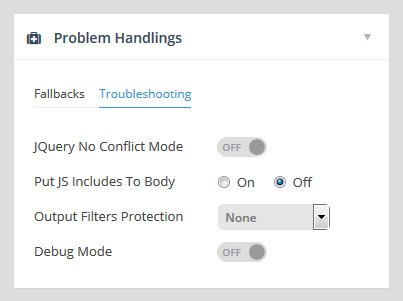
make sure that jquery no conflit mode is off and add js to body i also off in revslider settings
https://nwdthemes.com/docs/slider_revolution_m1/docs/assets/images/problem-handlings.jpgvery well, it worked. Thanks!
I have a question, if I buy this theme, i saw in the preview demo that are a lot of styles, and I like style 9, will i be able to have the style 9 when i install this theme? or do i have to create it from 0? please answer me, thank you.
there are predfinied styles files provided to import, you can check procedure https://iqit-commerce.com/xdocs/warehouse-theme-documentation/#style-import