16332 comments found.

Hi i am extremely disgusted that you still have not made a complete indepth tutorial video of your extension to help us solve alot of our problems.this business of opening a support ticket and waiting 24 hours for a response is pathetic.sometimes we ask a question only to be answerd by another question then another 24 hours is waited for a response.get your act together make a better documentation pdf or video i am sure hundreds of customers have complained about this issue but nothing gets done.
Hi, this is still in the works, you can expect more video content by the end of the year and into January. Thanks for your patience!
Meanwhile our support works fine, as it has for the past 6 years. Steady, 24h response time on thousands of tickets is actually pretty good support here on Themeforest. We are confident our support quality and consistence throughout the years is much better than other themes.
Thanks again for your feedback and patience!
Hi i hope so lets see if you guys mean what you say.
Hi there, just wanted to say we have 2 brand new tutorials coming out very soon. Not sure if it’s what you’re looking for as these ones go over the headers primarily, but they should have some valuable tips for everyone.
Thanks!
Hi, 1. How can i move the price group on the product page under the images, also i’ve set the price to center alignment, but for some reason it doesn’t at all. 2. I would like to have the product review comments listed below the review form. 3. Kind request to assist on which file to edit, so that i can add custom text after the product name, only in product page.
Hi,
1. In the product page style you can change the sort order of details sections, Journal > Styles > Product Page > [Active Style] > Product Details > ... each subsection will have a Sort Order, so go through them an indicate a top down order.
2. That is not possible with existing options unfortunately, you may have to edit the core files.
3. Product page file is in “catalog/view/theme/journal3/template/product/product.twig”
Best Regards.
i have checked to options suggested, but couldn’t have it,
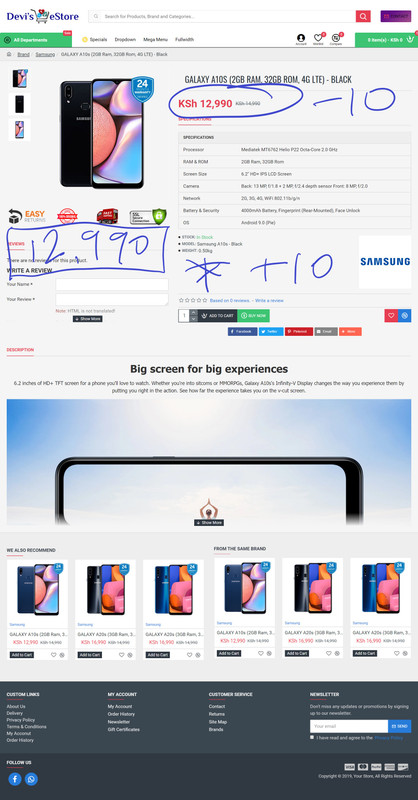
https://i.postimg.cc/RCjh3q2N/screencapture-devikenya-index-php-2019-12-15-21-14-12.jpgAs marked “-10” on sort order brings the price tag at the top and sort order “+10” places it to the end. I have marked the price in a blue box, that’s where i need to place it. I managed to get the review placed there, but not the price group. Please advise.
It’s not possible to move the price outside the details half, cannot be placed directly under the image on desktop .
Hi, i would like to add brand name on the meta title of the product page, i have tried changing in /catalog/controller/product/product.php under ”$this->document->setTitle($product_info[‘meta_title’]);” to ”$this->document->setTitle($product_info[‘manufacturer’] . ’ | ’ . $product_info[‘meta_title’]);” but doesn’t work, i kindly request to advise the file i need to edit correctly.
Hi, please file a ticket on our support page and consult with our developers.
Best Regards.
Hi, the price group on Skin > Product Page > Default > Product Details > Price Group > Section Align = “Center” or any other options are not working. Both on mobile and desktop view are just aligning on the left. I would like the price group be aligned in the middle.
Hi, we have tested this and it works fine at the product page. We’d need to take a look at your setup to determine what’s going on.
Best Regards.
OC version 3.0.3.1 and Journal 3 version 3.0.44
Although I have sticky header enabled and scroll to top enabled as well, they stopped working both in mobile.
What could be the reason? Thank you.
Hi, we would need to take a look at your setup to properly understand, please file a ticket on our support page and consult with our developers.
Best Regards.
I’ve just installed the newest OpenCart version and Journal 3 theme for a new website. Previously, I was using Journal 2 for 5 years on another website. I am totally lost and I can’t find any instructions on how to use it or even how to edit the demo skins. Do you have any video tutorials on how to use/edit the Journal 3? I’m getting ready to wipe it all out and go back to the version 2 since I know how to use that.
Hi, Journal 3 is a new theme built from scratch. You need to read the all the docs here: https://docs.journal-theme.com/docs/installation/
The if you still need assistance you can file a ticket on our support page and consult with our developers.
Although Journal 3 was distributed for free to all Journal 2 users, valid support is required if you need to file tickets.
Best Regards.
Thanks for the link!
Hi, I have created a popup but the popup content gets suppressed on mobile screen , check these 2 screenshots below :
- desktop-view : https://prnt.sc/q9radi
- mobile view : https://prnt.sc/q9ranr
I know our support expired (can’t create ticket ) but please if u can help with this
Hi, make sure there is a height applied on the popup module. In any case, we’d need to take a look at your setup, can’t say from the images so lease file a ticket on our support page and consult with our developers.
Best Regards.
this height ?
http://prntscr.com/qa9uehYou have Popup Height inside the module you use in Journal > Modules > Popup… https://take.ms/7Qclg
Height can be different on any devices by adding a breakpoint rule on the option, indicating a screen width and applying a different option value.. breakpoint rule (green plus button on the right side of the option).
Find out more about this concept here: https://docs.journal-theme.com/docs/variables/breakpoints/
these options are not available on journal v2.x
I am not on journal v3.x
We’d have to take a look a the page with the popup on and inspect the popup code, please consult with our developers on our support page.
Best Regards.
Hi DA, How do i adjust the size of brand image in the product page
Hi, please look in Journal > Skins > Edit > Image Dimensions > Brand Image.
Additional styling options are in Journal > Styles > Product Page > [Active Style] > Product Details > Stats > Brand Image…
Best Regards.
i want to extend the characters limit in the product listing. how to be able to see 10 more letters of product name in category listing?
Hi, please file a ticket on our support page and consult with our developers.
Best Regards.
I have a delivery module that has multipe select options. If I use opencart checkout – the module works fine. If I switch to journal-checkout (skin / edit / checkout) – a long list of select … options is displayed with check boxes.
Could you fix this bug? This happens for other delivery modules that have a select field with several choices.
Hi, please file a ticket on our support page and consult with our developers.
Best Regards.
My support has expired but this is a global bug. Any delivery module that has select fields displays incorrectly in journal-checkout.
If you believe this is a global bug you can send us a private message with temp access to your setup via the contact form on our profile page.
Best Regards.
I ask you a very important question for me. I will install opencart 3.0.3.2 and Journal 2.16.8 (the version that indicates it is for OpenCart_3.x). Do you consider the version of Journal 2.16.8 stable in OC3.0.3.2? Recommendations? In a while I will change to J3 (after learning it thoroughly) but it will be when OC is in 3.1.x
Hi, both Journal versions are stable, you can use J2 if you wish and then migrate to J3, you have access to both themes.
If you need assistance please file a ticket on our support page and consult with our developers.
Best Regards.
Perfect, thank you very much, so … I will install and work with OC 3.0.3.2 with Journal 2.16.8.
Journal 2 themes work in journal 3? Journal 3 themes work in journal 2?
Best regards.
No, they are separate themes, J3 has been redesigned from scratch.
Hi, Does this theme support the Product Option Image? Thank You
Hi, if you’re referring to changing the main product image when changing options no, unfortunately it does not.
Best Regards.
Hi,
When I send a subscription to the Newsletter the following error appears:
Unexpected token <in JSON at position 0
I have Opencart 3.0.3.2 and Journal 3 v.3.0.44
I need help, please.
Best regards
Hi, please file a ticket on our support page and consult with our developers.
Best Regards.
Hello, I am planning to deploy opencart and pay for your theme, but I am stuck by the opencart versions, so, which version of opencart do you recommend, or any analysis or online article to sharing please?
Thanks in advance.
Hi, we recommend the latest Opencart 3. Unless you have specific requirements, such as extensions that don’t support it, you should go with the latest version.
Journal 3 supports both Opencart 2 and 3 equally well though.
Best Regards.
Hi,
At the Product Extras > Extra Modules, if i choose Product Rules>Advanced and select a category, then because we have many products on our website, i set Product Limit 9999, and the site goes down with 500 error.
Can we disable the product limit?
And in which file is the relevant code?
Hi, not sure that’s possible but you should consult with our developers on our support page, please open a ticket there.
Best Regards.
Hi DA, How do i adjust the breakpoint or height of the show more on the description of the product page.
Hi, that is not available on breakpoint unfortunately, as it doesn’t seem to be CSS-based. Only CSS-based options can be dealt with on a breakpoint level (via media queries).
Best Regards.
Hi, i have created Bottom Menu for mobile, the module is enable but is not visible on layout. where does it attach to the layout to display it on the mobile? Thanks
Hi, please see https://docs.journal-theme.com/docs/layouts/layouts/
Point 2a and 2b deals with special modules positions. So you’d add it in 2a to apply to all layouts in Journal > Layouts > Home.
Best Regards.
How do i change the color of the buttons in the minicart ?
Hi, those are buttons styles from Journal > Styles > Buttons > Active Style > ... They in turn are applied in the cart style in Journal > Styles > Cart Content > Active Style > Buttons…
Best Regards.
Click product. Then let the product picture appear on the full page. Add in new version.
Hi, we don’t understand, can you provide more details, a screenshot perhaps?
Best Regards.
Is the SQL injection issue still exist? I got hacked recently by this https://www.getastra.com/e/malware/infections/favicon-ico-malware-backdoor-in-wordpress-drupal
and about the SQL injection https://forum.opencart.com/viewtopic.php?t=185538Hi, that post is quite old (3 years) and is referring to the old Journal 2 theme. We had updated the theme then and several times since.
You need to make sure you always have the latest theme version installed to get the latest fixes and patches.
If you’re still using Journal 2, the latest stable version is 2.16.8, you can grab it from here: https://www.journal-theme.com/v2/download/
Other than that, we are not aware of any other such issues, Journal is 100% secure but please check your other installed extensions too, they may contain security vulnerabilities.
Also, don’t forget Opencart platform itself, keep it up to date because some exploits can affect it too.
For more info please file a ticket on our support page and consult with our developers.
Best Regards.
Where I can change icons for Stepper in J3 (angle-up/angle-down)? See screenshot. http://prntscr.com/q7uirb There is no such function in style setting http://prntscr.com/q7uj6x
Hi, you need to edit the actual stepper style too: https://take.ms/fnP7z
Best Regards.
If press Actual stepper style I get this form http://prntscr.com/q80u1w I can’t find where is possibility to change icon. Show me please.
Actually you were already looking in the right style the first time, arrows options are right there. The actual icons can’t be changed but colors and size can: https://take.ms/4GsgY
Best Regards.
Hello, I would like report bug. In Joural3, setting out of stock in mini product style doesn’t work. The cart is still displayed whenever the product is or not on stock. Please can you fix this issue in next realese?
Best regards Minno
Hi, we have tested this and it works fine on our end, please try to clear all caches.
Best Regards.
Yes, you are right, thank for advice

This item was featured on ThemeForest

Power Elite Author
Contact the Envato Market Help Team