236 comments found.

I have purchased your Start Theme and want to have demo template as shown in your live preview demo. Please let me know how to get those template so I can further customize them after installation.
Thanks for the message! Please after installing the theme import demo data then you will get everything like our preview. Read our online documentation for details info here is the link https://www.docs.envytheme.com/docs/startnext-v3-theme-documentation/
Feel free to send us an email to hello@envytheme.com if you have any queries
Regards,
EnvyThee support
interested about the theme but noticed it’s loading very very very slow !
tested from different devices and good internet connection
Thanks for the message! For the theme, no optimization task has been performed and how it’s loading now genuine without any third-party plugins or scaling the images size. Only optimizing the images and serving scaled images can make the theme loading faster as expected.
Adding the Gtmetrix test report below for default homepage:
https://gtmetrix.com/reports/themes.envytheme.com/8LZftnfnBest
Ladies and gentlemen,
a while ago I bought your theme “StartNext”. Now I’m a bit irritated because I thought the plugin Elementor Pro included in the theme was fully usable. But it seems that without activating an Elementor Pro license the Pro features are not usable at all. Did I miss something or misunderstand something?
Also the plugin Advanced Custom Fields PRO is not updateable – right?
Many thanks in advance
Guenther Ludwig
— Purchase code: a863f3b1-c650-4326-825e-8f7822653e6d – 9 Mar 2020
Thanks for the message! If you want to use pro features of the plugins then you have to purchase the license key.
Feel free to send us an email to hello@envytheme.com if you have any queries
Regards,
EnvyThee support
Hi, the theme is having issues with Startnext… every time I change the page footer in Theme options, all site structure switch to align right, and all messed up… can you tell how to solve this issue?
Thanks for the message! Please download the latest version of the theme from ThemeForest.
Feel free to send us an email to hello@envytheme.com if you have any queries
Regards,
EnvyThee support
Recently, without my interference, the logo in the footer and header has stopped displaying. The button on the right side of the menu has also disappeared.
I decided to use the theme for the latest version. The problem remained and in addition the theme menu disappeared.
http://prntscr.com/rpacr1 – logo http://prntscr.com/rpc156 – theme menuThanks for the message! Please update the latest theme from ThemeForest. I think, the problem raised from the startnext-toolkit old file. Please make sure you are deactivating and deleting the existing old toolkit plugin then install & activate updated plugin.
Feel free to send us email to hello@envytheme.com if you have any queries
Regards,
EnvyThee support
Hello, I have purchased your theme an I wish that the teammates social links open in a new tab. The page I am referring to is at
http://incitelogixdev.wpengine.com/our-team/Early revert will be much appreciated. Also, it will be great if you can mark my email nishant@fairmarketing.com in cc while replying.
Thanks
Thanks for the message! We are looking into this
Regards
I know my support has finished but can you tell me why I can no longer see setting for this theme? There are not StartNext setting in the admin menu.
Thanks for the message! Could you please share bit details with screenshot by sending us an email to hello@envytheme.com then we can check about that?
Regards,
EnvyTheme support
Hello,
We have found one issue in the theme. The mobile menu is not working fine. When we scrolled down the page and then go to the top of the page, the menu is not opening.
Our website URL: http://incitelogixdev.wpengine.com/ Can you please resolve this issue
Thanks
Thanks for the message! We have updated the theme and now it’s working fine.
Regards
Hey, i have a problem regarding the installation process of the demo content. The following error displays:
Warning: require_once(/www/wp-content/plugins/startnext-toolkit/redux/ReduxCore/framework.php): failed to open stream: No such file or directory in /www/wp-content/plugins/startnext-toolkit/startnext-toolkit.php on line 271 Fatal error: require_once(): Failed opening required ’/www/wp-content/plugins/startnext-toolkit/redux/ReduxCore/framework.php’ (include_path=’.:/usr/share/php’) in /www/wp-content/plugins/startnext-toolkit/startnext-toolkit.php on line 271
Thanks for your help!
Regards Aaron
Thanks for the message! Please update the latest theme from ThemeForest, hope the issue will be solved. I think, the problem raised from the startnext-toolkit old file.
Feel free to send us email to hello@envytheme.com if you have any queries
Regards,
EnvyThee support
how can i update automatically this theme
Thanks for the email! Just replace your existing theme file by new file.
Feel free to send us email to hello@envytheme.com if you have any queries
Regards,
EnvyThee support
Is it not difficult to download and upload all files again and again Can you please make it easy uodate like other themes pls
hello sir ?
Hello! I am unable to install the following required and recommended plugins on my website:
Advanced Custom Fields Pro StartNext Toolkit Elementor Pro WPBakery Page Builder
I keep getting installation errors. Please kindly advise how to get them installed. Thanks.
Thanks for the message! Please read the theme installation and configuration from the following link-
https://www.docs.envytheme.com/docs/startnext-v3-theme-documentation/Regards
Thank you for your reply. I have taken my time to read your documentation. Your documentation does not provide me with information on how to fix my problem. My problem is that I am unable to install the following required and recommended plugins on my website because I get error message: “Download failed. A valid URL was not provided”
What is the solution for this problem? Please kindly answer intelligently. Thanks
Hello! It’s more than 24 hours now yet no reply. This is poor support from you. I am unable to install the demo contents using Elementor. I would prefer to use WPBakery instead, but I get the error: “Download failed. A valid URL was not provided” Why hasn’t any of your support team decided to look into this? Time is running on my end. Follow up on my support request and stop acting like a prick!
Thanks for the message! As you seen that we already replied with the documentation link as we found that by not following the docs as expected might raising issues for you. The theme doesn’t have any issue related to installation and setup but if anyone follows incorrect ways for the setup then issues might appear.
As the theme installation and setup is not included with the standard support so would like to request to follow the docs very carefully and setup the theme. For any kinds of issues with the theme features, please feel free to email to hello@envytheme.com.
Regards,
EnvyTheme support
wordpress standard search not working with theme and i have informed you guys any update please ?
Thanks for your patience! We are releasing soon updated file.
Regards
The updated version of StartNext v3.3 is now available on ThemeForest!
Regards
Hello, can you please update theme, or any other solutions to have the logo on the header back. Thanks
Thanks for the message! The item header has implemented by Header room js so the menubar will show automatically when you want to go top.
Feel free to send us email to hello@envytheme.com if you have any queries
Regards,
EnvyThee support
hello pls check my email
Thanks for the message! We sent reply.
Regards
sorry my site is www.securityvisit.com thank you. Colin
Hi, could you tell me why i would be getting this what looks to be overflow onto my main page? “SecurityVisit.com 0 pl_row [pl_text]
string(0) ””“
I have only started to use the plugin so i dont understand what this is. How can get rid of this please? Also is there anyway of rotating the first image so the site has some more interactivity by showing a news feed or something of interest rather than your man sitting on the desk ? thanks much appreciated Colin
Thanks for the message! Please update our latest file from the ThemeForest for this inconsistency hope you will get it solved.
Feel free to send us email to hello@envytheme.com if you have any queries.
Regards,
EnvyTheme support
what is in 5 feb update ?
The details can be found in the item description page.
Regards
Hi again. I want external links to open in a new tab.I’m using elementor. I tried “Open in New Windows” check box but it’s not working.
Thanks for the message! Please share bit details with screenshots by sending us email to hello@envytheme.com then we can share you instructions.
Regards,
EnvyTheme support
hello sir, i purchased your theme for my domain https://cloudstakes.com/ and i install this theme, but when i goes to import data, then i got error, 503, why this error occur, please help me, because i need install this site as soon as possible. here my purchase code :- 5486e506-8a70-452e-a2b9-f764f4485cdd
Thanks for the message! Please contact with your hosting provider such issue related to the server.
Feel free to send us an email to hello@envytheme.com if you have any other queries
Regards,
EnvyTheme Support
i am having error in import data, i checked my server there is no propblem, please help me out, even in your theme there is also not available xml file, that i can use another method for importing data, please solve my problem.
Good day ,
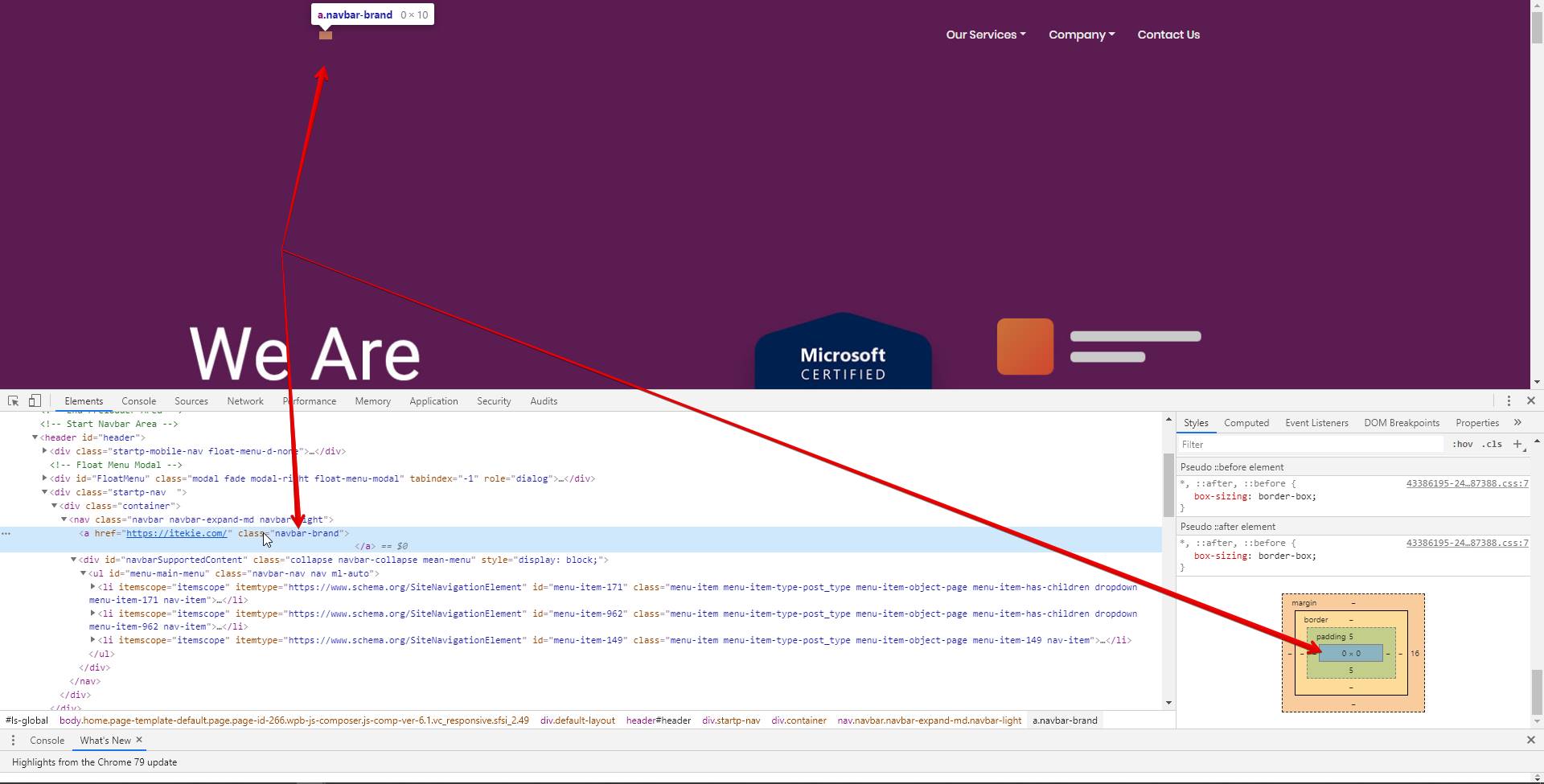
We updates our Wordpress to 5.3.2 today and our logo on home page has dissapeared I see it still defined on the Theme settings.
https://itekie.com/wp-admin/admin.php?page=startnext_header https://itekie.com/wp-content/uploads/2020/02/logo.pngAnd the file exists on the server. But the logo is not on source code, it means, somehow, the theme is not compatible on the latest WordPress version .Please check the header.php file and see why the logo is not being called after update.
Also the pre loader is disabled but it still comes up on our website ? Please advise
Thanks for the message! We are checking about that and will update as soon as possible.
Feel free to send us an email to hello@envytheme.com if you have any other queries
Regards,
EnvyTheme Support
We have tested the item with WordPress version 5.3.2 and it’s working fine. Please make sure you have updated the version properly.
Regards
The width and height for logo container is 0 there is no logo image