782 comments found.

amazing, but this is no badge ranking feature? like after 500 thread from user get 5 star or king badges like that/
Hi there,
It’s quite rare for these user-based features to be built into front end themes. Best option would be to install an extension which does this, there are thousands available on phpbb.com 
Does rtl support and when will it be released
Hi there,
RTL support is untestested and currently unsupported, but might work.
I’m hoping to develop compatibility at the end of this month.
Can I create a latest post/trending section on the sidebar with this theme? Someone please answer.
Hello
Not by default unfortunately.
But it would be possible to modify an existing extension of that nature and copy the output code into Milk’s sidebar template file to achieve the same outcome
Thank you. Is it possible to modify the registration terms and conditions to my own terms and conditions?
Yep, this text is defined in /language/*/ucp.php
Can you provide instructions on how to place ads on this theme? I installed the extension for ad management but once i add the code to the website it directs me to a blank page.
https://prnt.sc/rofo5oHi there,
Advertisement management is definitely the best extension to achieve this, but it sounds like you might have an error in your installation of it.
Have you been in touch with the extension developer?
Is there a solution/modification to allow the URL Link functionality in Advanced BBCode Box 3 to work correctly. Same issue as RedCougar. Thank you!
See the email reply I sent you a few minutes ago
Hi,
I’m having an issue where the text seems to be cut off, can you suggest a fix?
https://prnt.sc/rnx2x5Hi there,
Can you let me know which device this was taken on, the browser and resolution?
Thanks
I have tried all devices and the issues still persists. The browser I originally used was google chrome. The resolution is default.
Hi again,
A fix has been found.
Open: /styles/milk_v2/theme/forms.css
Find:
input.inputbox    {
    width: 100%;
    box-sizing: border-box;
}I tried that and it didn’t work, any other suggestions?
After implementing the change you might need to purge your cache, and / or clear your browser cache. See: https://docs.planetstyles.net/article/21-how-to-purge-cache
Hi PlanetStyles. How to i change a category icons? And how to i enable colour picker?
Hi there,
First you need to upload your grid images to the ‘images’ folder in your phpBB installation. Then next to each forum in the ACP you should see a green cog icon. If you click this, you can then link to the forum image from the ‘forum image’ field.
For example, if your image is uploaded to: yourforum.com/images/grid1.png , in the ‘forum image’ box you’d need to enter:
``` images/grid1.png ```
The accent colour is set in the ACP (Flightdeck extension), there isn’t a front-end colour picker built in
Thank you. U. Best And how to i use this style? -> https://i.hizliresim.com/IMySNE.gif
And how to i add a Awards/Rewards/profile badge system or extension?
Hi,
Those would require custom extensions. You should ask in the ‘extension requests’ section on phpbb.com/community , it’s very possible they exist already
How many styles does this theme come with? The demo shows 4 different styles, but when you buys there is only one style???
Hi there,
There is one core theme, all of the different configurations you see are achieved by changing the settings in the flightdeck control panel
@Christian: Got reported some SEO issues;
Google complains about the breadcrumbs which was recently discussed and fixed for prosilver here: https://tracker.phpbb.com/browse/PHPBB3-16316
Bing complains about the site logo having an empty alt attribute. Setting alt=”Site Logo” into listener.php was enough to make Bill happy.
Thanks,
Jordan
How to edit header’s size? I want it to fit with the image I put. http://prntscr.com/rkc1xx
how can i expand header footer and header to the both side? (the places I painted) http://prntscr.com/rkc2e2
Hi there,
I’ve just responded to your email
Just starting to use this application, and it seems to be extremely confusing. You have
Your First Category – but it seems that there is no way to name and describe your categoies, which is very puzzling to say the least
Your First Forum – but it seems that there is no way to name and describe your forums, which is very puzzling to say the least
Your First Topic – this one seems to be the only thing that makes sense so far
So how can I, as the admin, remembers which categories, and which forums I have already created/started if I can’t even name and/or describe them, am I supposed to read the posts for me to remember what I’ve created and started?
Also, can admins create categories with names, and forums with names, or is it just topics but if that is the case then how do topics get grouped under a forum and how do forums get grouped under a category? To be clear, for example, can I create something like this:
Category 1 = Vehicles ...Forum 1 = ....Cars .....Topic 1 = ........Toyota .....Topic 2 = .........Volkswagen ...Forum 2 = ....Trucks .....Topic 1 = .......Hino .....Topic 2 = .......etc .....Topic 3 = .......etc
and actually be able to NAME and describe them?
Very disappointing so far, even after paying a Fiverr freelancer to install it for me, as I can’t seem to find any documentation that would help answer my questions.
Hi there,
It sounds like this feedback is more pertinent to the phpBB software, rather than the Milk Theme. The theme we provide is a front-end visual style only.
Have you considered asking for additional help on phpbb.com?
Good night, your template is very good. but I just had a problem after the setup. After I saved all the color settings as instructed in the manual, the ACP page turns white. I can’t login, I can’t access this page anymore at http: // yoursite / adm
Hi there,
This is caused by a PHP error, but probably not in the flightdeck extension.
Have you installed any other extensions recently? Or edited any of the core files?
The theme has a very extensive FAQ page for users which is excellent, but is there also an FAQ page, or an extensive FAQ page, for administrators, like how to change the logo, etc., so that we can just go to the FAQ page instead of having to read the documentation?
There will be, I recently changed our customer support software which will enable this to happen in the near future
Is it possible to remove the captcha requirement during registration, and if yes, how? I am using the 3.3 demo that “has most of the cool features in one demo”.
Yes, this is a phpBB setting though, not a theme setting
Change it in ACP > Security settings
Hey Christian,
I found a bug into search_results.html; the topiclist_row_topic_title_after event is actually called before the title, instead of after.
Thanks,
Jordan
Thanks Jordan, will resolve in the next update
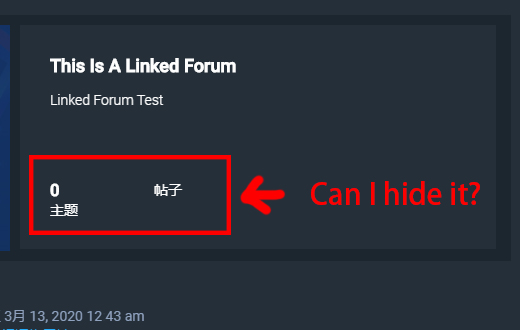
If is “link forum”...and i don’t want to show “Total redirects”... Can I hide it and make it blank this area? I think it ’s better to leave it blank
Screenshot: https://i.loli.net/2020/03/13/TxeW3jYz618kbBU.jpgWho is online shows that everyone is at index page
When I click on ‘who is online’ it shows that everyone is at index page.execpt bots.See also my question from 1 month ago. https://themeforest.net/item/milk-multipurpose-responsive-phpbb-31-theme/16119149/comments?page=24&filter=all#comment_23596193
In ProSilver Who is Online is working well, who is online shows the correct forum that a user is reading. But not in Milk.
do you have a demo where the buy now is not present!
huh?
hello, how do i add new extra style_settings_html_1 field for ads to display in the templates heder
like to add section for the header: Refer to documentation for corresponding output locations. HTML code blocks
add header content Sidebar Custom Content Supports HTML and special characters
Hi again,
This is a very complex change requiring multiple edits to the core extension code, so not something we can easily provide instructions for, sorry 
it was very easy to do .. i edit your core flight deck and aded the shortcodes and to the listener.
Is this theme compatible with Board3 Portal?
Yes
Hi. I found that registration page does not work anymore. Users can see the registration page, they can see the coppa or the normal registration button but none of them work! You can see what I am talking about if you visit my page (www.amnizia.org – It’s a Greek page about trains) Please give me your advise. Thank you
Hi there,
Interesting. Does the problem continue if you temporarily disable Milk and test using prosilver?
No, with prosilver the registration page works fine. I noticed that the same problem exists also at your demo page. Maybe this help you
Did you find anything for this problem?
I haven’t investigated it yet.
Maybe this is related to COPPA registration? I disabled it (COPPA) and now users can register