

135 comments found.

Hola, Acabo de instalar el tema en wordpress , solo que las plantillas no me aparecen , lo único que puedo ver es una plantilla blanco, rosa y negro que dice hello world!
After you install the theme, you will need to import the demo content so your website will look like our demos. You can find the instructions on how to import demo content here: https://wydethemes.com/ivery/documentation/#import-demo-content
Also, importing demo content can take several minutes to complete. Please ensure that you’ve increased the PHP limits to the minimum as provided in the documentation.
Your theme is listed and recommended on this blog post. https://medium.com/best-wordpress-themes/the-best-themes-for-portfolio-cv-59a134b4d9fd Wishing you lots of success!
Great! Thank you for letting us know.
We are happy to see it there 
Hi this is very urgent i updated my Wordpress site to the latest version and the for some reason the theme doesnt work
the problem is when goes to the url of portfolio page make a redirection and says the page not found
There seems to be an issue with WordPress permalink caches. To fix this issue, navigate to Settings -> Permalinks, and then click Save Changes button to clear the permalink caches on your site.
ok i have fixed that but now i saw that the revolution slider doesnt work on load, i mean i you go to navigate the site and the work page, if you go to home again load home without the revolution slider! i have checked all setting in revslider i have deactived all plugins, i have checked also in chrome and explorer and its the same problem can you help me please? thanks
My apologies for the delayed response!
I have never seen this issue before. It’s working properly on our demo site. Would you mind giving me your web address so I can check it?
ok please give a email thanks so i can send you
You can send it through the contact form on our profile page here: https://themeforest.net/user/wyde#contact
hi i have sent you mail in your contact form thanks please check it , its a urgent
My apologies for the delayed response! I just sent the details with screenshots to your email directly.
Is this theme gif friendly?
We are sorry but we do not recommend using animated GIFs on your WordPress site.
Whenever uploading images including GIFs to your WordPress website, they are automatically processed and resized into different thumbnail sizes.
Unfortunately, when creating thumbnails for animated GIFs, WordPress ends up saving only the first frame of the GIF and they will be static GIF images with no animation.
When using animated GIFs in this theme, they will work only on the page and in the post content. The animation will not work in the blog list and portfolio grid.
You can find more details here: https://www.wpbeginner.com/wp-tutorials/how-to-add-animated-gifs-in-wordpress/
Hello,
I’ve just installed the parent and child themes, followed the instructions and activated all necessary plugins, including demo content. However, after installing and activating the demo content plugin, the Theme Options sidebar item isn’t visible anywhere…I can’t access Theme Options.
Any ideas?
Thanks, Emma
Solved!
Glad to hear it has been solved
Hi, is there a way to insert more than one video in the portfolio template? Thanks
Sure, you can insert a video into the portfolio content directly by using a Media Player from WPBakery Page Builder.
If the page builder is not active on the portfolio you will need to enable it in WPBakery Page Builder -> Role Manager from your WordPress admin menu, choose “Custom” for Post types and then select “wyde_portfolio” so you will be able to edit the portfolio with the page builder.
Hi, is there a reason why my images seems to loose their quality once they are uploaded into the portfolio?
Please ensure that your portfolio images are bigger than 640×640px so they will be cropped to the certain sizes and fit perfectly in the portfolio grid. If you are using a full width page layout the images should be bigger than 960×960px.
However, WordPress compresses your images for better performance by default. If you would like to disable image compression, you may need to install the Disable JPEG Compression plugin: https://wordpress.org/plugins/disable-jpeg-compression/
You can find more details on how to disable image compression here: https://www.wpbeginner.com/wp-tutorials/how-to-increase-or-decrease-wordpress-jpeg-image-compression/
If it still doesn’t work, you may need to send me your site URL.
Hi, so here an example. My image once uploaded in my media library: http://rosemultidesign.com/wp-content/uploads/2019/08/Capture-d%E2%80%99e%CC%81cran-le-2019-08-18-a%CC%80-15.12.13.png
My image on the website once uploaded into the portfolio: http://rosemultidesign.com/portfolio-item/valorifete/
The line of code I add in the functions.php file (which I did before writing to you):
http://rosemultidesign.com/wp-content/uploads/2019/08/Capture-d%E2%80%99e%CC%81cran-le-2019-08-18-a%CC%80-15.21.59.pngSo it has nothing to do with the template?
Thanks
Thank you for the URLs!
This theme doesn’t compress your images. There may be some plugin compressing them, try to deactivate the third party plugins to see if it works. I guess the image compression is included in the Jetpack plugin.
Hope this helps!
It definitely helped! Thanks!
Glad to hear that
Hi, is there a reason why my images seems to loose their quality once they are uploaded into the portfolio?
We are sorry but please contact us from the account that purchased the Ivery theme to make sure you’re currently in the correct product page that corresponds to what you have purchased.
Hi! Amazing theme, really thorough and well designed. I had a few questions:
– Using the “Clients Grid”—how can I edit the number of logos displayed on mobile (responsive)? I have my columns set to display 6 thumbnails (150×150) in a row, but when I try the responsive mode, it aligns just 1 logo per row. I would like to change this number as the logos take up a lot of space on mobile.
—In a similar vein – is there a way to link logos under “Clients Grid”?
- I imported the demo, but the links are now: “xxx.com/portfolio-item” or “xxx.com/portfolio-photoset-full-width-4-columns” - how can I change the URLs to be more friendly with my content?
Thank you!
Hi,
Thank you for your kind words. That really means a lot.
1 – You will need to add CSS snippet below into Appearance -> Customize -> Additional CSS to achieve this:
@media only screen and (max-width: 991px) {

    .w-clients-grid .w-item {
        width: 50%;
    }

    .w-clients-grid ul li {
        border-right: 1px solid #dcdcdc;
    }

    .w-clients-grid ul li:last-child {
        border-bottom: 1px solid #dcdcdc;
    }

    .w-clients-grid ul li.col-2:nth-child(2n+0) {
        border-right: none;
    }

}
2 – We’re sorry but the Clients Grid doesn’t have any link fields and it doesn’t allow adding a link to the logos. You may need to use the Single Image element instead of the Client Grid to achieve this. Simply create a row with 6 columns then add a Single Image into each column.
3 – You can change the single portfolio URL (domain.com/portfolio-item/) under Theme Options -> Portfolio -> Portfolio Single Post -> Portfolio Slug.
Also, you can change the page URL (domain.com/portfolio-photoset-full-width-4-columns) in the Permalink setting on the page edit screen, see the picture below:
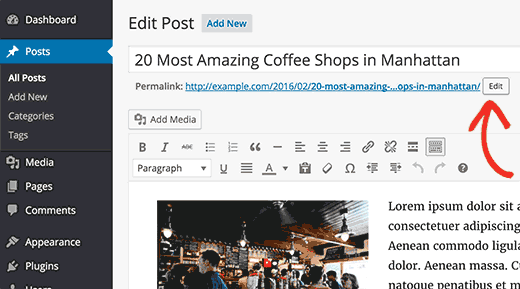
However, after changing the URLs, you may need to visit the permalink settings in Settings -> Permalinks on your WordPress admin, then click on save changes to clear WordPress permalink caches.
The additional css is perfect, thank you! However, there is now a weird border line in white in between on both mobile and desktop versions—how can I get rid of that?
Also—there seems to be a lot of space. I’m designing the logos to be in a square shape. Can I remove the spacing added? See screenshot: https://imgur.com/a/uQPkFSh
Thank you for the screenshot!
However, the CSS I provided is only for 6 columns in a row. Looks like you’re using 4 columns, try this one to see if it works:
@media only screen and (max-width: 991px) {

        .w-clients-grid .w-item {
            width: 50%;
        }

        .w-clients-grid ul li {
            border-right: 1px solid #dcdcdc;
        }

        .w-clients-grid ul li:nth-last-child(2) {
            border-bottom: none;
        }

        .w-clients-grid ul li.col-3:nth-child(2n+0) {
            border-right: none;
        }

}
However, if you’d like to use 4 columns, you may need to have 4 or 8 thumbnails in the Clients Grid to make it display correctly.
Regarding the space between thumbnails, the Clients Grid doesn’t add any space to the thumbnails, try changing the Image Size option in the Clients Grid settings to Thumbnails or Original to see if it works.
Also, try checking your logos to make sure they don’t have a lot of space.
If it still doesn’t work, you may need to send me your site URL so I can take a look.
Thanks for the new css, works great!
Tried changing thumbnails to Original, it ends up cutting the logos since I have all of them designed to be a square to fit the Thumbnails aspect ratio. I highlighted the logo image files—the highlight is the appearance of the logo images itself (you can see that there’s plenty of white space), but for some reason it’s displaying an additional line of white space almost the size of the logo images. https://imgur.com/a/9D6uFQR
My site is on maintenance mode currently since I’m revamping an old URL. Can I maybe send you the information or an access link via email?
.w-clients-grid ul li {
  height: auto;
}
If it still doesn’t work, you may need to send a private message with the login information via the contact form in the link below:
https://themeforest.net/user/wyde#contact
Anyway to make the image gallery (grid with space) 3 columns instead of 4?
We’re sorry, it looks like a bug of the theme. It should be able to choose the columns for both Grid and Grid with Space.
Thank you for reporting this issue, we will fix it in the next update.
How do I make the logo larger?
You may need to put the CSS snippet below to Appearance -> Customize -> Additional CSS to achieve this:
#header-logo img {
  max-height: 100%;
}
That didn’t make it bigger, neither did increasing the percentage of max-height.
It sounds like that the width of your logo is greater than the maximum width of the logo container (160px).
You may need to add CSS snippet below into Appearance -> Customize -> Additional CSS to increase the maximum width of the logo container:
#header-logo {
   width: 260px;
}
Hi I wanted to know if the theme is supported through forum or email?
Hi,
Of course, it is supported through both of them.
You can contact us through following methods:
1. Public forum. You can post any questions on the Comments page:
https://themeforest.net/item/ivery-creative-portfolio-cv-wordpress-theme/20365665/comments2. Private message (email). When you send any questions in the contact form on our profile page, we will reply directly to your email: https://themeforest.net/user/wyde#contact
Hi,
Im trying to change the text in the testimonials area but only see options for title and featured image, not text. Please see screenshot https://www.dropbox.com/s/se7o8olu3saheeq/Screen%20Shot%202019-02-07%20at%2012.26.55%20PM.png?dl=0
Hi,
Thank you for the screenshot you provided!
You will find the text and other fields in the Ivery Options section (click an arrow up and down to show/hide the content in that section).
If they do not show up, there may be plugin conflicts on your site, try to deactivate other plugins to see if it works.
Also, please ensure that you’ve updated the theme to make sure it will be compatible with new WordPress, you will find more details in the update log: https://themeforest.net/item/ivery-creative-portfolio-cv-wordpress-theme/20365665#item-description__changelogHi, I deactivated all plugins and even switch between main and child theme but its still not showing that block of options, neither in testimonials or portfolio.
Do you mind giving your WordPress admin login details?
You can send a private message in the contact form on the page below:
https://themeforest.net/user/wyde#contactHi. Is it possible to have full width layout working in portfolio single page view in Ivery theme? It would be nice to have this possibility – currently it does not seem to work.
Thanks
.single-wyde_portfolio .main-content .container {
    max-width: none;
}
However, this is not included in the theme design so some portfolio layout such as masonry might not work properly.
Hello, I’m really struggling to add videos to my portfolio. As a film editor, I am making my website primarily for this purpose. I’m enjoying this theme, but I’m very frustrated that I can’t seem to add more than one URL to the portfolio sections. Please let me know if there is something I am doing incorrectly. This is my first time creating a website using wordpress, I’ve only used square space before now and I’m exhausted trying to find out how to solve my problem.
Hello,
You have only one media URL because post and portfolio can have a single featured video. However, you can insert more videos into the portfolio content directly.
There are 2 ways to add videos to the portfolio:
1. Copy the video URL from the video sites (e.g. YouTube, Vimeo) and paste it directly into the text editor (in Visual mode), you can find the instructions in the link below:
https://www.wpbeginner.com/beginners-guide/how-to-easily-embed-videos-in-wordpress-blog-posts/2. Use WPBakery Page Builder. If it is not available on the portfolio edit screen, you will need to enable it under WPBakery Page Builder -> Role Manager. Choose “Custom” for Post types and then select “wyde_portfolio”.
Once you enable it, you can use the Backend Editor to add a Media Player element to the portfolio like you can do with the page.
Hope this helps!
Hi. Is it possible to somehow have single blog posts to have full width content? Currently no matter what – it is always boxed. I would like to have some rows in WPBakery to be full width, but it does not work. (It does work in pages)
Another question – how do I change color for header subheading? There is no such option anywhere and it is always default pink.
Thanks! Cool theme!
Hi,
1. We’re sorry but this is a bug of the theme. Thank you for reporting this issue, it will be fixed in the next update.
2. Apologies, it should be the same color as the theme color scheme. We will fix it in the next update of the theme. However, if you’d like to fix it right now, you can add CSS snippet below to Appearance -> Customize -> Additional CSS to change the color of the subtitle:
.header-title .subtitle {
  color: #fff;
}
Thank you for taking the time to report these issues. They will be fixed in the next update of the theme.
Ok, thanks! Waiting for the update
Hi – couple questions about Ivery theme. I’m probably doing something wrong, but setting Blog->Page Layout to Wide does nothing – it still displays everything boxed. How do I get my Blog page to display full width?
Another question – I was having trouble with getting portfolio grid working in Wide mode. I finally managed to do it, by setting “Content Width” to “Full Width” instead of “Default” in Row Settings in WPBakery editor. Otherwise it just ignores the Ivery Page options – page layout set to “Wide”. Is this how it is supposed to be?
Thanks
Hi,
1. Please ensure that you’ve setup the blog page already. In Settings -> Reading, choose your blog page for Posts page so that page will use the blog settings from Theme Options -> Blog.
2. To make the full width page and content inside, you will need to adjust these settings below:
- In Ivery Options -> Page, choose “Wide” for the Layout.
- In the Row Settings, change the Content Width to “Full Width”.
If it still doesn’t work, you may need to send me your site URL so I can take a look at it.
Hello,
Are you able to assist with the navigation of my site. The links only work on the homepage, not on the portfolio pages.
Thank you! Catherine
Do you mind giving me your site URL? If the login is required to access your site, you can send a private message in the contact form below:
https://themeforest.net/user/wyde#contactThank you for the site URL!
Looks like you’re using custom links in the navigation for a one page site.
If you’d like to create a one page site, I recommend using the one page site feature from the theme.
Actually, you can enable the “One Page Website” under Theme Options -> Page, so you don’t need to create custom page to show all content in one page. All you have to do is:
1. Create multiple pages normally like you do with a multi-page site (i.e Portfolio, About Me, Client Love, Contact).
2. Add those pages to the Primary Menu under Appearance -> Menus.
3. Enable the “One Page Website” option under Theme Options -> Page. Once it is enabled, the theme will combine all pages from the top level of the primary menu into your front page as one page. It also automatically generates anchors for the menu and section so you don’t need to set the ID for the row and custom links for the menu either.
Also, if you’d like to switch back to the multi-page site, you can easily disable the “One Page Website” option in Theme Options without editing any pages and menus.
However, if you’d like to create custom one page manually like you did on your site now, you will need to set the full URL for the link to make it work on other pages too (not only on home page).
For example:
Use:http://www.yourdomain.com/#contactusInstead of:
#contactus
Hope this helps!
Hello again! Thank you for your help, I was able to create a one page site!
Hello! Please help! I was updating my site and for some reason a 404 error shows up when going to my site now: www.catwalkstudios.com
Please assist as soon as possible!
Looks like it couldn’t find your homepage.
Navigate to Settings -> Reading, and make sure you’ve already set the Homepage for your site. You will find the instructions on how to setup the homepage in the documentation: https://wydethemes.com/ivery/documentation/#setting-up-home-page
Thank you that worked! Are you able to tell me how to re-link my home page navigation buttons to its section? Portfolio, About me, etc
Looks like you’re using a One Page website. Fortunately, this theme comes with One Page Website feature so you don’t need to put all sections into one page and add custom links to link the navigation buttons to its section.
Here’s a step-by-step guide on how to create a One Page site.
1. Firstly, you don’t need to put all sections into the same page (homepage) but should create a separated page for each section. In this case, you should have 4 pages, PORTFOLIO, ABOUT ME, CLIENT LOVE and CONTACT with their own section.
2. Navigate to Theme Options -> Page -> Page Options, turn on the One Page Website. When this option is enabled, the theme automatically combines the content of all pages in the Primary Menu, displays them on your homepage and creates a link to its section.
3. Navigate to Appearance -> Menus, you will need to remove your existing custom links from the Primary Menu, you don’t need them anymore. Instead, add all 4 pages (PORTFOLIO, ABOUT ME, CLIENT LOVE and CONTACT) into that menu.
Hello, thank you for the One Page option. Unfortunately, I have tried to create the individual pages but not having success. Is there any way I can make the links function on a One Page?
If you create custom one page, you will need to manually set an anchor for each section.
To set an anchor for the section, you have to edit the row settings, and then put the anchor name (e.g. aboutme) into the Row ID field so when you click on the navigation button ’#aboutme’, it will bring you to the About Me section.
Hope this helps!
Hello again! I tried to manually set an anchor for each section, however I can’t edit the content blocks and when I tried to add a new row, my updates are not saved. May I provide my username and pw for you to review?
You may need to update the theme and bundled plugins to make them work properly with the new version of WordPress. You will find more details in the changelog: https://themeforest.net/item/ivery-creative-portfolio-cv-wordpress-theme/20365665#item-description__changelog
Also, you can find the instructions on how to update the theme in the documentation: https://wydethemes.com/ivery/documentation/#update
Hello,
Few questions.
1) For the Portfolio grid. How can I hide the Filter but ONLY on mobile. It stacks and takes up too much space.
2) On iPad the site seems to have a slight horizontal scroll.
3) On the portfolio pages. How can I do the following on a centred alignment. A) swap the placement of the CATEGORIES, SKILLS and CLIENT to the left and VISIT SITE to the middle
4) on the portfolio page have the gallery images centred rather than left aligned.
Thank you!
Hello,
1) There are 2 options to fix this issue:
1 – You can add CSS snippet below to Appearance -> Customize -> Additional CSS to make it horizontal align instead of stacking vertically on mobile:
@media only screen and (max-width: 600px) {

.w-filter li {
    display: inline-block;
}

}
2 – If you’d like to hide it on mobile, you will need to add CSS snippet below to Appearance -> Customize -> Additional CSS:
@media only screen and (max-width: 600px) {

.w-filter {
    display: none;
}

}
2) It sounds like that there may be some elements on the page bigger than the screen width. Would you mind giving me the link of that page so I can take a look at it?
3) You will need to edit the portfolio template in your child theme to adjust this.
Here’s a quick guide:
1. Install the child theme, ivery-child-theme.zip. It’s included in the download package.
2. Copy the portfolio template file from the Ivery theme “wp-content/themes/ivery/templates/portfolio/single-gallery.php”.
3. Paste it into your child theme “wp-content/themes/ivery-child-theme/templates/portfolio/single-gallery.php”.
4. Edit that template file in your child theme as below:
Replace:
                <div class="col col-3">
                    <div class="col-inner">
                    <?php ivery_portfolio_widget('meta'); ?>
                    </div>
                </div>
                <div class="col col-8 col-offset-1">
                    <div class="col-inner">
                    <?php ivery_portfolio_widget('categories'); ?>
                    <?php ivery_portfolio_widget('skills'); ?>
                    <?php ivery_portfolio_widget('clients'); ?>
                    <?php ivery_portfolio_widget('fields'); ?>
                    </div>
                </div>
With:
                <div class="col col-3">
                    <div class="col-inner">
                    <?php ivery_portfolio_widget('categories'); ?>
                    <?php ivery_portfolio_widget('skills'); ?>
                    <?php ivery_portfolio_widget('clients'); ?>
                    <?php ivery_portfolio_widget('fields'); ?>
                    </div>
                </div>
                <div class="col col-8 col-offset-1">
                    <div class="col-inner">
                    <?php ivery_portfolio_widget('meta'); ?>
                    </div>
                </div>
4) If you’re using a Gallery layout for the portfolio, it will display your gallery images in a grid 4 columns. You may need to add 4 images or more to the gallery to make it display properly. Otherwise, you may need to use other layouts such as “Vertical” instead: https://wydethemes.com/ivery/portfolio-item/portfolio-5/
However, if you’d like to center the gallery images, you will need to add CSS snippet below to Appearance -> Customize -> Additional CSS:
.portfolio-gallery .post-gallery {
    text-align: center;
    font-size: 0;
}

.portfolio-gallery .post-gallery li {
    float: none;
    display: inline-block;
}
Hello.
I have a question regarding my Ivery theme.
Under THEME OPTION > HOME > CHOOSE DEMO
When Demo is chosen, all boxes check out except these are with an (X): MENUS, MEDIA, SLIDERS, SETTINGS
When I preview the page it’s missing images. I’m not sure if these settings are compromising the whole look and feel of the page but something seems off. Please contact me in regards to this problem. Or possibly going into my wordpress and helping set correct..
Thank you. Karlo kibarra001@yahoo.comHello,
It’s most likely a PHP limits issue. Importing demo content can take several minutes to complete the process, please ensure that you’ve increased the PHP limits as we provided in our documentation.
You can use the PHP Settings plugin ( https://wordpress.org/plugins/php-settings/ ) to check and increase those limits.
If that doesn’t fix the problem, you may need to send me your WordPress login details. You can send a private message via the contact form in the link below: https://themeforest.net/user/wyde#contact





