5515 comments found.

Hi there, quick question. I believe I am currently using wordpress 5.4. Is your theme compatible with this? Thanks.
Also, I need to be able to add insurance to each rental. Is this something that is possible to do or will it need to be done through customization by someone more experienced? For example if I wanted to add a fixed daily amount of insurance cost to each rental category or even each listing. Thanks again for all your help
Hi apcarrier – Yes, we’re compatible with 5.4
We only have security – https://help.wprentals.org/article/1-20-about-security-deposit-fee/
We have as extra fees City fee and cleaning fee – which could be set as a fixed daily amount. If you don’t need one of these fees, you could use translate to change the text label
In demo you can check these 2 fields in submit https://prnt.sc/ry8jzw
https://main.wprentals.org/We allow to login with username user and password 1234 or register for your account as well
Thank you
Hi! When I am in the part of adding a listing, the images section does not show me any button to upload images, what can this be? thanks!
How can I make my currency be COP: Colombian Peso?
Hi Sergio
Thank you for the message
1. Check in theme options Media is selected to be part of submission form – https://help.wprentals.org/article/how-to-add-edit-images-in-a-property/
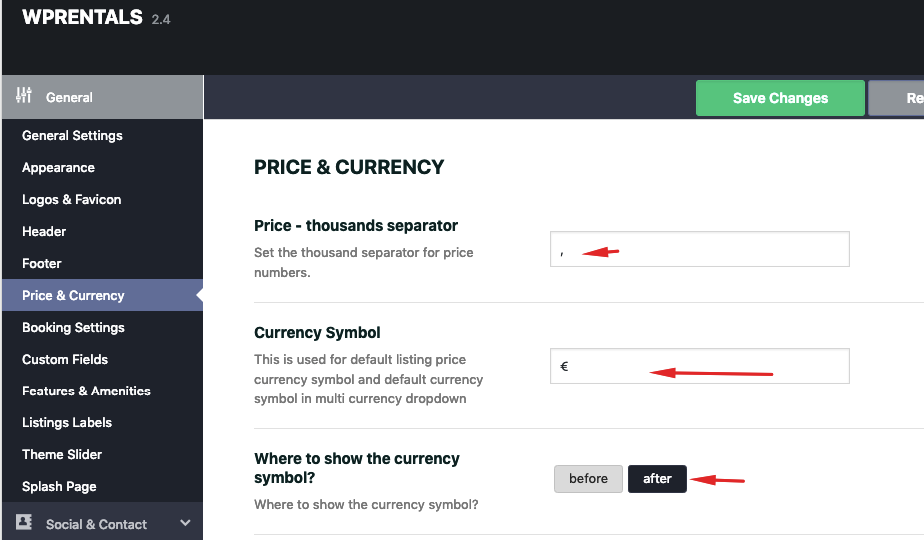
2. For property currency set your currency in theme options – Currency Symbol https://help.wprentals.org/wp-content/uploads/2015/10/property_currency.png
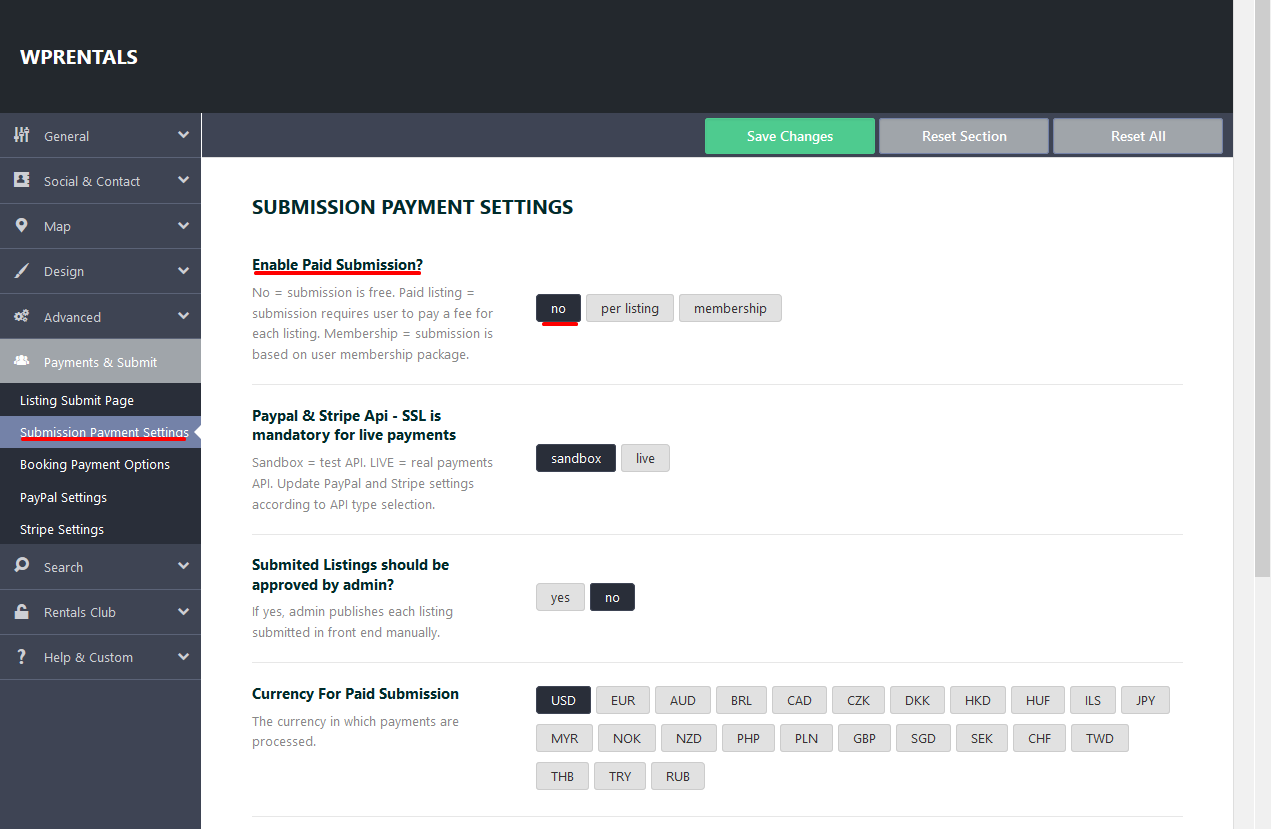
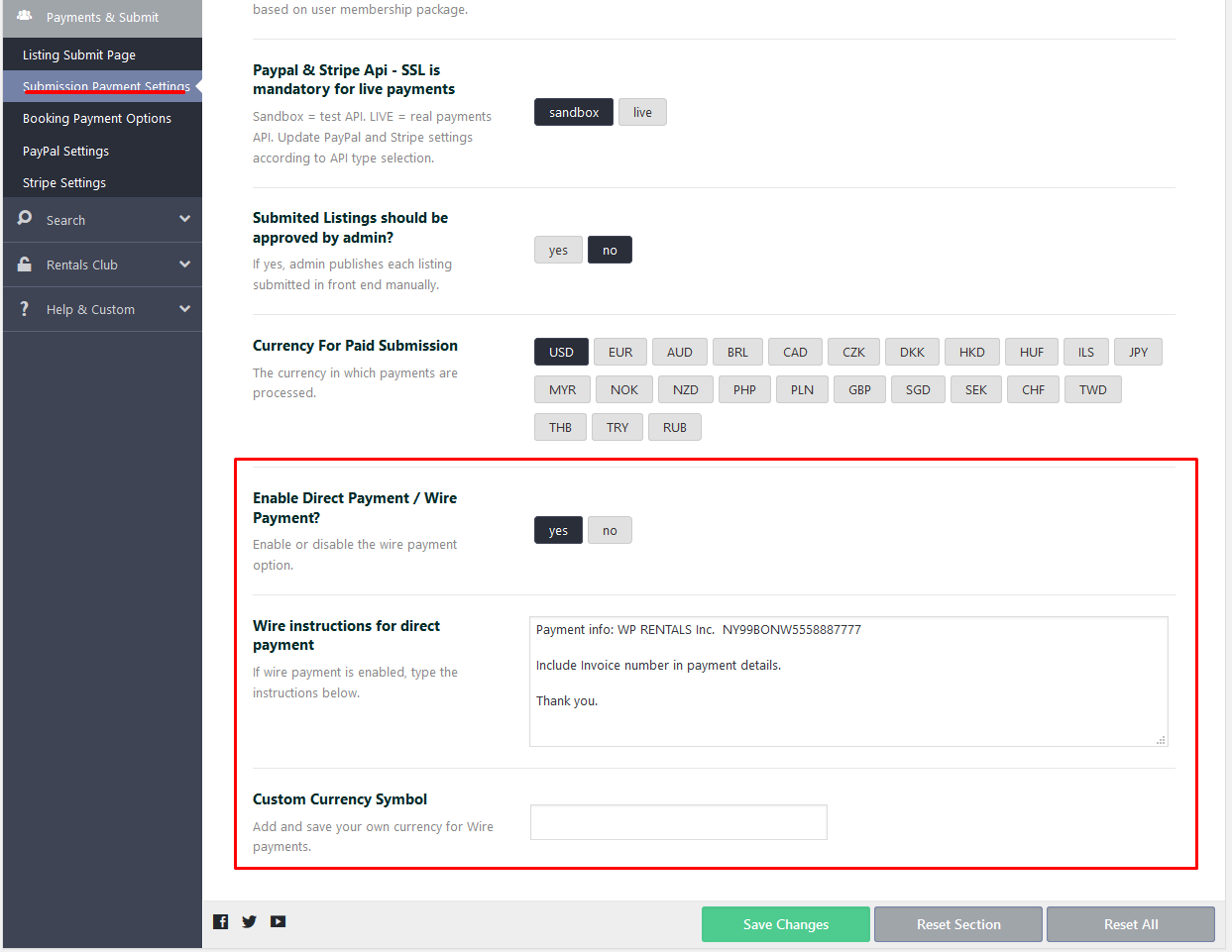
For price submission – we have this list https://help.wprentals.org/wp-content/uploads/2015/10/free_submision.png and for wire transfer you can add your currency – https://help.wprentals.org/wp-content/uploads/2016/08/wire-transfer-help.png
It’s possible with Woo as payment option to need to add other currencies in the list. We can help add now and save this for future update as well in client support. If it’s the same situation please send a message in client support http://support.wpestate.org/
Thank you
Hello, i have the following problem: when i want to select an start and end date in the listing. The dates starts in november in stead of this month (it is not posible to select a date before november). what should i do?
Hi Rickkorsten, Please send a message here https://themeforest.net/user/wpestate with site url and wp-admin to check. We don’t block dates automatically, so I need to check first. Thank you
i have send a message
Hi RIck. Thank you. I answered. Anna
PRESALE QUESTION Hi! I need that:
1)Create my custom design /theme (ALL PAGE) with elementor pro and NO CODING and use all plugin/functionality of WP Rentals. Can i?
Hi, We have many options in theme options (not bakery, or elementor). WE use elementor and bakery for pages content. Not sure what you expect to do, but it’s best you test before you make a decision. If you need further info or want to test our theme, please send a message from here https://themeforest.net/user/wpestate
Thank you
Hi – I have a few more questions before I renew my support if you could possibly advise please?
1. Can there be a preview option for the property owner to see how their listing looks from their dashboard user area?
2. In the listing location categories is it possible for there to be a ‘country’ level?
3. Can the availability calendar (booked out dates) be carried through to the ‘contact owner’ form? Also, can there be an option to choose on a per listing basis whether or not the booking form is displayed? Eg, can some listings just have the ‘contact owner’ form?
4. Can ‘Weekend Days’ under booking settings be chosen on an individual listing basis rather than globally?
Hello errolp
Thank you for the follow up.
1. I am afraid we don’t have the preview. Once the submit form is done (all steps), at last step user redirects to My Properties. If property is published, user can access the front end property directly to check. I am not sure if this can be done. Will add to wishlist for further review.
2. Country is selected by default. Not sure what you mean for “level”. If you use auto for City (places or algolia), then country is selected from algolia or places. If you use manual input or select from a dropdown for city and area, then country is a dropdown with all countries in the world. Help https://help.wprentals.org/article/location-options-in-submit-listing-form/
3. I am afraid that is not possible. The contact form is set to show for all properties. If you have an example of a site that does this, I can check to add to wishlist. I need to understand how this is managed to confirm if it’s possible to add to wishlist.
4. I am afraid that is not possible either, and honeslty, I am not sure if this can be added to wishlist.
Thank you
We have an issue with the listings disappearing from the admin? Any idea why?
Hi milvos, I’ve never seen this. Do a backup. Check wp-admin – users and make sure all existing administrators are in your control. Update all plugins. For further help, please use our client support http://support.wpestate.org/. Our standard office hours are Monday – Friday, 9AM-5PM Europe timezone.
Is there any setting to display price of property on per month basis for Rental property? it is showing only per night and per day and mixed one. Let me know if this feature can be integrated
Hello tukai87
Thank you for the interest
We do not have price per month and I cannot answer if this can be easily integrated. It would require custom development and a developer assistance to give a proper estimation, depending on what you wish to happen.
We have price per day or per hour, and price per day can be set price per day for 7d+ bookings and price per day for 30d+ bookings too.
Thank you
Do you guys have native app for this template? If no do you have any plans in the future to build mobile app for iOS and Android?
I want to have a website and mobile app.
Hello mzwe Thank you for the comment. We don’t have APP or any plan for an APP I am afraid. Thank you
Can we advertise people’s rentals, let people book direct with the owner and know when a booking was made ?
Hi, Thank you for the comment. The “rentals” must be published in order for people to book. The “owner” is who publishes the property. And people send booking requests to the “property owner”
A booking request is made from a property page so it includes check-in / check-out, guests and any other optional extra settings https://prnt.sc/rtu00r
Not sure if this answers your question. If not, please send more details.
If you need further info or want to test our theme, please send a message from here https://themeforest.net/user/wpestate
Thank you
Hi, I have lost SSL and HTTPS certification as it seems all the icons and media is being uploaded through a HTTP link. How do I change these to HTTPS?
Hi Mel, If you enabled SSL for your site, check your site url is set with https in wp-admin options https://help.wprentals.org/article/how-to-setup-wordpress-and-theme-to-use-ssl/ and that should load the font icons correctly. For further help I would need to see exactly the message in browser.
Thank you
Hi,
Here is the message through console.
My SSL Certificate is in place and renewed again last night, as is the ‘Force HTTPS’ settings. I use Kinsta.
When I try to edit the URL next to the media, it doesn’t let me. Every media I try to upload ends up with a HTTP link.
Any thoughts?
All the best,
Greg
Mixed Content: The page at ‘https://hadoru.com/listings/daily/' was loaded over HTTPS, but requested an insecure image ‘http://hadoru.com/wp-content/uploads/2020/03/dark_logo_transparent_background.png'. This content should also be served over HTTPS.
Hi Greg, I just answered via email but will copy here the reply as well, for other clients
From the screenshot I can tell the logos have http and need to be changed to https in Theme Options -> Logos
Help https://help.wprentals.org/article/1-18-themeoptions-logos-favicon/
You should be able to change the logos URL easily
Please give me wp-admin if you need help (via email pleasE)
I am not sure how you tried to contact us before, and I am sorry if you had problems reaching us. But we answer daily on comments on theme forest, chat, this email. We just don’t use Facebook
Hope with my assistance we can solve all your questions though 
Thank you Anna
Hi, I cannot create an account through WP Estate. Each time I try, it never sends through the system email. I’ve used multiple emails and no luck.
Hi Mel, Thank you for the message. Please send a short message here to check your email and will help create a new account if needed or reset the old one https://themeforest.net/user/wpestate
Thank you
This one is all sorted. Thank you so much for your speedy response.
You’re welcome
Hi, i would like to find out if the pricing supports south african rand (ZAR) before i purchase
Hello, Our theme can work with any currency. For payments, we have PayPal and Stripe (not sure if they work with ZAR but you can check), but we also have an option to extend the payment options and enable WooCommerce merchants on checkout (a merchant that works with ZAR should be checked if it exists as WooCommerce merchant compatible, but I assume it exists). If you need a specific merchant I can check this for you as well.
Thank you
Sorry, i meant the pricing display on the site. Im not using any payment facility, just the pricing option for clients to see. example: R599 per night. can i get an admin backend access demo please.
Yes, that is possible too. Please send a message here https://themeforest.net/user/wpestate for the test domain. Thank you
Hey I want to set the commission to get a % as admin from each an every booking is made through the website and show the total of commission I received in the property or hotel owner invoice. They is anyway to do that if no is it posible to do that for me?
Hi mzwe
Thank you for the interest in our theme.
That’s exactly what we have
A service fee you put globally as admin and applies to each booking in order to be confirmed.
This fee deducts from total booking and reflects only in owner invoice
Help https://help.wprentals.org/article/1-20-how-to-work-with-deposit-fee-and-service-fee/
But we do not have hotel booking. We rent accommodations as single listings. Please see our demos.
Thank you
cool that what we are looking for. How does the service fee and booking fee get stored are they submitted separately to payment gateway or I have to use split payment method in my payment gateway?
Hello again,
We have deposit – which is the amount required before booking needs to be confirmed
Service fee – which is the fee that admin wants to take for himself.
All money in our theme go to admin account, so admin must just be sure deposit covers the service fee.
Thank you
Hi there, Is this theme, on the current version, compatible with WP 5.4? It’s Ok to upgrade WP?
Thank you
Hi. We tested and all good so far. But as a note, we’re very reactive to wordpress updates. And if you need help with anything we’re available in support http://support.wpestate.org/ Thank you!
For booking via date or hour could the service providers accept/reject my booking. And does it include private messaging?
Do you support all the above?
Hi
Thank you for the interest in our theme.
We have 2 options with either daily or hourly booking.
1. Send booking and owner approves or rejects the request
User sends request (after he logins) -> Owner approves or Rejects the request -> If the request is approved user must pay the invoice (deposit) if that is enabled and booking is confirmed OR if deposit is 0, booking is confirmed when owner approves the request.
2. Instant booking
User sends request -> He is prompted to login -> He must pay the invoice (deposit) if that is set in admin and booking is confirmed if payment confirms. If deposit is 0, booking is confirmed without any payment.
This is instant booking https://demo1.wprentals.org/properties/apartment-in-jersey-city/
In demo1 we activated a deposit which must be paid. We also activated Woo Commerce payments (to process through other merchants if theme included merchants are not enough. Theme included merchants are PayPal and Wire Transfer)
This is instant booking with 0 deposit https://ibiza.wprentals.org/properties/west-town-3rd-floor-dorm/
After a booking is confirmed, owner can cancel a confirmed request at any time.
Yes, we have private message system. You can follow this help to understand how it works https://help.wprentals.org/article/my-inbox/ and you can see the messages display and options in user dashboard on our demo as well. Use username: user and password: 1234 to login and go to inbox page https://main.wprentals.org/inbox/
Thank you
Hi, just a quick question. Can this theme be customized for teachers listing? For instance if the booking availability options could be changed to lesson availability? All the required features seem to be in place, but I’m not sure how flexible it is at the backend to customize these options for a teachers listing.
Hello fjonline
Thank you for the interest in our theme
I am not sure what fields you need to change and how. You must send me specific questions and I will confirm if it’s possible or not. There are default fields, which you can choose to not show in front end. Booking needs check-in and check-out. Guests is optional and can be turned off.
If you need further info or want to test our theme, please send a message from here https://themeforest.net/user/wpestate
Thank you
Hi,
Pre-Sales question. Do you have the ability to do zapier ? Can it pull emails from other platforms with api then import to mailchimp?
Hello haneienterprises,
Thank you for the comment.
We don’t connect to Zapier or any 3rd party.
“Pull Emails” and export to MailChimp, I assume you refer to users’ emails. We don’t have a built-in option for that, but there are plugins that allow you to export WordPress registered users to Mailchimp. Like this one for example https://www.mc4wp.com/blog/synchronize-wordpress-users-with-mailchimp/
Thank you
Hello!
Is it possible to issue the invoice to an email address of a client if he didn’t send us the booking request from the website? Our recurrent clients often just send us an email and ask us to book a property for them, we currently use a booking system that allows us to send a quote to their email which they pay and the booking is automatically confirmed. Can it be done in WP rentals as well?
Another question – to process the payment, installing Woo commerce is a must or all the invoicing/payments can be done directly through the theme?
Thank you!
Hello Elencantovillascabo
Thank you for the comment. Please see my answer below:
Is it possible to issue the invoice to an email address of a client if he didn’t send us the booking request from the website?
—> In the theme, this feature doesn’t exist. You can use plugins to create invoices manually I think, but I didn’t test something in particular.
Our recurrent clients often just send us an email and ask us to book a property for them, we currently use a booking system that allows us to send a quote to their email which they pay and the booking is automatically confirmed. Can it be done in WP rentals as well?
—> We don’t have something like this —> Bookings must be requested and confirmed through wprentals to be confirmed. Or you use ical to sync calendar bookings (not invoices, just the calendar availability)
Another question – to process the payment, installing Woo commerce is a must or all the invoicing/payments can be done directly through the theme?
—> To process payments you can use theme’s included merchants PayPal or Stripe or Wire transfer (offline payment) https://help.wprentals.org/article/wire-transfer-payment-method/
—> WooCommerce is for clients who want to process in other merchants that we don’t support. An extra note: Woo is exclusively just to process a payment. it’s not used to do bookings for example. That happens with theme features.
Thank you
Hello!
We manage several properties owned by the individual owners, so the booking requirements vary from property to property. Some properties require 30% of deposit to confirm the booking, some 50%. How can we add this option?
We usually work the following way -
30% or 50% down to confirm the booking The rest is due 45 days prior to the arrival including the damage deposit fee.
Also, can we attach a PDF file – rental agreement – to the invoice?
Thank you for your help!
Hello Elencantovillascabo
We manage several properties owned by the individual owners, so the booking requirements vary from property to property. Some properties require 30% of deposit to confirm the booking, some 50%. How can we add this option?
—> I am afraid this is not possible. We have only 1 deposit setting and it’s global (for all bookings). Help – https://help.wprentals.org/article/1-20-how-to-work-with-deposit-fee-and-service-fee/
—> How to add this option, I don’t know honestly. It has to be coded to know the how steps, and it’s complex. The best i can do is share a help where we explain the existing booking https://help.wprentals.org/article/technical-booking-explained/ But to make such changes you need a developer to assist.
30% or 50% down to confirm the booking The rest is due 45 days prior to the arrival including the damage deposit fee.
—> We do not force the remaining payment, but there are emails that are sent to user. We send a follow up automatically 3 days booking starts https://help.wprentals.org/article/how-to-change-number-of-days-before-payment-due/
Also, can we attach a PDF file – rental agreement – to the invoice?
—> Now invoices are not sent as attachments. You can add PDF to properties *where you add images you can add also PDF), but these are not sent by email I am afraid.
—> If you need to email user automatically specific PDF documents, this feature must be coded. I will add to wishlist this idea, but I cannot promise this will exist in the future.
Thank you
Hello! I am trying to edit/update the information on the profile page, but it freezes with the “saving” sign and when I refresh it gets back to the old saved page… I tried clearing the cache and restarting the browser but it doesn’t help. Would you please, help us to fix it? Thank you!
Hi, Thank you for the comment. From what you describe, it seems save is not happening and there may be a plugin conflict as we cannot replicate the same situation. Please use our client support http://support.wpestate.org/ and to see exactly what messages are returned when saving. You can also disable your extra plugins to test again. And if you use minify or combine js in any plugins, disable these options before you disable the plugins. Please note that our standard office hours are Monday – Friday, 9AM-5PM Europe timezone.
Thank you, and stay healthy.